


I was on a bus from Mirpur to Motijheel when the NFP data hit.

Daniel Harrington
رئيس المحتوى
☕ 10 دقائق قراءة
ما ستتعلمه:
- 1What is MetaTrader 5 & Why It's Everywhere in Bangladesh
- 2Getting Started: Download, Broker Setup, and Your First Deposit
- 3Navigating the MT5 App: It's Ugly But Functional
- 4Advanced Features You're Probably Not Using (But Should)
- 5Adapting Your Trading Strategy for the Mobile App
- 6Common Pitfalls for Bangladeshi Traders & How to Avoid Them
- 7Final Thoughts: Making the MT5 App Work for You
I was on a bus from Mirpur to Motijheel when the NFP data hit. My phone buzzed, the MT5 app flashed, and USD/JPY spiked 40 pips against me. I fumbled, the app lagged for a second, and by the time my stop-loss order went through, I was down $217 instead of the planned $85. That moment, stuck in Dhaka traffic, taught me more about the MetaTrader 5 app than any tutorial. It's not just a tool, it's your lifeline. And if you don't set it up right for trading from Bangladesh, it will cost you real money.
Let's clear something up first. MetaTrader 5 (MT5) isn't just an app. It's the trading terminal provided by your broker. Think of it like the operating system for your trades. You download the MT5 app, but you log in with credentials from your broker, like Exness or IC Markets. The app itself is free, but it's useless without a funded broker account.
In Bangladesh, its popularity is simple: access. Most international brokers that accept Bangladeshi clients offer MT5. It supports more asset types than the older MT4 - stocks, futures, and forex all in one place. For a trader in Chittagong or Sylhet who wants to trade more than just currency pairs, that's a big deal.

Warning: Just because a broker offers MT5 doesn't mean they are properly regulated for Bangladeshi residents. Always check if they hold a license from a reputable authority like ASIC or FCA, not just a local offshore one. Your money's safety depends on it.
I made the mistake early on of choosing a broker with slick marketing but shaky regulation, lured by promises of "zero spread." The MT5 app worked fine, but withdrawing my profits was a month-long nightmare. The platform is only as good as the broker behind it. Do your homework first. Check our Exness review and IC Markets review for a start on brokers that are generally reliable for BD traders.

💡 نصيحة وينستون
The mobile screen shrinks your patience faster than your charts. If you feel the urge to trade from your phone, set a 10-minute timer and walk away first.
Downloading the App
Head to the Google Play Store (for Android) or the App Store (for iOS). Search "MetaTrader 5". The developer is "MetaQuotes Software Corp." Download it. That's the easy part. Do NOT download it from a third-party website. You risk getting a hacked version.
Choosing and Connecting Your Broker
This is where most beginners trip up. Open the MT5 app. Tap the three-line menu, then "Accounts." Tap the '+' to add a new account. You'll see a search bar to find your broker. Type in your broker's name (e.g., "XM," "Pepperstone").
If your broker isn't in the list, you'll need to use the "Login to an existing account" option. You must get the correct server name and your login details directly from your broker's website or support. Don't guess.
Funding Your Account (The Taka Factor)
This is the Bangladesh-specific headache. Most international brokers don't accept direct BDT deposits. You'll typically fund your account in USD. Common methods from BD include:
- Bank Wire Transfer: Slow (3-5 days) and expensive with TT charges from your local bank.
- Credit/Debit Card (Visa/Mastercard): Faster, but your bank may block international merchant transactions for "forex trading." You might need to call them.
- E-Wallets (Skrill, Neteller, etc.): Often the fastest. You fund the e-wallet via your card or bank, then transfer to the broker.
I once lost a perfect setup on XAU/USD because my bank wire took 4 days to clear. Now, I use an e-wallet for instant deposits. Expect to pay a small fee (2-4%) on the currency conversion from BDT to USD.

Pro Tip: Before you deposit a large amount, do a test withdrawal. Deposit $50, trade a little, then try to withdraw $45. If you get that money back to your Bangladeshi bank account smoothly, you're likely with a decent broker.

“The MT5 app will let you shoot yourself in the foot. It's your job to have the safety on.”
The MT5 mobile interface isn't winning design awards. It's clunky. But you need to know where everything is, blindfolded.
The Bottom Menu Bar:
- Quotes: Your market watch list. Tap a symbol (like EURUSD) to open a chart or place a quick trade.
- Charts: The heart of it. Customize timeframes, add indicators.
- Trade: This shows your open positions, pending orders, and account history. Check this tab constantly.
- History: Your closed trades. Your report card. Review it weekly.
- More: Settings, news, internal mail.
Placing a Trade (The Critical Sequence):
- Tap your symbol in Quotes.
- Tap Trade at the bottom.
- A new order window pops up. Here's where you MUST slow down.
- Volume: This is your position size in lots. 0.01 is a micro lot ($0.10 per pip move). For a $500 account, never go above 0.05 lots on a single trade unless you're gambling. Use a position size calculator.
- Stop Loss & Take Profit: SET THEM. ALWAYS. Tap the fields and enter the price levels. Don't be the guy who says "I'll watch it." You won't.
- Tap BUY or SELL.
My biggest early loss came from a "fat finger" error. I meant to sell 0.01 lots on GBP/USD. I accidentally entered 1.0 lot. The app didn't warn me. I was over-leveraged 200:1. A 20-pip move against me triggered a margin call. I lost 40% of my account in 15 minutes. The app will let you shoot yourself in the foot. It's your job to have the safety on.
The MT5 app has power under the hood that most Bangladeshi traders ignore.
One-Click Trading & Chart Trading
Enable this in settings. It lets you open and close trades directly from the chart with a single tap. Faster execution is critical for strategies like scalping.
Multiple Timeframe Analysis
You can have the same symbol open on multiple charts with different timeframes. I always have a 1-hour chart for the trend and a 5-minute chart for entry when I'm on the go. It's clunky to switch, but it's possible.
Custom Indicators & Scripts
Yes, you can add custom indicators to the mobile app. It's a pain. You need to download the .ex5 file (sent from your desktop MT5 or bought online), connect your phone to a computer, and transfer it to the right folder. I've done it twice. It's rarely worth the hassle for mobile-only traders.
The Real Limitation: Order Management
This is the MT5 app's Achilles' heel. Managing complex trades is a nightmare. Want to move your stop loss to breakeven after 20 pips? You have to manually close the old order and open a new one. Want to set a trailing stop? Forget it on mobile. Want to set multiple take-profit levels on a single trade? Not natively possible.
This limitation is why I only use the MT5 app for monitoring and simple entries/exits. All my complex order management is done on the desktop version or, frankly, with a specialized tool that plugs into MT5. Trying to manage a swing trading position with multiple targets from your phone while load-shedding kicks in is a recipe for stress.
💡 نصيحة وينستون
Your phone's battery percentage is now a key trading metric. A dead phone with an open trade is an unpaid tuition fee.

“A well-set-up MT5 app, used with discipline, can give you freedom. A poorly understood one will just be a very expensive way to watch numbers move.”
You can't trade the same way on a 6-inch screen as you do on a 24-inch monitor. You have to adapt.
Strategies That Work Well on Mobile:
- Higher Timeframe Swing Trading: This is the sweet spot. Check the daily or 4-hour charts for setups. Place your trade with stop loss and take profit. Then just monitor occasionally. The phone is perfect for this. I caught a great 300-pip move on AUD/USD last year purely from my phone, checking it twice a day.
- News Trading (With Caution): You can set pending orders (Buy Stop, Sell Stop) ahead of major news. But you must be ready for massive slippage and app lag during the volatile spike.
- Simple Indicator-Based Strategies: Using one or two clear indicators like the MACD indicator crossover on a 1-hour chart can be executed on mobile.
Strategies to Avoid on Mobile:
- Pure Scalping: The latency (delay) between your touch, the order routing to the broker's server, and execution is too high. You'll be late on every entry and exit. The spread will eat you alive.
- Complex Manual Strategies: If your strategy requires drawing 5 trendlines, watching the RSI indicator on three timeframes, and the order book simultaneously, use a desktop.
A personal rule: I never risk more than 2% of my account on any trade I initiate from my mobile. The environment is too distracting. The screen is too small to see the full context. It's for managing existing plans, not for making snap decisions.
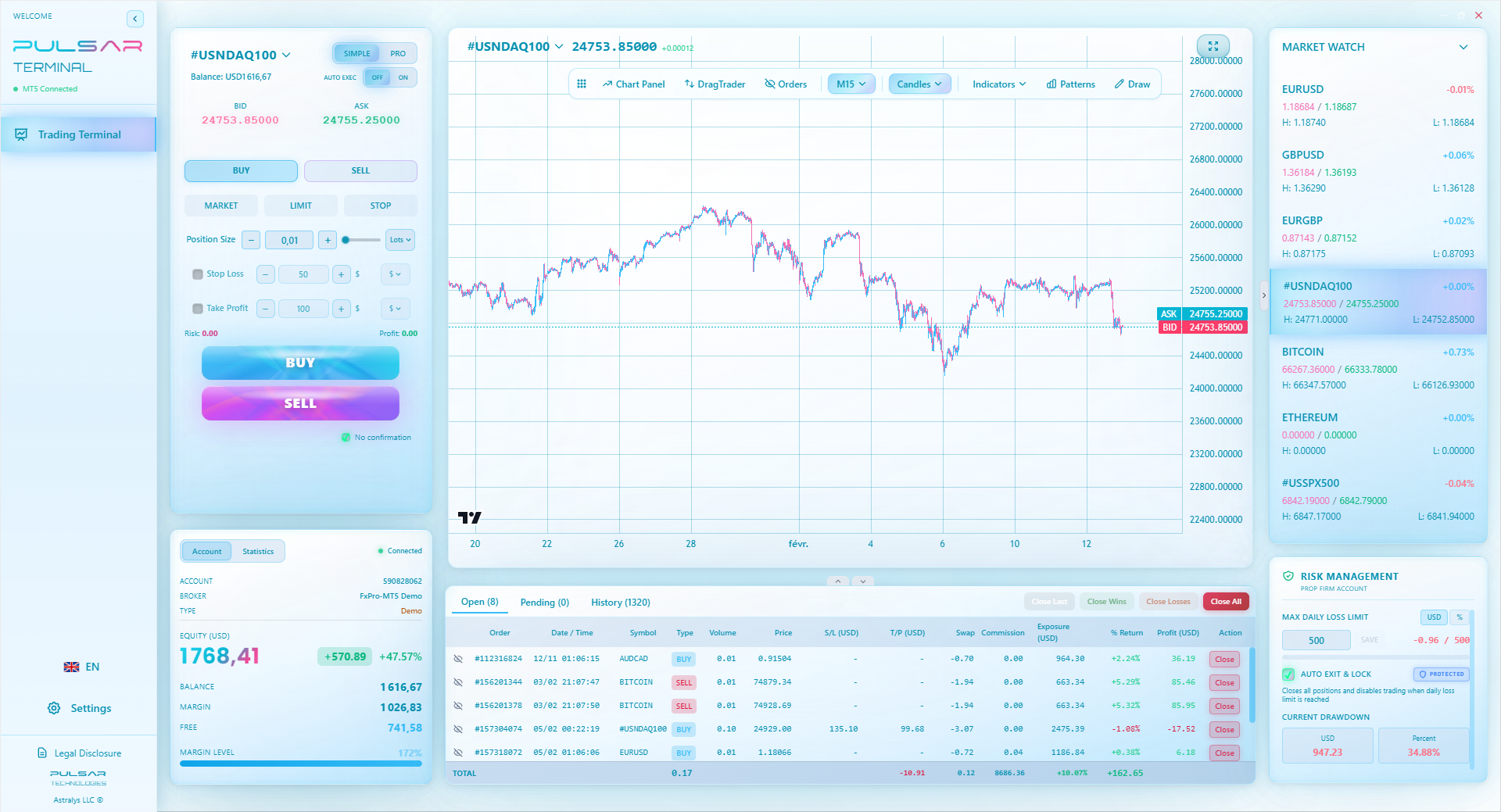
Manually moving stops and managing multiple targets on the MT5 app is a chore, which is why tools like Pulsar Terminal automate advanced order management directly on your MT5 platform.
Pulsar Terminal
أداة MT5 الشاملة: أوامر سحب وإفلات، متعدد TP/SL، تريلينج ستوب، تداول الشبكة، Volume Profile وحماية البروب فيرم. يستخدمها أكثر من 1000 متداول يومياً.
We face unique challenges. Here’s how they manifest on the MT5 app.
1. Unstable Internet: Your trade execution depends on a stable connection. If your Wi-Fi drops or your mobile data switches from 4G to E, your order may freeze. I've had a market order hang for 10 seconds during a Banglalink signal drop. Fix: Use a reliable connection. Consider a backup mobile data source from a different provider.
2. Power Outages (Load Shedding): The trade doesn't care that your electricity is gone. Your stop loss still needs to work. Fix: Ensure your phone is always charged above 50%. Use a power bank. Your broker's server holds your stop-loss order, not your phone, so once set, it should still trigger.
3. Overtrading on Small Screens: The ease of tapping "BUY" or "SELL" leads to impulsive trades. You see a tiny blip on the 1-minute chart and jump in. Fix: Zoom out. Force yourself to look at the 1-hour chart before any trade. Delete the 1-minute chart from your favorites.
4. Ignoring Economic Calendar Events: Trading during Bangladesh Bank announcements or major US news (like NFP) without knowing is suicide. The app has a news section, but it's basic. Fix: Use a separate economic calendar app (like Investing.com) and set alerts. Don't trade 15 minutes before and after major high-impact news.
5. Not Understanding the Costs: That "zero spread" broker? They make money on commission per lot. Or they widen the spread massively during news. You see the price, but the real cost is the spread + commission. A 2-pip spread on EUR/USD is $20 on a 1-lot trade. That's a huge hurdle to overcome. Always factor in the true cost of the trade shown in your platform.
💡 نصيحة وينستون
The 'Quotes' tab is a buffet. The 'Trade' tab is your bill. Stare at the bill twice as long as you drool over the buffet.

“Your phone's battery percentage is now a key trading metric.”
The MetaTrader 5 app is a tool, not a strategy. It won't make you money. It just executes your plan (or highlights your lack of one).
Here’s my final advice after 12 years, including 5 trading actively from Dhaka:
- Master the Desktop First: Learn MT5 on a big screen. Understand all the features. Then, and only then, use the mobile app as a remote control for the positions you've carefully planned.
- Keep It Simple on Phone: Use the mobile app for monitoring, alerts, and executing pre-defined plans from your desktop analysis. Don't do your primary analysis on it.
- Security is Everything: Use a strong, unique password for your MT5 account. Enable two-factor authentication on your broker's website if available. Never log in on public Wi-Fi.
- Accept Its Limits: The MT5 mobile app is bad at order management. It just is. If your strategy relies on advanced order types, trailing stops, or partial closures, you need a better solution than tapping frantically on a chart.
The goal is to control the trade, not let the trade control you. A well-set-up MT5 app, used with discipline, can give you freedom. A poorly understood one, used emotionally, will just be a very expensive way to watch numbers move on your phone.

Example: Your account: $1,000. Your risk per trade: 1% = $10. Trading EUR/USD, where 1 pip on a 0.01 lot = $0.10. Your allowed risk in pips: $10 / $0.10 = 100 pips. So your stop loss should be placed 100 pips away from entry. This math is non-negotiable. Do it before every trade.


FAQ
Q1Is the MetaTrader 5 app free to download and use?
Yes, the app itself is completely free to download from official app stores. However, you need a funded trading account with a broker that supports MT5 to actually trade. The broker may charge spreads, commissions, or other fees.
Q2Which brokers for Bangladeshi traders offer the MT5 app?
Most major international brokers that accept clients from Bangladesh offer MT5. This includes brokers like Exness, IC Markets, XM, and Pepperstone. Always verify their regulation and deposit/withdrawal methods for Bangladesh before signing up. Check our detailed broker reviews for more info.
Q3Can I use the MT5 app without a desktop computer?
Technically, yes. You can do everything from analysis to trading on the app. But it's not ideal. The small screen makes deep analysis difficult, and order management is limited. I strongly recommend using a desktop for your main planning and the app for monitoring and simple execution.
Q4How do I set a trailing stop loss on the MT5 mobile app?
You can't. This is a major limitation of the native MT5 mobile app. You can only set a static stop loss. To move it, you must manually modify the order. For automated trailing stops, you need to use the desktop platform or a third-party tool that connects to your MT5.
Q5My trade order is stuck on 'Pending' in the app. What should I do?
First, check your internet connection. If that's stable, the delay could be at your broker's server. Do NOT tap the order again and again; you might place multiple orders. Wait 30-60 seconds. If it's still stuck, close the app completely and restart it. Check the 'Trade' tab to see if the order is live or failed.
Q6Is my money safe in the MT5 app?
The app is just software. Your money is held with your broker. So, safety depends entirely on your broker's regulation and financial health. Ensure your broker is licensed by a top-tier authority (like ASIC, FCA, CySEC) and offers client fund segregation.
Q7Can I trade the Dhaka Stock Exchange (DSE) on the MT5 app?
No, generally not. The MT5 app provided by international forex/CFD brokers gives you access to global markets (forex, US stocks, commodities). To trade shares on the DSE, you need a trading account with a local Bangladeshi broker that provides its own platform or a different terminal.
درس البروفيسور وينستون
النقاط الرئيسية:
- ✓Always set Stop Loss & Take Profit before clicking Buy/Sell.
- ✓Never risk more than 2% on a mobile-originated trade.
- ✓Test withdrawals before large deposits.
- ✓Mobile is for monitoring, not complex analysis.
ما مدى فائدة هذا المقال؟
انقر على نجمة للتقييم
رؤى التداول الأسبوعية
تحليلات واستراتيجيات أسبوعية مجانية. بدون رسائل مزعجة.
عن المؤلف
Daniel Harrington
رئيس المحتوى
رئيس المحتوى في The Trading Mentor. متداول متمرس شغوف بتبسيط مفاهيم التداول المعقدة. يغطي المواضيع العالمية والاستراتيجيات وأدلة المنصات.
التعليقات
تحذير من المخاطر
ينطوي تداول الأدوات المالية على مخاطر كبيرة وقد لا يكون مناسبًا لجميع المستثمرين. الأداء السابق لا يضمن النتائج المستقبلية. هذا المحتوى لأغراض تعليمية فقط ولا ينبغي اعتباره نصيحة استثمارية. قم دائمًا بإجراء بحثك الخاص قبل التداول.
قد يعجبك أيضًا

Cara Trading Forex Sukses: 7 Prinsip dari Trader Profesional
Cara trading forex sukses dengan 7 prinsip trader pro: manajemen modal, disiplin, journal trading, backtest. Data nyata, bukan janji profit palsu.
Jam Trading Forex Terbaik untuk Trader Indonesia: Panduan Lengkap dengan Tabel Waktu
Panduan jam trading forex untuk trader Indonesia. Tabel 4 sesi dunia, jam emas 20:00-00:00, sesi mana yang harus dihindari. Data akurat + tips dari trader berpengalaman.
Top 5 Sàn Forex Uy Tín Nhất 2026: Review Jujur dari Trader Indonesia
Top 5 sàn forex uy tín 2026 untuk trader Indonesia. Review jujur: spread, deposit, withdraw, dukungan lokal. Exness, XM, IC Markets & lebih.
احصل على Pulsar Terminal
جميع هذه الحاسبات مدمجة في Pulsar Terminal مع بيانات حية من حساب MT5 الخاص بك.
احصل على Pulsar Terminal