


You're in Nigeria, you've got a phone, and you want to start trading forex.

Olumide Adeyemi
Pionier des Tradings in Westafrika ·  Nigeria
☕ 11 Min. Lesezeit
Was Sie lernen werden:
- 1What Actually Makes an App 'Good' for Beginners?
- 2Broker Apps: The Real Breakdown for Nigerian Starters
- 3MT4 & MT5: The Old Reliables (And Why They Might Still Be Best)
- 4The Nigerian-Specific Stuff You Can't Ignore
- 5My Step-by-Step App Selection Process for You
- 6Advanced Tools to Grow Into (But Not Start With)
- 7Final, Blunt Advice from Someone Who's Been There
You're in Nigeria, you've got a phone, and you want to start trading forex. Which app won't get you wrecked in the first week? I see this question every day. The truth is, most 'beginner-friendly' apps are designed to make you feel smart while you lose money. I've traded through three different phones since 2014, watched apps evolve, and made every mistake you can think of. Let's cut through the marketing and find what actually works for someone starting out here.
Forget flashy graphics. A good beginner app does three things: it keeps you from blowing up your account, it doesn't confuse you, and it lets you practice for free. In Nigeria, you need a fourth thing: it has to work with our payment methods.
When I started, I downloaded five different broker apps. I was so focused on which one had the prettiest charts that I ignored the spreads. My first real trade was on an app with a 'simple' interface but a 3-pip spread on EUR/USD. I made a 5-pip profit on the trade, but after the spread, I was barely up. The app felt easy, but it was quietly eating my profits.
Here's what to look for, in order of importance:
- A Real, Unlimited Demo Account: Not a 30-day trial. You need to practice for months without pressure. If a broker hides their demo sign-up, walk away.
- Clear, Unambiguous Order Tickets: The single biggest point of failure for new traders is mis-clicking an order. The app must show your entry, stop loss, and take profit in plain Naira or Dollar terms before you confirm.
- Local Payment Support: Can you fund it with your bank card, Opay, or Moniepoint? If depositing is a week-long drama, it's not the app for you.
- Integrated Learning: I'm not talking about a link to a YouTube channel. Look for an app that has a glossary built-in, or explains what a spread is right on the trading screen.

Warning: An app offering you 1:1000 use on a $10 account is not your friend. It's a trap. High use is the fastest way for a beginner to experience a margin call. A good app will warn you about this, or even limit use by default on small accounts.

💡 Winstons Tipp
Your first 100 trades should be on a demo account. If you can't be disciplined with pretend money, you'll be a disaster with real cash.
Based on the data and my own testing, here’s the honest truth about the popular options. I'm focusing on the app experience itself, not just the broker's reputation.
| Broker | Their App's Real Vibe for Beginners | The Catch (There's Always One) | Min. Deposit |
|---|---|---|---|
| Exness | Super slick, fast. The Exness Trade App feels modern and deposits/withdrawals are famously quick. Good for scalping due to low spreads. | The 'unlimited' use is a notorious beginner killer. It requires immense discipline. | $10+ |
| HFM | The HFM app is genuinely intuitive. Buttons are big, charting is simple. Their copy trading feature is built right in, which is a decent way to observe. | The sheer number of account types can be confusing. You need to pick the right one. | $5+ |
| XM | The XM app is solid and reliable. It's not the flashiest, but everything is where you expect it. Strong educational content within the app. | Spreads can be slightly higher than the ultra-low cost leaders. | $5+ |
| IC Markets | Raw power. The cTrader or MT5 mobile apps they offer are professional-grade. You get institutional-level spreads. | The app can feel overwhelming. It's like learning to drive in a Formula 1 car. Min deposit is higher. | $200+ |
| AvaTrade | AvaTradeGO is designed for simplicity. It holds your hand through the first trade. Good for complete novices who need structure. | You often pay for that simplicity with wider fixed spreads. Less flexibility for active trading. | $100+ |
My Personal Experience: I funded an Exness account with $200 in 2021 specifically to test their app. The trade execution was instant, which I liked. But I caught myself using too much use because the app made it so easy. I turned a $30 profit into a $15 loss on a GBP/USD trade because I didn't respect the position size. The tool wasn't to blame, but its design didn't discourage my bad habit.

Pro Tip: Don't choose a broker based on their minimum deposit. A $1 minimum is a marketing gimmick. You cannot properly manage risk or test a strategy with $1 or $10. Start with at least $100 in your demo and treat it like real money. Then, when you go live, start with an amount you can afford to lose - I'd say nothing less than $500 for real psychological impact.
“The 'best' app is the one you understand and that connects to a reputable broker.”
Everyone wants a shiny new app, but let's talk about the MetaTrader platforms. MT4 and MT5 are not broker apps. They're terminals you download, and you log into your broker account through them. Almost every broker supports them.
Why a beginner might actually prefer MT4/MT5:
- Consistency: Once you learn MT4, you can use it with Exness, XM, IC Markets, etc. You're not relearning a new interface every time you switch brokers.
- Community & Resources: 90% of trading tutorials, indicators, and Expert Advisors (EAs) are built for MetaTrader. The help available online is massive.
- No Nonsense: They don't hide advanced features. You learn on the industry standard.
The mobile apps for MT4 and MT5 are workmanlike. They get the job done. Charting is decent, placing orders is straightforward. They won't win design awards, but they won't suddenly change their layout next month either.
The downside? They can feel dated. Setting up a complex trade with multiple take-profit levels on a phone screen is fiddly. This is where companion tools come in handy later.
I used MT4 on my phone exclusively for my first two years of swing trading. It forced me to keep my analysis simple. I couldn't clutter my chart with 20 indicators because the mobile screen was too small. That limitation made me a better trader.
TradingView: The Charting Powerhouse
This isn't a broker app. It's a separate charting software. Many brokers (like Exness) now let you connect your account and trade directly from TradingView charts.
For a beginner, TradingView is a double-edged sword. The charts are the best in the world. Drawing tools, social ideas, and indicators like the RSI and MACD are superb. But it's easy to get lost in analysis paralysis. You can spend all day drawing lines and watching other people's trade ideas instead of developing your own plan.
Alright, let's get local. The app might be perfect, but if you can't fund it or the government decides to block it, you're stuck.
Regulations & Taxes: Trading forex is legal for you. The gray area is around the brokers. The CBN doesn't really license international retail brokers the way the UK's FCA does. So, you're relying on a broker regulated elsewhere (like South Africa's FSCA or Cyprus's CySEC). This is normal. The key takeaway: You still owe tax. The FIRS wants 10% Capital Gains Tax on your gross profits. Keep a simple spreadsheet. A profit of ₦500,000 means a tax bill of ₦50,000. Factor this into your profit targets.
Funding Your Account: This is the daily struggle. Bank transfers directly to forex brokers are often blocked.
- Debit/Credit Cards (Visa/Mastercard): Your best bet for a first deposit. Works most of the time, but banks may flag it. Have your bank's customer service number handy.
- E-Wallets (Skrill, Neteller, PayPal): Reliable for international brokers. You fund the e-wallet first (often with your card), then send to the broker.
- Cryptocurrency: Increasingly popular. You buy USDT on a local platform like Binance, send it to the broker's crypto wallet. Fast and bypasses banks. Understand blockchain fees before you do this.
- Local Processors: Some brokers partner with local payment gateways. Look for this - it's the smoothest experience.
Internet & Power: Your fancy app is useless during a 'no light' moment. A trade can turn in seconds. You need stable internet. I lost ₦80,000 on a gold (XAU/USD) trade in 2019 because my ISP dropped as price spiked and my stop loss couldn't be updated. Now, I have a basic data plan on a second phone as a backup hotspot. Cost me an extra ₦5k a month, but it's saved me multiples of that.
💡 Winstons Tipp
Write down your trade plan on paper before you even open the app. The screen will try to hypnotize you into making impulsive decisions.
“High use is the fastest way for a beginner to experience a margin call.”
Don't just pick the top name on a list. Follow this sequence.
Week 1-2: The Demo Tour
- Pick two brokers from the table above. I'd suggest HFM (for app simplicity) and Exness or IC Markets (for raw costs).
- Download their official apps AND the MT5 app.
- Open a demo account on each. Fund them with a realistic amount (e.g., $5,000 virtual).
- Do nothing but place simple buy and sell orders on EUR/USD. Get a feel for the order ticket. Try to set a stop loss and take profit. Which app felt less confusing?
Week 3-4: The Practical Test
- Test the deposit process. Go to the funding page on each app (still on demo if possible, or just look). Do they offer a method you actually use? (e.g., Visa card, Opay).
- Check the spreads at 10 AM, 2 PM, and 8 PM Lagos time. Write them down. Consistency matters.
- Use the in-app education. Is it useful, or just filler text?
Week 5: The Decision & Live Start
- Choose the one where the app felt like a tool, not an obstacle.
- Start with a small live amount. I mean it. The minimum required, or just $50. The goal is not to make money. The goal is to test the entire cycle: deposit, place one trade, withdraw your profit. If you can't get your money out easily, nothing else matters.
- Only after a successful withdrawal should you consider funding more seriously.

Example: Let's say you pick HFM. Demo test goes well. You deposit $50 via your UBA Visa card. You make a $5 profit on a trade. You request a $55 withdrawal back to your card. If that process takes less than 48 hours and works smoothly, you've found a viable platform. Now you can think about scaling up your capital.
Once you've survived your first 6 months and have a consistent process, you'll hit the limits of basic mobile apps. You'll want to manage trades more precisely. This is where professional trading software comes in.
These are desktop programs that connect to your MT4/MT5 and give you superior control. Think of them as a professional cockpit for your trading.
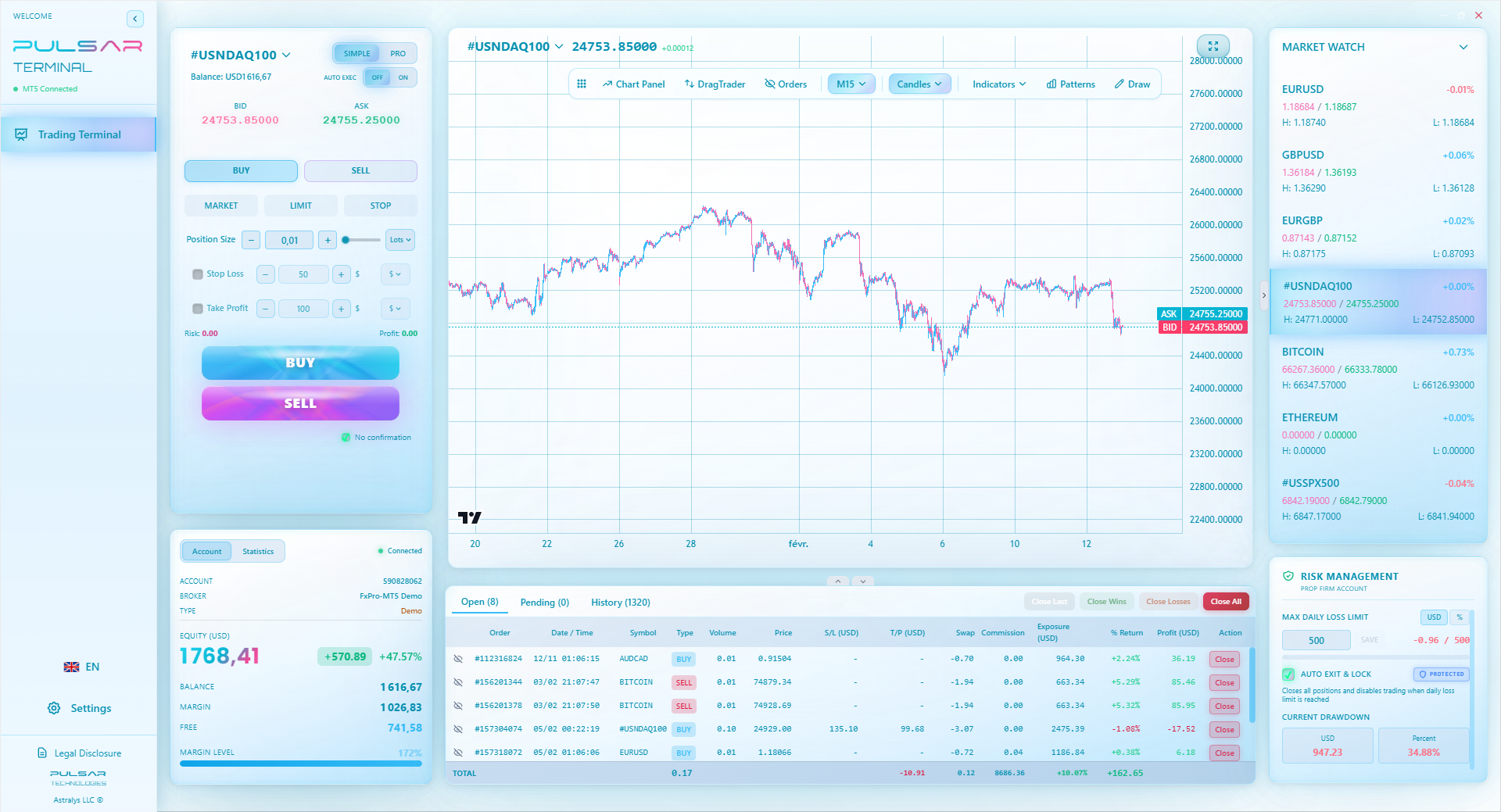
For example, a tool like Pulsar Terminal (an MT5 companion) lets you set advanced order types. You can place a trade with a trailing stop that automatically moves, or set a breakeven order that locks in profit once the trade goes your way. These features protect you from your own emotions.
The most relevant feature for a developing trader? Prop Firm Daily Loss Protection. If you ever try a funded account challenge, you have a strict daily loss limit. A tool can automatically monitor this and shut you down if you hit it, saving you from breaking a rule and failing the challenge.
But hear this clearly: Do not start here. These are power tools. You need to know how to use a basic hammer (your broker app) before you operate a nail gun. I bought my first advanced trading tool in my third year. Before that, I wouldn't have known what to do with it.
💡 Winstons Tipp
If you find yourself constantly checking the app, delete it from your phone for a week and only trade from a desktop. It breaks the addiction cycle.
Once you master the basics, tools like Pulsar Terminal automate advanced risk management—like setting trailing stops and daily loss limits—directly on your MT5 platform.
Pulsar Terminal
Das All-in-One MT5-Tool: Drag-and-Drop-Orders, Multi-TP/SL, Trailing Stop, Grid Trading, Volume Profile und Prop-Firm-Schutz. Täglich von 1.000+ Tradern genutzt.
“Your first year's goal isn't to get rich. It's to still be in the game at the end of it.”
The 'best' app is the one you understand and that connects to a reputable broker. In Nigeria, that's likely the HFM app for pure beginners, or the MT5 app connected to a low-cost broker like Exness or Pepperstone once you know the basics.
Your number one job as a beginner is capital preservation. The app should help with that, not hinder it. It should make setting a stop loss the easiest action on the screen.
Remember, the app doesn't trade for you. I've seen guys with $10,000 setups lose money and guys with just a phone screen make consistent profits. The difference is discipline and a simple, executable plan.
Start with a demo. Practice for longer than you think you need. Then start so small it feels silly. The goal of your first year is not to get rich. It's to still be in the game at the end of it. Choose the app that gives you the best chance of that.
One last thing: always, always use a position size calculator. No matter what app you're in, calculate your risk before every single trade. If your app doesn't have one built-in, have a website bookmarked. This habit alone will put you ahead of 80% of beginners who just guess.
FAQ
Q1Is forex trading legal in Nigeria for beginners?
Yes, trading forex with your own money is legal for individuals in Nigeria. The regulatory gray area is around the brokers themselves, which is why most Nigerian traders use internationally regulated platforms. You are still required to pay a 10% Capital Gains Tax on your profits to the FIRS.
Q2What is the safest minimum amount to start trading forex in Nigeria?
While some apps let you start with $1, that's a gimmick. A safer psychological and practical minimum is between $200 and $500. This allows you to practice proper risk management without your account being wiped out by a single small loss or high spread costs. Always start with a demo account first, though.
Q3Which is better for a beginner, a broker's own app or MT4/MT5?
It depends on your learning style. A broker's own app (like HFM's or Exness's) is often more streamlined and simpler for your very first trades. MT4/MT5 is the industry standard you'll likely graduate to; learning it early has long-term benefits. My advice: try a demo on both types and see which interface makes more sense to you initially.
Q4How do I fund my forex trading account from Nigeria?
International debit/credit cards (Visa/Mastercard) are the most common and reliable method. E-wallets like Skrill, Neteller, or cryptocurrency (USDT) are also popular as they can bypass bank restrictions. Some brokers now offer direct deposits via local payment processors - this is the most convenient option if available.
Q5What's the single biggest mistake beginners make with trading apps?
Trading without a stop loss. Period. The second biggest mistake is using the maximum use the app offers. A good beginner app makes it easy to set a stop loss. A dangerous one makes it easy to slide the use slider to the max.
Q6Do I need a special phone or internet to trade forex?
You don't need the latest iPhone, but you do need a reliable internet connection. Unstable power and data are major risks. Consider a backup data plan on a different network. The monthly cost (₦5,000–₦15,000) is a necessary business expense for a serious trader.
Q7Can I use TradingView as my main trading app?
You can use TradingView for world-class charting and analysis, and some brokers allow direct trading from it. However, for a complete beginner, it might be information overload. It's better to start with a simpler broker app or MT5, and use TradingView as a separate charting tool as you advance.
Prof. Winstons Lektion
Wichtige Erkenntnisse:
- ✓Demo trade for at least 2 months before going live.
- ✓Start live with less than $500 to learn the real process.
- ✓Always calculate your position size before every trade.
- ✓Factor in the 10% Nigerian capital gains tax on profits.
Wie nützlich war dieser Artikel?
Klicken Sie auf einen Stern
Wöchentliche Trading-Einblicke
Kostenlose wöchentliche Analysen & Strategien. Kein Spam.
Über den Autor
Olumide Adeyemi
Pionier des Tradings in Westafrika
Einer der aktivsten Forex-Trading-Ausbilder Nigerias. 8 Jahre Trading-Erfahrung aus Lagos. Spezialisiert auf Strategien mit geringem Kapital und Prop-Firm-Challenges für afrikanische Trader.
Kommentare
Risikohinweis
Der Handel mit Finanzinstrumenten birgt erhebliche Risiken und ist möglicherweise nicht für alle Anleger geeignet. Vergangene Ergebnisse garantieren keine zukünftigen Renditen. Dieser Inhalt dient ausschließlich Bildungszwecken und stellt keine Anlageberatung dar. Führen Sie immer Ihre eigene Recherche durch, bevor Sie handeln.
Das könnte Sie auch interessieren

Cara Trading Forex Sukses: 7 Prinsip dari Trader Profesional
Cara trading forex sukses dengan 7 prinsip trader pro: manajemen modal, disiplin, journal trading, backtest. Data nyata, bukan janji profit palsu.
Jam Trading Forex Terbaik untuk Trader Indonesia: Panduan Lengkap dengan Tabel Waktu
Panduan jam trading forex untuk trader Indonesia. Tabel 4 sesi dunia, jam emas 20:00-00:00, sesi mana yang harus dihindari. Data akurat + tips dari trader berpengalaman.
Top 5 Sàn Forex Uy Tín Nhất 2026: Review Jujur dari Trader Indonesia
Top 5 sàn forex uy tín 2026 untuk trader Indonesia. Review jujur: spread, deposit, withdraw, dukungan lokal. Exness, XM, IC Markets & lebih.
Pulsar Terminal herunterladen
Alle diese Rechner sind in Pulsar Terminal mit Echtzeit-Daten Ihres MT5-Kontos integriert.
Pulsar Terminal herunterladen