


Most traders obsess over indicators and entries but treat their trading laptop like an afterthought.
Sarah Collins
Trading-Stratege ·  United Kingdom
☕ 12 Min. Lesezeit
Was Sie lernen werden:
Most traders obsess over indicators and entries but treat their trading laptop like an afterthought. That's a £10,000 mistake waiting to happen. I've seen more trades go wrong because of a frozen chart or a missed alert from a laggy machine than from a bad analysis. Your laptop isn't just a tool; it's your trading desk, your risk manager, and your connection to a market that moves £2.9 trillion a day through London alone. Let's get your setup right so your only worry is the trade, not the tech.
Think about it. You're watching GBP/USD during the London open, your scalping strategy relies on split-second decisions, and your screen freezes. By the time it recovers, you're 15 pips in the hole. That's not bad luck; that's bad hardware.
In the UK, where the FCA's 1:30 use limit for majors is supposed to protect you, a technical failure can blow through that safety net in seconds. I learned this the hard way in 2018. I was trading EUR/GBP on a cheap, underpowered laptop. My platform (a heavy MT4 setup with multiple custom indicators) choked during a BoE announcement. I couldn't close my position. The 30-pip stop-loss I had set became a 75-pip loss because my machine couldn't execute the order in time. That was a £375 lesson about the true cost of a 'budget' laptop.
Your laptop handles three critical jobs simultaneously: processing real-time data feeds, running your trading platform(s), and executing orders without delay. A weak link in any of these can cost you real money. It's not about having a flashy gaming rig; it's about reliability. When 74-89% of retail accounts lose money, you don't need your own equipment stacking the odds further against you.

Warning: A common mistake is using a family laptop cluttered with other software. Background updates, antivirus scans, or even a browser with too many tabs can spike your CPU usage at the worst possible moment. Your trading machine should be dedicated.
“Your laptop isn't just a tool; it's your trading desk, your risk manager, and your connection to a £2.9 trillion-a-day market.”
Forget marketing buzzwords. These are the specs that actually matter for running platforms like MT5, cTrader, or TradingView smoothly while you have an economic calendar and a broker dashboard open.
Processor (CPU): The Brain
This is your number one priority. An underpowered CPU is the main cause of lag and freezing. For basic trading with one platform and a few charts, a modern Intel Core i5 or AMD Ryzen 5 is the absolute minimum. But let's be realistic - most of us run more than that.
For serious trading, you want an Intel Core i7/i9, AMD Ryzen 7/9, or Apple's M3 Pro/Max (or M4) chips. Why? When you're running MT5 with 20 charts, each loaded with a MACD indicator and a RSI indicator, plus a separate platform for execution and a browser for news, that's a heavy load. The extra cores and threads in these higher-end processors handle the multitasking without breaking a sweat.
RAM: Your Working Memory
RAM is where your open programs live. 8GB is the bare minimum and will feel cramped. 16GB of RAM is the sweet spot for most traders and is what I'd consider the standard for 2026. It allows you to run multiple trading platforms, dozens of browser tabs for research, and communication apps like Discord or Telegram for trade ideas.
If you're a power user who analyses multiple timeframes for swing trading setups or uses memory-intensive portfolio software, consider 32GB. It's overkill for many, but it future-proofs your machine.
Storage: Speed is Everything
You must have a Solid State Drive (SSD). Full stop. A traditional hard drive (HDD) will slow everything down - booting up, loading your trading platform, and accessing historical data. A 256GB SSD is the starting point. Aim for 512GB or 1TB. This gives you space for your trading software, historical tick data (which can be huge), and other essential programs.
Display: Your Window to the Market
You'll be staring at this screen for hours. Eye strain from a poor-quality display leads to fatigue and mistakes. Look for:
- Size: 15 inches is a good balance. 13-inch is too small for charting, 17-inch is great but less portable.
- Resolution: Full HD (1920x1080) is standard. A 4K display offers incredible sharpness and more screen real estate for arranging charts, but it can drain battery life faster.
- Panel Type: An IPS panel is best. It offers wider viewing angles and better colour accuracy than cheaper TN panels, which is crucial when you're looking for subtle patterns on a chart.

Example: Let's compare two setups. Laptop A has an i5, 8GB RAM, and a 256GB SSD. It costs £700. Laptop B has an i7, 16GB RAM, and a 512GB SSD. It costs £1,100. The £400 difference isn't for 'luxury'; it's for the reliability that prevents a single costly trade error. Over a year of trading, which is the better investment?

💡 Winstons Tipp
A trader once told me his laptop was his 'most reliable indicator.' He wasn't joking. He knew its every lag and quirk, and traded within its limits. Know your tools.
“The £400 difference between a budget and a pro laptop isn't for 'luxury'; it's for the reliability that prevents a single costly trade error.”
Based on the specs we just covered, here are the models that consistently deliver for traders. Prices are approximate and can vary.
| Model | Key Specs (Typical Config) | Best For | Approx. Price (GBP) |
|---|---|---|---|
| Apple MacBook Pro 16" (M3 Pro/Max) | M3 Pro/Max CPU, 18GB+ RAM, 512GB+ SSD, Stunning Mini-LED display. | Traders who value unparalleled screen quality, battery life (12+ hours), and seamless performance. Runs trading platforms via native apps or parallels. | From £2,400 |
| Dell XPS 17 (2025/26 Refresh) | Intel Core i9, 16GB+ RAM, 1TB SSD, 4K OLED display option. | The ultimate Windows workstation. That 17-inch 4K screen is a charting paradise. Handles multiple 4K external monitors with ease. | From £2,200 |
| Lenovo ThinkPad X1 Carbon Gen 12 | Intel Core i7, 16GB RAM, 512GB SSD, 14" 2.8K OLED. | The mobile professional. Incredibly lightweight, superb keyboard, and built like a tank. Perfect for the trader who needs to work from anywhere. | From £1,800 |
| ASUS Zenbook S 14 OLED (2026) | Snapdragon X2 Elite, 16GB RAM, 1TB SSD, 14" 3K OLED. | The efficiency king. New ARM-based chips offer incredible battery life (15+ hours) and cool, silent operation. Great for web-based platforms like TradingView. | From £1,400 |
| HP Spectre x360 16" | Intel Core Ultra 7, 16GB RAM, 1TB SSD, 16" 2.8K OLED touchscreen. | The versatile all-rounder. The 2-in-1 design can be useful for presentations, and the OLED screen is fantastic. | From £1,600 |
| Dell Inspiron 14 Plus | Intel Core i7, 16GB RAM, 512GB SSD, 14" FHD+ display. | The budget-conscious workhorse. Proves you don't need to spend £2k for reliable trading specs. Lacks the premium build but gets the job done. | From £900 |
My Personal Choice: After my 2018 disaster, I switched to a maxed-out MacBook Pro 16". The screen is the best I've used for spotting details on a chart, and I've never had it lag, even with 30+ MT5 charts open. The battery life means I'm not chained to a plug during a volatile US session. For a Windows user, the Dell XPS 17 is a monster of a machine. I used one for a month while reviewing IC Markets and their MT5 platform - it was flawless.

Pro Tip: Don't buy directly from the manufacturer's website without checking retailers like Box, Currys, or John Lewis first. They often have the same configs on sale, especially during back-to-school or Black Friday periods. You can save hundreds.
“The £400 difference between a budget and a pro laptop isn't for 'luxury'; it's for the reliability that prevents a single costly trade error.”
Your laptop is the engine, but the right accessories are the steering wheel and dashboard. The single biggest upgrade after the laptop itself is adding more screens.
I trade with my laptop screen plus two external 24-inch monitors. Here’s why: my laptop screen has my trade execution platform (like the one from Pepperstone). My left monitor has my primary MT5 charting window with multiple timeframes for my main pair. My right monitor has a macroeconomic dashboard, news feed, and a separate chart for a correlated pair. This setup stops me from frantically alt-tabbing and missing a move.
Essential Accessories:
- Docking Station: A single-cable solution to connect your laptop to monitors, keyboard, mouse, and ethernet. Look for one that supports the resolution of your external monitors (e.g., a dock that can handle two 4K @ 60Hz displays).
- External Monitors: You don't need gaming specs. Look for 24-inch IPS panels with thin bezels. A 1080p resolution is fine, but 1440p (QHD) gives you more space.
- Mechanical Keyboard & Mouse: This is about comfort and speed during long sessions. A good mechanical keyboard is more responsive, and a proper mouse is better for drawing trendlines than a trackpad.
- Uninterruptible Power Supply (UPS): A £100 UPS is cheap insurance. If the power flickers during a crucial trade, it gives you 10-15 minutes to close positions gracefully, avoiding a potential margin call from an unexpected disconnection.
Connecting all this is simple with modern laptops. Most have USB-C/Thunderbolt 4 ports that can handle video, data, and power all through one cable to a dock.
💡 Winstons Tipp
I've audited dozens of blown accounts. In at least five, a technical failure was the catalyst - a frozen platform, a missed alert. The common factor? An underpowered, cluttered machine. Don't be the next case study.
“For 50p per trade over four years, a premium laptop buys you the reliability that prevents just one major tech-induced loss.”
Powerful hardware is useless if your software is a mess. Your trading environment needs to be clean, organised, and secure.
Trading Platforms: Your choice of platform can influence your hardware needs. MetaTrader 5 (MT5) is more resource-intensive than MT4 but is becoming the standard. cTrader is very slick and efficient. Web-based platforms like TradingView are less demanding on your laptop but depend entirely on your internet connection.
I use MT5 for my primary analysis and execution. To manage its complexity, I use a companion app that adds advanced order types. For example, setting a multi-level take-profit with partial closures manually on MT5 is clunky. A good tool automates this, turning a risky manual process into a single, managed order. This is where software can directly manage your risk.
Security is Non-Negotiable:
- Use a VPN: Especially if you trade on public Wi-Fi. A VPN encrypts your connection so no one can intercept your trade orders or login details.
- Two-Factor Authentication (2FA): Enable this on your trading account, email, and any related services. It's the simplest way to stop account theft.
- Dedicated User Account: Create a separate user account on your laptop just for trading. Don't browse the web or check social media from this account. It limits exposure to malware.
- Regular Backups: Back up your chart templates, indicator settings, and trade journals weekly. I use an external SSD. Losing your custom setups is a massive setback.
Keep It Clean: Uninstall any bloatware that comes with your laptop. Use a lightweight antivirus (Windows Defender is often sufficient). Schedule updates for outside trading hours. The goal is to have a machine that does one thing exceptionally well: trade.
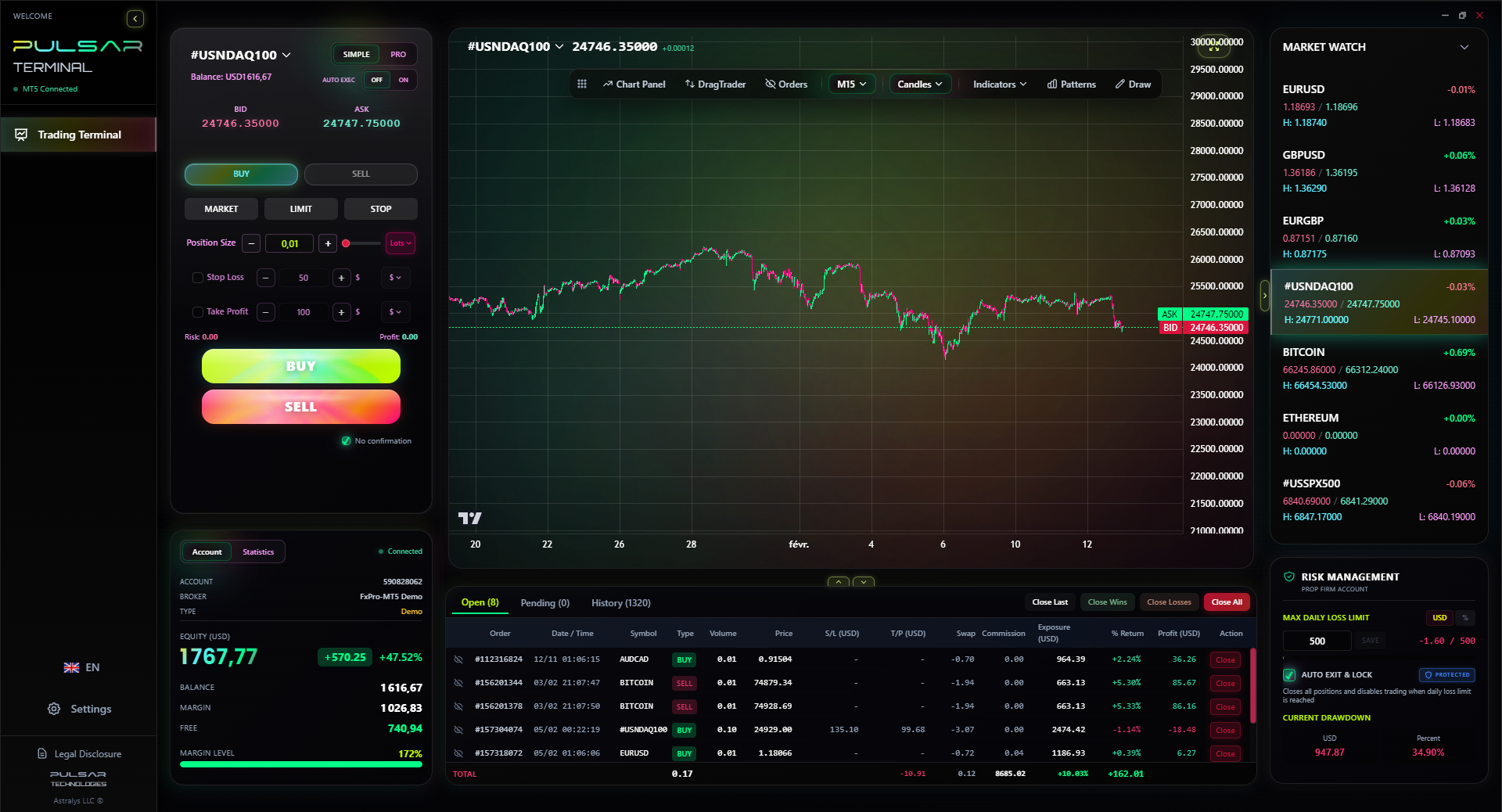
Managing complex orders on MT5 can be clunky and risky, but tools like Pulsar Terminal streamline this with drag-and-drop multi-TP/SL and partial closures directly on your charts.
Pulsar Terminal
Das All-in-One MT5-Tool: Drag-and-Drop-Orders, Multi-TP/SL, Trailing Stop, Grid Trading, Volume Profile und Prop-Firm-Schutz. Täglich von 1.000+ Tradern genutzt.
“For 50p per trade over four years, a premium laptop buys you the reliability that prevents just one major tech-induced loss.”
Let's cut through the noise. Is a £2,500 laptop really worth it over a £900 one? For a full-time trader, absolutely. For a beginner, maybe not. Here’s the real math.
The Budget Route (£800 - £1,200): You're getting a Dell Inspiron, Acer Swift, or similar with an i5/Ryzen 5, 8GB-16GB RAM, and a 512GB SSD. It will run one trading platform adequately. The risk? During high volatility (like an NFP release), your charts might stutter. The screen will be lower quality, causing more eye strain. The build quality is lower, so it might not last 3+ years of heavy use.
The Premium Route (£1,800+): You're getting a MacBook Pro, Dell XPS, or ThinkPad with an i7/Ryzen 7/M3 Pro, 16GB-32GB RAM, 1TB SSD, and a superb OLED or high-resolution IPS screen. Performance is smooth under any condition. The screen reduces fatigue. The build quality means it'll last 4-5 years easily.
The Cost-Per-Trade Analysis: Say you take 10 trades a week. A premium laptop costs £1,000 more than a budget one. Over 4 years (≈200 trading weeks, 2000 trades), that's an extra 50p per trade. For 50p per trade, you get reliability that prevents just one major tech-induced loss. One bad EUR/USD trade due to a freeze could be 20 pips – that's £200 on a standard lot (at 1:30 use, that's a big chunk of your capital). The premium laptop pays for itself many times over in risk mitigation.
For a beginner, start with solid mid-range specs (i5/16GB/512GB SSD). You can always add an external monitor. As your trading capital and frequency grow, your laptop investment should scale with it. Never let your equipment be the weakest link in your process.
💡 Winstons Tipp
Your laptop's cost per trade over its lifespan is pennies. The cost of one failed trade due to its lag can be your entire account. The math is brutally simple.
“In a game where the spread and the pip are everything, your laptop's performance is part of your edge - or your biggest liability.”
Before you click 'buy', run through this list. It'll save you from regret.
- CPU Check: Is it at least an i5/Ryzen 5? For serious trading, target i7/Ryzen 7 or Apple M3 Pro/Max.
- RAM Confirmation: 16GB is the 2026 standard. Don't settle for 8GB.
- Storage Type: Must be SSD. 512GB is the sweet spot.
- Screen Quality: IPS panel minimum. Resolution of 1920x1080 (FHD) or higher.
- Ports: Does it have enough USB/Thunderbolt ports for your mouse, external drives, and a docking station? An HDMI or USB-C video output is essential for a second monitor.
- Broker Compatibility: Sounds obvious, but check. If your chosen broker like XM or Exness offers a native Mac app or if you'll need to run Windows via Parallels.
- Upgradability: Can you upgrade the RAM or SSD later? Many modern thin laptops solder everything in place. If you think you might need more later, buy it now.
- Warranty & Support: A 3-year onsite warranty is worth the extra £100-£150. If your laptop dies during a trading week, you need it fixed fast.
Remember, you're not buying a laptop for watching Netflix. You're building the primary tool for a financially demanding activity. The goal isn't to have the flashiest machine, but the most reliable one. In a game where the spread and the pip are everything, your laptop's performance is part of your edge - or your biggest liability. Choose wisely.
FAQ
Q1Can I use a gaming laptop for forex trading?
Yes, and they're often a great choice. Gaming laptops like the ASUS ROG Zephyrus come with powerful CPUs, plenty of RAM, and fast SSDs - exactly what you need. Just be aware they can be bulky, have shorter battery life, and sometimes have fans that spin up noisily. For a stationary desk setup, they offer fantastic performance for the price.
Q2Is a Mac or Windows laptop better for trading?
It depends on your broker and platform preference. Windows is the universal standard; every trading platform supports it. Macs are excellent for their build quality, screens, and battery life, but you may need to run Windows via Parallels for some MT4/MT5 brokers. If you use web-based platforms like TradingView or your broker's own web platform, a Mac is flawless. It's more about personal workflow than one being objectively 'better.'
Q3How many monitors do I really need?
Start with one good external monitor alongside your laptop screen. This instantly doubles your workspace. Most professional traders I know use 2-4 monitors total. One for order execution, one for primary charts, one for news/macro data, and perhaps one for monitoring other asset classes like XAU/USD. Add them gradually as your strategy gets more complex.
Q4What is the most important spec for running MT5 smoothly?
The CPU (Processor) is the most critical. MT5 can be demanding, especially with many charts, indicators, and Expert Advisors (EAs). A modern multi-core processor (Intel i7/Ryzen 7 or better) will prevent lag. Pair this with 16GB of RAM, and you'll have a very smooth experience.
Q5Is it worth getting a 4K screen on a trading laptop?
It's a luxury, not a necessity, but a very nice one. A 4K screen on a 15-17 inch laptop is incredibly sharp, letting you see more detail on charts and fit more windows on-screen without things looking cramped. The downside is it uses more battery power. A high-quality 1920x1080 (FHD) or 2560x1440 (QHD) IPS screen is perfectly sufficient for most traders.
Q6How often should I replace my trading laptop?
A good laptop should last 4-5 years. Don't replace it just because a new model comes out. Replace it when it no longer meets your needs: if it starts lagging with your typical workload, can't support the latest platform updates, or the battery life has degraded too much for your use. Regular maintenance (cleaning software, reapplying thermal paste) can extend its life.
Q7Can I trade forex successfully on a cheap £500 laptop?
You can place trades, but you're adding significant operational risk. A £500 laptop will likely have a slower CPU, minimal RAM (8GB), and a basic SSD or even an HDD. During market volatility, it's more likely to freeze or lag, potentially causing missed entries or exits. It's a false economy. View your laptop as a business capital expenditure, not a consumer purchase.
Prof. Winstons Lektion
Wichtige Erkenntnisse:
- ✓Prioritise CPU & RAM: i7/16GB is the 2026 standard for reliability.
- ✓An SSD is non-negotiable for speed; a quality IPS screen fights fatigue.
- ✓Multi-monitor setups aren't a luxury; they're a risk management tool.
- ✓Calculate cost-per-trade: A premium laptop pays for itself in prevented losses.
- ✓Your trading machine must be dedicated, clean, and secure.
Wie nützlich war dieser Artikel?
Klicken Sie auf einen Stern
Wöchentliche Trading-Einblicke
Kostenlose wöchentliche Analysen & Strategien. Kein Spam.
Über den Autor
Sarah Collins
Trading-Stratege
In London ansässige Trading-Strategin mit 12 Jahren Erfahrung an den Finanzmärkten. Ehemalige Analystin bei einem City-of-London-Broker. Deckt GBP-Paare, europäische Märkte und FCA-regulierten Handel ab.
Kommentare
Risikohinweis
Der Handel mit Finanzinstrumenten birgt erhebliche Risiken und ist möglicherweise nicht für alle Anleger geeignet. Vergangene Ergebnisse garantieren keine zukünftigen Renditen. Dieser Inhalt dient ausschließlich Bildungszwecken und stellt keine Anlageberatung dar. Führen Sie immer Ihre eigene Recherche durch, bevor Sie handeln.
Das könnte Sie auch interessieren

Cara Trading Forex Sukses: 7 Prinsip dari Trader Profesional
Cara trading forex sukses dengan 7 prinsip trader pro: manajemen modal, disiplin, journal trading, backtest. Data nyata, bukan janji profit palsu.
Jam Trading Forex Terbaik untuk Trader Indonesia: Panduan Lengkap dengan Tabel Waktu
Panduan jam trading forex untuk trader Indonesia. Tabel 4 sesi dunia, jam emas 20:00-00:00, sesi mana yang harus dihindari. Data akurat + tips dari trader berpengalaman.
Top 5 Sàn Forex Uy Tín Nhất 2026: Review Jujur dari Trader Indonesia
Top 5 sàn forex uy tín 2026 untuk trader Indonesia. Review jujur: spread, deposit, withdraw, dukungan lokal. Exness, XM, IC Markets & lebih.
Pulsar Terminal herunterladen
Alle diese Rechner sind in Pulsar Terminal mit Echtzeit-Daten Ihres MT5-Kontos integriert.
Pulsar Terminal herunterladen