


Here's a hard truth most trading 'gurus' won't tell you: over 70% of retail traders lose money.

David van der Merwe
Schwellenland-Trader ·  South Africa
☕ 10 Min. Lesezeit
Was Sie lernen werden:
- 1What the Hell is a 'Trade View' Anyway? (It's Not Just a Website)
- 2Setting Up Your SA Forex Trading View: Costs, Data, and Reality
- 3Brokers That Play Nice With Your Trade View: The SA Lowdown
- 4Building a Strategy on Your Charts: From Squiggles to Signals
- 5Risk Management ON Your Charts: Stop Losses Aren't Secret
- 6Mistakes I See Every Day (And Made Myself)
- 7Leveling Up: When to Consider Advanced Tools & Automation
- 8Putting It All Together: Building Your Edge, Not Just a Setup

Here's a hard truth most trading 'gurus' won't tell you: over 70% of retail traders lose money. In South Africa, with our volatile Rand and expensive data, that number might be higher. A big part of the problem? Traders treat their trading view like a crystal ball instead of a tool. I've been charting the ZAR pairs for over a decade, and I can tell you that the platform you stare at all day is either building your discipline or fueling your demise. This isn't about finding the 'best' view; it's about building one that keeps you in the game.
When we say 'trade view forex' in SA, we're not just talking about the TradingView website (though it's a giant part of it). We're talking about your entire trading cockpit: the charts, the indicators, the news feed, the order window. It's your battlefield view. For years, my view was a cluttered mess on MT4 - dozens of indicators, multiple timeframes crammed in, all telling me conflicting stories. I lost R4,200 on a single EUR/ZAR trade because my 'view' was so noisy I missed a simple support break.
Your trade view is your personal setup. The core components are your charting platform (like TradingView, MT5, or CTrader), your broker's trading terminal for placing orders, and your market scanner or news source. The goal isn't complexity; it's clarity. A clean trade view for forex lets you see the price action and your planned levels without distraction. Most local brokers offer MT5, which is solid, but pairing it with a cleaner charting interface is where many pros go. You can learn more about setting up a clean foundation in our guide on swing trading.

Warning: Don't confuse a pretty chart with a profitable system. I've seen guys with stunning, multi-monitor setups consistently lose. The fanciest trade view in the world won't save you from poor risk management and emotional decisions.

💡 Winstons Tipp
Your first investment shouldn't be in a signal service. It should be in a reliable, uninterruptible power supply (UPS). A R2000 UPS has saved my trading account more than once.
Let's get practical. You're in Cape Town or Jo'burg, your internet might be shaky, and you're trading with Rands. Your setup needs to account for this.
The Data Problem
Real-time forex data isn't free if you want it reliable. TradingView's free plan has a delay. For serious trading, you need a Pro plan (around $15/month) or you connect your broker's data. Many SA brokers like IC Markets or Pepperstone offer direct integration, so your charts on TradingView reflect live prices from their servers. This is crucial for instruments like USD/ZAR, which can move fast on local news.
Platform Choice: MT5 vs. TradingView vs. Hybrid
Most South African brokers are MT4/MT5 shops. MT5 is powerful but its native charts are, frankly, outdated. The hybrid approach is king: use TradingView or another advanced charting package for analysis, and use your broker's terminal (or a trade copier) to execute. This separates analysis from action, a key psychological hack.
The ZAR-Specific Setup
When trading majors like EUR/USD, spreads are tight. But when you trade USD/ZAR or EUR/ZAR, you're dealing with wider spreads - often 80-150 pips during volatile sessions. Your trade view must clearly display the bid/ask spread. Don't just look at the candle; look at the spread window. A wide spread means you're already in a hole when you enter. I always have my position size calculator open in another tab, pre-set for the wider spreads of ZAR pairs, to avoid nasty surprises.
“The fanciest trade view in the world won't save you from poor risk management.”
Not all brokers give you clean data feeds for external charting. You need one with stable API connections or one-click linking to TradingView. Here’s the real scoop for South Africans.
| Broker | Good for Trade View Because... | Watch Out For... |
|---|---|---|
| IC Markets | Raw spreads, direct TradingView trading. Stable MT5/CTrader APIs. | Their raw account requires a $200 min, but spreads on EUR/USD can be under 0.0. |
| Pepperstone | Excellent cTrader integration, which has fantastic charts itself. Razor account offers tight spreads. | cTrader platform has a steeper learning curve than MT5. |
| Exness | Popular locally, offers MT5. | Be very careful with their bonus structures and always verify their FSCA regulation status. |
| XM | Good for beginners, low minimum deposit ($5). Offers MT4/5. | Spreads are typically higher than the raw accounts of IC or Pepperstone. |
My personal setup for years has been IC Markets' raw spread account feeding data into TradingView for analysis, with orders placed directly on their MT5 terminal. This gives me the best charts and reliable execution. I once tried to trade directly off TradingView's paper trading link with a different broker and had a 3-second execution lag on a USD/ZAR trade - that's an eternity. It cost me. Always test execution in a demo first.

Pro Tip: Whatever broker you choose, ALWAYS verify their regulation with the South African Financial Sector Conduct Authority (FSCA). A legit broker's FSCA license number should be front and center on their local website. No regulation, no trade. It's that simple.

This is where your trade view earns its keep. You're not just drawing lines; you're building a repeatable process.
Price Action is Your Foundation
Forget the 10-indicator soup. Start with clean price action. Mark key support and resistance levels on the daily and 4-hour charts. For USD/ZAR, pay attention to psychological levels (R18.00, R18.50) and previous weekly highs/lows. These matter more than any moving average.
Indicator Discipline: Less is More
I use two, maybe three indicators max. A volume profile to see where big money traded, a simple RSI indicator for divergence, and sometimes a MACD for trend confirmation on higher timeframes. I have them in a fixed, non-intrusive spot on my chart. The moment you start adding a fourth or fifth, you're usually just looking for confirmation of a bad trade you already want to take.
The Entry Ritual
My trade view has predefined zones. When price enters a zone, I don't just jump in. I switch to a lower timeframe (like 15-min) to look for a concrete entry signal - a pin bar, a small consolidation break. This discipline, enforced by how I set up my screens, has saved me from countless impulsive trades. For a method that relies on this kind of precision, check out the principles behind a scalping strategy.
Your chart setup should make your strategy effortless to see. If you have to squint or interpret, it's wrong.
💡 Winstons Tipp
If you can't clearly explain your trade setup from your charts in 15 seconds, it's too complicated. Simplify until you can.
“Your stop loss and take profit levels should be drawn on your chart BEFORE you enter the trade.”
Your stop loss and take profit levels should be drawn on your chart BEFORE you enter the trade. They are part of your trade view, not an afterthought. This visual commitment is powerful psychology.
I plot my SL at a level that, if hit, proves my trade thesis wrong. For a long trade on Gold (XAU/USD), that's often below a recent swing low. I then use my position size calculator to determine my lot size so that hitting that SL loses no more than 1% of my account. That number - the potential loss in Rands - is mentally noted. Seeing the SL on the chart makes it real.
This is also where advanced tools shine. Manually moving a stop to breakeven or trailing it can be emotional. Having a tool that automates this based on your rules removes that weakness. For instance, setting a rule to move stop to breakeven when price moves 1.5x your risk. This turns a defensive action into a systematic one.
I learned this after a brutal lesson on EUR/USD. I was up 45 pips, got greedy, didn't move my stop to breakeven, and watched the news reverse the trade. I ended up taking a full 30-pip loss instead of a guaranteed scratch. The loss was small, but the violation of my own rule was enormous. Your trade view must include your exit plan as clearly as your entry.
Let's cut the crap. Here’s where South African traders, myself included, go wrong with their trade view.
Overcomplicating the ZAR Pairs: We feel we have an edge trading our 'home' currency. Sometimes that leads to over-trading USD/ZAR. It's a wild beast. Treat it with more respect and wider stops than you would EUR/USD.
Ignoring Load Shedding: Your beautiful cloud-based TradingView setup is useless during stage 6. Have a mobile backup with your broker's app where you can at least manage open positions. I once had to close a trade from my phone in a dark room - not ideal, but it saved me from a margin call.
Chasing 'Secret' Indicators: The latest YouTube indicator won't make you rich. A solid understanding of support/resistance, volume, and trend on your trade view will. I wasted R8,000 on various 'signals' services before realizing the answer was on my own charts, for free.
Analysis Paralysis: Having 9 timeframes open doesn't make you smart. It makes you confused. Pick a primary timeframe for direction (Daily), a lower one for entry (1H or 4H), and stick to that hierarchy in your view.
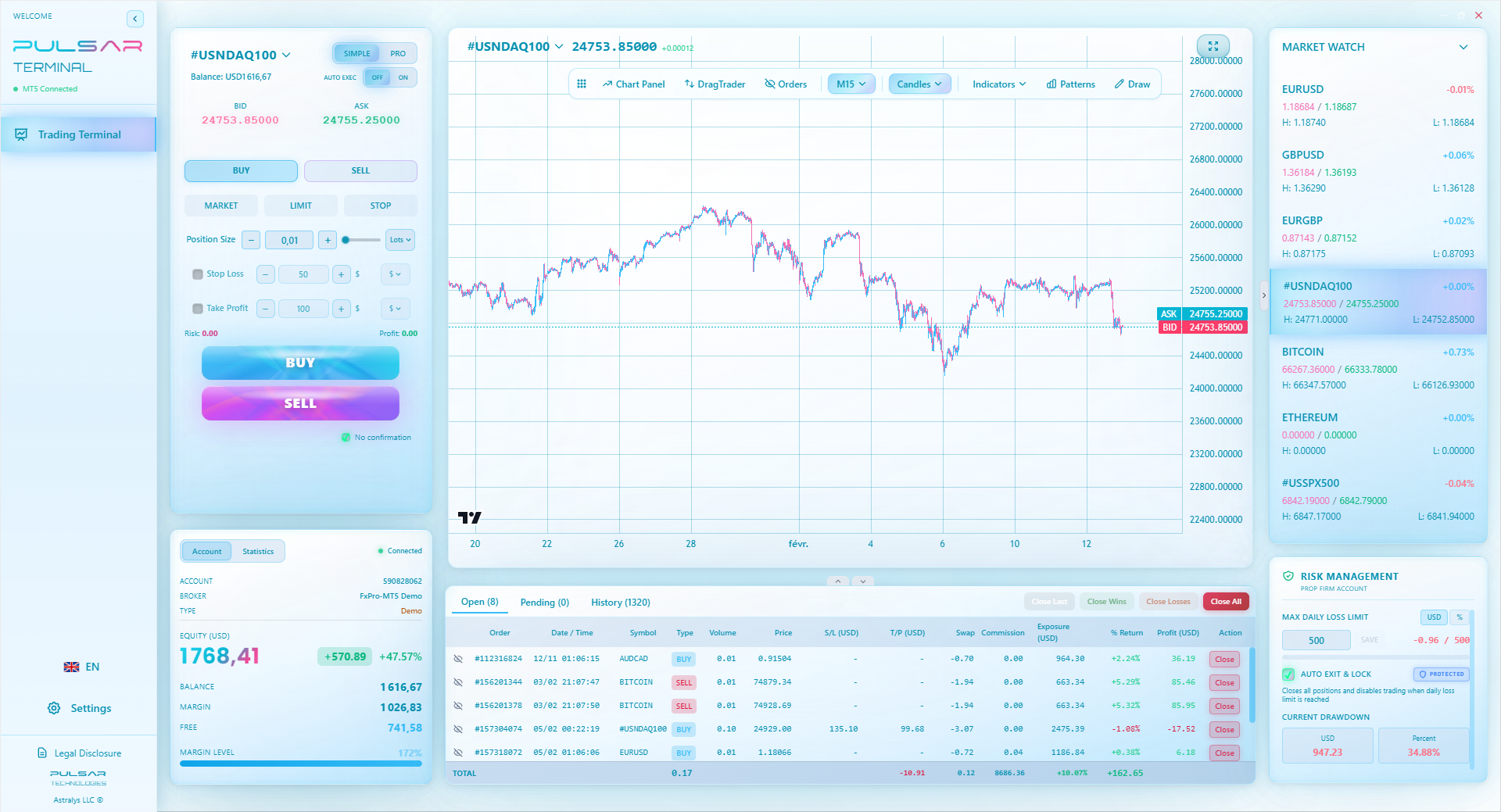
Manually moving stops and managing multiple targets on volatile pairs like USD/ZAR is stressful; Pulsar Terminal automates this directly on your MT5, turning your plan into automatic action.
Pulsar Terminal
Das All-in-One MT5-Tool: Drag-and-Drop-Orders, Multi-TP/SL, Trailing Stop, Grid Trading, Volume Profile und Prop-Firm-Schutz. Täglich von 1.000+ Tradern genutzt.
“Your trade view is the physical manifestation of your trading edge.”
After you've mastered a clean, disciplined manual setup, you might hit a ceiling. Your psychology during volatile SA market opens (8am-10am) might waver. This is where automation and advanced tools can help enforce your rules.
Think about tools that can:
- Automate Trade Management: Set a trailing stop that activates only after a certain profit level, or automatically close half a position at a first profit target. Doing this manually under pressure is hard.
- Visualize Order Flow: Tools that add Volume Profile or Market Profile directly onto your MT5/MT4 charts can reveal where the big battles were fought - key for finding strong support/resistance.
- Backtest Visually: The ability to replay the market on your charts, seeing how your strategy would have played out, is useful. TradingView's bar replay is a good start.
The key is that these tools should automate your existing, proven process. They are not the process itself. I added automated trade management only after 3 years of manually managing trades successfully. The tool just removed the occasional moment of weakness. If you're struggling with the manual execution of complex strategies, especially with multiple targets, the right software can be a bridge between your plan and your action.
💡 Winstons Tipp
The most important line on your chart isn't a trendline. It's the horizontal line marking your stop-loss. If you didn't draw it, you didn't plan the trade.

Your trade view for forex is the physical manifestation of your trading edge. If you don't have a clear edge (a statistical reason to believe you'll win over time), then the fanciest view is just a expensive distraction.
Start simple. One chart. One currency pair (maybe EUR/USD to avoid ZAR spread complexity at first). One or two indicators. Paper trade for a month. Your goal isn't profit in demo; it's consistency in process. Did you follow your rules every time? Did your trade view help that or hinder it?
Then, and only then, add complexity. Maybe a second monitor for a longer timeframe. Maybe a dedicated news feed. Perhaps an advanced tool to automate your stop-loss rules. Each addition should solve a specific problem you've identified in your trading, not just look cool.
Remember, the pros aren't staring at more screens than you. They're staring at better-organized screens that reflect a iron-clad process. They've built a trade view that filters out noise and highlights opportunity. That's your goal. Now go set it up, test it, and for goodness sake, start small with real money. That R5000 in your account is a tuition fee, not a lottery ticket. Protect it.
FAQ
Q1Is TradingView free for South African traders?
Yes, but with a major caveat. The free plan has delayed data and limited indicators. For real trading, especially with fast-moving pairs like USD/ZAR, the delay is a deal-breaker. You'll need at least a Pro plan ($14.95/month) or connect a live data feed from your broker (like IC Markets or Pepperstone) for real-time prices.
Q2What is the best broker for TradingView in South Africa?
There's no single 'best,' but brokers with strong direct integration and low latency are top choices. IC Markets and Pepperstone are excellent due to their raw spreads and stable API connections to TradingView. Always, and I mean always, check their current FSCA regulation status before depositing any Rand.
Q3Can I trade directly from TradingView charts in SA?
Technically, yes, if your broker supports TradingView's trading panel. However, I'm cautious about this. Execution speed and reliability are paramount. I prefer using TradingView for analysis and charting, and placing the trade directly on my broker's more strong MT5 or cTrader terminal. Test both methods thoroughly in demo first.
Q4How do I deal with load shedding while trading forex?
Have a contingency plan. 1) A UPS for your router and computer can buy you 15-30 minutes to close positions. 2) Ensure your broker's mobile app is set up and you can log in quickly. 3) Consider a local data bundle on your phone as a backup internet source. Not having a plan is a sure way to turn a power outage into a financial loss.
Q5What timeframes should I use on my trade view for USD/ZAR?
USD/ZAR is news-driven and volatile. I use a top-down approach: Daily chart for the overall trend and key levels, 4-Hour chart for swing trading opportunities, and 1-Hour or 30-minute for precise entries. Avoid very low timeframes (like 1-min or 5-min) unless you are a highly experienced scalper, as the spreads will eat you alive.
Q6How much money do I need to start trading with a proper setup?
You can open an account with as little as $5 (roughly R90) with some brokers. But to trade properly - meaning using sensible position sizing and surviving normal losses - you need enough capital so that your risk per trade is 1-2%. Realistically, I wouldn't start with less than $500 (roughly R9,000). This allows you to trade micro lots and actually practice risk management without being wiped out by two bad trades.
Prof. Winstons Lektion
Wichtige Erkenntnisse:
- ✓Verify FSCA regulation before depositing a single Rand.
- ✓Wider spreads on ZAR pairs require adjusted position sizing.
- ✓Always have a load-shedding contingency plan.
- ✓Automate trade management to remove emotional weakness.
- ✓Start with one chart, one pair, and one strategy.
Wie nützlich war dieser Artikel?
Klicken Sie auf einen Stern
Wöchentliche Trading-Einblicke
Kostenlose wöchentliche Analysen & Strategien. Kein Spam.
Über den Autor
David van der Merwe
Schwellenland-Trader
In Johannesburg ansässiger Trader mit 11 Jahren Erfahrung in Schwellenländerwährungen. Spezialisiert auf ZAR-Paare, FSCA-regulierten Handel und Analyse des südafrikanischen Marktes.
Kommentare
Risikohinweis
Der Handel mit Finanzinstrumenten birgt erhebliche Risiken und ist möglicherweise nicht für alle Anleger geeignet. Vergangene Ergebnisse garantieren keine zukünftigen Renditen. Dieser Inhalt dient ausschließlich Bildungszwecken und stellt keine Anlageberatung dar. Führen Sie immer Ihre eigene Recherche durch, bevor Sie handeln.
Das könnte Sie auch interessieren

Cara Trading Forex Sukses: 7 Prinsip dari Trader Profesional
Cara trading forex sukses dengan 7 prinsip trader pro: manajemen modal, disiplin, journal trading, backtest. Data nyata, bukan janji profit palsu.
Jam Trading Forex Terbaik untuk Trader Indonesia: Panduan Lengkap dengan Tabel Waktu
Panduan jam trading forex untuk trader Indonesia. Tabel 4 sesi dunia, jam emas 20:00-00:00, sesi mana yang harus dihindari. Data akurat + tips dari trader berpengalaman.
Top 5 Sàn Forex Uy Tín Nhất 2026: Review Jujur dari Trader Indonesia
Top 5 sàn forex uy tín 2026 untuk trader Indonesia. Review jujur: spread, deposit, withdraw, dukungan lokal. Exness, XM, IC Markets & lebih.
Pulsar Terminal herunterladen
Alle diese Rechner sind in Pulsar Terminal mit Echtzeit-Daten Ihres MT5-Kontos integriert.
Pulsar Terminal herunterladen