


You're sitting in traffic on the N1, watching a perfect setup form on the USD/ZAR chart.

David van der Merwe
Emerging Markets Trader ·  South Africa
☕ 10 min read
What you'll learn:
You're sitting in traffic on the N1, watching a perfect setup form on the USD/ZAR chart. Your phone buzzes with a news alert. Can you trust your device to get you in and out of that trade before the signal disappears? If you're trading from your phone in South Africa, the hardware in your hand isn't a luxury, it's your primary tool. I've traded from beaches in Cape Town, waiting rooms in Johannesburg, and braais in Pretoria. Let me tell you exactly what makes a phone worth your money, and which models will actually help you make better decisions instead of just costing you more.
Most traders think a phone is just a smaller screen. That's a quick way to lose money. In South Africa, with our load-shedding schedules and unpredictable connectivity, your phone isn't a backup, it's often your frontline. I learned this the hard way in 2021. I was short on EUR/USD during a major ECB announcement. My laptop was on a UPS, but the Wi-Fi died. I grabbed my phone, but the MT5 app on my mid-range device froze while trying to modify my stop-loss. By the time it responded, I was looking at a R4,200 loss instead of a R1,800 profit. The spread had widened, the app lagged, and my hardware couldn't keep up.
Trading on a phone introduces unique pressures:
- Screen Real Estate: You need to see price action, your open positions, and maybe an indicator or two. A cramped screen forces bad decisions.
- Processor Speed: When the US Non-Farm Payrolls data hits, every millisecond counts. A slow chip means delayed order execution.
- Battery Life: With Stage 6 load-shedding, you might be away from a charger for hours. A phone that dies is a trading account at risk.

Warning: Never rely on public Wi-Fi for trading in South Africa. The security is terrible, and the latency is a killer. Always use your mobile data from a reliable network like MTN or Vodacom for execution.
The right phone mitigates these risks. It gives you a fighting chance when the power's out and you need to manage risk on a volatile pair like GBP/ZAR.

💡 Winston's Tip
A trader once told me his phone was his 'edge.' I asked to see it. It was covered in chip grease and had 47 unread notifications. Your device reflects your discipline. Keep it clean, charged, and focused.
Forget megapixels. We care about performance and reliability. Here’s what actually impacts your trading.
Display: Size and Quality
You need at least a 6.5-inch screen. Anything smaller and you’re squinting at candle wicks. Resolution matters too. A sharp 1080p or 1440p OLED display lets you see subtle support/resistance lines that might be blurry on a cheaper LCD. I use an iPhone 15 Pro Max, and the screen clarity alone helps me spot false breaks on the XAU/USD guide chart that I’d miss on my older phone.
Processor and RAM
This is your engine. For Android, you want a Snapdragon 8 Gen 2 chip or better. For iOS, an A16 Bionic or newer. Pair this with minimum 8GB of RAM. Why? Broker apps like MetaTrader 4/5, cTrader, and proprietary platforms are memory hogs. If your phone can’t keep the app and your browser (for news) open simultaneously, you’re trading blind. A slow refresh rate also creates a lag between the price you see and the price you get.
Battery and Connectivity
A 4500mAh battery is the bare minimum. Look for phones with 5000mAh+. You need it to last a full trading session, which could be 6-8 hours of screen-on time. For connectivity, 5G is essential in major metros like Johannesburg and Durban for the lowest latency. It can shave precious milliseconds off your order transmission compared to 4G.

Example: Let's do a quick cost analysis. A R25,000 phone seems expensive. But if a faster device helps you avoid just one bad fill or missed exit on a standard 1-lot trade, you’ve potentially saved R500-R1000 (or more) on that single trade. It pays for itself faster than you think.
“In South Africa, with load-shedding and unpredictable connectivity, your phone isn't a backup, it's often your frontline.”
This is the eternal debate. In South Africa, it comes down to cost, customization, and app stability.
Android (The Flexible Workhorse)
- Pros: Wider range of prices. You can get a capable trading phone from R8,000. More freedom to customize your trading workspace. Some brokers offer slightly more advanced charting tools on Android.
- Cons: Fragmentation. An app might run perfectly on a Samsung but buggy on a Xiaomi. Updates are slower, leaving you potentially vulnerable.
- Best For: Traders who want value, need dual SIMs for separate data lines, and like to tinker.
iOS (The Reliable Performer)
- Pros: Uniform performance. The MT5 app on an iPhone 13 will behave exactly like on an iPhone 15. App updates and security patches are immediate. Generally, better optimization for trading apps.
- Cons: The upfront cost is brutal. Less customization. You’re locked into Apple’s environment.
- Best For: Traders who prioritize stability and consistency above all, and who are already in the Apple environment.
My take? If your strategy is fast-paced, like scalping strategy, the consistency of iOS is worth the premium. For swing trading, a good Android phone is more than sufficient. I’ve used both extensively, and while I prefer iOS now, I made plenty of money on a Samsung Galaxy S21.
Here are my specific recommendations based on hands-on use and what works with South African brokers like Exness review and IC Markets review.
| Budget Tier | Model | Key Specs for Trading | SA Price (Approx.) | Why It Works |
|---|---|---|---|---|
| Value King | Samsung Galaxy A54 5G | 6.4" Super AMOLED, 5000mAh, 8GB RAM | R 9,999 | Outstanding battery life, great screen for the price. Handles MT5 with multiple charts smoothly. |
| Mid-Range Power | Google Pixel 7a | 6.1" OLED, 90Hz, Tensor G2, 8GB RAM | R 12,499 | Clean Android, fastest updates, superb performance. The 90Hz screen makes chart scrolling buttery. |
| Pro Android | Samsung Galaxy S23+ | 6.6" Dynamic AMOLED 120Hz, Snapdragon 8 Gen 2, 4700mAh | R 24,999 | A beast. The 120Hz screen is a game-changer for tracking fast markets. Will last for years. |
| Pro iOS | iPhone 15 Pro Max | 6.7" Super Retina XDR, A17 Pro, 8GB RAM | R 36,999 | The ultimate. The action button can be configured for quick tasks. Unmatched app stability and speed. |
A note on "gaming phones" like the ASUS ROG Phone: They have amazing specs and cooling, but their software is often clunky for daily use. The Samsung S23+ or iPhone 15 Pro are better all-rounders.

Pro Tip: Buy last year's flagship. A Samsung S22+ or iPhone 14 Pro Max can be found for significantly less money and will outperform any new mid-range phone for trading tasks. Check out reputable refurbished sellers.
💡 Winston's Tip
The most expensive phone in the world won't save you from a poor risk calculation. Always double-check your lot size on a small screen. A misplaced decimal point is a capital destroyer.
“A R25,000 phone seems expensive, but if it helps you avoid one bad fill on a 1-lot trade, it's paid for itself.”
Buying the right phone is only half the battle. Setting it up correctly is what separates the pros from the amateurs.
1. Kill the Distractions. Turn off ALL non-essential notifications. Your phone should only buzz for price alerts and order executions. Every social media ping pulls your focus away from the chart.
2. Organize Your Home Screen. Create a dedicated trading folder. Put your broker app, economic calendar, news feed (like Reuters), and a calculator app in it. Nothing else. This creates a "trading mode" mindset.
3. Master the App Settings. Don't use the default MT5/MT4 app settings. Go in and:
- Increase the chart history period.
- Set up default order types and a pre-set position size calculator.
- Enable push notifications for every order event (open, modify, close).
4. Physical Setup. Get a good phone stand. Holding your phone for hours leads to fatigue and rushed decisions. Consider a Bluetooth keyboard for faster order ticket input if you trade large volumes.
5. Data Management. Monitor your data usage. Streaming charts can use 100-200MB per hour. Ensure you have a sufficient data bundle from your network. I made the mistake of running out of data mid-session once, and by the time I bought a top-up, my stop-loss had been vaporized.
This level of optimization turns your phone from a convenience into a legitimate, powerful trading terminal. It’s about creating a professional environment, even when you’re not at a desk.
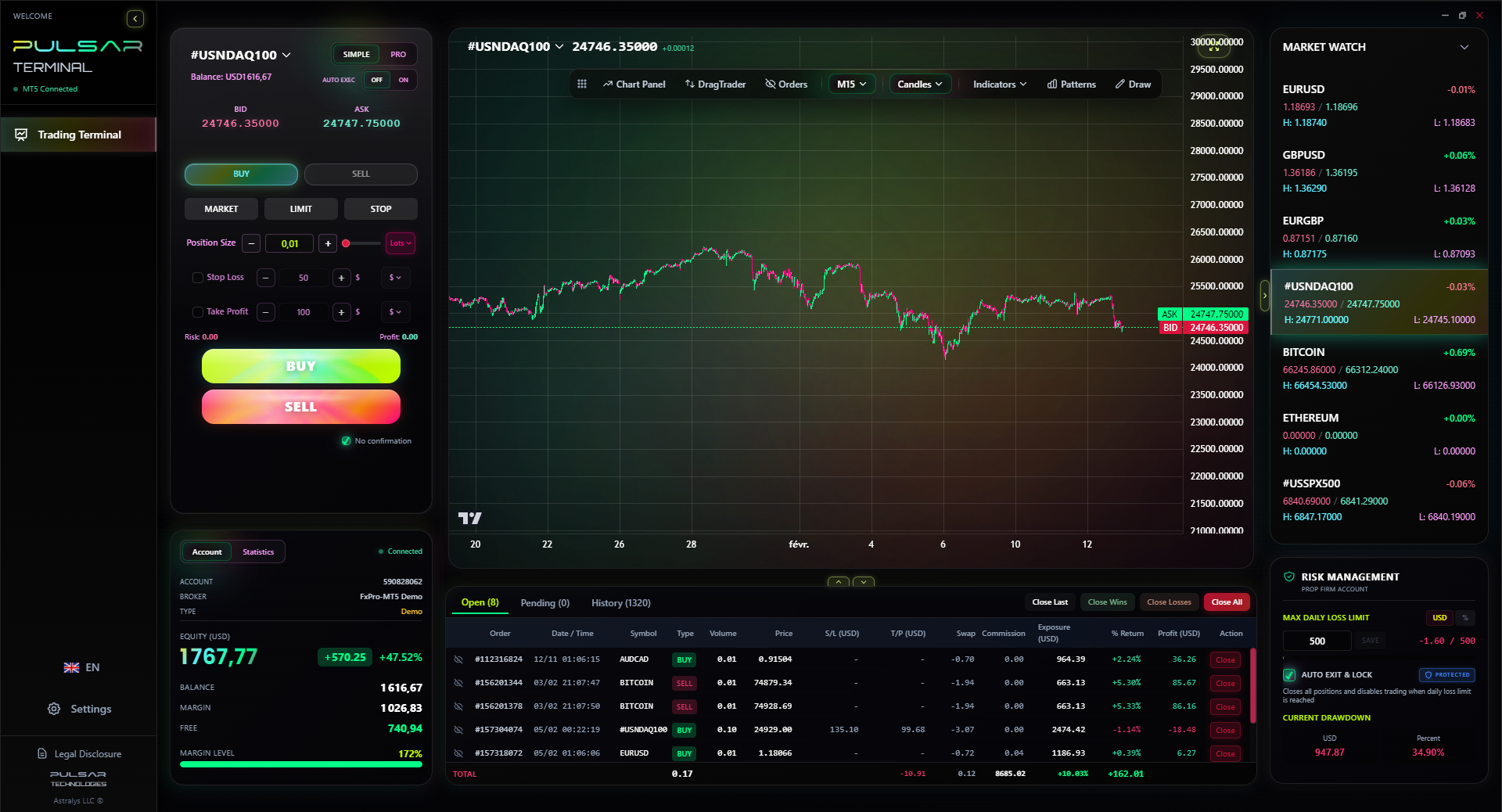
Manually moving stops and targets on a phone is slow and error-prone. Pulsar Terminal automates trailing stops, breakeven, and multi-level take-profits directly within MT5, so you can manage risk precisely even when you're away from your desk.
Pulsar Terminal
The all-in-one MT5 companion: drag-and-drop orders, multi-TP/SL, trailing stop, grid trading, Volume Profile, and prop firm protection. Used by 1,000+ traders daily.
I've seen traders throw away good money on bad mobile setups. Don't be one of them.
Mistake 1: Prioritizing Camera Over CPU. You're not buying a phone for Instagram. That R5,000 extra for a better camera is R5,000 not in your trading account. Focus on processor, RAM, and battery.
Mistake 2: Ignoring Screen Reflectivity. Try to view the phone outdoors or in bright light before you buy. A glossy screen that turns into a mirror in the sun is useless. You need to see your charts clearly in any light.
Mistake 3: Using a Cracked Screen. This seems obvious, but I've done it. A hairline crack can distort a trend line or obscure a key price level. It introduces an unnecessary, stupid risk. Fix it immediately.
Mistake 4: Not Having a Backup. Your phone is a physical object. It can be lost, stolen, or dropped in a braai pan. Have a plan. Know how to quickly install and log into your trading apps on another device. Keep a cheap, old phone charged and ready as a emergency backup.
Mistake 5: Trading on a Small Screen. Trying to day trade on a sub-6-inch screen is like performing surgery with oven mitts. You lack precision. It leads to mis-taps and emotional trading. If your primary device is small, use it only for monitoring and use a tablet or laptop for entries and exits.
“The right phone for trading is the one that disappears, letting you focus on the market, not the device.”
So, what's the single best phone for forex trading in South Africa right now? It depends, but I'll give you a straight answer.
If money is no object, the iPhone 15 Pro Max is the most reliable, powerful tool you can buy. The environment, the instant updates, and the raw performance make it the professional's choice. It just works, every single time.
For 95% of South African traders, the Samsung Galaxy S23+ is the sweet spot. You can find it for around R25,000, and it delivers 98% of the performance of the latest S24 series for much less. The screen is phenomenal, the battery gets through a full trading day even with screen-on constantly, and it handles every trading app flawlessly. It's the best balance of cost, performance, and durability for our market.
For those on a tight budget, the Samsung Galaxy A54 5G is a minor miracle. At under R10,000, it proves you don't need to spend a fortune to get a competent trading device. Pair it with a reliable broker like Pepperstone review (accessed via their global entity) and you have a setup that can absolutely make you money.
Remember, the best phones for forex trading are the ones that disappear. You shouldn't be fighting your device; you should be focused on the market. Your phone should be a clear window into the charts, not a barrier. Invest in that window, optimize it ruthlessly, and you turn one of South Africa's challenges - mobility - into your greatest advantage.
FAQ
Q1Is a tablet better than a phone for forex trading in South Africa?
For analysis and monitoring, yes, a tablet's larger screen is superior. But for execution, especially when you're mobile, a modern flagship phone with 5G will often have faster connectivity and more reliable apps. I use both: a tablet for chart analysis at home (during loadshedding with a UPS) and my phone for entries/exits and alerts on the go.
Q2How much mobile data does forex trading use per month?
It varies heavily. Just checking prices and managing positions uses very little (under 1GB per month). However, if you're streaming live charts with multiple timeframes and indicators for several hours a day, you can easily use 5-10GB. I recommend a dedicated 10-20GB data bundle for trading to be safe.
Q3Can I use the same MetaTrader login on my phone and laptop?
Yes, absolutely. You can be logged into the same MT4/MT5 account on multiple devices simultaneously. This is crucial for South African traders. You can manage a trade you entered on your laptop from your phone when the power goes out. Just ensure your orders are synchronized (they usually are).
Q4Are there any South African brokers with better mobile apps than MT5?
Most local and international brokers serving South Africa use MT4, MT5, or cTrader. cTrader has a particularly clean and responsive mobile app. Some proprietary platforms, like those from XM review, are also well-optimized. The app quality depends more on the platform (MT5 vs cTrader) than the broker itself.
Q5What's more important for trading: phone processor speed or RAM?
You need both, but they do different jobs. The processor (CPU) determines how fast the app runs and charts render. RAM determines how many apps you can keep open without reloading. For trading, I'd lean towards more RAM (8GB minimum). Running out of RAM causes your trading app to refresh when you switch to a news website, which can make you miss a critical price movement.
Q6Should I get a phone with stylus support like the Samsung S-Pen for trading?
It's a nice bonus, not a necessity. A stylus can be useful for drawing precise trend lines or Fibonacci levels on a chart. However, it won't make or break your profitability. Don't choose a phone specifically for stylus support unless you already know you'll use it for detailed analysis on the go.
Q7How do I protect my trading account if my phone is lost or stolen?
Immediate steps: 1) Use your backup device or computer to log in and close all open positions if necessary. 2) Contact your broker immediately to suspend mobile access to your account. 3) Use Find My Device (Android/iPhone) to remotely wipe the phone. Always use a strong, unique password for your trading account and enable two-factor authentication (2FA) if your broker offers it.
Prof. Winston's Lesson
Key Takeaways:
- ✓Screen size matters: Minimum 6.5 inches for clear chart viewing.
- ✓Battery is critical: 4500mAh absolute minimum, aim for 5000mAh+.
- ✓Performance over pixels: Prioritize processor (Snapdragon 8 Gen 2 / A16 Bionic) and RAM (8GB+).
- ✓Stability has a price: iOS offers consistency, Android offers value.
- ✓Optimize ruthlessly: Kill notifications, organize apps, master settings.
How useful was this article?
Click a star to rate
Weekly Trading Insights
Free weekly analysis & strategies. No spam.
About the Author
David van der Merwe
Emerging Markets Trader
Johannesburg-based trader with 11 years in emerging market currencies. Specializes in ZAR pairs, FSCA-regulated trading, and South African market analysis.
Comments
Risk Disclaimer
Trading financial instruments carries significant risk and may not be suitable for all investors. Past performance does not guarantee future results. This content is for educational purposes only and should not be considered investment advice. Always conduct your own research before trading.
You Might Also Like

Cara Trading Forex Sukses: 7 Prinsip dari Trader Profesional
Cara trading forex sukses dengan 7 prinsip trader pro: manajemen modal, disiplin, journal trading, backtest. Data nyata, bukan janji profit palsu.
Jam Trading Forex Terbaik untuk Trader Indonesia: Panduan Lengkap dengan Tabel Waktu
Panduan jam trading forex untuk trader Indonesia. Tabel 4 sesi dunia, jam emas 20:00-00:00, sesi mana yang harus dihindari. Data akurat + tips dari trader berpengalaman.
Top 5 Sàn Forex Uy Tín Nhất 2026: Review Jujur dari Trader Indonesia
Top 5 sàn forex uy tín 2026 untuk trader Indonesia. Review jujur: spread, deposit, withdraw, dukungan lokal. Exness, XM, IC Markets & lebih.
Get Pulsar Terminal
All these calculators are built into Pulsar Terminal with real-time data from your MT5 account. One-click position sizing, automatic risk management, and instant calculations.
Get Pulsar Terminal