


Here's the uncomfortable truth: 80% of South African traders renting a VPS are throwing their money away.

David van der Merwe
Emerging Markets Trader ·  South Africa
☕ 11 min read
What you'll learn:
- 1What the Hell is a Forex VPS (And Do You Actually Need One?)
- 2The Real Costs: What "Cheap" Actually Means in Rands
- 3Local vs. International: Picking a Provider in SA
- 4The Tech Specs That Actually Matter (Not the Fluff)
- 5Setting Up Your VPS: A 10-Step Checklist for Noobs
- 6The 5 Biggest Mistakes SA Traders Make (And How to Avoid Them)
- 7When to Skip the VPS Entirely: Smart Alternatives
Here's the uncomfortable truth: 80% of South African traders renting a VPS are throwing their money away. They're sold on 24/7 uptime and low latency, but they're running a single EA on a demo account with R5,000 in capital. It's financial insanity. I've traded from Cape Town to Johannesburg for over a decade, and I've seen this mistake burn through more accounts than any bad trade. This isn't about shilling for VPS providers. I'm going to show you exactly when you need a cheap forex VPS, when you don't, and how to pick one that won't fail you when USD/ZAR is gapping 500 pips at 3 AM.
Let's cut through the jargon. A VPS (Virtual Private Server) is a remote computer you rent. For forex, it's a computer that runs your trading platform and Expert Advisors (EAs) 24/7, without you needing to keep your own PC on.
The Real Reason You'd Need One
You need a VPS if you fall into one of these three categories:
- You're running automated strategies (EAs/Robots). If your EA needs to catch a London open breakout at 10:00 SAST while you're asleep, your home PC can't do that unless it's on and connected. A power outage in your suburb? Trade missed.
- You're a serious scalper. We're talking sub-10-pip targets on majors like EUR/USD. Every millisecond of latency matters between your click and the broker's server. A VPS hosted in the same data center as your broker (often London, New York, or Singapore) eliminates your home internet lag.
- You're trading a prop firm account. Most prop firms have strict rules against 'disappearing' trades. If your connection drops and a trade closes unexpectedly, you could fail the challenge. A VPS provides stability.
If you're a swing trader checking charts once a day, or you manually trade the JSE open, you absolutely do not need a VPS. You're lighting R100 a month on fire.

Warning: Don't get a VPS just because some guru on YouTube said to. It's a tool, not a magic profit generator. A bad strategy will lose money just as efficiently on a R500/month server as it will on your laptop.
I learned this the hard way early on. I rented a fancy $50/month VPS to run a grid EA on XAU/USD. The EA was flawed. The VPS ran it perfectly, 24/7, and I woke up to a margin call that wiped out R15,000. The tool worked. The strategy was garbage.

💡 Winston's Tip
A VPS doesn't make a bad strategy good. It just makes it fail faster and more reliably. Prove your edge on a demo first, then rent the horsepower.
“80% of South African traders renting a VPS are throwing their money away.”
Forget the USD prices. Let's talk Rands. The term 'cheap forex VPS' is relative. A cheap VPS for a high-frequency algo trader is different from a cheap VPS for someone running one simple EA.
Here’s the breakdown you’ll actually find in our market:
| Provider Type | Monthly Cost (ZAR) | What You Get | Who It's For |
|---|---|---|---|
| Local Promo Deal | R50 - R99 | Basic specs (1 CPU, 1GB RAM). Often a loss-leader to get you in. | Beginner testing a single EA. Risk of overselling. |
| Standard Local VPS | R150 - R350 | 2-4 vCPU, 4-8GB RAM, SSD storage. Reliable for most retail traders. | The majority of automated traders. The sweet spot. |
| Specialized Forex VPS | R500 - R1000+ | High-frequency optimized, guaranteed low latency (<1ms) to major broker hubs. | Professional scalpers, large prop firm accounts, complex multi-EA setups. |
That R50/month deal? It exists. I tried one back in 2022 from a local host. The performance was fine for a month, then the server became overcrowded. My EA's execution speed slowed, and I missed a key exit on a scalping strategy on GBP/USD, turning a 5-pip win into a 2-pip loss. Not a disaster, but it proved the point: you often get what you pay for.
The key metric isn't just the monthly fee. It's uptime guarantee (look for 99.9%+) and support response time. If your server goes down during a USD/ZAR news event, you need it fixed now, not in 24 hours.

Example: Let's do the math. A decent R250/month VPS costs R3,000 a year. If your trading capital is R20,000, that's 15% of your capital just on infrastructure. You'd need to generate a 15% return just to break even on the VPS cost. This is why your position size calculator needs to account for all costs, not just the spread.
“The critical latency is not to your home, but to your broker's server.”
This is the core decision. Do you go with a South African host or an international forex VPS specialist?
Local South African Providers (e.g., Afrihost, HostKing, CloudAfrica)
- Pros: Payment is easy (EFT, Zapper). Support is in SAST. If they have a server in Johannesburg (JINX), your local latency is fantastic.
- Cons: The critical latency is not to your home, but to your broker's server. If your broker like IC Markets or Pepperstone has its main servers in London, your data goes from JHB -> London. A VPS in London itself would be faster. Local providers also may not understand specific MT4/MT5 requirements.
International Forex VPS Specialists (e.g., FXVM, CheapForexVPS, Beeks)
- Pros: Servers are often in the exact same data centers (LD4 in London, NY4 in New York) as the major brokers. This gives you the lowest possible latency, sometimes under 0.5ms. They're built for trading.
- Cons: You pay in USD/EUR. Support might be in a different time zone. Initial setup can be slightly more complex.
My Verdict: For most South African traders using common brokers, an international provider with a London node is superior. The latency to your broker is the only latency that matters for order execution. I switched to this years ago and shaved an average of 80 milliseconds off my order confirmation times with my Exness ECN account. For pure manual trading on the JSE? A local VPS might make sense.

Pro Tip: Before you buy, ask the provider for a free trial or a 24-hour test IP. Run a simple ping test from your current location to their server and from their server to your broker's MT4/MT5 server address. The numbers don't lie.
“The critical latency is not to your home, but to your broker's server.”
Providers love to dazzle you with numbers. Ignore most of them. Focus on these four:
- CPU Cores & Guaranteed Resources: You want a guaranteed vCPU, not a shared one. Look for '2 vCPU' or more. For RAM, 2GB is the bare minimum for MT4. 4GB is comfortable. 8GB is for heavy lifting.
- Storage - SSD is Non-Negotiable: Your trading platform and journal write data constantly. A mechanical hard drive will bottleneck everything. Only accept SSD storage.
- Network Uptime & Latency: The 99.9% uptime guarantee is standard. The latency promise is key. It should specify latency to major financial hubs (e.g., <1ms to LD4, London).
- Windows OS & Remote Access: You need a full Windows Server OS (like Windows Server 2019) with a proper desktop. You should be able to connect via Remote Desktop (RDP) just like it's your own PC.
I once skimped and got a Linux VPS because it was R100 cheaper. Big mistake. While you can run MT4/5 on Linux with Wine, it's unstable. My custom MACD indicator would glitch, causing false signals. I lost a week of trading time troubleshooting before I paid for the Windows setup I should have bought in the first place.
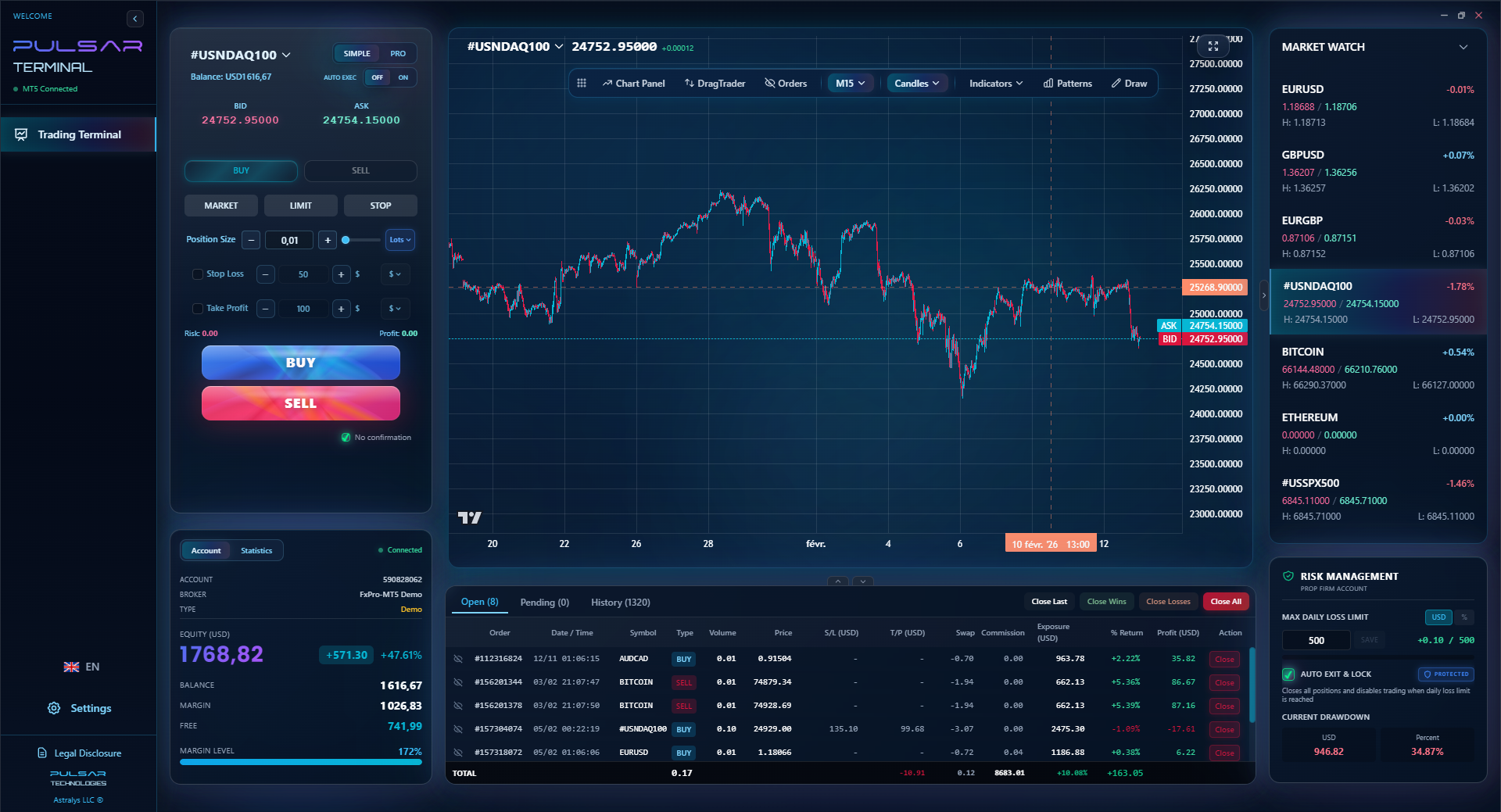
A VPS is the foundation. If you're building a serious automated system, your tools need to work in harmony. This is where a platform like Pulsar Terminal shines - it integrates directly with your MT5 on the VPS, letting you manage complex order types and risk automatically, which is crucial when you can't physically watch the screen.
💡 Winston's Tip
The monthly VPS fee is a business expense. If your trading capital is under R50,000, ask yourself if this expense makes economic sense. Often, it doesn't.
“A VPS is an employee. You can't just install an EA and vanish for a month.”
First-timer? Don't panic. Here's exactly what to do after you get your login details.
- Connect: Use the built-in Windows Remote Desktop Connection app. Enter the IP address, username, and password from your provider.
- Secure It: First thing, change the default password. This is a computer on the internet.
- Disable Updates: Go to Windows Update settings and pause updates for 30 days. You do NOT want Windows deciding to restart at 3 AM during a Fed announcement.
- Install Trading Platform: Download and install MT4/MT5 directly from your broker's website. Don't use a generic MetaQuotes download.
- Login & Save: Log into your trading account. Check 'Save Password' and 'Auto-login' in the platform. The VPS needs to restart the platform on its own if it crashes.
- Configure Charts: Set up your charts, templates, and indicators. This is now your master setup.
- Install Your EAs/Indicators: Copy your files over or download them. Place them in the correct 'MQL4/5' folders.
- Enable AutoTrading: In MT4/MT5, go to Tools > Options > Expert Advisors. Check 'Allow Algo Trading' and 'Allow DLL imports' if needed. Set 'Max Bars' to a high number.
- Test Everything: Run a strategy tester on your EA for a few minutes. Then, run it on a demo account with real market data for at least 48 hours. Watch the journal for errors.
- Set Up Monitoring (Optional but Smart): Use a free tool like TeamViewer to check in on the VPS from your phone. Or, use a notification EA that can send you Telegram alerts if something goes wrong.
Missing step 3 cost me once. A Windows update forced a restart on my VPS. My MT4 didn't auto-start. I was offline for 6 hours. Luckily, I was in a swing trading position with a wide stop, so no damage. But it could have been a catastrophe.
“A VPS is an employee. You can't just install an EA and vanish for a month.”
I've made half of these. Let's save you the trouble.
Mistake 1: Overbuying. You're running one simple moving average crossover EA. You don't need a 8-core, 16GB RAM monster. Start with a cheap forex VPS plan and upgrade only if you see performance issues.
Mistake 2: Ignoring the Broker's Server Location. If your broker's main server is in Cyprus and you get a VPS in New York, you've added latency, not reduced it. Know where your broker's trade server is (ask support) and pick a VPS nearby.
Mistake 3: No Backup Plan. The VPS will have an issue eventually. Have a plan. Can you quickly log in from your home PC? Do you have mobile trading set up? I once had a VPS hardware failure. Because I had my MT4 profile saved, I was up and running on my laptop within 15 minutes.
Mistake 4: Forgetting About Costs. That R250/month seems small. But R3,000 a year is a serious business expense. It must be justified by your trading style and capital. If you're trading a R10,000 account, the math rarely works.
Mistake 5: "Set and Forget." You can't just install an EA and vanish for a month. You must monitor performance, check the log for errors, and ensure your strategy still fits the market conditions. I check my VPS for 5 minutes every morning with my coffee.
Your VPS is a employee. You need to manage it. Tools that help you manage risk automatically, like setting a trailing stop or a daily loss limit, are force multipliers. This is especially critical for prop firm traders where a single bad hour can end your challenge.
💡 Winston's Tip
Test your VPS during volatile news like the US Non-Farm Payrolls. That's when poor performance will be exposed. If it handles that, it'll handle Tuesday afternoon.
When your VPS is running automated strategies, you need tools that manage risk without constant oversight, which is exactly what Pulsar Terminal's automated trade management features are built for.
Pulsar Terminal
The all-in-one MT5 companion: drag-and-drop orders, multi-TP/SL, trailing stop, grid trading, Volume Profile, and prop firm protection. Used by 1,000+ traders daily.
“Every Rand spent on unnecessary infrastructure is a Rand not compounding in your account.”
A VPS isn't the only path. For many South Africans, these alternatives are smarter and cheaper.
1. Use Your Broker's Free VPS. Many brokers, including XM, IC Markets, and others, offer a free VPS if you maintain a certain account balance (e.g., $5,000) or trading volume. This is your best option. The VPS is usually in an optimal location for that broker. Always ask your broker first.
2. A Dedicated Old PC/Laptop. Got an old laptop gathering dust? Install Windows, MT4, and nothing else. Disable updates, set it to never sleep, and connect it via Ethernet cable to your router. It's not as reliable as a professional data center, but for R0/month, it's a fantastic starting point. This is how I ran my first EA for two years.
3. Cloud Virtual Machines (AWS, Azure, Google Cloud). These are more technical and can be cost-effective if you know what you're doing. You can spin up a Windows instance on AWS Lightsail for less than $10/month. However, you're responsible for all setup and security. Not for beginners.
4. Manual/Swing Trading. Let's be blunt: if you're not automating, you probably don't need it. A solid internet connection and a reliable home PC are enough. Focus your money on education and a larger trading capital instead.
The goal is to keep costs low and efficiency high. Every Rand spent on unnecessary infrastructure is a Rand not compounding in your trading account. Start with the free option from your broker. If that's not available, try the old laptop method. Only go to a paid, cheap forex VPS when you have a proven, profitable strategy that demands it.
FAQ
Q1Is a free VPS from my broker good enough?
Usually, yes. It's often your best first choice. The broker hosts it close to their servers, so latency is minimal. The catch is the minimum deposit or volume requirements. If you qualify, use it. It's one less monthly expense eating into your profits.
Q2What is a good latency (ping) for a forex VPS?
For scalping, you want under 10 milliseconds (ms) to your broker's trade server. For general EA trading, anything under 50ms is fine. Over 100ms and you might start seeing slippage on fast-moving pairs. Test it before you buy.
Q3Can I use a VPS for trading on my phone?
No. The VPS runs the desktop version of MT4/MT5. You use your phone (via Remote Desktop apps) to view and control the VPS desktop, not to run a separate mobile trading app. It's like controlling a PC from afar.
Q4How much RAM does my MT4/MT5 VPS really need?
For MT4 with a few charts and one EA, 2GB RAM is the absolute minimum, 4GB is recommended. For MT5 or multiple complex EAs, start with 4GB and move to 8GB if you see performance warnings. More RAM than you need is just wasted money.
Q5Are there any hidden costs with a cheap forex VPS?
Watch for setup fees (many waive them), costs for extra IP addresses, or charges for exceeding bandwidth limits (rare for forex). The main 'hidden' cost is your time if you pick an unreliable provider that causes losses.
Q6As a South African, should I choose a VPS in London or Johannesburg?
Almost always London (or another major financial hub). Your broker's liquidity and servers are there. A JHB VPS gives you fast control from SA, but the trade order still has to travel to London. A London VPS completes the entire journey in milliseconds.
Q7Can I run TradingView or cTrader on a VPS?
Yes, you can install any Windows application. However, TradingView strategies cannot execute trades directly through a VPS unless you use a third-party bridge application. For cTrader, ensure your VPS provider supports it, as its server locations differ from MetaTrader.
Prof. Winston's Lesson
Key Takeaways:
- ✓Only use a VPS for automation, scalping, or prop firms.
- ✓Cheap often means R150-R350/month for reliable specs.
- ✓Prioritize low latency to your broker's hub, not your city.
- ✓Always test with a free trial or your broker's free VPS first.
- ✓Monitor it daily; it's not a fire-and-forget solution.
How useful was this article?
Click a star to rate
Weekly Trading Insights
Free weekly analysis & strategies. No spam.
About the Author
David van der Merwe
Emerging Markets Trader
Johannesburg-based trader with 11 years in emerging market currencies. Specializes in ZAR pairs, FSCA-regulated trading, and South African market analysis.
Comments
Risk Disclaimer
Trading financial instruments carries significant risk and may not be suitable for all investors. Past performance does not guarantee future results. This content is for educational purposes only and should not be considered investment advice. Always conduct your own research before trading.
You Might Also Like

Cara Trading Forex Sukses: 7 Prinsip dari Trader Profesional
Cara trading forex sukses dengan 7 prinsip trader pro: manajemen modal, disiplin, journal trading, backtest. Data nyata, bukan janji profit palsu.
Jam Trading Forex Terbaik untuk Trader Indonesia: Panduan Lengkap dengan Tabel Waktu
Panduan jam trading forex untuk trader Indonesia. Tabel 4 sesi dunia, jam emas 20:00-00:00, sesi mana yang harus dihindari. Data akurat + tips dari trader berpengalaman.
Top 5 Sàn Forex Uy Tín Nhất 2026: Review Jujur dari Trader Indonesia
Top 5 sàn forex uy tín 2026 untuk trader Indonesia. Review jujur: spread, deposit, withdraw, dukungan lokal. Exness, XM, IC Markets & lebih.
Get Pulsar Terminal
All these calculators are built into Pulsar Terminal with real-time data from your MT5 account. One-click position sizing, automatic risk management, and instant calculations.
Get Pulsar Terminal