


Here's a fact that should keep you up at night: over 90% of retail traders lose money.

Olumide Adeyemi
West African Trading Pioneer ·  Nigeria
☕ 9 min read
What you'll learn:
- 1What Exactly Is a Forex Calculator App? (It's Not Just Math)
- 2The 3 Non-Negotiable Calculations You Must Do Every Time
- 3How Nigerian Traders Misuse Calculator Apps (And Blow Up)
- 4Fitting the Calculator Into Your Actual Trading Process
- 5Beyond the Basics: When You Need More Than a Simple App
- 6Picking the Right Tool: App, Website, or Platform Integration?
- 7The Real Goal: Making Risk Management Automatic

Here's a fact that should keep you up at night: over 90% of retail traders lose money. The single biggest reason isn't a bad strategy. It's bad math. Most traders in Nigeria blow up their accounts not because they can't spot a trend, but because they can't calculate a safe position size. They guess. They use 'feel.' This is where a proper forex calculator app should be your most-used tool, not an afterthought. I've seen too many traders, myself included in the early days, turn a 50-pip win into a net loss because the spread and commission ate all the profits. Let's fix that.
A forex calculator app is a tool that does the critical risk math for you before you enter a trade. Think of it as your pre-flight checklist. You're not just calculating potential profit. You're calculating your maximum permissible loss.
At its core, it answers one question: "How many units or lots can I trade so that if I'm wrong, I only lose X amount of my account?"
Most free calculators you find online or in app stores handle the basics: position size, profit/loss, pip value, and margin. But the good ones, the ones that actually prevent disaster, force you to input your stop-loss first. That's the key difference between a toy and a tool.
I remember early on, I'd get a 'hot tip' on USD/NGN or GBP/USD, jump in with a standard lot because that's what the big boys did, and then panic when a 20-pip move against me meant a $200 loss. I wasn't trading. I was gambling with a fancy chart. A proper position size calculator would have shown me that for my $1,000 account and a 2% risk rule, I should have been trading a 0.02 lot on that setup. That's the reality check it provides.
“Most traders blow up their accounts not because they can't spot a trend, but because they can't calculate a safe position size.”
1. Position Size: The King of All Metrics
This is the calculation that determines your survival. The formula is simple, but ego makes it hard:
Position Size = (Account Risk in Currency) / (Stop Loss in Pips * Pip Value)
If you have a 500,000 Naira account and you're willing to risk 1% (5,000 Naira) on a EUR/USD trade with a 30-pip stop, the calculator tells you exactly how many units to buy or sell. Ignoring this is the express lane to a margin call.

Warning: Never, ever reverse-engineer this. Don't decide you want to trade 1.0 lots and then figure out where your stop loss 'should' go to make the risk 'okay.' That's how you get stopped out on market noise.
2. Pip Value for Different Pairs
A pip on USD/NGN isn't the same as a pip on GBP/JPY. If your account is denominated in Naira, trading a Yen pair adds a conversion layer. A good forex calculator app does this automatically. Getting this wrong can skew your risk by 20-30% easily.

Example: Let's say your account is with a broker like Exness and is in USD. You want to trade GBP/JPY. A 10-pip move doesn't equal $10. It might be $7.50 or $12.50 depending on the current rate. The calculator handles the JPY (quote currency) conversion for you.
3. Real Cost of Trading: Spread & Commission
This is where hope meets reality. You see a 15-pip profit, but you entered with a 2-pip spread and pay a $5 commission per lot. Your real gain is much smaller. For scalping strategies especially, not factoring this in is a guaranteed way to lose over time. I learned this the hard way trying to scalp gold (XAU/USD) where the spreads can widen massively during news.

💡 Winston's Tip
A calculator doesn't give you answers. It gives you constraints. Your job is to trade well within them.
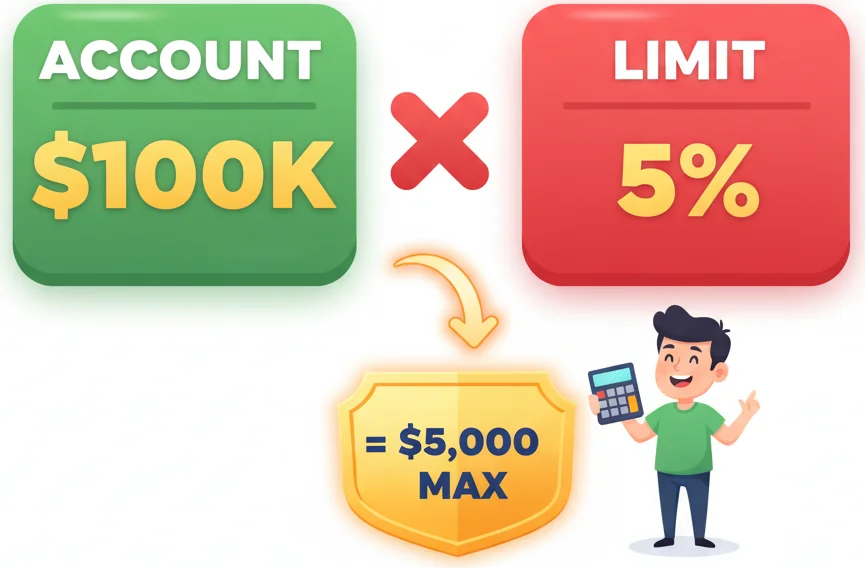
“The calculator sits squarely between your decision and your execution. It's the gatekeeper.”
We have a unique set of pitfalls here. First, the temptation of high use offered by brokers like XM or IC Markets. A calculator shows you can trade 5 lots with your margin. So you do. The calculator did the margin math right, but you ignored the risk math. It's a tool, not a permission slip.
Second, we often trade around liquidity crunches. During local bank closures or late nights, spreads on pairs involving Naira or even majors can blow out. You calculate your position size based on the typical 3-pip spread on EUR/USD, but you enter when it's 12 pips. You're down 4 times your expected 'cost of entry' before the market even moves. Your entire risk management is broken from the first second.
Third, and this is a global sin: using the calculator after the trade is placed. You take a trade on emotion, it goes in your favor, and then you use the calculator to see how much you 'might' make. Or worse, it goes against you, and you use it to figure out how doomed you are. It's a pre-trade tool. Period.
I once made this mistake with a swing trading idea on the AUD. I bought based on a weekly chart pattern, didn't calculate because 'it was a long-term trade.' A few days later, a surprise RBA comment sent it plummeting. I frantically opened a calculator to see the damage: I was risking over 8% of my account. I had to take a humiliating, oversized loss that set me back months.
“The calculator sits squarely between your decision and your execution. It's the gatekeeper.”
Your trading process should be a straight line: Analysis → Decision → Calculation → Execution. The calculator sits squarely between your decision and your execution.
- Do Your Analysis: Use your RSI indicator, MACD, or price action to find a potential trade. Identify a logical, technical level for your stop-loss. This is not a random number. It's the level where your trade idea is proven wrong.
- Open Your Forex Calculator App: Input your account balance, your risk percentage (I never exceed 1.5%), your stop-loss in pips, and the pair.
- Get Your Position Size: This is your order. Not a suggestion. The output is the maximum lot size you are allowed to trade.
- Place the Trade with Correct Stops: Enter the trade with the exact lot size and the predetermined stop-loss. If you're using a platform like MT5, some advanced tools can help manage this seamlessly post-entry.

Pro Tip: If the position size the calculator gives you seems laughably small (like 0.03 lots), that's not the calculator's fault. It means your stop-loss is too tight for your account size, or you're trying to risk too much on a single idea. Either widen your stop (if the analysis allows) or accept the small size. Small and alive beats big and dead.
💡 Winston's Tip
If you feel embarrassed by the small position size your calculation demands, your ego is writing checks your account can't cash.
“Small and alive beats big and dead. Every single time.”
As you graduate from a $500 to a $5,000 account, or start trading multiple positions, basic calculators fall short. You need to manage aggregate risk.
Correlation Risk: Are you about to go long on GBP/USD and short on EUR/USD? They are highly correlated. You're doubling your risk on one market move. A basic app won't tell you this. You need to be aware of your total exposure.
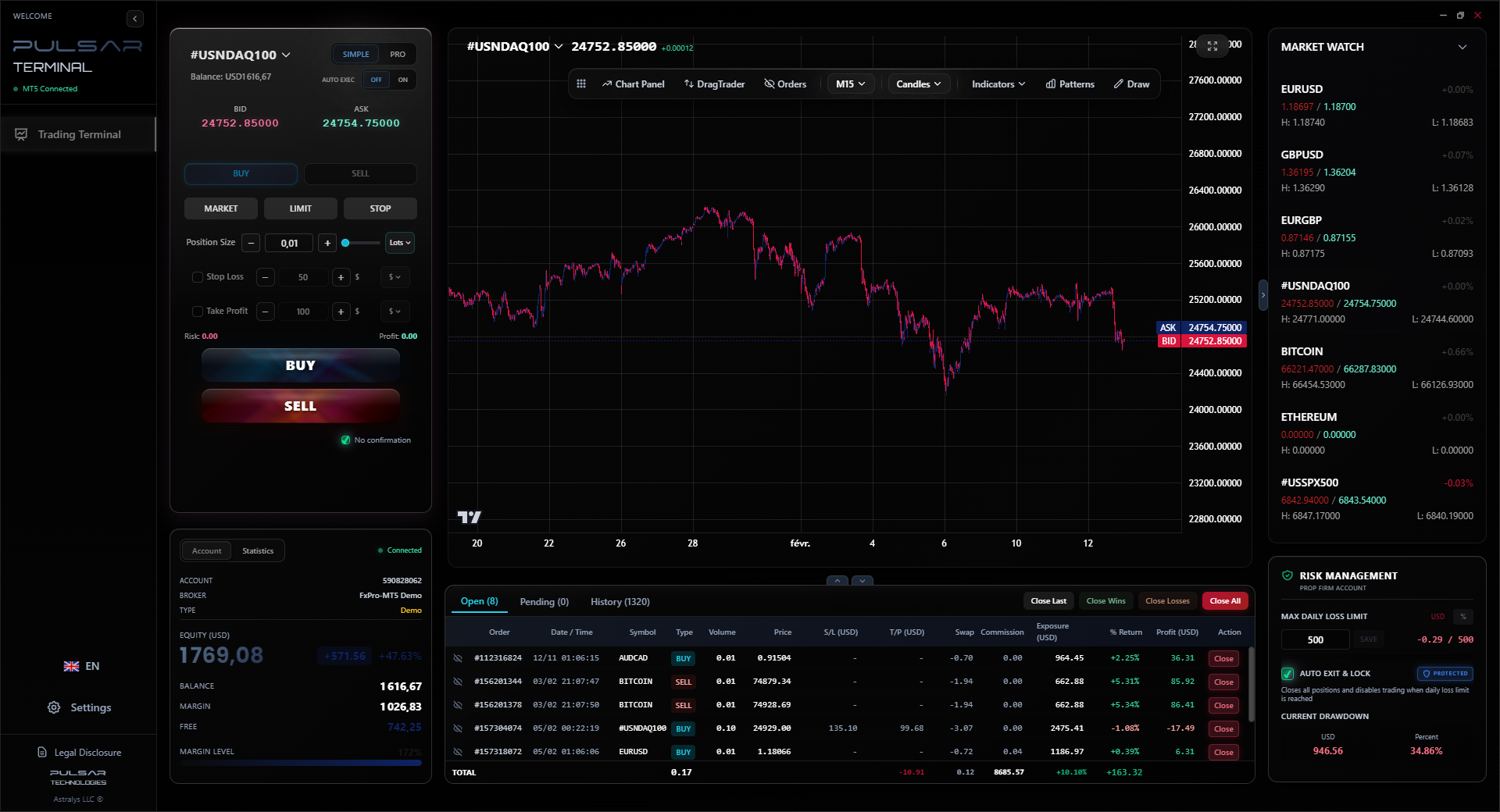
Multi-Target & Partial Close Calculations: Let's say you use a strategy with two take-profit levels. You close half at TP1 and move your stop to breakeven. What's your risk on the remaining half? What's your overall risk-to-reward now? Manual calculation here gets messy. This is where integrated trading terminal features become valuable, as they can automate these calculations and order adjustments in real-time.
Portfolio-Wide Risk: This is the big league. If you have 3 trades running, what is your total drawdown if they all hit their stops? It shouldn't exceed your daily or weekly loss limit (say, 5%). Keeping a manual spreadsheet is possible, but error-prone. The principle, however, starts with using your position size calculator correctly on every single entry.
Managing complex multi-target strategies and precise risk calculations manually is error-prone; tools like Pulsar Terminal automate this directly within your MT5 platform, turning your trading plan into executed trades.
Pulsar Terminal
The all-in-one MT5 companion: drag-and-drop orders, multi-TP/SL, trailing stop, grid trading, Volume Profile, and prop firm protection. Used by 1,000+ traders daily.
“Small and alive beats big and dead. Every single time.”
You have options, each with pros and cons.
| Tool Type | Pros | Cons | Best For |
|---|---|---|---|
| Standalone Website | Free, accessible on any device, often has many features. | You have to switch windows/tabs, manual entry, can be distracting. | Beginners testing the waters. |
| Mobile App | Portable, quick calculations on the go. | Small screen, easy to input errors, often filled with ads. | Traders who need to check things away from their desk. |
| Broker Platform Widget | Integrated, often pre-filled with account balance, live prices. | Locked to that broker, quality varies wildly. | Traders who stick to one broker like Pepperstone. |
| Advanced Trading Terminal | Fully integrated, can automate position sizing, manage multi-TP/SL, track live risk. | Usually a paid tool, has a learning curve. | Serious traders with consistent strategies and larger accounts. |
My advice? Start with a reliable free website calculator. Drill the habit into your brain. Once you're consistent and your account is growing, consider a more integrated solution that reduces manual steps and human error. The goal is to make risk management so effortless it's impossible to skip.
💡 Winston's Tip
The most profitable trade you'll ever make is the one where you used the calculator, saw the risk was too high, and walked away.
“The free math is the same math. Don't blame the tool for your lack of discipline.”
The endgame of using a forex calculator app isn't to get better at arithmetic. It's to bake unbreakable risk discipline into your DNA.
Every time you calculate, you are reinforcing a contract with yourself: "I will not lose more than X on this idea." This does something psychological. It makes the stop-loss sacred. It turns it from a suggestion into a law. When the market hits your stop, you don't feel cheated. You feel like your plan was executed. That's a win, even on a losing trade.
I'll be honest, there were times in my third year of trading, after some wins, where I thought, "I know this setup. I don't need to calculate. I'll just risk a bit more." That arrogance led to my single worst monthly drawdown: 22%. I broke my own rules. I stopped calculating. The calculator wasn't the problem. My decision to ignore it was.
Now, I don't even see a tradeable chart without knowing my stop and my size. The calculator is the gatekeeper. If I can't define my stop loss clearly, I have no business entering. If the calculated position size looks too small for my ego, I walk away. That discipline, more than any indicator, is what turned me from a loser into a consistent performer.

FAQ
Q1Is a free forex calculator app good enough?
Yes, absolutely. The free calculators on reputable trading education sites are perfectly capable of doing the essential math: position size, pip value, margin. The paid features are usually about convenience, integration, and advanced portfolio tracking. The free math is the same math. Use a free one until you outgrow it.
Q2My broker's platform shows P&L. Why do I need a separate app?
Your platform shows P&L after you're in the trade. A calculator is for before. It's a planning tool. Relying on your platform's live P&L for planning is like trying to plan your family budget by only looking at your bank balance after you've gone shopping. You need the budget first.
Q3How do I calculate position size for Nigerian Naira (NGN) pairs?
The principle is identical. 1) Decide your risk in Naira (e.g., 1% of your Naira account). 2) Determine your stop-loss in pips for the USD/NGN pair. 3) Input these into the calculator. The key is ensuring the calculator knows your account currency is NGN. If using a calculator set for USD, you'll need to manually convert your Naira risk to USD first using the current rate, which adds an extra step for error.
Q4What's a realistic risk percentage per trade?
For retail traders, especially in volatile markets we access, 0.5% to 2% is the sane range. I personally never go above 1.5%. At 1% risk, you can withstand 20 consecutive losses before you're down 20% of your account. At 5% risk (which many over-leveraged traders do), 4 consecutive losses put you down 20%. The math is brutal and unforgiving.
Q5Can a calculator help with prop firm challenges?
It's critical. Prop firms like FTMO or The5%ers have strict daily and overall loss limits. A miscalculation on one trade can blow your entire challenge. You must use a calculator to ensure each trade's risk is a tiny fraction of the allowed drawdown. It's about survival math, not profit math, in the beginning.
Q6I calculated my position size, but my broker won't let me trade that exact lot size (e.g., 0.023 lots). What do I do?
Always round DOWN. If your calculator says 0.023 lots and your broker only allows increments of 0.01, trade 0.02 lots. Rounding down reduces your risk. Rounding up increases it beyond your plan. Never round up.
Prof. Winston's Lesson
Key Takeaways:
- ✓Calculate position size BEFORE every trade. No exceptions.
- ✓Never risk more than 2% of your account on a single idea.
- ✓Your stop-loss determines your size, not the other way around.
- ✓If the calculated size seems too small, walk away from the trade.
How useful was this article?
Click a star to rate
Weekly Trading Insights
Free weekly analysis & strategies. No spam.
About the Author
Olumide Adeyemi
West African Trading Pioneer
One of Nigeria's most active forex trading educators. 8 years of experience trading from Lagos. Specializes in low-capital strategies and prop firm challenges for African traders.
Comments
Risk Disclaimer
Trading financial instruments carries significant risk and may not be suitable for all investors. Past performance does not guarantee future results. This content is for educational purposes only and should not be considered investment advice. Always conduct your own research before trading.
You Might Also Like

Cara Trading Forex Sukses: 7 Prinsip dari Trader Profesional
Cara trading forex sukses dengan 7 prinsip trader pro: manajemen modal, disiplin, journal trading, backtest. Data nyata, bukan janji profit palsu.
Jam Trading Forex Terbaik untuk Trader Indonesia: Panduan Lengkap dengan Tabel Waktu
Panduan jam trading forex untuk trader Indonesia. Tabel 4 sesi dunia, jam emas 20:00-00:00, sesi mana yang harus dihindari. Data akurat + tips dari trader berpengalaman.
Top 5 Sàn Forex Uy Tín Nhất 2026: Review Jujur dari Trader Indonesia
Top 5 sàn forex uy tín 2026 untuk trader Indonesia. Review jujur: spread, deposit, withdraw, dukungan lokal. Exness, XM, IC Markets & lebih.
Get Pulsar Terminal
All these calculators are built into Pulsar Terminal with real-time data from your MT5 account. One-click position sizing, automatic risk management, and instant calculations.
Get Pulsar Terminal