


How many times have you stared at a chart, trying to figure out if that potential trade is even worth the risk? You eyeball the stop loss, guess at the position size, and hope the math works out in your favor.

Olumide Adeyemi
West African Trading Pioneer ·  Nigeria
☕ 11 min read
What you'll learn:
- 1Why Your Broker's Calculator Isn't Enough
- 2What Makes a Great Forex Calculator for PC?
- 3Review: The Best Calculator Tools for Your Desktop
- 4Integrating the Calculator Into Your Trading Routine
- 5Pitfalls to Avoid: Where the Math Goes Wrong
- 6From Calculator to Risk Management Hub
- 7My Verdict and Your Action Plan
How many times have you stared at a chart, trying to figure out if that potential trade is even worth the risk? You eyeball the stop loss, guess at the position size, and hope the math works out in your favor. Let me tell you, hope is a terrible trading strategy. If you're trading from a PC in Lagos, Abuja, or Port Harcourt without a dedicated forex calculator, you're basically driving at night with your headlights off. You might get lucky, but you're asking for a crash. This isn't about fancy indicators; it's about the boring, essential arithmetic that keeps you in the game.
Every trading platform has a basic calculator built in. MetaTrader 4 and 5 have that little window you can pop open. So why bother with a separate forex calculator for PC? Simple: speed, precision, and pre-trade planning.
Your broker's tool is reactive. You have to have a trade ticket open, input your lot size, and then it tells you the margin and potential profit. A standalone calculator is proactive. You can play with scenarios before you ever click 'buy' or 'sell'. What if I move my stop loss 5 pips tighter? How does that change my risk in Naira? What's the exact lot size to risk 1.5% of my $500 account on this GBP/NGN trade?
Trying to do this mentally, or with a phone calculator, is where leaks happen. A tiny decimal error on your position size calculator can turn a 2% risk into a 5% loss before you know it. I learned this the hard way back in 2018. I was trading XAU/USD and miscalculated the pip value on a mini lot. Thought I was risking $80. The trade went south, and I was staring at a $200 loss. That mistake paid for a professional-grade calculator ten times over.

Warning: Relying on mental math during volatile sessions - like when Lagos banks are active or during London open - is a direct path to a margin call. Emotion clouds calculation. Let a tool do the cold, hard arithmetic.

💡 Winston's Tip
The first number you write in your trading plan shouldn't be an entry price. It should be the cash amount you're willing to lose. Let the calculator work backwards from there.
“Hope is a terrible trading strategy.”
Not all calculators are created equal. You can download a dozen free ones, but most are junk. Here’s what separates the useful from the useless for a Nigerian trader.
Core Functionality is Non-Negotiable
First, it must handle the basics flawlessly:
- Position Size from Risk: Input your account balance, risk percentage, stop loss in pips, and currency pair. It should spit out the exact lot size (standard, mini, micro).
- Pip Value Calculator: This is critical for cross pairs and exotics. The pip value for EUR/NGN is wildly different from EUR/USD.
- Profit & Loss Projection: Set your take-profit level and see the potential reward in your account currency (USD or Naira).
- Margin Requirement Calculator: Know exactly how much of your balance will be locked up before you enter.
Advanced Features That Give You an Edge
If a calculator only does the above, it's just okay. The good ones include:
- Multiple Account Currency Support: You might fund your Exness or IC Markets account in USD, but you think in Naira. A top calculator will convert P&L to your local currency at the current rate.
- Commission Integration: If you're a scalping strategy user, commissions eat into profits. A proper calculator lets you input your broker's commission per lot.
- Swap/Rollover Calculator: For swing trading positions you hold overnight, knowing the cost or credit from swaps is vital.

Example: Let's say you have a $1,000 account with XM and want to trade USD/NGN. You're willing to risk 2% ($20). Your stop loss is 50 pips. A good calculator will tell you: "To risk $20 on USD/NGN with a 50-pip stop, trade 0.04 lots. Margin required: ~$40. Pip value: ~$0.40." That's actionable intelligence.
“A tiny decimal error on your position size can turn a 2% risk into a 5% loss before you know it.”
I've tested most of them. Here’s the breakdown of where to spend your time (and money, if necessary).
1. Free & Web-Based: BabyPips Calculator This is the best starting point. It's free, runs in your browser, and covers all the basics. It's perfect for beginners who are still grasping the relationship between pips, lots, and risk. The downside? You need an internet connection, and it can feel slow when you're trying to calculate fast during a market move.
2. Premium Desktop Software: Forex Calculators by J. K. This is a one-time purchase (around $30-$50) for a downloadable Windows application. This is my personal daily driver. Why? It's instant. No browser lag. It sits on my second monitor, always ready. It has every feature I mentioned, plus a "trade journal" mode where I can record the calculation with a screenshot. It handles Naira conversions seamlessly if you feed it the USD/NGN rate.
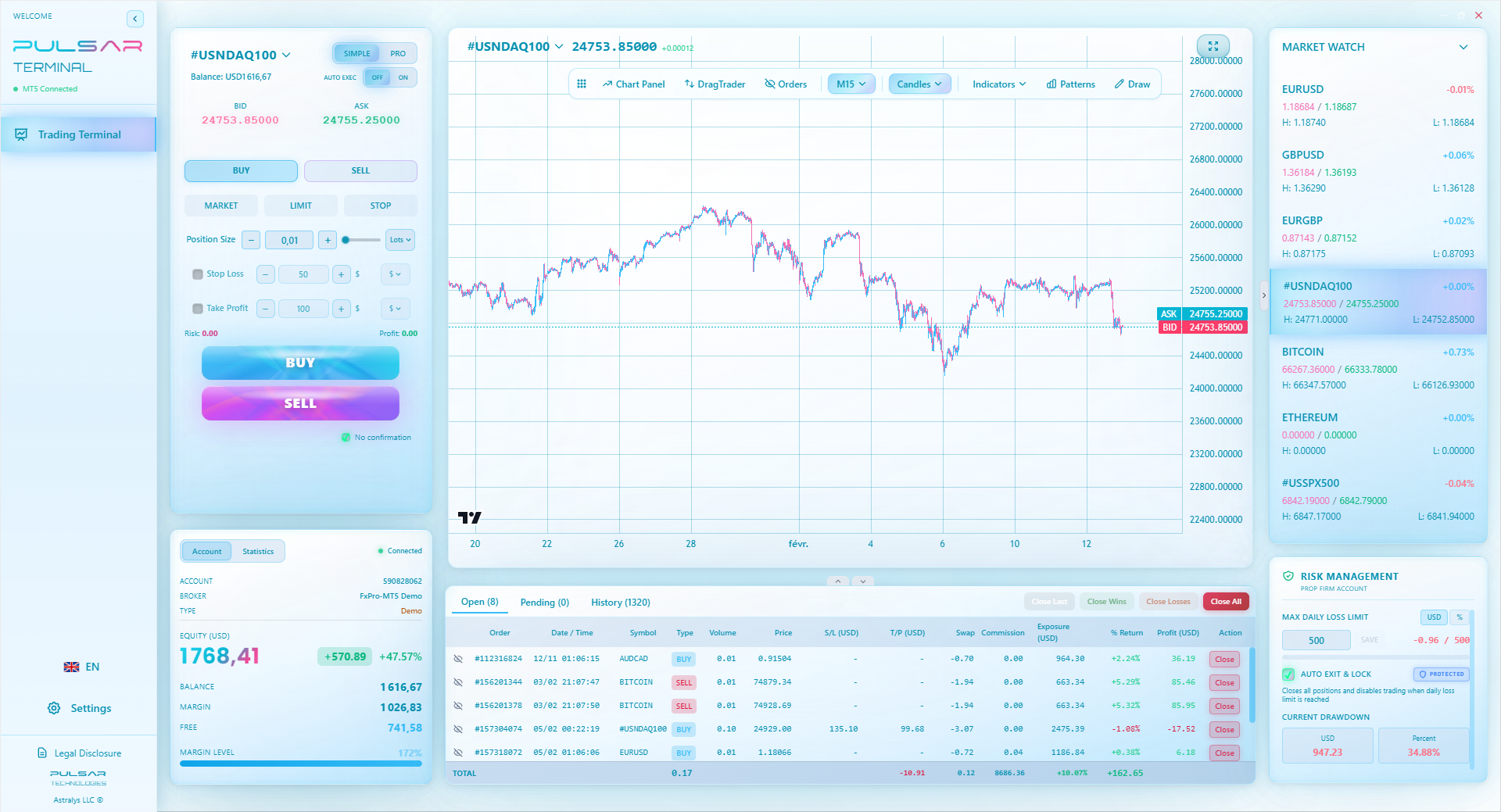
3. Trading Platform Plugins & Terminals This is the professional tier. Advanced trading platforms like Pulsar Terminal (an MT5 companion) or cTrader have sophisticated risk management tools baked in. They're more than just calculators; they're integrated trading assistants. You can drag a stop loss on a chart and see your risk update in real-time. For the serious trader who has graduated from just calculating to executing complex strategies, this is the endgame.
The MT4/5 Indicator Hack Some developers have created indicator-based calculators for MetaTrader. You drop them on a chart, and they show position size based on graphical stops. They're clever, but I find them clunky. They clutter your chart and can sometimes recalculate incorrectly if you change timeframes. I prefer a dedicated tool.
Here’s a quick comparison table:
| Feature | BabyPips (Web) | Premium Desktop App | Platform Plugin (e.g., Pulsar) |
|---|---|---|---|
| Cost | Free | One-time fee ($30-$50) | Subscription or one-time fee |
| Speed | Good | Instant | Instant & Integrated |
| Offline Use | No | Yes | Yes (within platform) |
| Advanced Features | Basic | Extensive | Very Extensive (auto-trading, trailing stop) |
| Best For | Beginners, occasional check | Serious retail traders | Professional & high-volume traders |
“A tiny decimal error on your position size can turn a 2% risk into a 5% loss before you know it.”
Buying a tool is pointless if you don't use it. Here's how to make a forex calculator for PC a non-negotiable part of your process.
Step 1: The Pre-Market Scan Before the market even opens (I do this at 7 AM WAT), I have my watchlist. I open my calculator and my broker's platform side-by-side. For each pair I'm watching - maybe EUR/USD and GBP/JPY - I identify key support and resistance levels. I measure the pip distance for a logical stop loss. I plug that number into the calculator first.
Step 2: The "What If" Stage This is where you get creative. Let's say EUR/USD is 1.0850. Resistance is at 1.0900 (50 pips away). Support is at 1.0800 (50 pips away). I calculate:
- If I sell at 1.0850, stop at 1.0900 (50 pips), what's my position size for a 1% risk?
- If I buy at 1.0850, stop at 1.0800 (50 pips), what's the position size? Now I know, for either scenario, what my exact risk is. The market hasn't moved, but I'm prepared. This kills impulsive trading.
Step 3: Execution and Record Keeping When your setup triggers, you don't calculate. You execute the plan you already calculated. The lot size is already known. After the trade, I take a screenshot of the calculator window and paste it into my trade journal next to the chart screenshot. This creates a perfect record. Was my RSI indicator overbought? Yes. Did I still risk only 1%? The calculator screenshot proves it.

Pro Tip: Set your calculator to use a fixed risk percentage for a month. Try 1%. See how your psychology and results change when every trade has an identical, pre-defined risk. It removes emotion from the size of the bet.
💡 Winston's Tip
If you find yourself overriding the calculator's suggested position size because you 'really believe' in the trade, shut down the platform. Your discipline is broken.
“When your setup triggers, you don't calculate. You execute the plan you already calculated.”
I've seen these errors drain accounts time and again. Check your own habits against this list.
1. Ignoring the Account Currency Conversion This is the big one for us. Your broker account is in USD. You see a profit of $100 and think, "Great, that's about ₦140,000." But you funded the account with Naira. Did you account for the exchange rate fee when you deposited? When you withdraw, will the rate be the same? A sophisticated forex calculator for PC lets you input your deposit currency and tracks your true Naira-based ROI. Otherwise, you're fooling yourself.
2. Forgetting the Spread as Part of the Risk If you're placing a trade with a 3-pip spread definition, your trade is 3 pips in the red the moment you get filled. If your stop loss is only 10 pips away, you're already risking 30% of your planned risk on the spread alone! Always add the spread to your stop distance when calculating. A 10-pip stop with a 3-pip spread means you need a 13-pip move to hit your stop. Calculate your position size using 13 pips, not 10.
3. Miscalculating Pips on JPY Pairs and Exotics A pip definition on USD/JPY is 0.01. On EUR/NGN, it's 0.01 for most brokers. But the value of that pip is different. Never assume the pip value is $10 for a standard lot. It's only $10 for pairs where the quote currency is USD, like EUR/USD. For USD/JPY at 151.00, the pip value is about $6.62. Get this wrong, and your risk is completely off. Let the calculator do it.
4. Not Re-Calculating After a Partial Close You take 50% profit off the table and move your stop to breakeven on the remainder. Your risk has changed! The calculator isn't a one-time use. You need to re-calculate your remaining position's risk profile. This is where integrated tools in platforms like Pulsar Terminal shine - they can manage partial closes and auto-adjust stops, keeping your risk managed in real-time.
Managing partial closes and adjusting risk on the fly is where basic calculators fail, but tools like Pulsar Terminal automate this directly within your MT5 platform.
Pulsar Terminal
The all-in-one MT5 companion: drag-and-drop orders, multi-TP/SL, trailing stop, grid trading, Volume Profile, and prop firm protection. Used by 1,000+ traders daily.
“When your setup triggers, you don't calculate. You execute the plan you already calculated.”
When you truly master a calculator, it evolves from a simple tool into the command center for your entire risk strategy.
Scenario Planning for News Events You know the CBN is announcing interest rates tomorrow. Volatility will be huge. Instead of avoiding it, use your calculator to plan.
- Scenario A: Price spikes 200 pips. What's the max lot size I can use if I place a stop 250 pips away to avoid the initial whip?
- Scenario B: I want to fade the initial spike. If I enter 100 pips above current price with a 50-pip stop, what's the size? You plan for chaos, so you're not reacting to it.
Optimizing for Prop Firm Challenges If you're trying to pass a funded account challenge from a prop firm, the rules are brutal: a max daily loss, a max total loss. A basic calculator won't cut it. You need one that can track your running daily P&L and tell you, in real-time, how much you can still risk before hitting the daily limit. This isn't a nice-to-have; it's mandatory. I failed my first prop challenge because I breached the daily loss by 0.2% on a trade I mis-calculated after a long session. Never again.
Correlation Adjustments This is next-level. If you're long EUR/USD and also considering a long on GBP/USD, you're doubling down on a USD short. Your real risk is not the sum of the two individual trades; it's higher because the pairs are correlated. Advanced calculators (or portfolio risk tools) let you input a correlation coefficient to adjust your total portfolio risk. For most retail traders, a simple rule is better: if you're in two correlated pairs, halve the position size on the second trade. Your calculator helps you enforce that rule with cold, hard numbers.
💡 Winston's Tip
A calculator's most valuable output isn't the lot size. It's the moment it tells you a trade isn't worth taking because the risk is too high for the potential reward.
“Your next step isn't to find a magic indicator. It's to master the arithmetic of survival.”
So, what should you do right now? Here's a straightforward path.
For Beginners (Account < $1000): Don't spend a kobo. Use the free BabyPips calculator religiously for two months. Make it a habit. Every single trade, no exceptions. Your goal is to ingrain the process of calculating risk before entry. Once you've executed 50 trades this way, then consider an upgrade.
For Intermediate Traders (Consistently Active): Invest in a good premium desktop forex calculator for PC. That one-time $40 fee is less than the cost of one avoidable bad trade. The speed and reliability will improve your workflow dramatically. Look for one with a trade journal feature. Start correlating your calculated risk with your actual emotional comfort during trades.
For Serious/Professional Traders: Your calculator needs to be part of your execution platform. You're beyond a separate window. Look at advanced trading terminals that bake risk management into the order entry process. The efficiency gain is massive. When you're managing multiple lots and complex strategies, the integrated approach isn't a luxury; it's a necessity for survival.
Your next step isn't to find a magic indicator. It's to master the arithmetic of survival. Open your broker platform right now, pick a random pair, and use any calculator to figure out the lot size for a 1% risk with a 20-pip stop. Do it ten times. Make it a reflex. That boring reflex will save you more money than any trading "secret" ever will.
FAQ
Q1Is a forex calculator for PC legal to use in Nigeria?
Absolutely. It's just a mathematical tool, like a spreadsheet. The Central Bank of Nigeria (CBN) and SEC don't regulate software that helps you calculate risk. They're more concerned with unlicensed brokerages and illegal fund movements. Using a calculator is not just legal; it's responsible trading.
Q2I trade on my phone mostly. Do I still need a PC calculator?
You need a calculator, period. Phone trading is great for monitoring, but planning and calculating complex risk is painfully clumsy on a small screen. Use the PC calculator for your pre-market analysis and planning session. Then, use the calculated lot sizes to execute on your phone. The PC tool is for the thinking, the phone is for the doing.
Q3Can't I just use the calculator in my MetaTrader 4/5 platform?
You can, and you should for a quick check. But it's limited. It doesn't let you easily model different scenarios ("what if my stop was here?") without opening a new order ticket each time. A dedicated tool is for planning and strategy. The MT4/5 calculator is for final verification just before you click 'buy'.
Q4How do I account for Naira fluctuations in my calculations?
This is crucial. If your broker account is in USD, your true profit/loss in Naira depends on the USD/NGN rate at withdrawal. A good premium calculator will have a "local currency" field. You input the current USD/NGN rate, and it converts all P&L figures. Update this rate weekly for a rough guide. Remember, bank transfer fees and your broker's conversion spread will also take a bite.
Q5What's the single most important number I should calculate before every trade?
The Naira (or USD) amount you are risking. Not the pip distance, not the lot size. The cold, hard cash. If your account is ₦500,000 and you're risking 2%, you must know you are putting ₦10,000 on the line for that specific trade idea. If that number makes you uncomfortable, your trade size is too big, no matter what the charts say.
Q6Are there any free downloadable PC calculators you trust?
Honestly, most free downloadable .exe files are sketchy. They might contain malware or ads. I don't trust them. The best free option is the reputable web-based one from BabyPips. If you want a desktop application, be prepared to pay a small one-time fee to a reputable developer. It's worth it for security and reliability.
Q7How does a calculator help with prop firm challenge rules?
It's essential. Prop firms have strict daily and overall loss limits (e.g., 5% daily, 10% total). A basic calculator tells you per-trade risk. An advanced one or a good trading journal lets you input your starting balance for the day and tracks your running P&L. You can see instantly if your next planned trade would breach the daily limit. This is non-negotiable for passing challenges.
Prof. Winston's Lesson
Key Takeaways:
- ✓Always calculate risk in cash terms (Naira/USD), not just pips.
- ✓The spread is part of your risk. Add it to your stop distance.
- ✓Re-calculate position size after every partial close.
- ✓For JPY pairs & exotics, never assume a $10 pip value.
How useful was this article?
Click a star to rate
Weekly Trading Insights
Free weekly analysis & strategies. No spam.
About the Author
Olumide Adeyemi
West African Trading Pioneer
One of Nigeria's most active forex trading educators. 8 years of experience trading from Lagos. Specializes in low-capital strategies and prop firm challenges for African traders.
Comments
Risk Disclaimer
Trading financial instruments carries significant risk and may not be suitable for all investors. Past performance does not guarantee future results. This content is for educational purposes only and should not be considered investment advice. Always conduct your own research before trading.
You Might Also Like

Cara Trading Forex Sukses: 7 Prinsip dari Trader Profesional
Cara trading forex sukses dengan 7 prinsip trader pro: manajemen modal, disiplin, journal trading, backtest. Data nyata, bukan janji profit palsu.
Jam Trading Forex Terbaik untuk Trader Indonesia: Panduan Lengkap dengan Tabel Waktu
Panduan jam trading forex untuk trader Indonesia. Tabel 4 sesi dunia, jam emas 20:00-00:00, sesi mana yang harus dihindari. Data akurat + tips dari trader berpengalaman.
Top 5 Sàn Forex Uy Tín Nhất 2026: Review Jujur dari Trader Indonesia
Top 5 sàn forex uy tín 2026 untuk trader Indonesia. Review jujur: spread, deposit, withdraw, dukungan lokal. Exness, XM, IC Markets & lebih.
Get Pulsar Terminal
All these calculators are built into Pulsar Terminal with real-time data from your MT5 account. One-click position sizing, automatic risk management, and instant calculations.
Get Pulsar Terminal