


I lost R4,200 in under an hour because of a dashboard indicator.

David van der Merwe
Emerging Markets Trader ·  South Africa
☕ 8 min read
What you'll learn:
I lost R4,200 in under an hour because of a dashboard indicator. It was one of those flashy, all-in-one MT4 tools promising 'institutional signals.' It painted a beautiful buy arrow on EUR/ZAR. I jumped in, full of confidence. What it didn't show me, buried in its own complexity, was the massive sell volume hitting the USD just as South African markets opened. The arrow was right for about five minutes. Then it reversed, and my stop-loss got taken out like a lamb at a braai. That loss taught me more about dashboard indicators than any sales page ever could.
Let's cut through the marketing. A forex dashboard indicator isn't one thing. It's usually a custom script or panel that tries to cram multiple pieces of information onto your chart or a separate window. Think of it as a car's dashboard. Instead of just a speedometer (price), you get a fuel gauge, engine temp, and warning lights all at once.
Common things they try to show:
- Multiple timeframe trend direction (often with arrows or colours).
- Overbought/oversold conditions from several oscillators like the RSI indicator and Stochastics.
- Support and Resistance levels, sometimes auto-drawn.
- 'Buy' and 'Sell' signals (the part that gets most people into trouble).
The promise is efficiency. Instead of looking at ten different charts and indicators, you get one neat package. The reality? It's often a confusing mess that gives you a false sense of security. You stop thinking and just follow the colours. That's a recipe for donating your rands to the market.

Warning: Any dashboard that primarily shows flashing arrows or '100% accurate' signals is selling you a dream, not a tool. The best ones are information aggregators, not crystal balls.

💡 Winston's Tip
Your best dashboard is a blank chart and a written trading plan. Fancy tools just distract you from the price.
“The promise of a dashboard is efficiency. The reality is often a confusing mess that gives you a false sense of security.”
Trading USD/ZAR or EUR/ZAR isn't like trading EUR/USD. Our market has unique quirks that generic, often internationally-made, dashboard indicators completely miss.
Liquidity and Spreads
When London opens, EUR/USD spreads are tight. When Jo'burg is most active, our major pairs can still have wide spreads, especially around local data releases. A dashboard screaming 'BUY NOW!' might not account for the 50-pip spread on GBP/ZAR at that moment. You enter the trade already R500 in the hole on a standard lot. I learned this the hard way using a popular dashboard on Exness. The signal was perfect, but the execution cost killed the profit potential before the move even started.
Local Drivers
A dashboard tracking global risk-on/risk-off might be useful. But does it factor in Eskom load-shedding schedules, local CPI data surprises, or SARB MPC meeting tones? Almost never. These are the events that cause violent, short-term moves in ZAR pairs. Relying solely on a dashboard that ignores them is like driving with a map of Europe while you're on the N1.
Broker Specifics
Your choice of broker matters immensely. The raw tick data feeding a dashboard on IC Markets with its tight raw spreads will be different from another platform. Some cheaper dashboards recalculate slowly and can give wildly different readings on different brokers' feeds. Always test a demo version with your specific FSCA-regulated broker first.
“Trading USD/ZAR with a generic dashboard is like driving with a map of Europe while you're on the N1.”
Let's be balanced. They're not all useless.
The Good (If You're Smart):
- Speed: A well-designed dashboard can help you scan multiple pairs or timeframes faster. This is its true strength for a scalping strategy.
- Discipline: Some force you to wait for multiple conditions (e.g., trend alignment on 3 timeframes + RSI confirmation) before showing a signal. This can prevent impulsive trades.
- Customisation: The best ones let you choose which components matter to you. You can turn off the silly arrows and just use the market structure tools.
The Bad & The Ugly:
- Over-optimisation: Most are back-tested to death on historical data. They look amazing on last year's chart. They fail on tomorrow's.
- Analysis Paralysis: Too many conflicting lights and numbers can freeze you. Is it a buy if the trend is green but volatility is red and volume is yellow?
- Cost: I've seen South Africans pay $100 a month for these. That's R1,800+ a year. You need consistent profits just to cover the subscription.
- Lag: They repaint. That beautiful buy signal that appeared on your closed 1-hour candle? It wasn't there when the candle was live. It painted after the move. Chasing it is a sure loss.

Example: I paid $87 for a dashboard that promised 'smart money concepts.' Backtest showed an 80% win rate. Live trading? 42% over 100 trades. The difference? Backtesting doesn't account for slippage, emotional execution, or the spread. That $87 cost me over $500 in losing trades before I scrapped it.
“The biggest edge in the South African market isn't a secret indicator. It's discipline and understanding local fundamentals.”
Here's the secret the sellers don't want you to know: you can build a more strong, personalised forex dashboard indicator for free. It won't be as pretty, but it will be honest and tailored to your strategy.
Step 1: Define Your Core Needs. What do you actually need to see? For my swing trading, I need: 1) Primary trend direction (H4 chart). 2) Key support/resistance. 3) Is price at an extreme? (Using RSI). 4) Basic volume check. That's it. No arrows, no rainbows.
Step 2: Use What Your Platform Gives You. MT4/MT5 have powerful tools most ignore.
- Multiple Charts: Open three charts for one pair: one for your main timeframe, one higher, one lower. Line them up. Instant multi-timeframe dashboard.
- Indicator Templates: Save your perfect setup of 2-3 key indicators as a template. One click applies it to any chart.
- Market Watch Window: Colour-code your watchlist. Green for strong uptrend, red for downtrend, grey for ranging. Quick visual scan.
Step 3: Add One Custom Tool If Needed. If you must have an all-in-one panel, look for simple, open-source 'market condition' indicators. They just display text like "H4 Trend: Up | M15: Retracement | RSI: 58." No signals. Just clean data. This forces you to make the decision, not the tool.
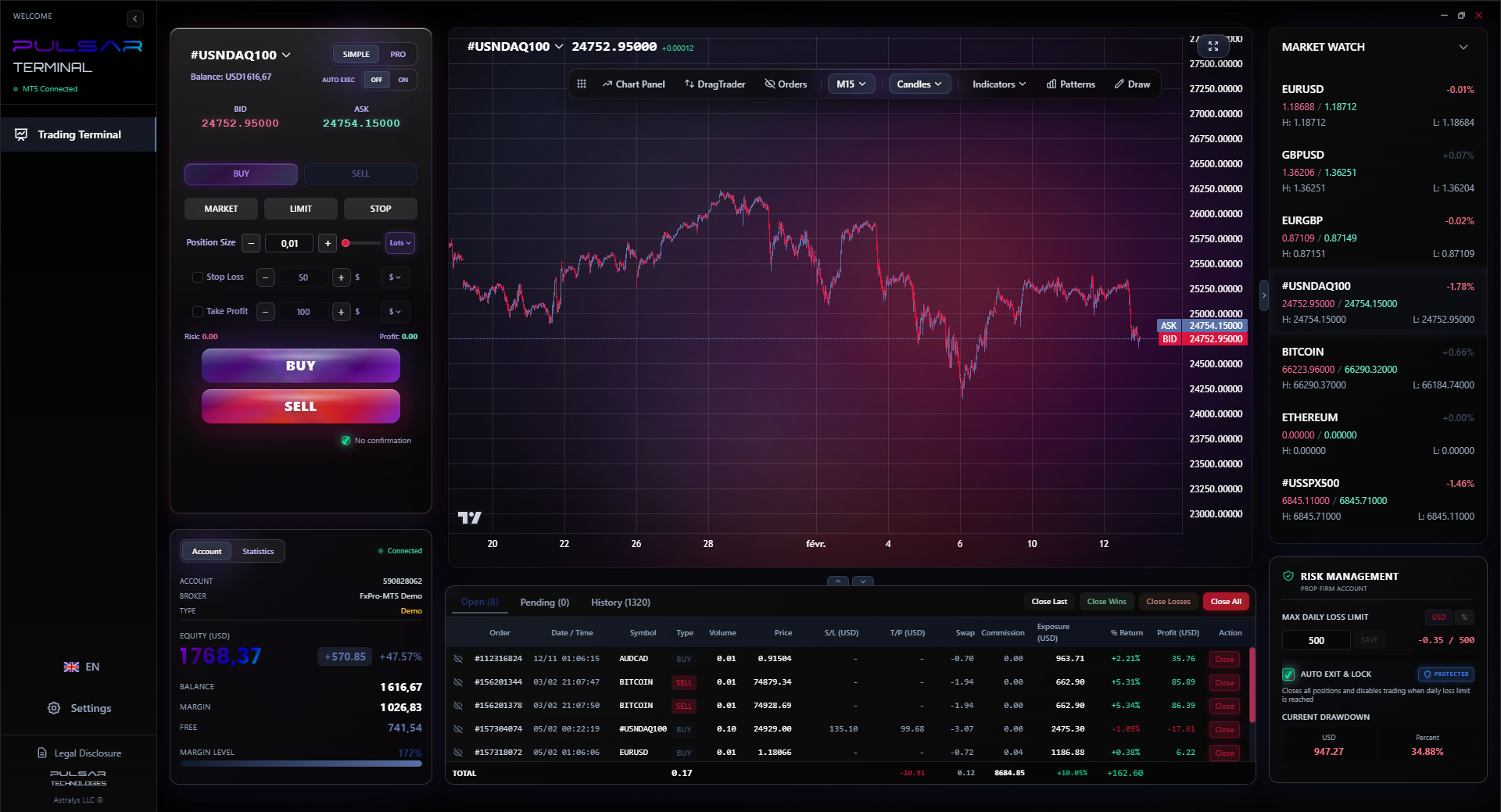
This DIY approach did more for my consistency than any paid system. It made me understand why I was taking a trade, not just that a light turned green. For managing those trades, a tool that helps with order execution is far more valuable than another signal generator. This is where something like a trading terminal that integrates with MT5 shines, letting you manage risk without taking your eyes off your own dashboard setup.
💡 Winston's Tip
If you can't explain the trading signal to another trader in two sentences, you shouldn't be taking the trade. Dashboards often obscure the 'why.'
“The biggest edge in the South African market isn't a secret indicator. It's discipline and understanding local fundamentals.”
If you're still tempted to buy one, here's your due diligence checklist.
Red Flags:
- No Demo/Demo Doesn't Match Live: The vendor says "it works differently in real markets." Run.
- Over-the-Shoulder Trades: Sales pages filled with "I made $5,000 today!" screenshots. These are often simulated or cherry-picked.
- Vague Strategy: They won't explain the logic. "Proprietary algorithm" is code for "we don't want you to know how simple this is."
- Auto-Trading Promises: They claim you can just let it run. This is the fastest path to a margin call.
A Proper 30-Day Test (The Winston Method):
- Demo Only: Use it on a demo account that mirrors your real account size. Use a reputable broker's demo like Pepperstone or XM.
- Track EVERYTHING: Not just wins/losses. Note the entry spread, the time of day, the clarity of the signal. Was it obvious, or did you have to squint and convince yourself?
- Ignore the Floating P&L: Look at the closed trade results only. Anyone can be in profit for 5 minutes.
- Test During Volatile News: How does it behave during SARB announcements or US NFP? Does it give crazy signals or shut down? This is crucial.
- Calculate Realistic Profit: Subtract the average spread and the cost of the indicator from your gross demo profit. Is it still worth it? For most traders, the answer is no.
Once you have a clear view from your dashboard, executing and managing trades with precision is the next critical step, which is where a dedicated trading terminal proves its worth.
Pulsar Terminal
The all-in-one MT5 companion: drag-and-drop orders, multi-TP/SL, trailing stop, grid trading, Volume Profile, and prop firm protection. Used by 1,000+ traders daily.
“Boring trading is profitable trading. Dashboards try to make it exciting, and excitement is expensive.”
After 12 years and wasting more money on these than I'd like to admit, here's my verdict for the South African trader.
For beginners: Avoid them completely. They are a crutch that prevents you from learning to walk. You need to understand price action and what a single indicator like the MACD indicator is telling you first. Adding a dashboard now will confuse you profoundly.
For intermediate traders: You might benefit from a simple dashboard as a scanner or checklist. But it must be a tool for your process, not the process itself. The moment you find yourself waiting for its permission to trade, uninstall it.
For experienced traders: You likely already have a mental dashboard. A custom one might save you time, but you're probably better off using that time to analyse the market yourself.
What do I use? A clean chart. I have key horizontal support/resistance lines drawn. I use one moving average for trend. I have the RSI indicator and volume below. That's it. My 'dashboard' is my trading journal spreadsheet where I pre-define my risk for the day using a position size calculator.
The biggest edge in the South African market isn't a secret indicator. It's discipline, understanding local fundamentals, and ruthless risk management. No dashboard in the world can give you that. It comes from taking losses, learning from them, and sticking to a plan so simple it feels boring. Boring is profitable.
FAQ
Q1Are free forex dashboard indicators from forums any good?
Sometimes, but be very careful. They can contain malware or 'time bombs' that stop working. More often, they're poorly coded and slow down your MT4 platform. If you try one, use it on a demo account first and monitor your PC's performance. The free ones are usually someone's failed attempt at selling a paid version.
Q2Can I use a dashboard indicator for trading USD/ZAR specifically?
You can, but you must adjust your expectations. Most aren't built for exotic pairs. The volatility and wider spreads will trigger false signals more often. You'll need to widen your stop-loss significantly compared to what the dashboard might suggest, which changes the entire risk-reward math.
Q3Do prop firms allow dashboard indicators?
Most do, as they're just a visual tool on your MT4/MT5. However, if the dashboard has an auto-trading function, that's usually prohibited during evaluation challenges. Always check your specific prop firm's rules. The real challenge is passing with strict drawdown limits, which requires manual control, not automated signals.
Q4What's the single most important feature a good dashboard should have?
Transparency. It should clearly show you the raw data or logic it's using (e.g., "Trend Up because MA50 > MA200 on H1"). Avoid 'black box' systems where you have no idea why it gave a signal. If you don't understand it, you can't trust it when it inevitably has a losing streak.
Q5How much should I realistically pay for one?
I wouldn't pay a recurring subscription. Ever. If you find a one-time purchase tool for under R500 ($30) that genuinely saves you time as a scanner, maybe consider it. But remember, the most successful traders I know in SA don't use them. That monthly fee is better spent on a quality data subscription or saved as trading capital.
Q6Do dashboard indicators work better for scalping or swing trading?
They're often marketed to scalpers for speed, but that's where they're most dangerous. Fast markets expose lag and repainting instantly. For swing trading, they can be less problematic as the signals are slower, but you still face the core issue: you're following a system you didn't build. Neither style gets a free pass.
Prof. Winston's Lesson
Key Takeaways:
- ✓Dashboards are aggregators, not crystal balls.
- ✓Test any tool with a 30-day demo using real spread data.
- ✓ZAR pairs need local context most dashboards lack.
- ✓Build your own visual setup; it's free and honest.
- ✓If it has flashing arrows, it's probably a scam.
How useful was this article?
Click a star to rate
Weekly Trading Insights
Free weekly analysis & strategies. No spam.
About the Author
David van der Merwe
Emerging Markets Trader
Johannesburg-based trader with 11 years in emerging market currencies. Specializes in ZAR pairs, FSCA-regulated trading, and South African market analysis.
Comments
Risk Disclaimer
Trading financial instruments carries significant risk and may not be suitable for all investors. Past performance does not guarantee future results. This content is for educational purposes only and should not be considered investment advice. Always conduct your own research before trading.
You Might Also Like

Cara Trading Forex Sukses: 7 Prinsip dari Trader Profesional
Cara trading forex sukses dengan 7 prinsip trader pro: manajemen modal, disiplin, journal trading, backtest. Data nyata, bukan janji profit palsu.
Jam Trading Forex Terbaik untuk Trader Indonesia: Panduan Lengkap dengan Tabel Waktu
Panduan jam trading forex untuk trader Indonesia. Tabel 4 sesi dunia, jam emas 20:00-00:00, sesi mana yang harus dihindari. Data akurat + tips dari trader berpengalaman.
Top 5 Sàn Forex Uy Tín Nhất 2026: Review Jujur dari Trader Indonesia
Top 5 sàn forex uy tín 2026 untuk trader Indonesia. Review jujur: spread, deposit, withdraw, dukungan lokal. Exness, XM, IC Markets & lebih.
Get Pulsar Terminal
All these calculators are built into Pulsar Terminal with real-time data from your MT5 account. One-click position sizing, automatic risk management, and instant calculations.
Get Pulsar Terminal