


You've downloaded MT5, maybe funded an account with a broker like Exness or XM, and now you're staring at a screen full of charts and numbers.

Olumide Adeyemi
West African Trading Pioneer ·  Nigeria
☕ 11 min read
What you'll learn:
- 1What Is MT5, Really? (And Why It's Not Just for Forex)
- 2Setting Up MT5 in Nigeria: Broker, Charts, and the First Trade
- 3The 4 MT5 Features You Can't Afford to Ignore
- 4placing-managing-trades
- 5The 3 Mistakes Every Nigerian Trader Makes on MT5 (And How to Stop)
- 6Advanced MT5: Custom Indicators, EAs, and Realistic Automation
- 7Trading on Your Phone: MT5 Mobile App Pros and Cons
- 8Your Action Plan: From Beginner to Competent in 30 Days

You've downloaded MT5, maybe funded an account with a broker like Exness or XM, and now you're staring at a screen full of charts and numbers. What next? Most Nigerian traders I've coached get this far, then lose their first ₦500,000 trying to figure it out. The platform isn't the problem. It's how you use it. This isn't a fluffy overview. It's a risk manager's breakdown of how to actually use Forex Metatrader 5 to survive and build capital, not incinerate it.
Let's clear this up first. When you hear 'Forex Metatrader 5,' you think currency pairs. That's only part of the story. MT5 is a multi-asset platform. It's built to handle stocks, futures, and commodities just as well as forex. For us in Nigeria, that's crucial. It means on one platform, you can trade US stocks (through CFDs with brokers like IC Markets), gold (XAU/USD), oil, and yes, your EUR/USD and GBP/NGN pairs.
The big upgrade from MT4 is under the hood. MT5 has a more powerful strategy tester for your Expert Advisors (EAs), more timeframes (21 vs. 9), and an economic calendar built right in. The order system is different, too. It uses a 'netting' system by default, which can be confusing if you're used to MT4's 'hedging' style. Some brokers let you switch it, but you need to know which one you're in.
Here's my blunt take: The extra bells and whistles don't matter if you don't have a solid plan. I've seen traders obsess over the perfect EA on MT5 while ignoring their position size. The fanciest car won't save you if you don't know how to drive.

Warning: The default order system in MT5 can get you in trouble. If you open multiple positions on the same pair, they will net against each other by default. This means you can't hold a buy and a sell open simultaneously on the same chart unless your broker offers a 'hedging' account mode. Always check your broker's settings first.
Your first decision is your broker. This isn't about who has the flashiest ads. It's about who gets your money in and out reliably. For Nigerian traders, you need a broker that accepts local deposits (bank transfer, cards) and has a solid track record. I've used accounts with Pepperstone, XM, and Exness from Lagos. Your experience will live or die by execution speed and customer support when you have an issue.
Choosing Your Broker
Look for two things: low, consistent spreads on the pairs you trade (check EUR/USD during London session) and clear withdrawal policies. Don't just look at the minimum deposit. Ask other traders how long withdrawals take to a Nigerian bank account. That's the real test.
Your First Chart Setup
Once installed, don't touch a thing. I want you to do this:
- Open a EUR/USD chart.
- Right-click on the chart, select 'Properties'.
- Set the background to a plain black or white. No distracting grids.
- Set the 'Line Graph' color to something bold, like yellow. This is your price line.
- Add two simple moving averages: a 50-period (blue) and a 200-period (red). That's it. No other indicators.
This clean setup forces you to look at price action. The clutter of 10 indicators is what new traders hide behind. I blew my first serious account (about $2,000) because I had an RSI, a MACD, a Stochastic, and three moving averages all on one chart, giving me conflicting signals. I was paralyzed. Simplicity wins.
Your first trade shouldn't be for real money. Use the demo account religiously. But here's the key: trade the demo with the exact amount you plan to deposit. If you're putting in ₦200,000, set your demo balance to ₦200,000. This makes your practice real. You can learn more about the mechanics of a trade with our pip definition guide.

💡 Winston's Tip
The platform is a mirror. If you see chaos on your MT5 charts, look first at the chaos in your trading plan.
“Simplicity wins. The clutter of 10 indicators is what new traders hide behind.”
MT5 has a hundred buttons. You only need a handful. Master these four, and you're ahead of 90% of traders.
1. The Market Watch & Depth of Market (DOM) Right-click in the Market Watch window and select 'Symbols'. Add the pairs you actually follow. For Nigeria, that's often GBP/NGN, EUR/NGN, USD/NGN, plus the majors like EUR/USD and XAU/USD (gold). The DOM shows you the buy and sell orders stacked up at different prices. It's a glimpse of real-time supply and demand.
2. The Terminal Window (Your Trade Desk) This is your command center. 'Trade' tab shows your open positions and pending orders. 'Account History' is your report card. Go through it weekly. Look for your average win vs. your average loss. If your average loss is bigger, you have a stop-loss problem.
3. One-Click Trading Enable this. Go to Tools > Options > Trade. Check 'One-Click Trading'. This lets you execute directly from the chart. Speed matters, especially if you're considering a scalping strategy. The half-second you save can be the difference between your desired price and a slippage-filled mess.
4. The Strategy Tester This is MT5's secret weapon. You can backtest any trading idea or Expert Advisor (EA) against years of historical data. But be skeptical. I once spent weeks perfecting an EA that showed 95% profit in the tester. I ran it live, and it lost 30% in two days. Why? The tester assumed perfect, slippage-free execution. Reality is messier. Use the tester to disprove bad ideas, not just to find magical ones.

Example: Let's say you want to test a simple moving average crossover strategy on USD/NGN. Load the EA into the Strategy Tester, select 'Every tick' for the most accurate model, and run it over the last 2 years. The report will show you the net profit, drawdown, and profit factor. If the max drawdown is 50%, ask yourself: could you stomach losing half your account waiting for it to recover?
This is where accounts explode. You understand the theory, but the pressure of a live trade makes your hand shake. Let's lock in a process.
Placing Your First Real Order
- Right-click on the chart > Trading > New Order. A ticket pops up.
- Symbol: Your pair (e.g., GBP/USD).
- Volume: This is your lot size. 1.00 is a standard lot ($10 per pip). For a ₦500,000 account, you should be trading 0.01 (micro lot) or 0.10 (mini lot). Use our position size calculator to be sure.
- Stop Loss & Take Profit: ENTER THEM NOW. Do not open a trade without these. Period. This is non-negotiable.
- Type: 'Instant Execution' is fine for most retail trades.
The Trailing Stop Trap
MT5 has a built-in trailing stop. It sounds great: it moves your stop loss up as the trade goes in your favor. Here's the problem: it's attached to your PC. If you close MT5 or your internet drops, the trailing stop stops trailing. It becomes a fixed stop. I learned this the hard way on a gold trade. I was up $800, went to bed with a trailing stop active, my laptop went to sleep, and I woke up to a $200 profit because the price had retraced and hit my static stop. Don't rely on it as a set-and-forget tool.
Managing Multiple Trades
With the netting system, managing multiple positions on one pair is tricky. Your terminal will show one net position. If you want to scale in or out, you need to plan it as part of one overall position. This is where a clear swing trading plan is essential, or where tools that sit on top of MT5 can help manage partial closures more visually.

“Your first trade shouldn't be for real money. But trade the demo with the exact amount you plan to deposit.”
After coaching hundreds of traders, I see the same errors on repeat.
1. Trading Without Understanding the Spread You see GBP/NGN move 50 pips and think, "Easy money." But if the spread is 40 pips (common with exotic pairs), you're already in a deep hole. The trade needs to move 40 pips just for you to break even. Always check the live spread in the Market Watch before you click buy or sell. A high spread kills scalping strategies instantly.
2. Ignoring Swap Rates (Overnight Fees) MT5 shows the swap rate for holding a position overnight. For a long-term trade, these can add up or eat your profits. If you're selling USD/NGN (holding a high-interest Naira), you might get a positive swap. If you're buying it, you pay. Check the 'Specification' for your symbol to see the rates. It's in the fine print, but it hits your bottom line.
3. Chasing Prop Firm Challenges with Bad Settings Prop firms are huge here. They often require you to use MT5. Traders blow challenges because they don't configure MT5 correctly. They trade too large, not realizing their broker's use, and get a margin call. Or they don't understand the firm's specific drawdown rules, which are calculated differently on the platform. You must align your MT5 risk settings with the prop firm's rulebook before you place a single trade.
💡 Winston's Tip
Backtest to find failure, not just success. A strategy that survives 10 years of worst-case scenarios is worth more than one that made 1000% in a bull market.
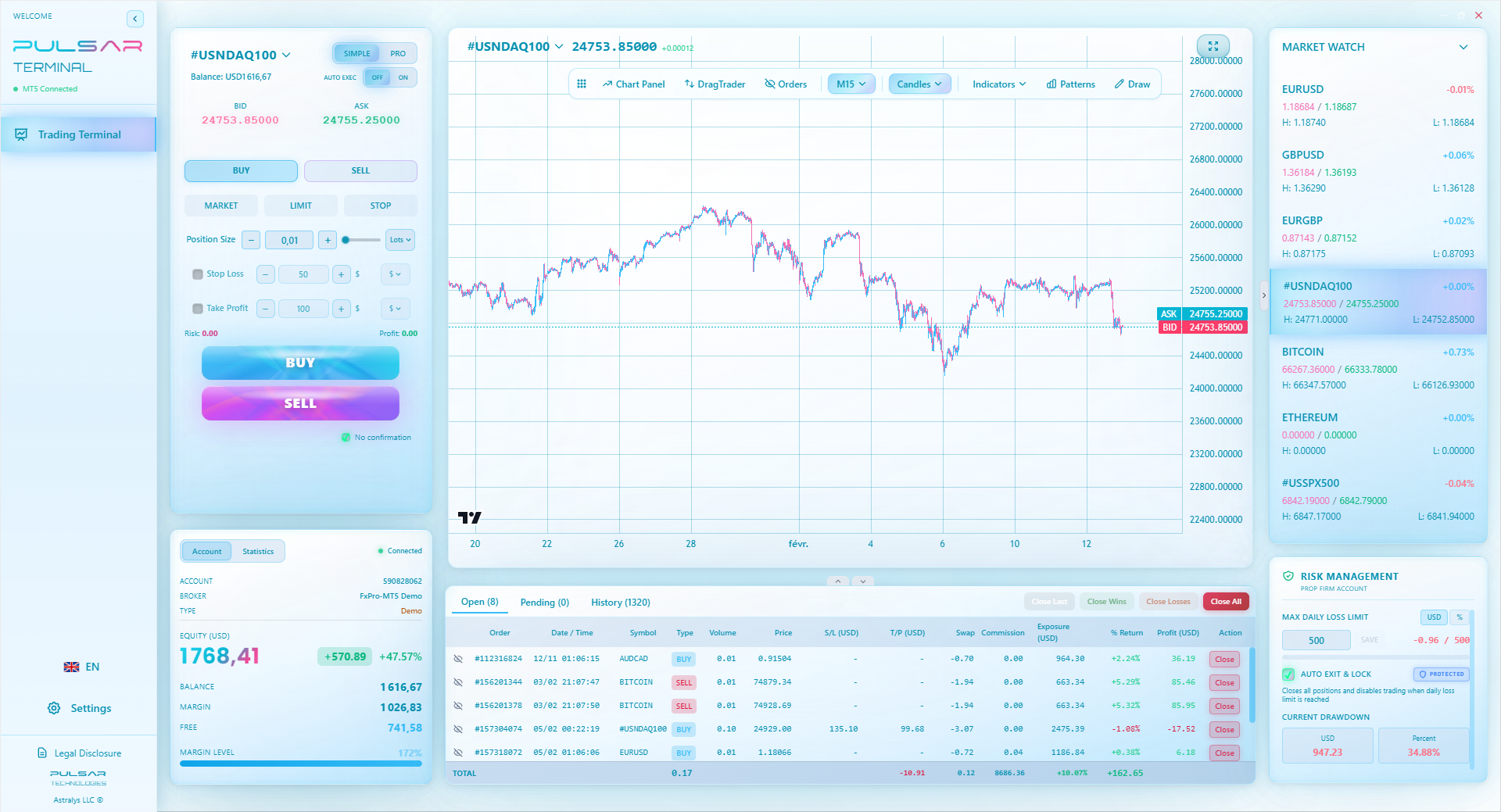
Managing complex trades and prop firm rules on MT5 is stressful, but tools like Pulsar Terminal automate advanced order types and daily loss protection directly on your charts.
Pulsar Terminal
The all-in-one MT5 companion: drag-and-drop orders, multi-TP/SL, trailing stop, grid trading, Volume Profile, and prop firm protection. Used by 1,000+ traders daily.
Once you've survived the basics, you can explore. But tread carefully.
Custom Indicators & EAs The MQL5 community is vast. You can find thousands of free and paid scripts. My rule: never run a strategy live that you don't understand in theory. Download a simple indicator, like a custom moving average, and study its code (right-click > Modify). See what it's calculating. This demystifies the 'black box' feeling.
Creating Alerts This is an underused power feature. Right-click on the chart > Create Alert. You can set a price alert or an indicator alert (e.g., when RSI crosses 30). This means you don't have to stare at the screen all day. The alert will pop up or send an email. It removes the emotion of constant watching.
The Reality of Automation Everyone wants a robot that prints money. I built one. It worked for 6 months in a strong trending market. Then the market changed to a choppy range, and it gave back all its profits plus 20%. An EA is just a set of rules. It cannot adapt to new market conditions like a human can. Use EAs to execute a plan you already trust, not to find a plan for you. For understanding the signals an EA might use, get familiar with tools like the MACD indicator.
“MT5 is a microscope. It will magnify both your skill and your flaws.”
The MT5 mobile app is solid. You can check charts, place trades, and manage positions. But it's a tool for management, not for analysis.
Pro: It's fantastic for monitoring open trades and setting alerts. If you have a swing trading position open, you can check it without being at your desk. Con: The screen is too small for serious chart analysis. Trying to draw trendlines or spot patterns on a 6-inch screen is a recipe for mistakes. I once tried to enter a trade on my phone while in traffic. I misclicked and entered with double my intended lot size. I was lucky it went my way, but it was pure recklessness.
My rule: Use the mobile app to close trades or adjust stops if you're away. Never use it to open a new trade based on fresh analysis. Wait until you're at your full setup. Discipline is harder on a small screen.
💡 Winston's Tip
Your phone is for monitoring, not deciding. The biggest trades deserve the biggest screen and your full attention.
Knowledge is useless without action. Here is your 30-day MT5 mastery plan:
Week 1: Familiarization
- Download MT5 from your broker (like Exness or IC Markets).
- Open a demo account with your real intended capital (e.g., ₦300,000).
- Practice the clean chart setup from Section 2. Open and close 20 trades with strict stop losses and take profits. Don't care about profit. Care about the mechanics.
Week 2-3: Strategy Testing
- Pick ONE simple strategy. For example, price bouncing off the 200-period moving average.
- Use the Strategy Tester to see its historical performance on EUR/USD.
- Then, trade it on demo for 10 days. Keep a journal. Note your emotional state for each trade.
Week 4: Risk Integration
- For every single demo trade, calculate your position size using the 1% risk rule. Our position size calculator makes this easy.
- Review your Account History. What's your win rate? What's your profit factor (Gross Profit / Gross Loss)? If it's below 1.0, you're losing money overall.
- Only then, consider a small live account. Start with an amount you can afford to lose completely. Your goal in month two is not profit. It's to execute your plan under real money pressure.
Forex Metatrader 5 is a phenomenal tool. But it's a microscope. It will magnify both your skill and your flaws. Your job is to build a trading self that's worthy of the magnification.
FAQ
Q1Is MT5 legal for forex trading in Nigeria?
Yes, using MT5 for forex trading is legal in Nigeria. The platform itself is just software. The legality depends on you using a broker that is properly regulated. The Securities and Exchange Commission (SEC) of Nigeria advises using internationally regulated brokers. It's your responsibility to choose a reputable broker.
Q2MT4 vs MT5 in Nigeria: which is better?
For pure forex trading, MT4 is simpler and more than enough. However, MT5 is more powerful and future-proof. If you ever plan to trade stocks, indices, or commodities, or if you want to use advanced backtesting, MT5 is the better choice. Most new brokers are pushing clients towards MT5. I'd recommend starting with MT5 if you're new.
Q3Why can't I find my broker's server when installing MT5?
You're likely downloading the generic MT5 from the MetaQuotes website. You must download MT5 directly from your broker's website (e.g., from the XM or Pepperstone client area). The broker-specific version comes pre-loaded with their servers and correct settings.
Q4What's a good starting capital for MT5 in Nigeria?
There's no magic number, but you must think in risk, not capital. You can start with as little as ₦50,000 with a broker offering micro lots (0.01). The key is that your lot size must be tiny enough that a 50-pip loss doesn't wipe out more than 1-2% of your account. Starting too small can be frustrating due to spreads; starting too big is dangerous. ₦200,000 - ₦500,000 allows for more realistic position sizing.
Q5How do I avoid internet disconnection problems with MT5?
Use a reliable, wired internet connection if possible. For mobile, have a backup data plan. More importantly, always use stop-loss orders on every trade. If you get disconnected, your stop loss remains active on the broker's server, protecting you from a catastrophic loss. Never rely solely on a mental stop.
Q6Can I use MT5 for prop firm challenges?
Absolutely. Most prop firms (like FTMO, The5%ers) require you to use MT4 or MT5. It's critical you understand the firm's specific rules (daily loss, max drawdown) and configure your MT5 trading to stay within them. Many traders fail because their platform management doesn't match the prop firm's evaluation criteria.
Prof. Winston's Lesson
Key Takeaways:
- ✓Always enter Stop Loss & Take Profit with your order. No exceptions.
- ✓Check the live spread before every trade, especially on pairs like GBP/NGN.
- ✓Use the Strategy Tester to disprove bad ideas, not just find magical ones.
- ✓Start with a clean chart: price and two moving averages. Master that first.
How useful was this article?
Click a star to rate
Weekly Trading Insights
Free weekly analysis & strategies. No spam.
About the Author
Olumide Adeyemi
West African Trading Pioneer
One of Nigeria's most active forex trading educators. 8 years of experience trading from Lagos. Specializes in low-capital strategies and prop firm challenges for African traders.
Comments
Risk Disclaimer
Trading financial instruments carries significant risk and may not be suitable for all investors. Past performance does not guarantee future results. This content is for educational purposes only and should not be considered investment advice. Always conduct your own research before trading.
You Might Also Like

Cara Trading Forex Sukses: 7 Prinsip dari Trader Profesional
Cara trading forex sukses dengan 7 prinsip trader pro: manajemen modal, disiplin, journal trading, backtest. Data nyata, bukan janji profit palsu.
Jam Trading Forex Terbaik untuk Trader Indonesia: Panduan Lengkap dengan Tabel Waktu
Panduan jam trading forex untuk trader Indonesia. Tabel 4 sesi dunia, jam emas 20:00-00:00, sesi mana yang harus dihindari. Data akurat + tips dari trader berpengalaman.
Top 5 Sàn Forex Uy Tín Nhất 2026: Review Jujur dari Trader Indonesia
Top 5 sàn forex uy tín 2026 untuk trader Indonesia. Review jujur: spread, deposit, withdraw, dukungan lokal. Exness, XM, IC Markets & lebih.
Get Pulsar Terminal
All these calculators are built into Pulsar Terminal with real-time data from your MT5 account. One-click position sizing, automatic risk management, and instant calculations.
Get Pulsar Terminal