


How many times have you missed a perfect trade setup because you were stuck in traffic on the Third Mainland Bridge, or in a meeting? You check your phone later and see the price shot right past your entry level.

Olumide Adeyemi
West African Trading Pioneer ·  Nigeria
☕ 10 min read
What you'll learn:
- 1What Are Price Alerts, Really? (Beyond the Basic Beep)
- 2How to Set Alerts That Actually Make You Money
- 3The 3 Big Mistakes Nigerian Traders Make with Alerts
- 4Where to Set Your Alerts: MT5, Apps, and More
- 5Leveling Up: Advanced Alert Strategies for the Disciplined Trader
- 6Staying Sharp: How to Avoid Alert Fatigue
- 7Your Action Plan: From Reading to Doing

How many times have you missed a perfect trade setup because you were stuck in traffic on the Third Mainland Bridge, or in a meeting? You check your phone later and see the price shot right past your entry level. It's frustrating, right? I've been there more times than I care to admit. The truth is, staring at charts all day is a recipe for burnout and bad decisions. The real skill isn't in watching every tick, it's in setting up a system that watches for you. That's where mastering forex price alerts comes in. It's the difference between being a reactive gambler and a proactive planner.
Most traders think a price alert is just a notification that says "EUR/USD is at 1.0850." That's the kindergarten version. For a professional, a price alert is a strategic trigger in a broader plan. It's the signal that tells you, "The conditions you defined for potential action are now being met. Time to assess."
Think of it like a security guard you've hired for your trading plan. You don't pay the guard to make decisions for you. You pay him to stand at specific doors (price levels) and tell you when someone (the price) is knocking. Your job is to decide whether to open the door, look through the peephole, or ignore it.

Warning: An alert is not an automatic trade signal. It's an information signal. The biggest mistake I see is traders setting an alert, getting it, and immediately slamming an order in without a second thought. That's just automated gambling.
The best brokers, like the ones we've reviewed such as Exness or IC Markets, offer strong alert systems. But the tool is only as good as the strategy behind it.
“The real skill isn't in watching every tick, it's in setting up a system that watches for you.”
Random alerts are useless. You need a method. Here’s how I structure mine, moving from the obvious to the advanced.
On Key Support & Resistance
This is the bread and butter. Identify clear levels on the higher timeframes (like the 4H or Daily chart). Don't just set the alert at the level. Set one 5-10 pips before it. Why? Because if EUR/USD is approaching a major support at 1.0700, I want a heads-up at 1.0705. This gives me time to pull up the chart, check the lower timeframe structure, and see if there's any confluence (like a RSI indicator showing oversold conditions) before price actually touches the level.
On Breakouts
Setting an alert after a breakout is too late. The move is already happening. Instead, identify consolidation ranges. Let's say GBP/NGN has been trading between ₦1,520 and ₦1,540 for a week. I'll set two alerts:
- Alert 1: At ₦1,541 (just above the resistance). This tells me the breakout attempt is starting.
- Alert 2: At ₦1,545. This tells me the breakout has some momentum and a retest might be a higher-probability entry.
On Your Trade Triggers
This is where it gets personal. If your scalping strategy requires the 15-minute candle to close above the 50 EMA, set an alert for when price gets within a few pips of that EMA. You're not waiting for the close; you're getting prepped for it.

Example: I was watching USOIL (WTI Crude) for a long setup. My plan required a pullback to the 61.8% Fibonacci level at $78.50, coinciding with the 200-period SMA on the 1H chart. Instead of babysitting the chart, I set an alert at $78.60. Got the alert while having dinner, checked the 15-minute chart for bullish rejection candles, and took the trade. Entry: $78.45. Exit: $80.20. The alert didn't make the trade, but it put me in the seat to execute my plan.
Always, always use your position size calculator before you get the alert. Have your risk and lot size ready to go.

💡 Winston's Tip
An alert is a hypothesis, not a conclusion. It says 'Check this,' not 'Do this.' The discipline to wait for confirmation after the alert is what separates the pro from the amateur.
“Random alerts are useless. You need a method.”
I've made these myself, and I see them every day in trading groups. Avoid these traps.
-
Alert Overload. Setting alerts on every minor swing low and high on the 5-minute chart. Your phone will ding non-stop, you'll become numb to the notifications, and you'll miss the important ones. It's like the boy who cried wolf. I once had 27 active alerts across 8 pairs. It was chaos. I missed a major XAU/USD (Gold) breakout because the signal got lost in the noise. Now I rarely have more than 5-7 critical alerts active at once.
-
Ignoring the 'Why'. You set an alert because some guy on YouTube mentioned a level. You have no personal conviction in that level. When the alert hits, you hesitate, second-guess, and either enter too late or not at all. Every alert must be tied to your analysis and your plan.
-
Forgetting About Spread and Slippage. You set a buy-stop alert (an alert that triggers when price moves up to a level) at 1.1050 on EUR/USD, thinking you'll enter there. But if the market is fast, the actual fill might be 1.1053 or higher due to the spread and slippage. This can wreck your risk-reward ratio. Either set the alert a few pips early to account for this, or use pending orders instead of market orders after the alert.
Remember, an alert is a servant to your strategy, not a replacement for it.
“Random alerts are useless. You need a method.”
You have options. Your choice depends on whether you're a screen-bound trader or need to be mobile.
Your Trading Platform (MT4/MT5): This is the most direct method. The alert pops up on your desktop platform. The downside? If you close your laptop, you miss it. Great for when you're working at your desk.
Broker's Mobile App: This is essential for the Nigerian trader on the go. Apps from brokers like XM or Pepperstone allow you to set and receive alerts directly. The notification will come through even if the app is closed. This is my primary method for key daily levels.
Dedicated Market Alert Apps (Like TradingView): TradingView has a superb alert system. You can set alerts on virtually any indicator or drawing tool. You can choose to be notified via mobile push, email, or SMS. The SMS option is a game-saver for when mobile data is spotty (we all know those days).
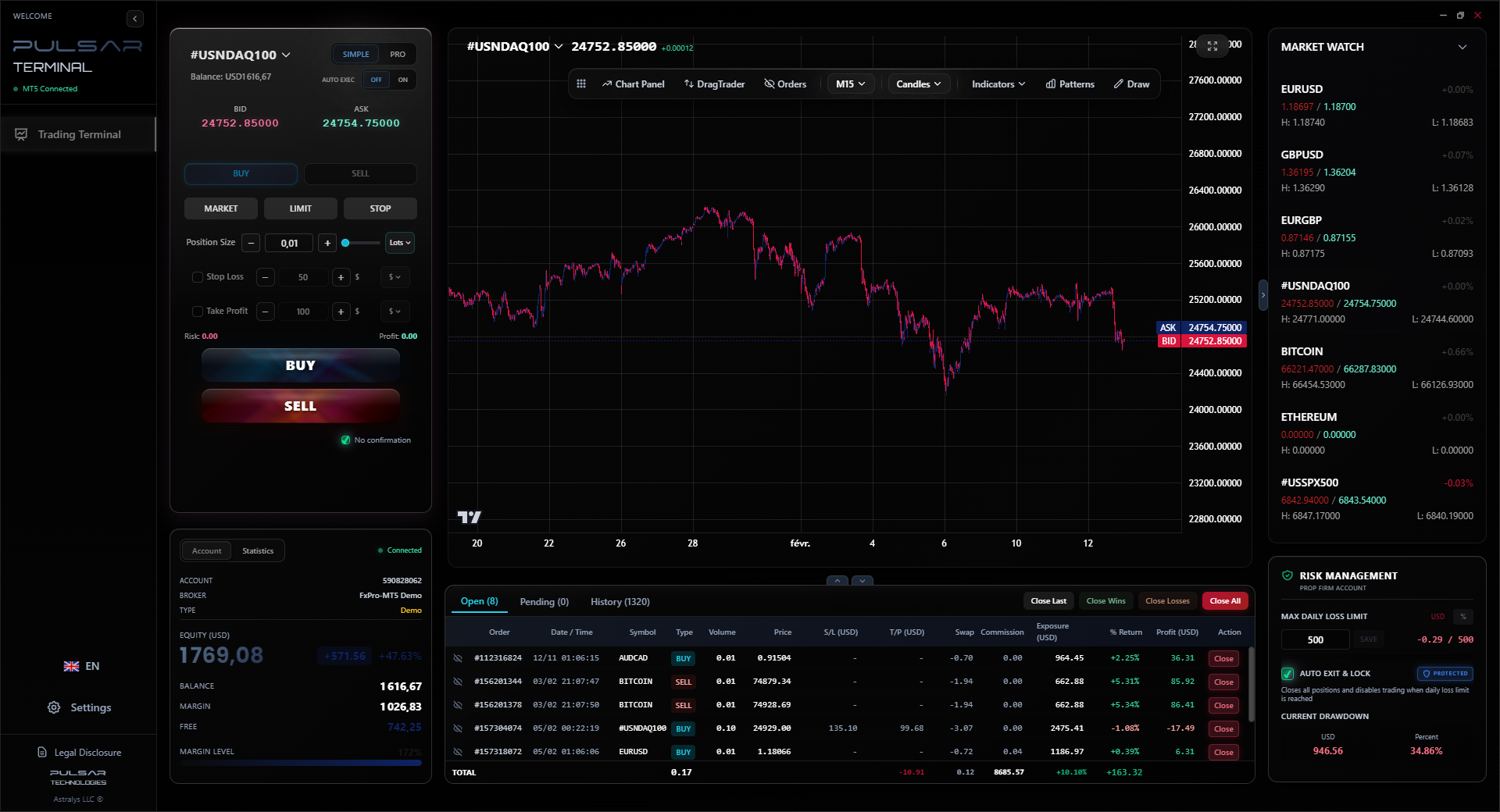
A Hybrid Approach: This is what I use. I set long-term structural level alerts on TradingView (SMS notification). I set more tactical, trade-management alerts (like for moving average crosses) directly on my MT5 platform, which I monitor when at my desk. Tools like Pulsar Terminal, which integrate with MT5, can add another layer of sophistication here, letting you manage complex orders that might be tied to alert levels.
| Tool | Best For | Big Drawback |
|---|---|---|
| MT5 Platform | Tactical, short-term alerts while trading | No notification if platform is closed |
| Broker Mobile App | Key level alerts for traders on the move | Functionality can be limited |
| TradingView | Complex alerts on indicators & multi-timeframe | Free plan has limited alerts |
Find what fits your life. If you're always in transit, the mobile app is non-negotiable.
💡 Winston's Tip
If your phone dings more than 3 times a day from trading alerts, you're not trading. You're just watching noise. Prune your alerts ruthlessly.
“An alert is a servant to your strategy, not a replacement for it.”
Once you've mastered the basics, you can use alerts to enforce discipline and manage trades you're already in.
The 'Walkaway' Alert for Emotional Control. This is a psychological trick. Enter a swing trading position based on your daily chart analysis. Immediately set two alerts: one at your take-profit target and one at your stop-loss level. Then close the chart. Go live your life. The alerts will tell you when the trade is over. This stops you from micromanaging and emotional tweaking. I did this with a USD/CAD short. Entry: 1.3650, SL: 1.3720, TP: 1.3520. I didn't look at it for 3 days. The TP alert hit, and I banked 130 pips without a moment of stress.
The 'Re-Assessment' Alert for Trade Management. You're in a profitable trade and using a trailing stop. Instead of manually dragging it every few pips, set an alert at the next key resistance or support level ahead. When the alert hits, that's your cue to re-evaluate: Do you move your stop to breakeven? Take partial profit? The alert forces a disciplined check-in point.
The Divergence Hunter. Use TradingView to set an alert when an indicator like the MACD indicator shows a divergence. For example, "Alert me when EUR/USD makes a new low but the MACD histogram makes a higher low." This can catch potential reversals early.
These strategies turn alerts from simple price reminders into pillars of your trading system. They automate your discipline.
When your advanced alert signals a re-assessment point, tools like Pulsar Terminal let you manage complex trade adjustments—like partial closures or moving to breakeven—directly on your MT5 chart with a single click.
Pulsar Terminal
The all-in-one MT5 companion: drag-and-drop orders, multi-TP/SL, trailing stop, grid trading, Volume Profile, and prop firm protection. Used by 1,000+ traders daily.
“An alert is a servant to your strategy, not a replacement for it.”
Getting too many alerts is worse than getting none. You'll start ignoring them. Here's my maintenance routine.
The Weekly Purge. Every Sunday evening, I review all active alerts. I ask one question: "Does this level still matter based on the current weekly and daily charts?" If my analysis has changed, the alert gets deleted. No sentimentality.
Categorize by Priority. Most platforms let you name alerts. Use it.
URGENT: GBP_NGN_BREAKOUTWATCH: GOLD_SUPPORT_TESTINFO: USD_INDEX_LEVELThe name tells you how quickly you need to react.
Silence is Golden. Turn off sound notifications for non-urgent 'info' alerts. Let only the critical ones make a sound. Your sanity will thank you.
The goal is to create a calm, efficient flow of information. Your trading shouldn't feel like a frantic NEPA customer care line. It should feel like a prepared general receiving field reports.
💡 Winston's Tip
The most profitable alert I ever set was for when my account hit a 3% daily loss. It wasn't on a chart. It was on my account balance. Sometimes the most important price is your own.
“Your trading shouldn't feel like a frantic NEPA customer care line.”
Knowledge is useless without action. Let's build your alert system today.
- Pick One Currency Pair. Start with your favorite, maybe the EUR/USD. Open the daily chart.
- Mark Two Key Levels. Find one clear support and one clear resistance from the past few weeks. Not a guess - a level where price has clearly reacted before.
- Set Four Alerts. Using your broker's app or TradingView:
- Alert 1: 10 pips ABOVE current resistance (for a breakout watch).
- Alert 2: 10 pips BELOW current support (for a breakdown watch).
- Alert 3: 5 pips ABOVE the support level (for a bounce watch).
- Alert 4: 5 pips BELOW the resistance level (for a rejection watch).
- Define Your Response. Write it down. "If Alert 3 hits (near support), I will open the 1H chart. I will look for a bullish engulfing candle or RSI above 30. If I see it, I will buy with a stop loss 15 pips below the support level."
- Wait and Practice. Don't force a trade. Just let the system work. See how it feels to be alerted and then analyze. The first few times, just observe.
This process moves you from being a passive spectator to an active manager of opportunities. It gives you back your time and, more importantly, your peace of mind. You're no longer chasing the market. You're letting the market come to you, on your terms. That's the real power of a well-oiled forex price alert system.
FAQ
Q1Are price alerts free to use?
Most brokers include basic price alerts for free in their mobile and desktop platforms. Advanced features, like SMS alerts or complex conditional alerts on platforms like TradingView, often require a paid subscription. The free tier is usually enough to start.
Q2Can I set a forex price alert on my phone without a desktop?
Absolutely. Almost every major broker's mobile app has an alert function. You can set them directly on your phone. This is perfect for Nigerian traders who aren't always at a computer. Just download your broker's app from the official app store and look for the 'Alerts' or 'Notifications' section.
Q3What's the difference between a price alert and a pending order?
A huge difference. A price alert is just a notification; it doesn't place a trade. A pending order (like a Buy Limit or Sell Stop) is an instruction to your broker to automatically enter a trade at a specific price. Alerts give you a choice. Pending orders execute automatically. Use an alert when you need to assess the situation first. Use a pending order when you're confident in your exact entry level.
Q4How many pips away from my level should I set the alert?
It depends on the pair's volatility and your timeframe. For major pairs like EUR/USD on a daily level, 5-10 pips early is good. For something more volatile or on a lower timeframe, you might need 15-20 pips. The goal is to get the alert with enough time to open your chart and analyze before price hits your actual decision point.
Q5My alert didn't trigger even though price hit the level. Why?
This is usually due to one of three things: 1) Spread: The 'ask' price (the price you buy at) may not have touched your level, only the 'bid' price did. 2) Data Feed: Slight differences can exist between charting platforms and your broker's servers. 3) Alert Type: You may have set a 'crossing down' alert but price only touched and bounced. For key levels, I set two alerts: one for 'crossing above' and one for 'crossing below' to catch any touch.
Q6Can price alerts help me avoid a margin call?
Indirectly, yes. While they won't automatically close a position, you can set a critical alert at a price level that would put your account in severe drawdown. If that alert hits, it's a loud, clear signal to immediately review all open positions and your risk. It's a last-line defense to manually intervene before a broker's automated margin call happens. Never rely solely on an alert for risk management, though.
Q7Is it safe to rely on SMS alerts in Nigeria with network issues?
SMS is generally more reliable than push notifications that require a stable data connection. However, delays of a few minutes can happen. Don't use SMS for ultra-short-term scalping alerts. For daily swing trade levels, SMS is a great, strong backup. The safest approach is a combination: a push notification from your broker's app and an SMS from a service like TradingView (if you have a paid plan).
Prof. Winston's Lesson
Key Takeaways:
- ✓Set alerts 5-10 pips before key levels, not at them.
- ✓Never have more than 7 critical alerts active at once.
- ✓Name your alerts (URGENT, WATCH, INFO) for priority.
- ✓Use SMS alerts as a backup for unreliable mobile data.
- ✓Conduct a weekly 'alert purge' to stay relevant.
How useful was this article?
Click a star to rate
Weekly Trading Insights
Free weekly analysis & strategies. No spam.
About the Author
Olumide Adeyemi
West African Trading Pioneer
One of Nigeria's most active forex trading educators. 8 years of experience trading from Lagos. Specializes in low-capital strategies and prop firm challenges for African traders.
Comments
Risk Disclaimer
Trading financial instruments carries significant risk and may not be suitable for all investors. Past performance does not guarantee future results. This content is for educational purposes only and should not be considered investment advice. Always conduct your own research before trading.
You Might Also Like

Cara Trading Forex Sukses: 7 Prinsip dari Trader Profesional
Cara trading forex sukses dengan 7 prinsip trader pro: manajemen modal, disiplin, journal trading, backtest. Data nyata, bukan janji profit palsu.
Jam Trading Forex Terbaik untuk Trader Indonesia: Panduan Lengkap dengan Tabel Waktu
Panduan jam trading forex untuk trader Indonesia. Tabel 4 sesi dunia, jam emas 20:00-00:00, sesi mana yang harus dihindari. Data akurat + tips dari trader berpengalaman.
Top 5 Sàn Forex Uy Tín Nhất 2026: Review Jujur dari Trader Indonesia
Top 5 sàn forex uy tín 2026 untuk trader Indonesia. Review jujur: spread, deposit, withdraw, dukungan lokal. Exness, XM, IC Markets & lebih.
Get Pulsar Terminal
All these calculators are built into Pulsar Terminal with real-time data from your MT5 account. One-click position sizing, automatic risk management, and instant calculations.
Get Pulsar Terminal