


You're thinking about using a forex simulator, aren't you? Maybe you're new and scared to lose your hard-earned Rand, or maybe you're a seasoned trader testing a new strategy.

David van der Merwe
Emerging Markets Trader ·  South Africa
☕ 11 min read
What you'll learn:
- 1What Exactly Is a Forex Simulator? (It's Not Just Play Money)
- 2Why Every South African Trader Needs a Simulator (Yes, Even You)
- 3How to Pick the Right Simulator in South Africa
- 4The 4 Deadly Demo Account Mistakes (I Made #3)
- 5Level Up: Advanced Simulator Drills for Serious Traders
- 6The Million-Rand Question: When Do You Switch to Live Trading?
- 7Where to Go: FSCA Brokers with Solid Simulators

You're thinking about using a forex simulator, aren't you? Maybe you're new and scared to lose your hard-earned Rand, or maybe you're a seasoned trader testing a new strategy. Either way, you're asking the right question. But here's the brutal truth most guides won't tell you: 90% of traders use demo accounts wrong. They treat it like a video game, rack up fake millions, and then get their teeth kicked in when they go live. I've been there. This isn't about finding any simulator; it's about using the right one, from the right broker, with the right mindset. Let's get you practicing like your real money depends on it, because one day, it will.
A forex simulator, which everyone calls a demo account, is a trading platform that feeds on live market data but uses virtual currency. Think of it as a flight simulator for traders. You get the same charts, the same price movements, and the same tools as a live account, but the money isn't real.
But here's the critical distinction most South Africans miss: not all simulators are created equal. The quality depends entirely on the broker providing it. A simulator from a dodgy, unregulated broker with manipulated spreads and slippage is worse than useless - it teaches you bad habits that will bankrupt you. You need one from a reputable, FSCA-regulated broker that mirrors their live trading conditions as closely as possible. This means real spreads, real execution speeds, and real market liquidity.
I learned this the hard way early on. I practiced for months on a simulator from a now-defunct broker, perfecting a scalping strategy that relied on 1-pip spreads. I felt like a genius. I switched to a live account with a proper broker, and the EUR/USD spread jumped to 1.8 pips during my usual trading window. My entire strategy was instantly unprofitable. The simulator lied to me. The lesson? The simulator's only job is to replicate reality. If it doesn't, you're practicing for a game that doesn't exist.

💡 Winston's Tip
Set your demo balance to the exact amount of your first intended live deposit. Trading a $500 account is a completely different psychological game than trading $50,000 of pretend money.
“The simulator's only job is to replicate reality. If it doesn't, you're practicing for a game that doesn't exist.”
Look, the ZAR is a wild animal. Trading USD/ZAR or EUR/ZAR without practice is like trying to tame a lion with a feather. The volatility is immense, and the spreads are wide. A forex simulator is your training cage.
For Beginners: Learn Without Bleeding
If you're new, this is non-negotiable. You need to learn what a pip actually means for your account balance. You need to feel the panic of a losing trade without actually losing your rent money. You need to understand how to place orders, set stops, and use basic tools like the RSI indicator without financial pressure. Jumping straight into live trading with the Rand's swings is a surefire way to fund someone else's retirement.
For Experienced Traders: Test, Refine, Validate
Maybe you've been trading for a while. A simulator is your laboratory. Want to test a new strategy on GBP/ZAR? Do it in the sim first. Think you've found an edge with gold (XAU/USD) during London opens? Backtest it, then forward-test it in the simulator for a month. I once spent six weeks in a simulator tweaking a swing trading system. I discovered it only worked 70% of the time during high global volatility periods. That saved me from a 30% drawdown in my live account.

Warning: The biggest danger for experienced traders is ego. "I don't need a demo account." That's how you blow up an account. Humility is cheaper than a margin call.

“Humility in a demo account is cheaper than a margin call in a live one.”
This is where you separate the pros from the punters. Don't just Google "free forex demo account" and click the first link. You need a checklist.
1. FSCA Regulation is Non-Negotiable. This is your first and most important filter. Only consider simulators from brokers licensed by the Financial Sector Conduct Authority. Why? Because their live trading conditions are monitored. Their simulator will be the closest thing to reality. Go to the FSCA website and verify the license. Brokers like Exness, IC Markets, and XM have FSCA regulation and offer strong demo accounts.
2. Demand Realistic Trading Conditions. When you open the simulator, check these immediately:
- Spreads: Are the EUR/USD spreads floating around 0.8-1.5 pips? Or are they a fixed, too-good-to-be-true 0.0? If it's the latter, it's fake.
- Execution: Is there slippage on news events? There should be.
- Liquidity: Can you place a 10-lot order on a major pair without the price moving against you? In a real ECN environment, you can. In a fake one, you'll see weird requotes.
3. Platform Matters. You'll likely be using MetaTrader 4 or 5. Make sure the simulator is on the platform you plan to use live. Practicing on MT4 and then switching to cTrader live is a headache you don't need.
4. ZAR Account Option. While you can demo in USD, using a ZAR-denominated demo account helps you grasp the real value of profits and losses in your local currency. It makes the psychology more real.
| Feature to Check | Good Sign | Red Flag |
|---|---|---|
| Regulation | FSCA License Number Publicly Listed | "Regulated Offshore" or no clear regulation |
| Spreads on EUR/USD | Variable, 0.8 - 1.8 pips | Fixed at 0.0 or 0.1 pips constantly |
| Demo Balance | Reasonable (e.g., $10,000 - $50,000) | $1,000,000 (encourages reckless trading) |
| Platform | MT4/MT5 or the broker's live platform | A simplified, web-only "demo" that looks nothing like the real platform |

“Humility in a demo account is cheaper than a margin call in a live one.”
This is the core of the article. Screw this up, and your simulator time is wasted.
Mistake 1: Trading with Monopoly Money Mentality. You get a $100,000 demo balance. So you start throwing around 10-lot positions like a billionaire. This teaches you nothing about real risk. The fix? Use a realistic balance. If you plan to deposit R10,000 ($~530), set your demo balance to $500 or $1,000. Then use a proper position size calculator. Trade with the same fear and respect you'll have for real money.
Mistake 2: No Trading Plan. "I'll just wing it and see what happens." That's not practice; that's gambling. You must have a written plan before you open the simulator: Your strategy, entry/exit rules, risk per trade (I recommend 1-2% even in demo), and daily loss limit. Follow it religiously.
Mistake 3: Chasing Losses (My Embarrassment). Here's my confession. Early on, I blew a $5,000 demo account down to $3,000 in a day. My plan was gone. Instead of stopping, I thought, "It's fake money, who cares?" I doubled my position sizes to get back to even. I got back to $4,900, felt brilliant, and then proceeded to blow the entire account to zero. I learned a terrible habit: revenge trading. It took me years to unlearn it with real money. The simulator reinforced my worst instinct.
Mistake 4: Assuming Instant Live Success. You crush it in the simulator for three months. You go live and lose five trades in a row. What happened? Psychology. The absence of real financial emotion in a demo is its greatest weakness. You calmly held a losing trade for 50 pips in demo. With real money, you'll sweat at 10 pips and close it early. The simulator can't teach you that. You must be aware of this gap.

Pro Tip: To bridge the psychology gap, make a personal rule. For every R100 you lose in your demo account, do 10 push-ups. Or put a real R10 in a jar. Create a tangible consequence. It sounds silly, but it wires your brain to associate loss with real-world discomfort.
💡 Winston's Tip
Once a week, review your demo trades with the charts blank. Look only at your entry price, stop-loss, and take-profit. Ask: 'Knowing what I know now, would I take this trade again?' This separates analysis from outcome.

“The goal of your first live month is not to make money. The goal is to execute your plan exactly as you did in the simulator.”
Once you've mastered the basics, stop just "trading." Start drilling. Here's how I use simulators now.
Drill 1: The Worst-Case Scenario Session. Pick a volatile day (like a Fed announcement). Load your simulator. Now, intentionally enter a trade right before major news hits. Experience the slippage, the spread widening, the chaos. Let your stop-loss get hit. The goal isn't profit; it's to desensitize yourself to market violence and see how your broker's execution holds up. You'll learn more about your broker's true conditions in one of these sessions than in a month of normal demo trading.
Drill 2: Strategy Stress-Testing. Take your primary strategy and trade it ONLY on the 15-minute charts for a week. Then ONLY on the 1-hour charts. Then only on exotic pairs like USD/ZAR. You're testing the boundaries of your system. When does it break? This is how you find its true edge.
Drill 3: Platform Mastery. You think you know MT5? Use the simulator to learn one new advanced feature per week. Set up a complex multi-chart layout. Code a simple custom indicator. Practice setting a trailing stop and a breakeven order simultaneously. Mastering your tools in a zero-risk environment is a massive advantage. This is where tools that integrate with your platform, like advanced trade management terminals, show their value. Being able to drag and drop orders or set a grid of trades for a range-bound strategy without fumbling is a real edge.
Drill 4: Prop Firm Challenge Rehearsal. This is huge in South Africa now. Many prop firms have specific rules: an 8% daily loss limit, a 5% maximum drawdown, no holding trades over the weekend. Use your simulator to rehearse their challenge EXACTLY. Set your demo balance to their starting balance, and program your mind to their rules. If you blow a demo account three times practicing their rules, you are not ready to give them real money for an evaluation.

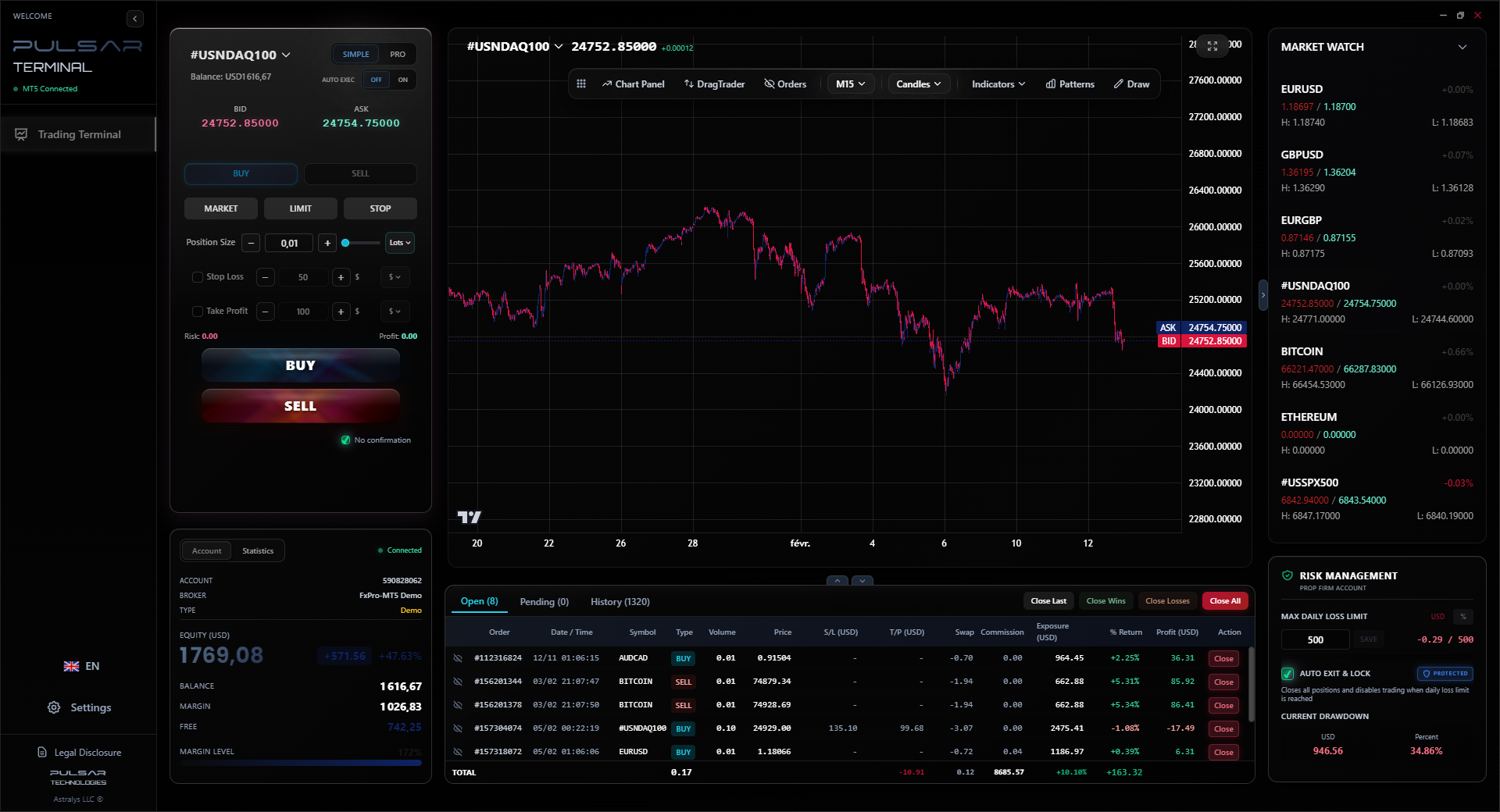
When rehearsing for a prop firm challenge with strict daily loss limits, manually tracking that can break your focus. Pulsar Terminal's prop firm daily loss protection feature automates this, cutting all trades if you hit your limit, so you can practice discipline in your simulator exactly as you'll need it live.
Pulsar Terminal
The all-in-one MT5 companion: drag-and-drop orders, multi-TP/SL, trailing stop, grid trading, Volume Profile, and prop firm protection. Used by 1,000+ traders daily.
“The goal of your first live month is not to make money. The goal is to execute your plan exactly as you did in the simulator.”
This is the transition everyone messes up. It's not about a specific profit percentage. It's about consistency and process.
You are ready to go live when you can look at your simulator trading journal and see this:
- You've followed your trading plan for at least 100 trades. Not 20, not 50. One hundred. This filters out luck.
- Your journal shows consistent risk management. Every single trade had a stop-loss. You never risked more than 2% of your balance. Your wins and losses are relatively even in size (no letting losses run).
- You are emotionally bored. The thrill of clicking the buy button has worn off. It feels like a business process. You can close a losing trade and immediately move on to analyzing the next setup without frustration.
- You've survived a drawdown period in the sim. You had a string of 5-7 losses. Did you deviate from your plan? Did you increase your size? If you stuck to your rules and emotionally weathered it, that's a green light.
When you do go live, start small. Painfully small. If you practiced with a $10,000 demo, start with a live account of $200 or $500. The goal of your first live month is not to make money. The goal is to execute your plan exactly as you did in the simulator. If you can do that, then you can gradually scale up.

Example: My final demo test before going live with a new system: I traded for 8 weeks. 87 trades. 52 wins, 35 losses. Average win: 1.8% of account. Average loss: -1.0%. Max consecutive losses: 4. Total gain: 14.3%. The key number? I never broke my 2% risk rule. That consistency told me I was controlling the system, not the other way around.
💡 Winston's Tip
If you're serious about prop firms, use your simulator's trade history to calculate your exact 'Expected Value' per trade. If it's not positive, you're not ready, no matter how good you feel.

“You are ready to go live when you can close a losing trade and immediately move on without frustration.”
Based on my experience and the experience of traders I mentor, these FSCA-regulated brokers offer demo accounts that are a faithful representation of their live environment. Remember, you still need to do your own verification.
- Exness: Their demo is excellent for testing their raw spread and zero-spread accounts. Execution is fast, and you get a feel for their unique conditions. Good for ZAR-based accounts.
- IC Markets: My personal favorite for true ECN conditions. The demo mirrors their live spreads (often under 0.1 pips on EUR/USD for Raw accounts) and shows real market depth. This is where you practice serious scalping.
- XM: Offers a very user-friendly demo with no time limit. Great for beginners who need to get comfortable with the MT4/5 platform without pressure.
- Pepperstone: Another top-tier ECN/STP broker. Their demo on the Razor account gives you a realistic view of commission-based trading, which is crucial to understand.
A final, critical step: Once you pick a broker, open their demo AND a micro live account with $50. Trade the same strategy on both simultaneously for a week. Compare the fills, the spreads at 10 PM South African time, the emotional feel. This is the ultimate reality check for any forex simulator.
FAQ
Q1Are forex simulators really free in South Africa?
Yes, 100%. Any legitimate, FSCA-regulated broker will offer a fully functional demo account for free, with no hidden fees. It's a standard part of their service. If someone tries to charge you for a demo account, run away - it's a scam.
Q2How long can I use a demo account?
It varies by broker. Some offer unlimited time (like XM), while others expire after 30 or 90 days. The expiration is a good thing; it forces you to either go live or reassess. You shouldn't be in demo purgatory for years.
Q3Can I test automated trading (Expert Advisors) on a demo?
Absolutely, and you must. It's the safest way to forward-test any EA or trading robot. Run it on your demo account for several market cycles to see how it handles different volatility conditions, especially on Rand pairs.
Q4Why do my demo trades always win, but my live trades lose?
This is the psychology gap. In demo, there's no fear or greed. You follow your plan perfectly. With real money, emotion hijacks your brain. You move stop-losses, take early profits, and overtrade. The solution is to make your demo practice so disciplined and realistic that the live execution becomes mechanical.
Q5Is demo trading on MT4 different from MT5?
The core trading mechanics are similar, but MT5 offers more timeframes, a built-in economic calendar, and a different order execution model. If you plan to trade live on MT5, practice on MT5. Don't mix platforms.
Q6Can I use a demo to practice for a prop firm challenge?
It's the best possible use for a simulator. Replicate the prop firm's starting balance, profit target, and - most importantly - their daily and maximum drawdown rules. Practice until you can pass their simulated challenge three times in a row. Only then consider buying a real evaluation.
Q7What's the biggest waste of time in a forex simulator?
Trying to turn $10,000 into $1,000,000. That's fantasy trading. It teaches reckless risk-taking. The most valuable use of time is practicing strict risk management and consistent execution of a simple plan with small, realistic profit goals.
Prof. Winston's Lesson
Key Takeaways:
- ✓Only use simulators from FSCA-regulated brokers.
- ✓Demo spreads on EUR/USD should be 0.8-1.8 pips, not 0.0.
- ✓Practice with the exact capital you'll use live.
- ✓100 disciplined demo trades are the minimum benchmark.
- ✓The psychology gap is real; create tangible demo consequences.
How useful was this article?
Click a star to rate
Weekly Trading Insights
Free weekly analysis & strategies. No spam.
About the Author
David van der Merwe
Emerging Markets Trader
Johannesburg-based trader with 11 years in emerging market currencies. Specializes in ZAR pairs, FSCA-regulated trading, and South African market analysis.
Comments
Risk Disclaimer
Trading financial instruments carries significant risk and may not be suitable for all investors. Past performance does not guarantee future results. This content is for educational purposes only and should not be considered investment advice. Always conduct your own research before trading.
You Might Also Like

Cara Trading Forex Sukses: 7 Prinsip dari Trader Profesional
Cara trading forex sukses dengan 7 prinsip trader pro: manajemen modal, disiplin, journal trading, backtest. Data nyata, bukan janji profit palsu.
Jam Trading Forex Terbaik untuk Trader Indonesia: Panduan Lengkap dengan Tabel Waktu
Panduan jam trading forex untuk trader Indonesia. Tabel 4 sesi dunia, jam emas 20:00-00:00, sesi mana yang harus dihindari. Data akurat + tips dari trader berpengalaman.
Top 5 Sàn Forex Uy Tín Nhất 2026: Review Jujur dari Trader Indonesia
Top 5 sàn forex uy tín 2026 untuk trader Indonesia. Review jujur: spread, deposit, withdraw, dukungan lokal. Exness, XM, IC Markets & lebih.
Get Pulsar Terminal
All these calculators are built into Pulsar Terminal with real-time data from your MT5 account. One-click position sizing, automatic risk management, and instant calculations.
Get Pulsar Terminal