


I once watched a $2,500 trade evaporate into a $312 loss because I trusted a basic online calculator.

James Mitchell
Senior Trading Analyst ·  Canada
☕ 10 min read
What you'll learn:
- 1What Exactly Are You Calculating?
- 2The Canadian Variables Your Calculator Must Include
- 3Plugging in Real Canadian Broker Costs
- 4Building Your Own Accurate Calculation (The Right Way)
- 5The Top 3 Calculator Mistakes Canadian Traders Make
- 6From Calculators to Integrated Trading Tools
- 7The Calculator's Final Boss: Taxes and Reporting
- 8Your Action Plan: Building a Bulletproof Process

I once watched a $2,500 trade evaporate into a $312 loss because I trusted a basic online calculator. I was trading USD/CAD, thinking my 1.5 lot position with a 25-pip target would net me a clean $375. The calculator said so. What it didn't account for was the wider-than-usual spread during the Toronto open (3 pips instead of 1), the $5 commission per lot my broker charged, and the fact that my profit in USD needed to be converted back to CAD at a less favourable rate. My 'profit' was a mirage built on incomplete math. That's the day I learned that for a Canadian trader, a proper forex trading profit calculator isn't a convenience, it's a survival tool.
At its core, a forex profit calculator answers one question: 'If this trade hits my target or stop-loss, what's the final number in my account?' It converts pips, those tiny price movements, into cold, hard cash (or loonies, in our case). But here's where most new traders trip up. They think a pip is a fixed dollar amount. It's not.
The value of a single pip depends entirely on three things: the currency pair you're trading, your position size (lot size), and the quote currency of your account. If you're trading USD/CAD with a CAD-denominated account, the math is different than if you're trading EUR/USD. A standard lot (100,000 units) on USD/CAD means each pip is worth roughly $10 CAD. A mini lot (10,000 units) makes it about $1 per pip. Get this wrong at the start, and your entire risk management plan is built on quicksand. I strongly recommend bookmarking our pip definition page until this becomes second nature.

Warning: The most basic online calculators often assume a USD account and ignore commissions. For a Canadian, this can distort your profit/loss by 10-20% instantly. Always verify the calculator's default settings.
Trading from Canada isn't the same as trading from the US or Europe. Our regulatory and financial environment adds layers that a generic tool will miss. If your calculator doesn't have fields for these, it's dangerously incomplete.
CIRO use Limits & Margin
Our regulator, the Canadian Investment Regulatory Organization (CIRO), caps use at 1:50 for majors and 1:20 for minors. This isn't just a rule, it's a critical input for your position size calculator. A calculator that lets you simulate a 1:200 position on USD/CAD is showing you a fantasy trade you can't legally execute with a CIRO-regulated broker. The required margin changes everything. Higher use means less margin per trade, which tempts you to size up. The calculator should show you the exact margin requirement based on CIRO caps, keeping your ambitions in check.
The Hidden Tax Bite
This is the silent profit killer. The CRA doesn't care about your pip count. They care about your taxable income. Are you an active trader (business income) or an occasional one (capital gains)? The difference is getting 100% of your profit taxed vs. only 50%. A sophisticated calculator will let you input an estimated tax rate to show your net profit after the government takes its share. Seeing a $1,000 trade result turn into $650 after tax is a powerful reality check.
Currency Conversion (The Double Whammy)
You trade USD/CAD, profit $500 USD. Great! But your account is in CAD. When your broker converts that profit at their marked-up rate (often 0.5%-1% off the interbank rate), that $500 USD might only land as $670 CAD instead of $675. On losses, the conversion works against you twice. I learned this the hard way with a losing GBP/USD trade where the conversion fee amplified my loss. Always calculate in your account's currency from the start.

💡 Winston's Tip
A calculator that doesn't ask for your account currency is like a map without north. It'll give you a number, but no idea if it's the right one.
“The CRA doesn't care about your pip count. They care about your taxable income.”
Spread and commission data from our research isn't just trivia, it's the fuel for accurate calculations. Let's use real numbers.
Say you're using a broker like FOREX.com's Raw account. For USD/CAD, you might get a tight 0.5 pip spread, but you pay a $5 commission per lot per side ($10 round turn). Your competitor using OANDA's standard account might pay no commission but a 1.7 pip spread. Which is cheaper? It depends entirely on your trade size. A calculator that only asks for 'spread' is giving you half the story.

Example: A 2-lot trade on USD/CAD, targeting 20 pips.
- FOREX.com Raw: Spread Cost = 0.5 pips * $20/pip = $10. Commission = 2 lots * $10 = $20. Total Cost = $30.
- OANDA Standard: Spread Cost = 1.7 pips * $20/pip = $34. Commission = $0. Total Cost = $34. For this trade size, the 'commission' account is actually cheaper. But for a 0.5 lot trade, the results flip. A good calculator does this breakeven analysis for you.
Also, never forget swap rates (overnight financing). If you're a swing trading holding positions for days, those daily charges can add up. A long USD/CAD position might pay you a small credit or charge a debit each night. Over a week, this can be the difference between a winning and losing trade. The best calculators fetch live or historical swap rates.

Stop relying on random websites. Here’s the manual formula I use to check every trade. Memorize it.
Profit/Loss in CAD = [(Pips Gained or Lost) * Pip Value in CAD] - (Commission in CAD) ± (Swap Fees in CAD)
Let's walk through a real, messy trade I did last year on XAU/USD (gold).
- Trade: Short XAU/USD at $1845.30.
- Account Currency: CAD (Exchange Rate: 1 USD = 1.35 CAD).
- Position: 0.5 lots (a 1 pip move = ~$0.50 USD, or ~$0.675 CAD).
- Stop Loss: 15 pips away ($1846.80).
- Commission: $7 round turn.
First, calculate risk: 15 pips * $0.675 CAD/pip = $10.125 CAD. Commission = $7 USD * 1.35 = $9.45 CAD. Total Risk per 0.5 lot = $19.58 CAD.
I got stopped out. My loss was: (15 pips * $0.675) + $9.45 = $19.58 CAD. The basic calculator that ignored commission would have told me I lost $10.13. I would have been confused about where my money went. This is why you need the full picture. For more on trading gold, our XAU/USD guide dives into its unique volatility.

Pro Tip: Build a simple spreadsheet. Columns for Pair, Lot Size, Entry, Stop, Target, Pip Value CAD, Spread Cost, Commission CAD, Swap Rate, and Final P/L. Update it once a month with your broker's latest commission sheet. This is your single source of truth.
“Seeing a $1,000 trade result turn into $650 after tax is a powerful reality check.”
I've made these. My clients have made these. Let's save you the trouble.
1. Ignoring the Account Currency Field. This is the #1 error. You simulate a EUR/USD trade, profit 100 pips, and see $1,000. But if your account is in CAD and the USD weakened against the CAD during the trade, that $1,000 USD might be $1,320 CAD instead of $1,350. You left money on the table due to forex exposure within your forex trade. MetaTrader's built-in calculator is notoriously bad for this.
2. Forgetting That Costs Are Per Side. You enter a $5 commission. The calculator assumes that's the total. Nope. Most brokers charge that on entry and exit. Your true commission cost is $10 for a round turn. This tiny oversight can turn a simulated profitable scalping strategy into a net loser after 10 trades.
3. Using Pre-Trade Calculators for Post-Trade Analysis. The spread you calculated with might be the typical 1 pip. But if you entered during a news event, the actual spread you got was 5 pips. Your post-trade analysis must use the actual filled price, not the theoretical price. Always compare your calculator's result to your broker's statement. If there's a discrepancy, find out why. It's usually spread or a conversion fee you missed.
💡 Winston's Tip
Your biggest trading cost isn't commissions or spreads. It's the tax man. Run your profit numbers after a 25-30% haircut to see what you're really working for.
A standalone calculator is a good start, but it's reactive. You have an idea, you plug in numbers. The next evolution is using platforms where the calculation is part of the order process.
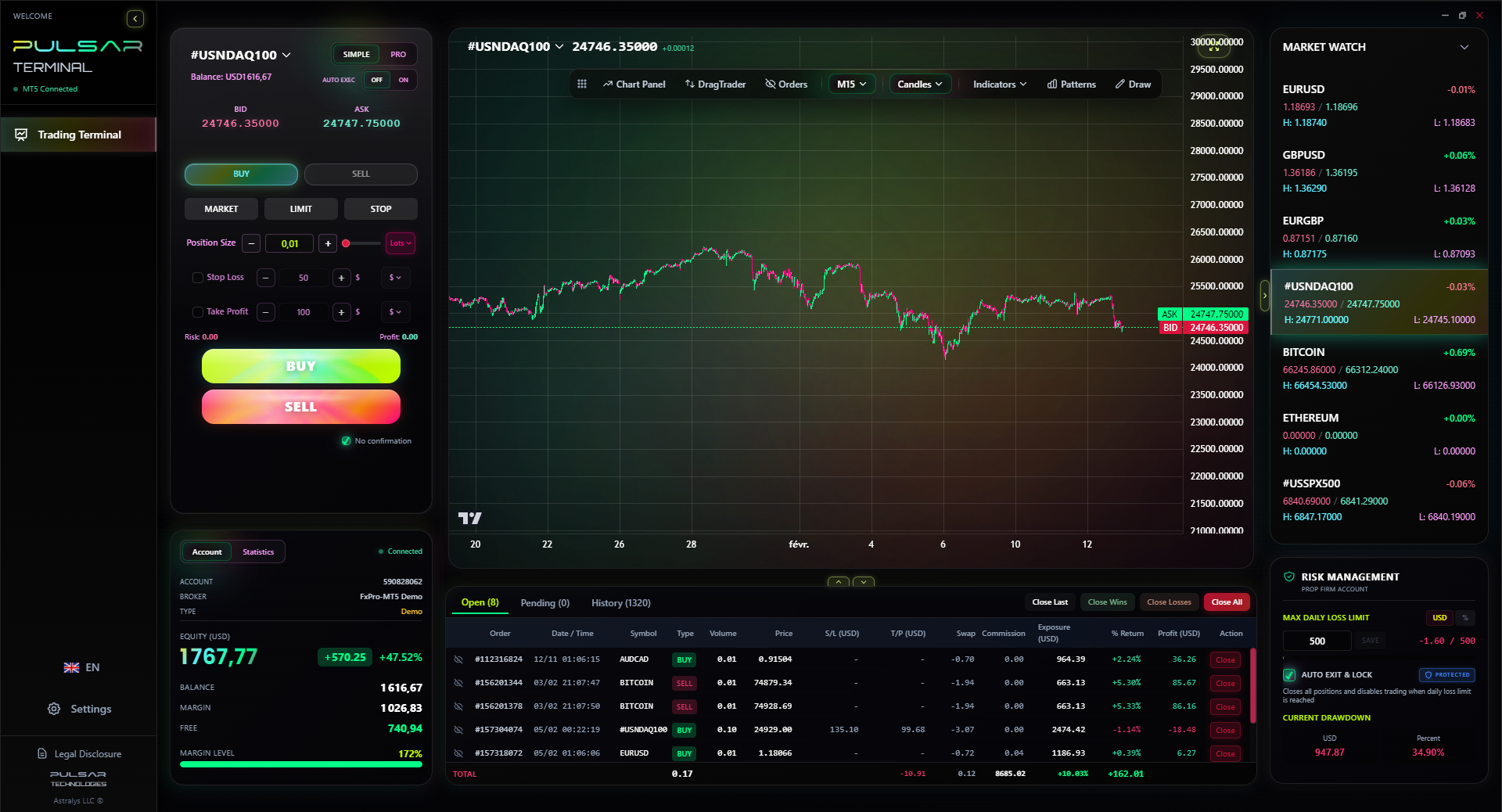
This is where advanced trading terminals shine. Imagine dragging an order onto your chart and instantly seeing a live profit/loss, margin, and risk display that updates with price movement, using your actual account currency and broker fees. This eliminates the manual transfer error between a web calculator and your platform.
Also,, these tools let you set multi-level exits. Instead of one take-profit, you can set three partial closes at different levels. A good tool will show you the exact dollar amount for each partial close and the remaining position's risk before you place the trade. This is useful for managing trades on pairs like EUR/USD, where you might scale out. Check our EUR/USD guide for common price action levels.
The real magic is in automation. Setting a breakeven or trailing stop based on a specific dollar amount, not just a pip distance, is a game-changer for psychology. You're managing money, not just pips.
Manually calculating multi-level exits and trailing stops is tedious; Pulsar Terminal automates this directly on your MT5 chart, locking in profits based on your precise dollar-amount goals.
Pulsar Terminal
The all-in-one MT5 companion: drag-and-drop orders, multi-TP/SL, trailing stop, grid trading, Volume Profile, and prop firm protection. Used by 1,000+ traders daily.
“A calculator that ignores commissions is showing you a fantasy trade.”
In Canada, your forex trading profit calculator is the first draft of your tax return. If you're trading actively, the CRA will likely consider it business income. Every single trade is a taxable event. This makes record-keeping non-negotiable.
You need a calculator or trading journal that can export a log of every transaction: date, instrument, proceeds (in CAD), adjusted cost base (in CAD), and gain/loss. The conversion of each trade's entry and exit price to CAD is the most tedious part. Some brokers like Interactive Brokers Canada provide decent tax reports, but many offshore brokers do not.
Here's my blunt advice: If your broker's statement doesn't show every trade's P/L in CAD, you have a problem. You'll spend days each spring doing manual conversions. Use a calculator or journal that does this automatically by pulling in daily FX rate data. The $100/year for a proper journaling service is a tax-deductible expense that saves you headaches and potentially thousands in accounting fees.
Calculate your profit after an estimated tax set-aside. If you need a 30% average tax rate, mentally mark 30% of every calculated profit as belonging to the CRA. It will make you a more conservative, and more successful, trader.

Theory is useless without a system. Here's the exact process I follow for every trade.
- Idea Generation: I see a setup on my charts. Let's say a pullback to support on AUD/USD.
- Initial Guesstimate: I quickly think, 'Okay, 30 pip risk, 1 lot, that's about $300 CAD risk.' This is just a sanity check.
- Formal Calculation: I open my trading spreadsheet or platform tool. I input:
- Pair: AUD/USD
- Account Currency: CAD (Current USD/CAD rate: 1.3480)
- Planned Entry, Stop, Target
- My broker's exact spread for AUD/USD (0.9 pips)
- My broker's exact commission ($7 round turn)
- The tool shows me: Risk = $287.45 CAD. Reward = $515.21 CAD. Risk/Reward = 1:1.79.
- Margin & use Check: It confirms the margin required is $2,150 CAD, well within my CIRO-limited use and account equity. I check that I'm not near a margin call.
- Tax & Net Profit Check: I see the gross profit is $515. I mentally note that ~$360 of that is mine to keep after tax.
- Execute & Monitor: I place the trade. My platform's trade management window now shows a live P/L in CAD, including the spread cost I already incurred.
This process takes 90 seconds. It turns trading from gambling into a measured business decision. The right forex trading profit calculator, used correctly, is the engine of that process. Don't trade without it.
💡 Winston's Tip
If you can't explain the math behind your calculator's result in 30 seconds, you don't understand your trade. And if you don't understand it, you shouldn't be in it.
FAQ
Q1Is there a free forex profit calculator that works well for Canadians?
Yes, but with caveats. Many free online calculators exist (BabyPips has a decent one). However, you must manually adjust for your CAD account currency, CIRO use limits, and your broker's specific commissions. None will handle tax estimates or currency conversion fees automatically. They're a starting point, not a complete solution.
Q2How do I calculate profit when my account is in CAD but I'm trading EUR/USD?
You have to convert twice. First, calculate the profit in USD (the quote currency of EUR/USD). Formula: (Pips Gained) * (Pip Value in USD). Then, convert that USD amount to CAD at the exchange rate when you close the trade (or your broker's rate). The formula is: Profit in CAD = (Profit in USD) * (USD/CAD Rate). This is why trading cross-currency pairs adds an extra layer of risk.
Q3Do CIRO's use limits change how I should use a profit calculator?
Absolutely. The use limit (1:50 for majors) dictates the maximum position size you can take for a given amount of margin. Your calculator should have a 'margin' field. If you try to calculate a profit for a position size that requires more use than CIRO allows, the calculation is irrelevant because you can't legally place that trade with a regulated Canadian broker.
Q4How do swap rates affect my profit calculation, and how do I account for them?
Swap rates are daily interest charges or credits for holding a position overnight. They can slowly eat into profits or add to them. For a trade held multiple days, you need to estimate them. Your broker's website lists swap rates. A proper calculation would be: (Swap Rate in USD per lot) * (Number of Lots) * (Number of Nights) * (USD/CAD Rate). For short-term trades, they're often negligible. For long-term swing trades, they're critical.
Q5Can I use MetaTrader 4 or 5's built-in calculator for accurate profit estimates?
You can, but be very careful. MT4/5's calculator is great for seeing pip value and approximate profit/loss in the pair's quote currency. However, it often ignores commissions, doesn't always reflect your true account currency for P/L display, and won't apply CIRO use rules. It's a good real-time P/L ticker once a trade is open, but a poor pre-trade planning tool for Canadians.
Q6How important is it to factor in the spread before I even calculate profit?
It's everything. The spread is your immediate cost of doing business. If your target is only 10 pips away and the spread is 3 pips, you're already down 30% on the trade before it even moves. Your profit calculation must start from your entry price plus the spread cost. A good rule: your minimum target should be at least 1.5 to 2 times the average spread for that pair.
Prof. Winston's Lesson
Key Takeaways:
- ✓Always calculate profit/loss in your account's currency (CAD), not the pair's quote currency.
- ✓Factor in ALL costs: spread, commission (per side!), swap fees, and currency conversion.
- ✓Use CIRO's 1:50 use limit as a hard cap in your margin calculations.
- ✓Pre-set a 25-30% tax rate on profits to see your true net gain.
How useful was this article?
Click a star to rate
Weekly Trading Insights
Free weekly analysis & strategies. No spam.
About the Author
James Mitchell
Senior Trading Analyst
Based in New York with over 9 years of trading experience. Focuses on major USD pairs, prop firm challenges, and the US regulatory landscape.
Comments
Risk Disclaimer
Trading financial instruments carries significant risk and may not be suitable for all investors. Past performance does not guarantee future results. This content is for educational purposes only and should not be considered investment advice. Always conduct your own research before trading.
You Might Also Like

Cara Trading Forex Sukses: 7 Prinsip dari Trader Profesional
Cara trading forex sukses dengan 7 prinsip trader pro: manajemen modal, disiplin, journal trading, backtest. Data nyata, bukan janji profit palsu.
Jam Trading Forex Terbaik untuk Trader Indonesia: Panduan Lengkap dengan Tabel Waktu
Panduan jam trading forex untuk trader Indonesia. Tabel 4 sesi dunia, jam emas 20:00-00:00, sesi mana yang harus dihindari. Data akurat + tips dari trader berpengalaman.
Top 5 Sàn Forex Uy Tín Nhất 2026: Review Jujur dari Trader Indonesia
Top 5 sàn forex uy tín 2026 untuk trader Indonesia. Review jujur: spread, deposit, withdraw, dukungan lokal. Exness, XM, IC Markets & lebih.
Get Pulsar Terminal
All these calculators are built into Pulsar Terminal with real-time data from your MT5 account. One-click position sizing, automatic risk management, and instant calculations.
Get Pulsar Terminal