


I lost R1,850 on a single EUR/USD trade because of a load-shedding-induced internet dropout.

David van der Merwe
Emerging Markets Trader ·  South Africa
☕ 9 min read
What you'll learn:
- 1What is a Forex VPS and Why You Absolutely Need One
- 2The 'Free' Part: Understanding the Trade-Off
- 3Which Brokers Offer Free VPS for South African Traders?
- 4Setting It Up: A Step-by-Step Walkthrough
- 5When a Free VPS Isn't Enough: Time to Go Paid
- 6Pitfalls I've Stepped In (So You Don't Have To)
- 7The Bottom Line for Traders in South Africa
I lost R1,850 on a single EUR/USD trade because of a load-shedding-induced internet dropout. My stop-loss was set, my analysis was sound, but Eskom had other plans. The chart froze, and by the time my Wi-Fi router rebooted, the price had blown through my level. That was the day I stopped trusting my home connection for anything more serious than a demo account. A Virtual Private Server (VPS) running your trading platform 24/7 is the only real solution here. But paying for one in US dollars can eat into your profits. So, let's talk about the promise - and the reality - of a free forex VPS server.
Think of a VPS as a remote computer you rent, housed in a data centre with industrial-grade power and internet. You install your MetaTrader 4 or 5 on it, and it runs your Expert Advisors (EAs) and scripts non-stop. For us in SA, this isn't a luxury for algorithmic geeks. It's basic risk management.
Your home setup has three big enemies: load-shedding, crappy ISP reliability, and your own computer needing updates or just crashing. A VPS eliminates all that. The server is usually located physically close to your broker's trade servers, which can shave precious milliseconds off your order execution. For scalping strategy, that's critical. For the rest of us, it's about peace of mind. You can close your laptop and know your trades are being managed.

Warning: A VPS does not prevent a margin call if your strategy is flawed. It just ensures your flawed strategy executes without technical interruption.
I learned this the hard way. After my R1,850 loss, I manually ran my MT5 on an old laptop with a UPS. It worked until a Windows update forced a restart overnight. I woke up to a missed swing trade opportunity on Gold that would have netted about $35 per lot. That's when I finally got serious about a proper VPS.

Let's be clear: nothing is truly free. A free forex VPS server is a marketing tool for brokers. They provide it to incentivize you to trade more volume with them. The cost of the server is baked into their business model, which means you're paying for it somehow.
How 'Free' VPS Deals Usually Work
Most brokers attach conditions. The most common is a minimum monthly trading volume. For example, you might need to trade 5 standard lots (500,000 currency units) per month to qualify. If you don't hit that target, they'll charge your account the monthly VPS fee, often around $25-$30. For a ZAR account, that's a moving target of R450-R550, depending on the exchange rate.
Other brokers might offer it for a minimum account deposit, like $5,000. The risk here is you might deposit more than you're comfortable with just to get the 'free' service.
The Performance Question
Free VPS plans are often the most basic tier. You might get limited RAM (like 1GB), a slower CPU, and less storage. For running a simple EA, it's usually fine. But if you're backtesting complex strategies or running multiple currency pairs with heavy indicators, you might experience lag. I once tried to run a resource-intensive grid EA on a broker's free VPS, and the charts became unusably slow. I had to upgrade to a paid plan.

Pro Tip: Always check the VPS specifications (RAM, CPU cores) before you commit. A free service that can't run your setup is worse than useless.

💡 Winston's Tip
A 'free' VPS that costs you 2 extra pips in spread is a very expensive server. Always calculate the total cost of trading.
“A VPS doesn't prevent a margin call if your strategy is flawed. It just ensures your flawed strategy executes without technical interruption.”
This is the practical bit. You need a broker that accepts ZAR deposits, has decent regulations, and offers a viable free VPS. Here’s a breakdown of the major players I've tested or have reliable info on.
| Broker | Free VPS Condition (Typical) | Good for SA? | My Notes |
|---|---|---|---|
| Exness | Min. deposit ~$500 (varies) or min. trading volume. | Yes | Popular here. Their VPS, powered by Beeks, is solid. The volume requirement is achievable for active traders. Read our full Exness review for more. |
| IC Markets | Trade 5 standard lots per month. | Yes | My personal choice for raw spreads. Their VPS (also Beeks) is top-tier. Hitting 5 lots is straightforward if you're trading a few EUR/USD positions a week. |
| XM | Deposit $5,000+ or trade 5 lots/month on certain account types. | Maybe | The $5k deposit is steep for many. The volume route is better. Their service is reliable. Check the XM review for details. |
| Pepperstone | Trade 15 standard lots per month (on Razor account). | For high-volume traders | 15 lots is a high bar for beginners. Great broker, but the free VPS is for their serious clients. See the Pepperstone review. |
A Local Angle: Some international brokers have local ZAR payment partners (like Ozow, PayFast) which makes funding easier. But the VPS itself will almost always be located in London, New York, or Tokyo for optimal connectivity to liquidity providers. That's actually what you want.
My experience with IC Markets: I trade about 8-10 lots a month on average, so I qualify easily. The setup was a form on their website. Within 24 hours, I had server details. The latency to their Sydney servers (where my account is) is under 5ms. I've had zero downtime in 14 months, through every stage of load-shedding.
Once your broker approves you, you'll get an email with an IP address, username, and password. Here's how to connect.
- On Your PC: Open the Windows Remote Desktop Connection app (just type 'Remote Desktop' in the start menu).
- Enter Details: Type in the IP address from the email and click Connect.
- Log In: Use the provided username and password. The first time, it'll warn you about certificates - just accept.
You'll now see what looks like a fresh Windows desktop. This is your virtual machine.
The First Things You Must Do
- Install MT4/MT5: Download the installer from your broker's website and install it. Don't use any other broker's terminal, as your login details might not work.
- Disable Windows Updates (Carefully): This is crucial. Go to Windows Settings > Update & Security > Advanced Options. Use the 'Pause updates' feature for the maximum period (usually 35 days). Set a calendar reminder to re-pause it. An unexpected reboot during a trade is a disaster.
- Install Only What You Need: Don't clutter it with browsers or other software. This is a work machine. I only have MT5, a position size calculator, and a notepad file with my trading rules on mine.

Example: My VPS setup uses about 800MB of RAM with MT5 open, three charts running MACD indicator and RSI indicator, and one simple EA. The basic 1GB plan leaves just enough headroom.
💡 Winston's Tip
Log into your VPS every Monday morning. Check the MT5 journal for errors. This 2-minute habit prevents 90% of VPS-related disasters.
“The mental freedom is priceless. You can enjoy a braai during load-shedding stage 6, knowing your trades are safe on a server in London.”
There are times when paying $20-$50 a month for a premium VPS is a smart business expense. Here’s when you should consider opening your wallet.
- You're a Prop Firm Trader: If you're trading a funded account challenge, the rules are strict. You need rock-solid, ultra-low latency execution. Many prop firms even mandate using a VPS. A paid VPS from a specialist like Beeks, FXVM, or CheapVPS gives you more control and better specs. The daily loss limits on prop accounts make reliability non-negotiable.
- You Run Heavy EAs or Multiple Terminals: If your strategy involves 20+ charts, complex multi-currency EAs, or running a copy-trading server, you'll need more RAM (2GB+) and CPU power. The free tier will choke.
- Your Broker's Free VPS is Unreliable: If you're getting disconnections or slow performance, the 'free' cost is actually your losing trades. Test it thoroughly in the first month.
I switched to a paid VPS (from FXVM) when I started managing a small pool of capital for family. The stress of a potential technical glitch wasn't worth the $29 per month. The performance jump was noticeable, especially during high-volatility news events.
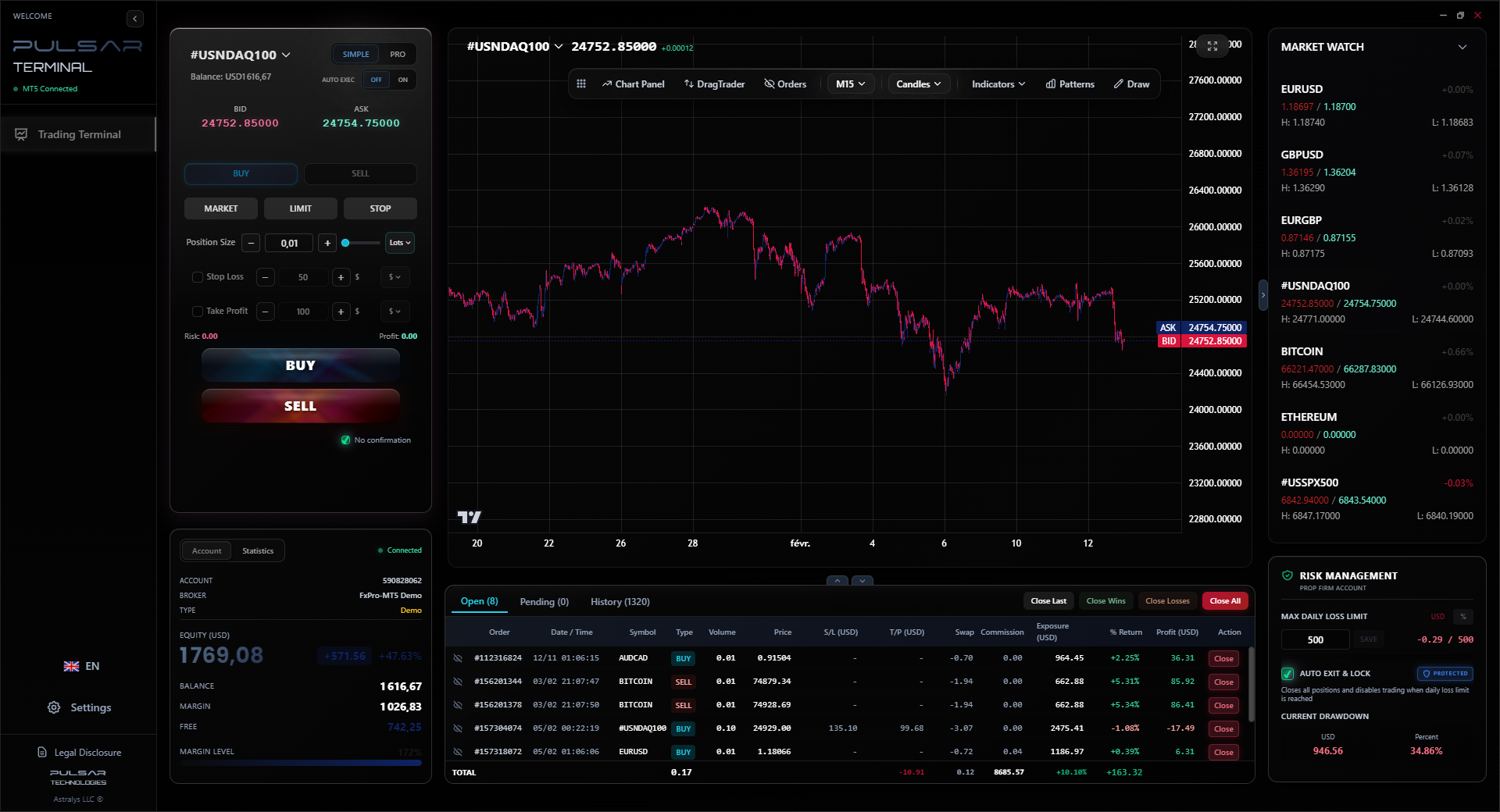
When running complex strategies on a VPS, having a tool like Pulsar Terminal to manage advanced order types and risk directly on MT5 is a massive advantage.
Pulsar Terminal
The all-in-one MT5 companion: drag-and-drop orders, multi-TP/SL, trailing stop, grid trading, Volume Profile, and prop firm protection. Used by 1,000+ traders daily.
Let me save you some frustration and lost money.
Mistake 1: Assuming 'Set and Forget.' You must monitor your VPS. Log in at least once a week to check that MT5 is running, your EA is enabled, and there are no error messages. I once forgot for three weeks and found my EA had stopped after a symbol configuration error. I missed a whole series of swing trading signals on Gold.
Mistake 2: Not Understanding the Spread. Some brokers with great free VPS offers have wider spreads. You might save R500 on VPS fees but pay R2,000 more in spread costs over the month. Always do the math. A tight spread broker like IC Markets or Pepperstone often makes more sense even if their VPS terms are slightly stricter.
Mistake 3: Poor Security. Your VPS password is the key to your trading account. Never reuse a password from another site. Enable two-factor authentication (2FA) on your broker account if possible, so even if someone accessed your VPS, they couldn't withdraw funds.
Mistake 4: Letting the Volume Lapse. If your free VPS depends on a monthly lot volume, track it! Set a mid-month alert. I nearly lost my free tier once because I was on holiday and didn't trade. I had to scramble in the last two days to place a few extra positions to hit the target. Not ideal for disciplined trading.
💡 Winston's Tip
If your strategy is profitable, the $30/month for a premium paid VPS is the cheapest insurance you'll ever buy. Don't be penny-wise and pound-foolish.

“Start with a free VPS, but the day you start managing other people's money, it's time to go paid.”
For most active South African retail traders, a free forex VPS server from a reputable international broker is a fantastic deal and a necessary tool. It solves our single biggest infrastructure problem: unreliable power and internet.
Start with free. Choose a broker like Exness or IC Markets where the volume requirements are realistic for your style. Use it for 3-6 months. If you outgrow it or start trading more seriously, then look at paid options.
The mental freedom is priceless. You can actually enjoy a braai during load-shedding stage 6, knowing your trades are safe on a server in a London data centre. Just remember, the VPS manages the execution, not the strategy. You still have to do the hard work of becoming a better trader. But at least now, Eskom isn't your silent trading partner.
FAQ
Q1Will a VPS improve my trading speed from South Africa?
Yes, significantly. Your orders go from your VPS (in a hub like London) to the broker in milliseconds. From your home in SA, the same journey involves our slower international links, adding 200-300ms of latency. For scalping, that's huge. For everyone else, it ensures your stop-loss is received as fast as possible.
Q2Can I use a free VPS from a broker I don't trade with?
Almost never. The free VPS is linked to your live trading account with that specific broker. They won't give you a free server to trade with their competitors.
Q3What happens if I don't meet the monthly trading volume?
The broker will typically charge the monthly VPS fee to your trading account. Always check the exact terms. The fee is often $25-$30, which will be converted from your account balance (likely in USD or ZAR).
Q4Is my money safe if the VPS company goes down?
Your funds are held with your broker, not the VPS provider. If the VPS crashes, your open trades remain active on the broker's servers. You just lose the ability to modify or close them until you reconnect via another device or the VPS restarts. This is why a stop-loss is always mandatory.
Q5Can I run other software, like trading journals, on my free VPS?
Technically yes, but I don't recommend it. These servers have limited resources. The primary goal is to keep MT4/MT5 running smoothly. Cluttering it with other apps increases the risk of crashes or slowdowns.
Q6Do I need a VPS for manual trading, or just for EAs?
You need it for both. If you're manually trading but use stop-loss and take-profit orders, those are just pending orders on the server. If your home internet drops, you can't react if the market moves. A VPS ensures those orders stay active and can be executed.
Prof. Winston's Lesson
Key Takeaways:
- ✓Free VPS servers are a trade-off: you pay via volume or wider spreads.
- ✓For SA traders, a VPS is essential infrastructure, not a luxury.
- ✓Always monitor your VPS weekly; it's not set-and-forget.
- ✓Upgrade to a paid VPS when trading serious capital or prop firm challenges.
How useful was this article?
Click a star to rate
Weekly Trading Insights
Free weekly analysis & strategies. No spam.
About the Author
David van der Merwe
Emerging Markets Trader
Johannesburg-based trader with 11 years in emerging market currencies. Specializes in ZAR pairs, FSCA-regulated trading, and South African market analysis.
Comments
Risk Disclaimer
Trading financial instruments carries significant risk and may not be suitable for all investors. Past performance does not guarantee future results. This content is for educational purposes only and should not be considered investment advice. Always conduct your own research before trading.
You Might Also Like

Cara Trading Forex Sukses: 7 Prinsip dari Trader Profesional
Cara trading forex sukses dengan 7 prinsip trader pro: manajemen modal, disiplin, journal trading, backtest. Data nyata, bukan janji profit palsu.
Jam Trading Forex Terbaik untuk Trader Indonesia: Panduan Lengkap dengan Tabel Waktu
Panduan jam trading forex untuk trader Indonesia. Tabel 4 sesi dunia, jam emas 20:00-00:00, sesi mana yang harus dihindari. Data akurat + tips dari trader berpengalaman.
Top 5 Sàn Forex Uy Tín Nhất 2026: Review Jujur dari Trader Indonesia
Top 5 sàn forex uy tín 2026 untuk trader Indonesia. Review jujur: spread, deposit, withdraw, dukungan lokal. Exness, XM, IC Markets & lebih.
Get Pulsar Terminal
All these calculators are built into Pulsar Terminal with real-time data from your MT5 account. One-click position sizing, automatic risk management, and instant calculations.
Get Pulsar Terminal