


I remember staring at my screen on October 15th last year, watching my manual trade on USD/ZAR hit my stop-loss.

David van der Merwe
Emerging Markets Trader ·  South Africa
☕ 9 min read
What you'll learn:
- 1Why Build a Robot? The South African Context
- 2Step 1: The Foundation – Your Trading Strategy
- 3Step 2: Choosing a Platform & Coding Basics
- 4Step 3: The Make-or-Break Phase: Backtesting & Optimization
- 5Step 4: Going Live – The Real Test
- 6Costs, Maintenance & The Reality Check
- 7Final Advice From My Experience
I remember staring at my screen on October 15th last year, watching my manual trade on USD/ZAR hit my stop-loss. The rand had spiked on a surprise SARB announcement, and I was too slow to react. That was the moment I decided I needed consistency, something that wouldn't get tired or emotional. I started figuring out how to create a forex trading robot. It wasn't about getting rich quick. It was about codifying my hard-won lessons into a set of cold, logical rules that could trade while I slept. This guide is the map I wish I'd had.
Let's be honest, most people think a trading robot is a magic money machine. It's not. For us in South Africa, with our unique market quirks and the FSCA's 30:1 use cap, the real value is different.
First, it removes emotion. You don't get FOMO when USD/ZAR breaks a key level, and you don't hesitate to cut a loss on a bad ZAR trade. The robot just executes. Second, it handles our time zone. The London and New York sessions are when things get wild, and I'm not always awake or at my desk. A robot doesn't care if it's 3 AM in Johannesburg.
But here's the critical part for South Africans: the FSCA is watching. They've cracked down on unlicensed signal providers and shady EA sellers. If you're building this for yourself, you're in the clear. But if you plan to sell it or manage money with it, you're looking at needing an FSP license. That's a whole other ball game with serious compliance costs. For now, let's focus on building a personal tool.

Warning: Selling a trading robot or its signals without an FSCA license isn't just risky, it's illegal. The FSCA has prosecuted people for this. Build for your own account first, always.
You can't automate what you don't understand. This is where most fail. They download a fancy EA without knowing its core logic, then blow up their account when market conditions change.
Your first job is to have a written, tested strategy. I'm talking about a boring checklist. For my first robot, I used a simple swing trading strategy on EUR/USD. The rules were:
- Go long if price closes above the 50-day SMA and the RSI indicator is above 50 but below 70.
- Place stop-loss 1.5x the Average True Range (ATR) below the entry candle's low.
- Take profit at a 2:1 risk-to-reward ratio.
- No more than one trade per day.
It was simple. The key was that I had traded it manually for six months and kept a detailed journal. I knew its win rate (about 55%), its average loss, and, crucially, when it performed terribly (during low-volatility, range-bound markets).
From Journal to Code
You need to define every single variable. What timeframe? What instruments? (Stick to major pairs like EUR/USD or XAU/USD for your first bot). What's your exact entry trigger? Is it a candle close? A specific indicator crossover? Your exit rules need to be just as clear. Ambiguity is the enemy of code.

Pro Tip: Backtest your manual strategy first using MT4/MT5's strategy tester on historical data. If it doesn't work there, coding it into a robot is a waste of time. This is where you'll see if your position size calculator logic holds up over time.

💡 Winston's Tip
A robot is only as good as the strategy it executes. If you can't trade profitably manually, automating won't save you. It'll just lose money faster.
“Ambiguity is the enemy of code. You need to define every single variable.”
For 95% of retail traders, the answer is MetaTrader. MT4 is the old reliable, with a massive library of existing EAs and indicators. MT5 is more powerful and is where the industry is slowly heading. Most South African brokers like Exness or IC Markets support both.
You'll code your robot as an Expert Advisor (EA) in MQL4 or MQL5. Don't panic. You don't need to be a software engineer. The syntax is based on C++, and there are thousands of free code examples online. Start by modifying a simple moving average crossover EA. Change the inputs, tweak the entry logic.
My biggest mistake early on was overcomplicating the code. I tried to build a system that accounted for news, correlation, and three different indicator confirmations. It was a bug-ridden mess that never placed a single trade. Start stupidly simple. A robot that places one trade a week based on one clear rule is a success.
The core functions you need to understand are:
OnTick(): This function runs every time a new price quote comes in. Your main logic goes here.- Order sending functions:
OrderSend()to open trades,OrderModify()to move stops,OrderClose()to exit. - How to access indicator data, like
iRSI()oriMACD().
It's a grind, but there's no way around it. Learning the basics of MQL is non-negotiable if you want true control.
This is where you separate a strong system from a curve-fitted fantasy. MT4/MT5 has a built-in Strategy Tester. You feed it years of historical data and let your EA run through it.
Here's my painful lesson. My first profitable backtest was a miracle. On EUR/USD data from 2015-2020, it showed a 70% win rate and smooth equity growth. I was ecstatic. I ran it live with real money. It proceeded to lose 8 trades in a row. Why? I had committed the cardinal sin of over-optimization.
I had tweaked every parameter - the RSI level, the stop-loss multiplier, the moving average period - until the backtest results looked perfect. I had coded the robot to fit the exact historical noise of that period. It had no predictive power for the future.
How to Backtest Properly
- Use Quality Data: Ensure your broker's historical data is good. Gaps can ruin results.
- Walk-Forward Analysis: This is key. Optimize your parameters on a segment of data (e.g., 2018-2019), then test those fixed parameters on a completely unseen period (e.g., 2020). If it works on the "out-of-sample" data, you might have something.
- Mind the Spread: Always enable "every tick" or "every tick based on real ticks" mode and set the spread to a realistic average for your broker. A strategy that's profitable with a 0-pip spread but blows up with a 2-pip spread definition is useless.
- Check the Metrics: Don't just look at net profit. Look at the maximum drawdown (could you stomach that loss?), the profit factor (total profit/total loss), and the number of trades (too few and it's not statistically significant).

Example: My second, more successful robot had a net profit of ZAR 24,000 over a 2-year backtest. Sounds good. But the max drawdown was ZAR 9,500. That meant I needed at least ZAR 15,000 in my account to avoid a potential margin call. That single number changed my entire risk plan.
💡 Winston's Tip
The 'Walk-Forward Analysis' test is your best defence against self-deception. If it doesn't work on unseen data, it's not a strategy, it's a history lesson.
“The satisfaction is in seeing a system you built from scratch execute a plan flawlessly.”
Your backtest is green. Your code is clean. Now comes the scary part. Never, ever launch a robot with your full trading capital.
Start with a demo account for at least two weeks. Let it run in real-time market conditions. Watch for execution slippage, especially on ZAR pairs which can be less liquid. See if it places orders correctly.
Then, move to a live account with the absolute minimum deposit. For many brokers like XM or Pepperstone, that's around $100 or ZAR 1,800. Trade micro lots (0.01). The goal here is not to make money. The goal is to confirm that the live performance matches your backtest and demo test.
Essential Live Settings
- Use a VPS: A Virtual Private Server costs about ZAR 200-500 a month and runs your MT4 platform 24/7 from a data center. If your home internet or power goes out (load-shedding, anyone?), your robot stops. A VPS prevents that.
- Set Hard Limits: Code in a daily loss limit (e.g., 3% of account) and a weekly loss limit. No matter what the strategy says, if it hits that limit, it stops trading. This is your circuit breaker.
- Monitor, But Don't Meddle: This is the hardest part. You will see it take a loss and think, "I wouldn't have done that." But interfering defeats the entire purpose. Unless you spot a clear bug, let it run its course.
I learned this the hard way. I shut down my robot during a string of three losses, only to watch the next four trades - which it would have taken - all be winners. I had broken my own system.
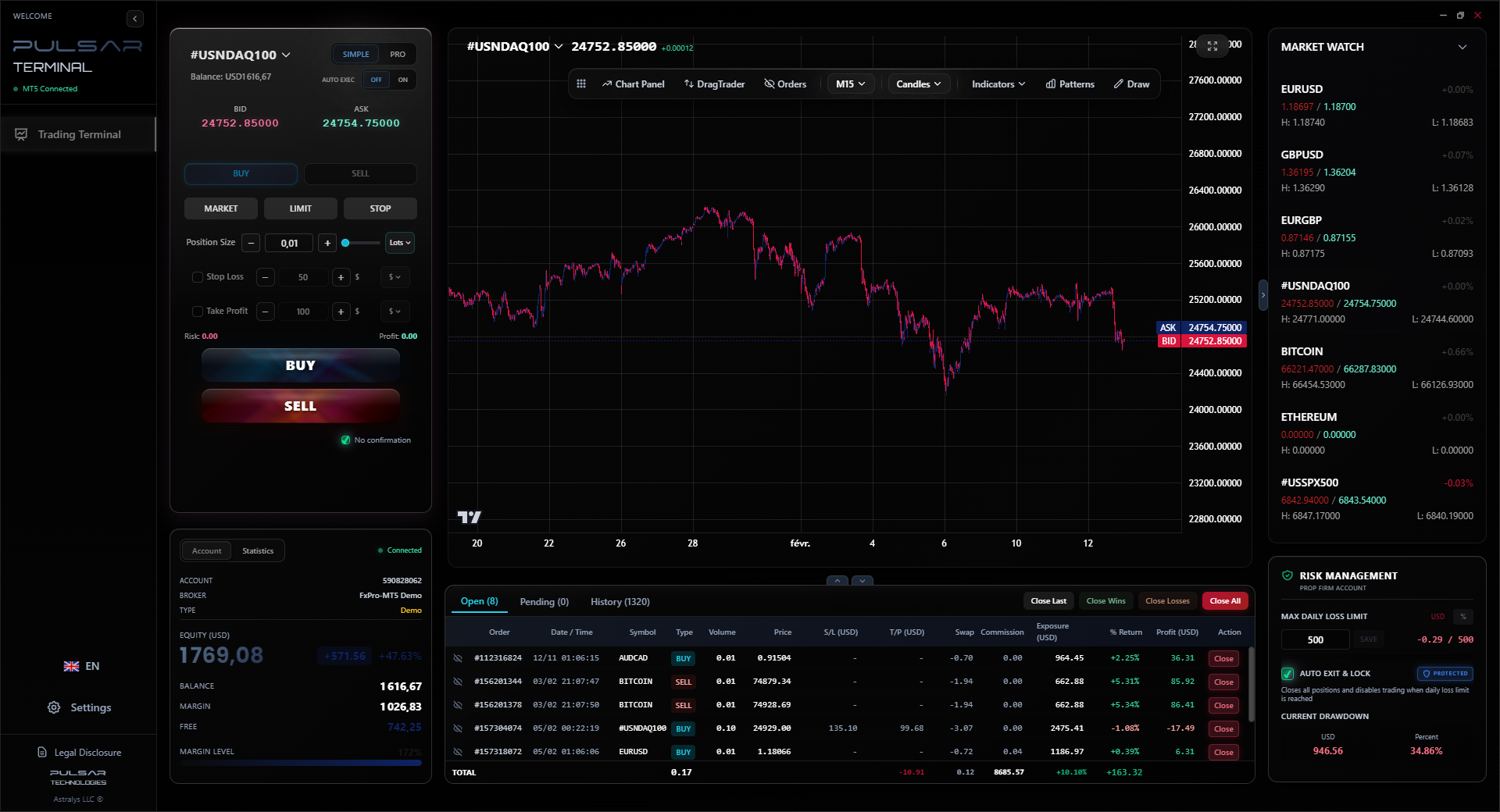
Manually moving stops to breakeven or trailing a winner is tedious and error-prone, but Pulsar Terminal automates these advanced risk management rules directly on your MT5 platform.
Pulsar Terminal
The all-in-one MT5 companion: drag-and-drop orders, multi-TP/SL, trailing stop, grid trading, Volume Profile, and prop firm protection. Used by 1,000+ traders daily.
Let's talk numbers, because this isn't free.
- Development Cost (Your Time): Priceless, but substantial. Count on 100+ hours for your first functional bot.
- VPS Hosting: ZAR 150 - ZAR 500+ per month. Non-negotiable for serious use.
- Broker Costs: Your robot will incur spreads and possibly commissions on every trade. A scalping strategy with 10 trades a day will see these costs add up fast.
- The Hidden Tax: Remember, profits are taxable in South Africa. Your robot's trade history is your audit trail. Keep it carefully.
And then there's maintenance. Markets evolve. A strategy that worked in a trending market will fail in a ranging one. You can't just "set and forget." You need to periodically check the performance metrics. Has the win rate dropped significantly? Has the drawdown increased? You might need to pause the EA and go back to the drawing board.
Your robot is a tool, not an employee. You are its manager. It follows rules, but you are responsible for its overall fitness for the current market environment. This ongoing duty is the real work of automated trading.
💡 Winston's Tip
Your first live run should be with money you are 100% prepared to lose. Consider it the final, most expensive phase of testing.
“Over-optimization is when you code the robot to fit historical noise, not future price action.”
Building my first profitable robot took me 18 months and two failed attempts. Here’s the condensed wisdom:
- Start with a clone of your own best manual trade. Automate the one setup you have the most confidence in.
- Embrace simplicity. A robot with 5 lines of clear logic is better than 500 lines of complex, unstable code.
- Risk management is not a feature, it's the foundation. Code it in first, before the entry logic. Define your pip definition risk per trade absolutely.
- The market will humble your creation. Be prepared to deactivate it, tweak it, or even scrap it. The goal is long-term survival, not perfection.
- It's a marathon. This isn't a weekend project. It's a serious study in discipline, programming, and statistics.
The satisfaction isn't just in the profits. It's in seeing a system you built from scratch execute a plan flawlessly. It's watching a trade close at a profit on a day you were completely away from the charts. That feeling, for a trader, is unique. It turns the chaotic market into a game of probabilities that you've finally learned how to structure. Good luck.
FAQ
Q1Is it legal to use a forex trading robot in South Africa?
Yes, it's completely legal for personal use. The FSCA regulates the brokers and the financial service providers. Using a robot on your own account with an FSCA-licensed broker is fine. The legal issue arises if you sell the robot's signals or manage other people's money with it without the required FSP license.
Q2How much money do I need to start trading with a robot?
Technically, you can start with a broker's minimum deposit, often around ZAR 1,800. However, you need enough capital to withstand the robot's maximum drawdown. If your backtest shows a ZAR 5,000 drawdown, starting with ZAR 1,800 is a sure way to blow your account. Start small with micro lots, but ensure your account size is at least 3-4 times the historical max drawdown.
Q3Can I use a free forex robot I found online?
You can, but be extremely cautious. Many are scams, poorly coded, or contain malware. Even if they work, they're often over-optimized for past data and fail live. The safest 'free' robot is the one you build yourself by learning MQL and coding a simple, logical strategy you understand inside out.
Q4Do I need to know how to code to create a trading robot?
For a custom robot that fits your strategy, yes, you need to learn the basics. Platforms like MT4 use MQL4/5. You don't need a computer science degree, but you must understand variables, functions, and logic flow. Using a 'robot builder' with drag-and-drop blocks can work for very simple strategies but offers limited control and flexibility.
Q5How do I handle South Africa's load-shedding with a trading robot?
You don't handle it - you avoid it entirely. This is the single most important reason to use a Virtual Private Server (VPS). For about ZAR 200-500 a month, your robot runs on a computer in a data center with permanent power and internet. Your home PC and internet can be off, but your trades will still be managed.
Q6What's the most common reason forex robots fail?
Over-optimization, also called curve-fitting. This is when you tweak a strategy's parameters so much that it fits the historical data perfectly but has no predictive power for future price action. The robot was trained to pass a specific test, not to trade in a live, changing market.
Q7Are profits from my trading robot taxable?
Yes. In South Africa, profits from forex trading are considered taxable income. The South African Revenue Service (SARS) doesn't care if a human or a robot placed the trade. It's your responsibility to keep accurate, detailed records of all trades (which your trading platform should provide) for your annual tax return.
Prof. Winston's Lesson
Key Takeaways:
- ✓Start with a simple, well-defined manual strategy you understand.
- ✓Always test with realistic spreads and on unseen data.
- ✓Use a VPS to counter load-shedding and internet issues.
- ✓Risk management logic must be coded in before entry signals.
How useful was this article?
Click a star to rate
Weekly Trading Insights
Free weekly analysis & strategies. No spam.
About the Author
David van der Merwe
Emerging Markets Trader
Johannesburg-based trader with 11 years in emerging market currencies. Specializes in ZAR pairs, FSCA-regulated trading, and South African market analysis.
Comments
Risk Disclaimer
Trading financial instruments carries significant risk and may not be suitable for all investors. Past performance does not guarantee future results. This content is for educational purposes only and should not be considered investment advice. Always conduct your own research before trading.
You Might Also Like

Cara Trading Forex Sukses: 7 Prinsip dari Trader Profesional
Cara trading forex sukses dengan 7 prinsip trader pro: manajemen modal, disiplin, journal trading, backtest. Data nyata, bukan janji profit palsu.
Jam Trading Forex Terbaik untuk Trader Indonesia: Panduan Lengkap dengan Tabel Waktu
Panduan jam trading forex untuk trader Indonesia. Tabel 4 sesi dunia, jam emas 20:00-00:00, sesi mana yang harus dihindari. Data akurat + tips dari trader berpengalaman.
Top 5 Sàn Forex Uy Tín Nhất 2026: Review Jujur dari Trader Indonesia
Top 5 sàn forex uy tín 2026 untuk trader Indonesia. Review jujur: spread, deposit, withdraw, dukungan lokal. Exness, XM, IC Markets & lebih.
Get Pulsar Terminal
All these calculators are built into Pulsar Terminal with real-time data from your MT5 account. One-click position sizing, automatic risk management, and instant calculations.
Get Pulsar Terminal