


I remember the first time I opened MetaTrader 4.

David van der Merwe
Emerging Markets Trader ·  South Africa
☕ 10 min read
What you'll learn:

I remember the first time I opened MetaTrader 4. It was 2010, and the EUR/USD was bouncing around 1.2900. The chart looked like a mess of green and red candles, and I had no clue what a moving average was. I hit the 'buy' button anyway, convinced it was going up. Two hours later, I was down R800. That was my expensive introduction to the world of meta4 forex. Over a decade later, MT4 is still the bedrock for most of us trading from SA, not because it's flashy, but because it just works. Let's talk about how to use it without lighting your money on fire.
Let's clear this up straight away. When South Africans say 'meta4 forex', 99% of the time they're talking about MetaTrader 4 (MT4). It's a typo or shorthand that stuck. It's not a new platform or a secret strategy. It's the old, reliable, slightly clunky trading software that powers probably 70% of retail forex trading in this country.
Developed by MetaQuotes, MT4 launched in 2005. Think about that. It's older than the iPhone. Yet, it's everywhere. Why? Because it's stable, it's familiar to brokers, and it has a massive library of custom indicators and Expert Advisors (EAs) for automated trading. For us in SA, dealing with loadshedding and shaky internet, its reliability is a godsend. A platform crash during a volatile ZAR move is a heart attack you don't need.

Warning: If someone is trying to sell you a 'new Meta4 Forex system' for thousands of rand, they're almost certainly just repackaging free MT4 indicators. Don't fall for it.
The core of MT4 is the charting package. You get nine timeframes, from one minute to one month. You can draw trend lines, throw on indicators like the RSI indicator or MACD indicator, and place trades directly from the chart. Your broker provides a server to connect to, and your trades flow through them.

💡 Winston's Tip
The platform is just the cockpit. Don't mistake a better dashboard for being a better pilot. Spend 80% of your time learning the markets, 20% learning the buttons.
“The market smells fear (and real money) and acts differently.”
You can't just download MT4 and start trading. You need a broker that offers it. In SA, you have a choice: a local broker regulated by the Financial Sector Conduct Authority (FSCA), or an international broker. There's no single right answer, it's about your priorities.
Local vs. International Brokers
Local brokers (think easyMarkets SA, GT247) make funding easy. You can EFT directly in ZAR, and customer service is in SA time. The downside? Spreads on major pairs are often wider. I've seen EUR/USD spreads at 2.5 pips during quiet times on local platforms, where international brokers offer 0.8.
International brokers like Exness, IC Markets, or Pepperstone usually offer tighter spreads and raw ECN accounts. But you'll fund in USD or EUR, which means your bank hits you with a foreign exchange fee. For a $1000 deposit, that could be an extra R150-200 gone before you even trade.
The Demo Account Lie
Every broker will give you a meta4 forex demo account. Use it to learn the buttons, but don't trust the psychology. I turned R100,000 virtual ZAR into R200,000 in a month on a demo. Got overconfident, went live, and blew 30% of my real capital in two weeks. The market smells fear (and real money) and acts differently. Once you know the platform, switch to a tiny live account. The emotional education is worth more than any demo profit.

Pro Tip: When testing a broker's MT4, check their server location. A server in London trading EUR/USD is better than one in Johannesburg. Lower latency means faster execution, which is critical for a scalping strategy.
“Vanilla MT4 doesn't do trailing stops that move automatically with the price. You have to manually drag it, which is a pain.”
This is where the rubber meets the road. Opening a trade on MT4 is simple: right-click the chart, 'Trading', 'New Order'. A ticket pops up. You choose your volume (lot size), set your stop loss (SL) and take profit (TP), and hit buy or sell. The simplicity is deceptive.
The Big Mistake: Lot Sizes
This is the number one account killer for new South African traders. MT4 defaults to a 1.00 lot size. That's 100,000 units of the base currency. On EUR/USD, with no use, that's a $100,000 position. With 1:500 use (common internationally), you only need about $200 margin. But the risk is insane. A 10-pip move against you on a 1.00 lot is a $100 loss. That's over R1800. Blow that on a few bad trades, and you're done.
I learned this the hard way in 2012. I traded a 0.50 lot on GBP/USD, thinking I was being conservative. A surprise news spike moved it 50 pips against me in seconds. That was a $250 loss. Over R3500 at the time, gone in a blink. I felt physically sick. Now, I rarely go above 0.10 lots on my main account unless I have a massive conviction. Always, always use a position size calculator. Risk 1-2% of your account per trade, max.
Orders Beyond the Basics
MT4 lets you place pending orders (Buy Limit, Sell Stop, etc.). This is great for swing trading where you want to enter at a specific level. You can also modify trades easily: drag your stop loss or take profit line on the chart. But here's a limitation: vanilla MT4 doesn't do trailing stops that move automatically with the price. You have to manually drag it, which is a pain if you're not glued to the screen.
Charts and Analysis
This is MT4's strength. Adding indicators is a right-click away. You can save chart templates. Want to compare the EUR/USD guide to the USD/ZAR? Open multiple charts. For gold traders, the XAU/USD guide setups work perfectly here. The language of the charts is universal, even if the platform feels a bit 2008.

“Vanilla MT4 doesn't do trailing stops that move automatically with the price. You have to manually drag it, which is a pain.”
The platform is free. The trading is not. You pay in three main ways, and if you don't understand them, they'll eat you alive.
-
The Spread: This is the difference between the buy and sell price. It's how many market makers and brokers make their money. A tighter spread is better. On USD/ZAR, don't be shocked by spreads of 50-100 pips during illiquid times. That's R50-R100 per 1.00 lot gone the moment you enter. On majors like EUR/USD, aim for under 1.2 pips on a standard account.
-
Commission: Some brokers, especially ECN models, charge a commission per lot traded on top of a razor-thin spread. It might be $3.50 per 1.00 lot round turn. On a 0.10 lot trade, that's $0.35. Factor this into your profit targets.
-
Swap/Rollover Rates: If you hold a position past 5 PM New York time (midnight-ish SA time), you pay or earn a swap fee based on the interest rate differential between the two currencies. Holding a sell position on USD/ZAR (betting the rand strengthens) often means you PAY a negative swap daily. I once held a USD/ZAR short for two weeks trying to catch a trend. The trend never came, and the swap fees cost me more than the small loss I eventually took. Check the 'Swap' column in the Market Watch window.
Here's a quick comparison of how costs can look on a typical 0.10 lot trade:
| Cost Type | USD/ZAR Example (50 pip spread) | EUR/USD Example (1.0 pip spread + commission) |
|---|---|---|
| Spread Cost | ~R50 (50 pips * ~R1 per pip) | ~$1 (1 pip * $1 per pip on 0.1 lot) |
| Commission | Usually none on local brokers | ~$0.35 ($3.50/10 for 0.1 lot) |
| Total Entry Cost | R50 | ~$1.35 |
You see why trading the rand pairs requires bigger moves to be profitable? Your trade needs to move over 50 pips just to break even on costs.
💡 Winston's Tip
If your trading strategy can't be drawn on a napkin, it's too complicated for MT4 or any platform. Complexity is the enemy of execution.
“Your trade needs to move over 50 pips just to break even on costs.”
This is where meta4 forex separates from simpler web platforms. The MQL4 programming language lets people build stuff. Some of it is genius. Most of it is garbage.
Expert Advisors (EAs): These are automated trading robots. You can buy them, download free ones, or learn to code your own. I've tested over a hundred. The ones sold for thousands with 'guaranteed profits'? They almost always blow up in live markets. The only EAs I've seen work consistently are simple ones that manage risk or execute very specific, boring strategies like grid trading in a range. Even then, they need supervision.
Custom Indicators: Can't get enough of that rainbow moving average? Someone has built it. These can help visualize data, but indicator overload is a disease. I used to have 12 indicators on my chart. It was a colorful mess that just confirmed whatever bias I already had. Now I use maybe two or three.
The Need for Better Tools: Vanilla MT4 is lacking. Want to set a breakeven stop automatically when a trade goes 20 pips in your favor? Can't do it. Want to take partial profits at multiple levels? You need to manually open several trades. Managing risk across multiple trades is a spreadsheet exercise. This manual process is where people, including a younger version of me, make costly errors.

“Your trade needs to move over 50 pips just to break even on costs.”
Let's walk through the hall of shame so you can avoid these Rande-destroying errors.
Pitfall 1: Ignoring the News. MT4 has an economic calendar, but it's basic. Trading USD/ZAR during a SARB interest rate announcement or a budget speech without knowing is suicide. I lost R2,000 in 90 seconds once because I was long USD/ZAR and the Finance Minister said something the market didn't like. The chart just screamed lower. Now, I don't trade major ZAR news unless I'm intentionally speculating on the outcome.
Pitfall 2: Overleveraging. use is a double-edged sword. 1:500 use means you can control R500,000 with R1,000. It also means a 0.2% move against you wipes your margin. That's a margin call waiting to happen. Use use to control sensible position sizes, not to maximize your bet.
Pitfall 3: Chasing the Platform, Not the Skill. People spend more time searching for the 'perfect' EA or indicator than learning what a pip definition really means or how to read price action. The platform is a tool. A hammer doesn't build a house; a carpenter does. MT4 won't make you money. Your discipline and strategy will.
Pitfall 4: No Trading Plan. Clicking buttons reactively is gambling. A plan states: I will buy EUR/USD IF it bounces off this support level with a bullish candle pattern. My stop loss is 20 pips below. My take profit is 40 pips above. I risk 1% of my account. Write it down. MT4 can't do that for you.
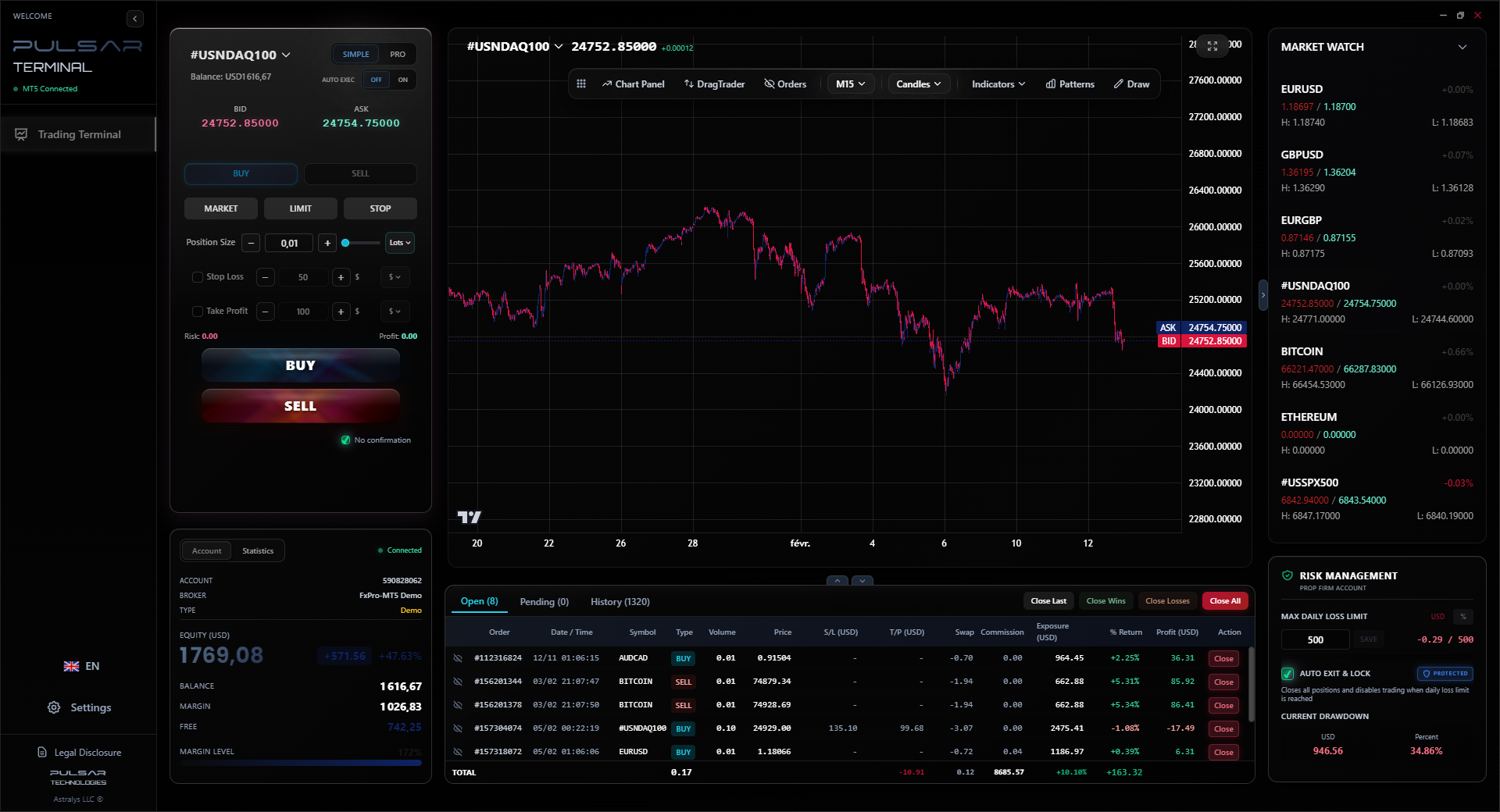
Manually dragging stops and managing multiple trades on MT4 is inefficient; Pulsar Terminal automates trailing stops, breakeven orders, and partial closures directly on your MT5 charts.
Pulsar Terminal
The all-in-one MT5 companion: drag-and-drop orders, multi-TP/SL, trailing stop, grid trading, Volume Profile, and prop firm protection. Used by 1,000+ traders daily.
“The only EAs I've seen work consistently are simple ones that manage risk.”
MetaQuotes has been trying to kill MT4 for years with MT5. It has more timeframes, an economic calendar, and a built-in hedging mode (though SA brokers often disable it due to local regulations). But traders, especially us old dogs, love MT4. The environment is too big.
Most South African brokers still offer MT4 as their primary platform. Some offer MT5 as an option. For forex, MT4 is still perfectly adequate. If you want to trade stocks or futures seriously, MT5's infrastructure is better. But for pure forex, including ZAR pairs, you won't miss much on MT4.
The future is in tools that plug into MT4 to fix its weaknesses. Think of advanced trade management, visual portfolio risk, and automated journaling. The core charting engine remains, but the helper apps do the heavy lifting of risk management and efficiency. That's where the real edge is developing now for retail traders.
FAQ
Q1Is Meta4 Forex different from MetaTrader 4?
No, it's not. 'Meta4 Forex' is just a common misspelling or shorthand used by many South African traders referring to the MetaTrader 4 (MT4) platform. They are the same thing.
Q2Which South African brokers offer the best MT4 conditions?
It depends on your style. For tight spreads on major pairs, international brokers like IC Markets or Pepperstone are hard to beat. For easy ZAR funding and local support, regulated SA brokers like GT247 are convenient, but expect wider spreads, especially on USD/ZAR. Always test their demo first.
Q3Can I use automated trading (robots) on MT4 in South Africa?
Yes, absolutely. MT4 supports Expert Advisors (EAs). However, be extremely wary of buying expensive 'guaranteed' EAs. Most fail. The platform allows it, but making it profitable is the hard part. Many prop firms allow EAs, which you can manage with tools designed for the task.
Q4What are the typical spreads for USD/ZAR on MT4?
They can vary wildly. During active London or US hours, you might see 25-40 pips. In thin Asian sessions or around SA public holidays, they can balloon to 80-100 pips or more. This high cost is a major reason why trading the rand requires patience and wider stop losses.
Q5Is MT4 being phased out? Should I learn MT5 instead?
MT4 is in maintenance mode but shows no sign of disappearing. Its user base is massive. For a new South African forex trader, starting with MT4 is perfectly fine. The skills are transferable. If you branch into other markets later, you can learn MT5 then.
Q6Why does my MT4 platform keep disconnecting?
First, blame loadshedding or your ISP. If it's persistent, check your broker's server status. Sometimes, you need to switch from the default server to a backup (like Server 2 or 3) in the login box. A stable internet connection is non-negotiable for trading.
Q7How do I avoid a margin call on MT4?
Use a sensible position size. If your account is R10,000, don't trade 1.00 lots. Use 0.01 or 0.05 lots. Set stop losses on EVERY trade. Monitor your 'Margin Level' in the Terminal window. If it drops below 100%, you're in margin call territory. Using a position size calculator is the best preventative medicine.
Prof. Winston's Lesson
Key Takeaways:
- ✓MT4 is a tool, not a strategy.
- ✓Risk 1-2% max per trade, always.
- ✓USD/ZAR spreads can kill profits.
- ✓Automate your risk, not your greed.
How useful was this article?
Click a star to rate
Weekly Trading Insights
Free weekly analysis & strategies. No spam.
About the Author
David van der Merwe
Emerging Markets Trader
Johannesburg-based trader with 11 years in emerging market currencies. Specializes in ZAR pairs, FSCA-regulated trading, and South African market analysis.
Comments
Risk Disclaimer
Trading financial instruments carries significant risk and may not be suitable for all investors. Past performance does not guarantee future results. This content is for educational purposes only and should not be considered investment advice. Always conduct your own research before trading.
You Might Also Like

Cara Trading Forex Sukses: 7 Prinsip dari Trader Profesional
Cara trading forex sukses dengan 7 prinsip trader pro: manajemen modal, disiplin, journal trading, backtest. Data nyata, bukan janji profit palsu.
Jam Trading Forex Terbaik untuk Trader Indonesia: Panduan Lengkap dengan Tabel Waktu
Panduan jam trading forex untuk trader Indonesia. Tabel 4 sesi dunia, jam emas 20:00-00:00, sesi mana yang harus dihindari. Data akurat + tips dari trader berpengalaman.
Top 5 Sàn Forex Uy Tín Nhất 2026: Review Jujur dari Trader Indonesia
Top 5 sàn forex uy tín 2026 untuk trader Indonesia. Review jujur: spread, deposit, withdraw, dukungan lokal. Exness, XM, IC Markets & lebih.
Get Pulsar Terminal
All these calculators are built into Pulsar Terminal with real-time data from your MT5 account. One-click position sizing, automatic risk management, and instant calculations.
Get Pulsar Terminal