


Here's a fact that might surprise you: as of early 2025, MetaTrader 5 officially handles more global trading volume than its older brother, MT4.

James Mitchell
Senior Trading Analyst
☕ 10 min read
What you'll learn:
Here's a fact that might surprise you: as of early 2025, MetaTrader 5 officially handles more global trading volume than its older brother, MT4. Yet, if you're trading from the United States, your choice between the two is almost an illusion. It's not about which platform is 'better' in a vacuum. It's about which one you're legally allowed to use, which one your broker supports, and which one won't get your account shut down. Having traded on both for over a decade, I've made costly mistakes assuming they worked the same everywhere. Let's cut through the marketing and look at the real, regulated landscape for US traders.
Forget the global debate for a second. In the US, the CFTC and NFA call the shots, and their rules fundamentally shape the MetaTrader experience. The most critical one? The FIFO rule (First-In, First-Out).
Back in 2012, I learned this the hard way. I was running a simple scalping strategy on EUR/USD, taking multiple quick trades in the same direction. On my international account with a non-US broker, it was fine. When I tried the same on a US-regulated MT4 account, my platform froze. The broker's compliance overlay, a clunky plugin forced by the NFA, couldn't handle my order flow. I missed two clear exits and took an unnecessary loss. The platform wasn't broken. It was just not built for US rules.
MT4 was designed for a hedging model, letting you hold opposing positions on the same pair. In the US, that's illegal. MT5 uses a netting system by default (one position per instrument), which aligns better with US futures trading rules. This architectural difference is why you see so few US brokers offering MT4/5. The cost and complexity of retrofitting these platforms for FIFO and anti-hedging is massive.

Warning: Never download MT4 or MT5 directly from MetaQuotes and try to connect to a US broker. It won't work, and you might violate terms. Access is only legal through a US-regulated broker's specific installation package. Companies like FOREX.com and OANDA provide these.
The bottom line? Your 'choice' is really a list of what your compliant broker offers. For years, that list was shrinking, thanks to MetaQuotes pulling licenses from brokers serving US clients without proper regulation. As of now, your shortlist is basically FOREX.com (MT4 & MT5), OANDA (MT4), and Trading.com (MT5 only). That's it.
When you strip away the regional restrictions, the technical differences between MT4 and MT5 are stark. It's not an upgrade. It's a rewrite.
The Engine Under the Hood
MT4 runs on a 32-bit system with MQL4. MT5 is a 64-bit platform with MQL5. In practice, this means MT5 can handle more data, run more complex indicators without lagging, and use modern computer processors efficiently. If you're backtesting a strategy with 20 years of tick data, MT5 will finish the job while MT4 is still thinking about it.
Market Depth & Timeframes
MT5 has a built-in Market Depth tool (Level II quotes), which MT4 lacks. For equity or futures traders, this is huge. MT5 also offers 21 timeframes versus MT4's 9. Those extra granular timeframes (like 2-hour or 6-hour charts) can be useful for certain swing trading approaches.
A Painful Personal Lesson with Pending Orders
Here's where I got burned. MT4 has 4 types of pending orders. MT5 has 6. The two new ones are 'Buy Stop Limit' and 'Sell Stop Limit.' I assumed they worked like they did on other platforms. In 2019, I set a Buy Stop Limit on gold (XAU/USD), expecting it to become a limit order once my stop price was hit. On MT5, a 'Buy Stop Limit' requires two price parameters: the 'Stop' price (where the order is activated) and the 'Limit' price (the maximum price you're willing to pay). I set them too close together during a volatile news spike. The price blew past my tiny limit range before the order could fill, and I missed a 180-pip move. My mistake was not understanding the platform's specific mechanics. The XAU/USD guide I was using didn't cover MT5's order quirks.
The table below sums up the key tech differences:
| Feature | MetaTrader 4 | MetaTrader 5 |
|---|---|---|
| System Architecture | 32-bit | 64-bit |
| Programming Language | MQL4 | MQL5 |
| Pending Order Types | 4 | 6 |
| Built-in Timeframes | 9 | 21 |
| Economic Calendar | No (requires plugin) | Yes, Built-in |
| Default Account System | Hedging | Netting (aligns with US rules) |

💡 Winston's Tip
Platforms are just tools. Obsessing over MT4 vs. MT5 is like a carpenter arguing over two hammers while the house plans are on fire. Your edge comes from your strategy and psychology, not the color of your chart.
“I moved to MT5 for the convenience of having everything in one place. The transition was annoying, but the multi-asset view was worth the headache.”
The platforms are free for you, but brokers pay a fortune for them, and those costs get passed to you indirectly. An MT4 license can have a $100,000 upfront fee for the broker. MT5 licenses come in tiers (Entry, Standard, Enterprise). This is why many smaller brokers stick with MT4 - the initial investment is sunk, and the user base is familiar.
For you, the trader, costs come from spreads and commissions. Let's use real 2026 data from available US brokers:
- FOREX.com's Raw Account on MT5: Offers spreads from 0.0 pips on EUR/USD, but charges a commission of $7 per side, per 100k lot. That's $14 round turn. If your position size calculator says to trade 2 lots, your commission is $28 on top of the spread. You need to factor that into your risk/reward.
- OANDA on MT4: Typically commission-free, but the spread is the cost. On a calm day, EUR/USD might be 1.2 pips. On a volatile day, it can widen to 2.5 pips or more. Your entry and exit price are less predictable.
I made a classic error early on. I saw a "0.0 pip spread!" advertisement and jumped on it, not calculating the commission. On a high-frequency strategy where I was taking 20 trades a day, those $14 round turns murdered my profitability. The tight spread was an illusion. Always, always calculate your total cost per trade: (Spread in pips * Pip Value) + Commission. That's your true hurdle to profitability.

Example: Trading 1 standard lot (100k units) of EUR/USD on FOREX.com's Raw Account.
- Commission: $14 round turn.
- If the spread is truly 0.0, your total cost is $14.
- To translate that to pips: $14 / $10 (value of 1 pip for EUR/USD) = 1.4 pips. So, a "0.0 pip spread" with commission is effectively a 1.4-pip cost. You need the price to move more than 1.4 pips just to break even.
Given the limited options, here’s how to think about it.
Choose MT4 (via OANDA or FOREX.com) if:
- You are a pure forex trader who doesn't need stocks or futures.
- You rely on a massive library of existing, custom MQL4 indicators or Expert Advisors (EAs) that haven't been ported to MQL5. The environment is still larger.
- You prefer the simpler, older interface. There's value in familiarity.
- Your strategy is heavily dependent on specific scripts that use MT4's hedging model (though remember, US brokers disable hedging, so test thoroughly).
Choose MT5 (via FOREX.com or Trading.com) if:
- You want to trade more than just forex (stocks, futures). This is MT5's biggest advantage.
- You develop your own algorithms. MQL5 is a more modern, powerful language, and the strategy tester is vastly superior.
- You need detailed backtesting with multiple assets and economic calendar integration.
- You value the slightly more modern interface and built-in tools like the economic calendar.
- The netting account model aligns perfectly with your US-compliant trading style.
My personal shift happened in 2023. As I incorporated more US equity index futures into my analysis, I needed to see the correlation live. Sticking with MT4 meant having two platforms open. I moved my forex trading to MT5 just for the convenience of having everything in one place. The transition was annoying - reprogramming some alerts, getting used to the new order dialog - but the multi-asset view was worth the headache.
💡 Winston's Tip
In the US, the most critical 'indicator' is the NFA rulebook. A strategy that violates FIFO is guaranteed to lose, no matter how good your RSI reading is. Test for compliance first, profitability second.
“Don't let platform loyalty blind you to opportunity. Choose the tool that serves your strategy and complies with your reality.”
MetaQuotes is clearly pushing MT5. They stopped selling new MT4 licenses in 2023. Global volume has tipped in MT5's favor. For the world, the writing is on the wall.
For the US trader, the future is... static. The regulatory wall isn't coming down. We will always have fewer choices than international traders. Your setup needs to be bulletproof for compliance.
- Download from your broker ONLY. Go to FOREX.com's, OANDA's, or Trading.com's website and get their specific installer. This ensures the FIFO and anti-hedging plugins are pre-configured.
- Test your strategy in a demo first. Don't assume your EA or manual method will work. Place multiple orders on the same pair. Try to open opposing positions. Make sure the platform behaves as the US rules dictate.
- Understand your broker's specific MT build. As of July 2025, MetaQuotes mandates minimum builds. Your broker's version should be newer than Build 1440 for MT4 or Build 4755 for MT5. Check in the platform's 'About' section.
- Bridge the gap with external tools. This is where modern tools change the game. The native trailing stop in both MT4 and MT5 is clunky. Advanced trade management often requires external assistance.
If you're running complex multi-trade strategies or need strong trade management that MT5's native interface lacks, companion software becomes essential. Managing a grid of orders or setting automatic breakeven points across multiple positions is a manual nightmare without it.
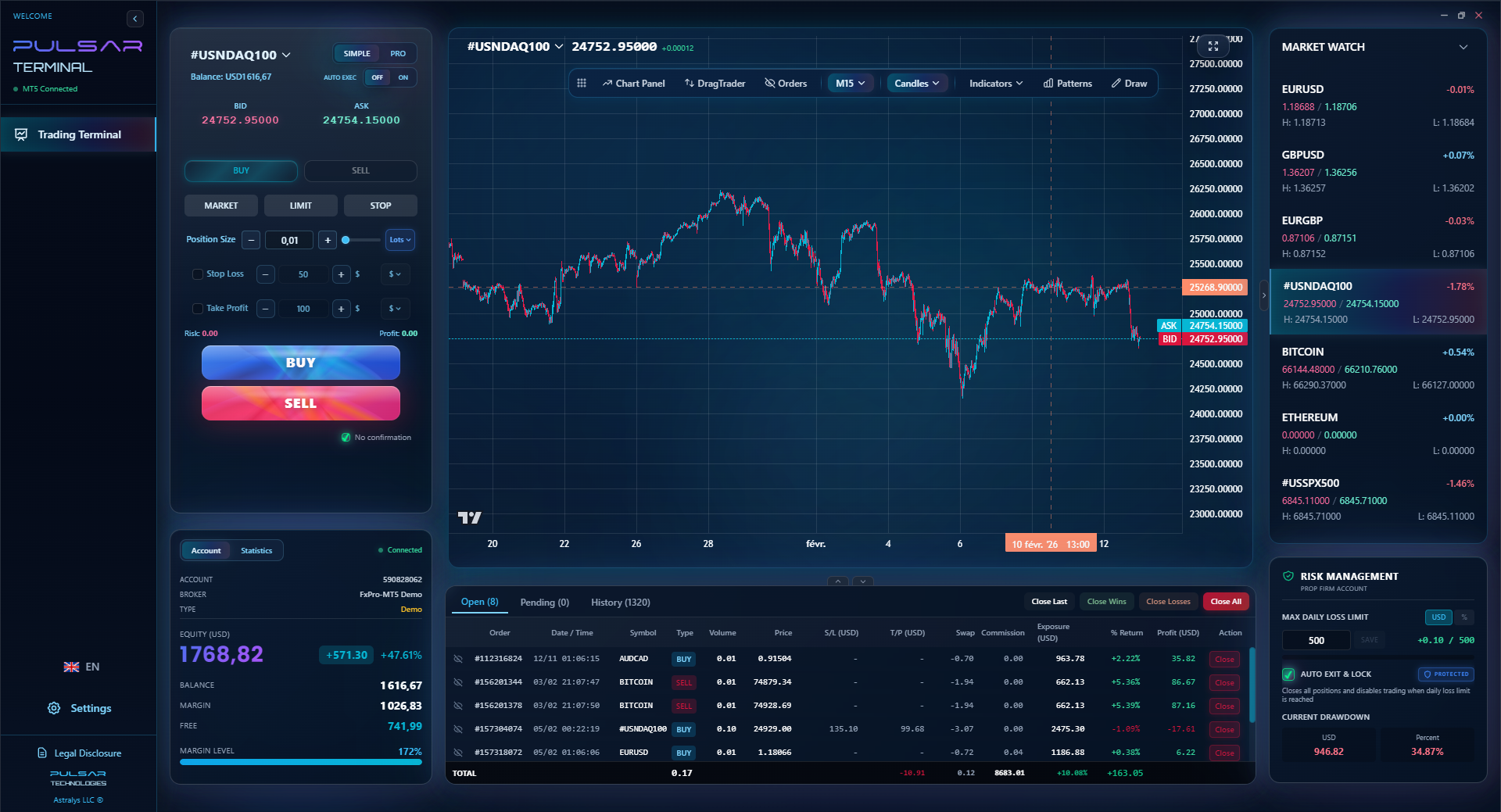
Managing complex orders and setting precise stops across multiple trades in MT5 is where a dedicated tool like Pulsar Terminal transforms a manual chore into an automated, rule-based process.
Pulsar Terminal
The all-in-one MT5 companion: drag-and-drop orders, multi-TP/SL, trailing stop, grid trading, Volume Profile, and prop firm protection. Used by 1,000+ traders daily.
So, MT4 vs MT5? It's the wrong question. The right question is: "Which regulated broker offers a MetaTrader platform that fits my asset needs and allows me to execute my strategy within US law?"
For most new US traders starting today, I'd lean towards MT5 if your broker offers it. It's the platform with a future, it handles more assets, and its netting system is a natural fit for the US regulatory box we're in. The learning curve is a bit steeper, but it's a better long-term investment of your time.
For the established forex specialist with a beloved library of MQL4 tools, MT4 via OANDA remains a solid, if sunsetting, fortress.
I'll leave you with this. In 2020, I was stubborn. I loved my MT4 setup. I resisted MT5 for years, calling it bloated. My reluctance meant I was late to explore trading micro futures, which became a crucial diversification for my portfolio. Don't let platform loyalty blind you to opportunity. Choose the tool that serves your strategy and complies with your reality, not the other way around. Always know your true costs, and never, ever forget that in the US, the NFA's rules are the most important indicator on your screen.

Pro Tip: Whichever you choose, master its built-in MACD indicator and RSI indicator first. Every platform draws them slightly differently. Knowing their exact behavior on your specific MT4 or MT5 build is more valuable than hunting for 100 exotic indicators.
FAQ
Q1Can I use MetaTrader 4 or 5 in the United States?
Yes, but only through specific US-regulated brokers that are authorized to offer them. As of 2026, your main options are FOREX.com (MT4 & MT5), OANDA (MT4), and Trading.com (MT5). You cannot download the platform directly from MetaQuotes or use it with an international broker as a US resident.
Q2Which is better for forex trading, MT4 or MT5?
For pure forex, MT4 is still perfectly capable and has a larger library of custom indicators and Expert Advisors (EAs). However, MT5 has a more powerful backtesting engine and is built on modern 64-bit architecture. In the US, the decision is often made for you based on which platform your chosen broker supports.
Q3Does the FIFO rule apply to both MT4 and MT5 in the US?
Yes. The NFA's FIFO (First-In, First-Out) rule applies to all retail forex trading in the US, regardless of platform. MT5's default netting account model naturally aligns with this rule. MT4 requires brokers to install additional compliance software to enforce FIFO, which can sometimes affect order execution.
Q4What are the main technical differences between MT4 and MT5?
MT5 is a complete rewrite: 64-bit vs. 32-bit, the MQL5 programming language vs. MQL4, 21 timeframes vs. 9, a built-in economic calendar, and native support for trading stocks and futures, not just forex and CFDs. MT5 also uses a netting account system by default, while MT4 uses hedging.
Q5Is MetaTrader 4 being phased out?
Globally, yes, but slowly. MetaQuotes stopped selling new MT4 broker licenses in 2023. However, with millions of active users, support will continue for many years. In the US, its availability is more likely to be phased out by individual brokers due to regulatory costs than by MetaQuotes itself.
Q6Are spreads and commissions different on MT4 vs MT5?
No, not directly. The costs are set by your broker, not the platform. The same broker account will have the same spreads and commissions whether you access it via MT4, MT5, or their web platform. Always check the broker's fee schedule.
Q7Can I hedge my trades using MT4 with a US broker?
No. Hedging (holding both a buy and sell position on the same currency pair simultaneously) is prohibited by NFA rules for US retail traders. Even though MT4 is built for hedging, US brokers must disable this functionality on their servers.
Prof. Winston's Lesson
Key Takeaways:
- ✓US regulations (FIFO) dictate platform functionality, not features.
- ✓MT5's netting system aligns naturally with US trading rules.
- ✓Always calculate total cost: (Spread in pips * Pip Value) + Commission.
- ✓Download the platform only from your US-regulated broker's website.
- ✓MT5 is the future for multi-asset trading; MT4's environment is larger for forex-only EAs.
How useful was this article?
Click a star to rate
Weekly Trading Insights
Free weekly analysis & strategies. No spam.
About the Author
James Mitchell
Senior Trading Analyst
Based in New York with over 9 years of trading experience. Focuses on major USD pairs, prop firm challenges, and the US regulatory landscape.
Comments
Risk Disclaimer
Trading financial instruments carries significant risk and may not be suitable for all investors. Past performance does not guarantee future results. This content is for educational purposes only and should not be considered investment advice. Always conduct your own research before trading.
You Might Also Like

Cara Trading Forex Sukses: 7 Prinsip dari Trader Profesional
Cara trading forex sukses dengan 7 prinsip trader pro: manajemen modal, disiplin, journal trading, backtest. Data nyata, bukan janji profit palsu.
Jam Trading Forex Terbaik untuk Trader Indonesia: Panduan Lengkap dengan Tabel Waktu
Panduan jam trading forex untuk trader Indonesia. Tabel 4 sesi dunia, jam emas 20:00-00:00, sesi mana yang harus dihindari. Data akurat + tips dari trader berpengalaman.
Top 5 Sàn Forex Uy Tín Nhất 2026: Review Jujur dari Trader Indonesia
Top 5 sàn forex uy tín 2026 untuk trader Indonesia. Review jujur: spread, deposit, withdraw, dukungan lokal. Exness, XM, IC Markets & lebih.
Get Pulsar Terminal
All these calculators are built into Pulsar Terminal with real-time data from your MT5 account. One-click position sizing, automatic risk management, and instant calculations.
Get Pulsar Terminal