


I remember staring at my screen in 2023, watching a perfect setup on EUR/USD unfold on TradingView.
James Mitchell
Senior Trading Analyst
☕ 13 min read
What you'll learn:
- 1Why TradingView Isn't Just Another Charting Tool
- 2The Top US Prop Firms with TradingView in 2026
- 3The Game-Changer: The 'Pay After You Pass' Model
- 4The Real Costs: Fees, Splits, and What You Actually Keep
- 5Navigating the Rules: Drawdowns, Daily Loss, and Consistency
- 6Setting Up Your TradingView Prop Account for Success
- 7Pitfalls to Avoid: My Costly Mistakes
I remember staring at my screen in 2023, watching a perfect setup on EUR/USD unfold on TradingView. My analysis was spot-on, but I was trading with a prop firm that forced me to use their clunky, proprietary platform. By the time I switched windows, placed the order, and got filled, I'd missed 8 pips of the move. That trade, which should have netted me $400 on a $50k account, made only $120. That frustration is exactly why finding the right prop firms that use TradingView has become non-negotiable for serious US traders. It's not just about pretty charts; it's about speed, precision, and keeping your entire workflow in one place.
If you're like me, you probably live on TradingView. The custom indicators, the Pine Script strategies you've tweaked for months, the clean layout - it's your command center. The problem? Most traditional prop firms haven't cared about your workflow. They'd hand you an MT5 login and say 'good luck.'
But here's the shift: prop firms that use TradingView aren't just offering a nice-to-have feature. They're acknowledging that your edge might be tied to that specific platform. Your ability to quickly draw Fibonacci retracements, use multi-timeframe analysis, or execute based on a custom script alert can be the difference between passing a challenge and blowing an account.
I learned this the hard way with a failed scalping strategy on gold (XAU/USD). My system relied on a specific combination of the RSI indicator and volume profile on the 5-minute chart. On my personal broker, with TradingView execution, it worked. On a prop firm's separate platform, the lag and different data feed made it unreliable. The consistency vanished.

Pro Tip: When testing a prop firm's TradingView integration, don't just check if it connects. Place a demo trade and time it. From clicking the button to seeing the 'filled' notification on your chart, it should feel instantaneous. Any noticeable delay will cost you money in real trading.
The Two Types of Integration
Not all integrations are created equal. You need to know which one you're getting.
1. Full On-Chart Execution: This is the gold standard. You see your chart, you click, the order goes directly to the prop firm's liquidity. Your stop-loss, take-profit, and even trailing stops are managed right there on the candle chart. Firms like MyFundedFutures and Take Profit Trader do this well, usually through a futures broker bridge like Tradovate.
2. Broker-Bridged Execution: Here, TradingView is basically a fancy order ticket. You analyze on TradingView, but when you click 'buy,' it opens a ticket that then sends the order to another platform (like cTrader or DXtrade) for execution. It's a half-step. It's better than nothing, but you might not get true one-click trading.
Ask the firm directly: 'Is this direct chart execution, or a bridge?' Their answer tells you everything about their tech stack.

💡 Winston's Tip
A platform is just a tool. I've seen traders make millions on terrible software and blow up on the best. Your psychology and risk management are the real differentiators. Don't confuse a shiny interface with an edge.
The landscape changed dramatically after the 2024 MetaQuotes crackdown. A lot of firms got kicked off MT4/5 for US clients and had to scramble. The good news? This forced innovation. Many moved to better, faster platforms and embraced TradingView to stay competitive.
Here’s my breakdown of the current leaders for US traders. I'm basing this on my own testing and chatter from trading desks.
| Firm | TradingView Integration Type | Best For | A Quick Note |
|---|---|---|---|
| MyFundedFutures | Full On-Chart Execution | Futures Traders | Uses Tradovate bridge. Execution is slick and fast. Their rules are also some of the most trader-friendly. |
| Take Profit Trader | Full On-Chart Execution | Swing & Day Traders | Also on Tradovate. Famous for no time limits and straightforward rules. |
| Apex Trader Funding | Full On-Chart Execution (via Tradovate/NinjaTrader) | Scalpers | Huge selection of account sizes. Their integration is mature and reliable. |
| Topstep | Embedded TradingView Engine | Structured Education | Their new TopstepX platform (launched July '25) bakes TradingView in with their rules on top. More for learning. |
| The5ers | Broker-Bridged (cTrader) | Forex Focused | Came back to the US in 2025 strong. Not direct chart execution, but a very solid bridge setup. |
| FTMO | Broker-Bridged (via OANDA/MT5) | Experienced Traders | Re-entered the US in 2025 through OANDA. A big name, but the integration is a step removed from direct TradingView trading. |
My personal experience? I funded a $100k account with MyFundedFutures in late 2025 specifically for their TradingView setup. Trading the NQ (Nasdaq futures), I could place a bracket order with a 5-point stop and 20-point target directly on the chart in under a second. That's the level of integration you want. Compare that to my earlier struggle with a firm that required manual entry on a separate platform, and it's a different world.

Warning: Just because a firm says 'TradingView' on their website doesn't mean it's seamless. Some of the smaller or newer firms use janky third-party bridges that disconnect during high volatility. Always start with the smallest challenge size to test the platform's reliability with your own capital at stake.
“Finding the right prop firms that use TradingView has become non-negotiable for serious US traders.”
This is the biggest development for US traders in 2026. Forget dropping $500 on a challenge fee upfront. The new model works like this: you pay a tiny setup fee (we're talking $10 to $17) to start your evaluation. You trade, you hit your profit target, you pass. Only then do you pay the remaining balance of the challenge fee.
Why is this huge? It aligns the prop firm's incentives with yours. They only get paid if you succeed. It also removes the massive psychological burden of knowing you're risking hundreds of dollars in non-refundable fees. I tested this with a firm called UProfit on a $25k account. $17 to start. I passed the first phase in 3 days, paid the remaining $183, then passed the second phase. My total out-of-pocket risk was $17, not $200.
This model is spreading fast. It forces firms to have fair rules and good technology, because if their platform is garbage or their spreads are awful, traders will just walk away after the cheap trial. It turns the evaluation into a true test of your skill, not just a test of your risk tolerance for fees.
When you're looking at prop firms that use TradingView, check if they offer this option. It's a strong signal they're confident in their product. You can use our position size calculator to figure out your exact risk per trade on their account sizes, knowing your initial financial risk is now minimal.
Let's talk numbers, because this is where dreams get budgeted. The 'pay-after-you-pass' model changes the upfront cost, but the overall fee structure and profit splits are what determine your long-term earnings.
Challenge Fees: These are all over the map. You can find small account challenges (like $10k) for as low as $15/month. For a standard $100k account, expect fees in the $200-$600 range for the old upfront model. With the new model, you might see a total fee of $299, but only pay $15 to start.
Profit Splits: This is the most important number after 'pass.' The standard is 80/20 or 90/10 in your favor. Some, like The5ers, have a scaling plan that starts at 50/50(!) but can go to 100% after you prove yourself. Others, like many futures firms, offer a flat 80% or 90% from day one.

Example: Let's say you take a $100k account with an 80/20 split. You make a $5,000 profit in your first month. You get $4,000, the firm gets $1,000. If you have a 90/10 split, you keep $4,500. That $500 difference per month adds up fast. Always negotiate for the best split you can get, especially on scaling plans.
The Hidden Cost: Data Fees. This catches people off guard. If you're trading futures through TradingView with a prop firm, you might need to pay for real-time CME data. TradingView's basic data is delayed for futures. A real-time data package can cost $5-$15 per month. It's not much, but factor it into your costs.
Payout Speed: This is a big one. The best firms now process payouts weekly, some in under 2 hours. I've had a payout from MyFundedFutures hit my Wise account in 90 minutes. Others can take 3-5 business days. Fast payouts improve your cash flow and psychology dramatically. Nothing feels better than getting paid on a Friday for a trade you took on Wednesday.
💡 Winston's Tip
The 'pay after you pass' model is the most trader-friendly innovation in years. It shifts the risk of failure from your pocket back to the firm's, where it belongs. Prioritize firms offering this in 2026.
“The 'pay after you pass' model turns the evaluation into a true test of your skill, not just a test of your risk tolerance for fees.”
This is the fine print that will make or break you. Every prop firm has a rulebook, and if you're used to trading your own account, these rules feel restrictive. But they're there for a reason: to force you to trade like a professional.
The two biggest rules are Maximum Drawdown and Daily Loss Limit.
- Maximum Drawdown: This is usually calculated from your starting balance or your highest equity point. A typical rule is 8-10%. On a $100k account, that's $8k-$10k. Once your losses hit that total, the account is closed.
- Daily Loss Limit: This is often around 4-5%. You can't lose more than $4k-$5k in a single day on that $100k account.
Here's where TradingView integration can be a lifesaver. You can set alerts on your chart for when your running P&L approaches these limits. Some advanced traders even use Pine Script to create visual warnings on their charts.
But the real killer isn't the big loss; it's the death by a thousand cuts. You break even for two weeks, then have one bad day where you hit your daily loss limit. Game over. The key is using a strict position size calculator so that even 3 losing trades in a row won't put you near your daily limit. I never risk more than 1% of the account's drawdown limit per trade. So on that $100k account with an $8k max drawdown, my max risk per trade is $80. It feels small, but it keeps you in the game.
The consistency rule is another hurdle. Most firms want to see steady growth, not one lucky trade. They might have a rule that your largest winning trade can't be more than 30-40% of your total profit target. This prevents people from just gambling on one high-impact news event.
Managing all these rules manually is stressful. This is where a tool that automates risk management becomes useful, especially when you're trying to pass a challenge.
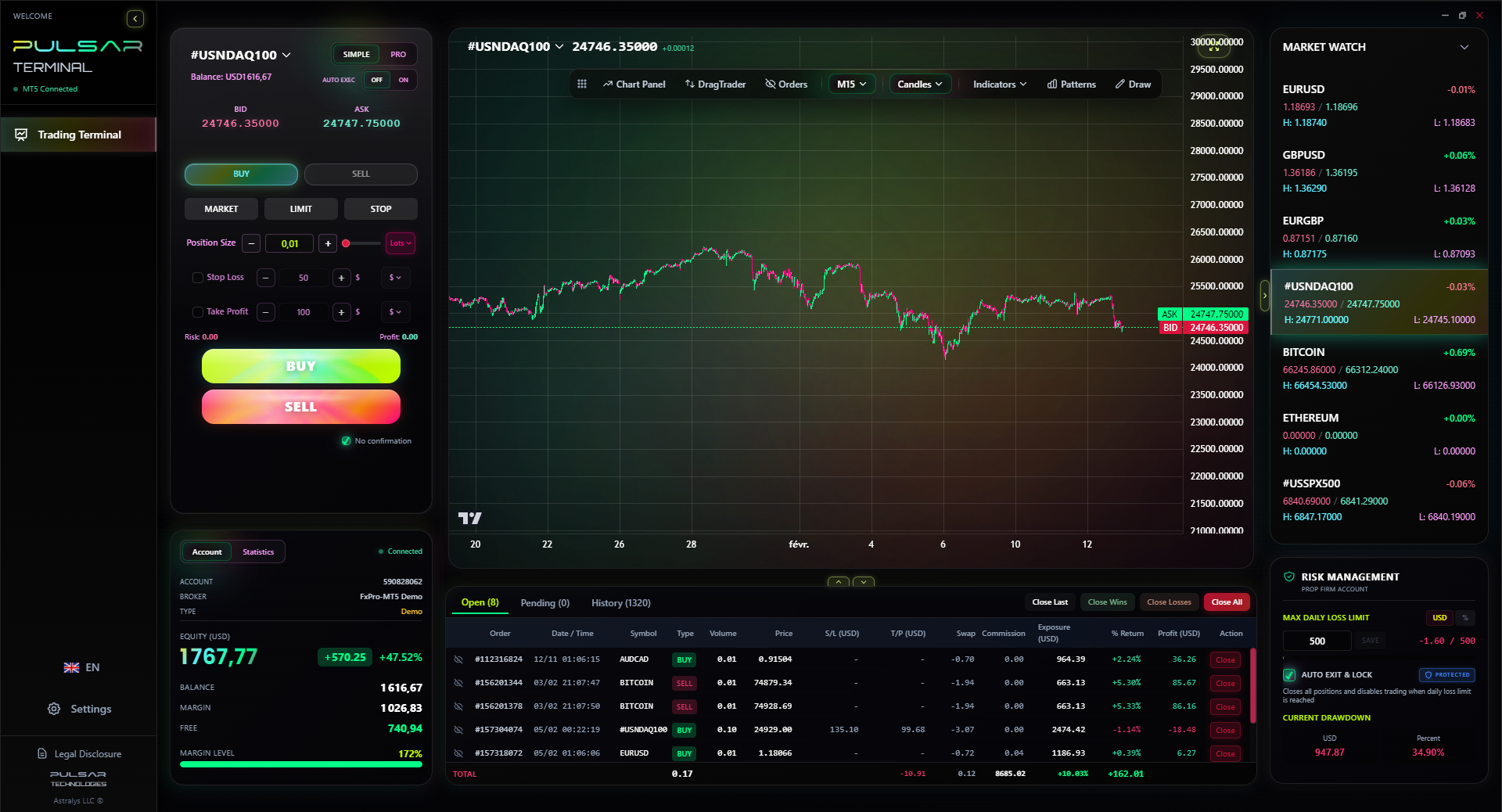
Managing prop firm drawdown and daily loss limits manually is a huge distraction; Pulsar Terminal automates this protection directly on your MT5 platform, so you can focus on the trade, not the rulebook.
Pulsar Terminal
The all-in-one MT5 companion: drag-and-drop orders, multi-TP/SL, trailing stop, grid trading, Volume Profile, and prop firm protection. Used by 1,000+ traders daily.
Okay, you've picked a firm. You've passed the challenge (or you're about to). Now, let's build your battlefield. A messy setup will lead to costly mistakes.
Step 1: The Broker Connection. When you sign up, the firm will give you credentials. This isn't a TradingView login; it's a broker login (like Tradovate, Rithmic, etc.). In TradingView, you go to the 'Trading Panel' and add this broker. This is the moment of truth. If it connects smoothly, you're golden.
Step 2: Chart Defaults. Set your default chart template. This includes your favorite indicators (MACD indicator, moving averages, Volume Profile), your color scheme, and your default chart type (I'm a Heikin Ashi candlestick guy for trends). Save this as your prop firm template.
Step 3: Order Defaults. This is critical. Set your default order type (I use 'Limit' for entry to control price), and pre-set your stop-loss and take-profit distances. For example, on the ES (S&P futures), I might set a default 5-point stop and a 15-point target. This way, when I click on the chart, the order is already structured with my risk parameters.
Step 4: The One-Chart Setup. One of the biggest advantages of prop firms that use TradingView is consolidating your workspace. I run a single 38-inch monitor with TradingView. I have 8 charts open: 4 major forex pairs, 2 equity indices, and 2 commodities. Because I can execute on any chart, I never have to switch contexts. My attention never wavers.
Step 5: Alerts and Scripts. Use TradingView's alert system for your strategies. But remember, if you're running a Pine Script strategy that places automated orders, you need to confirm the prop firm allows it. Most don't allow full automation, but they're usually fine with scripts that just give you visual or audio alerts.
My biggest workflow upgrade was linking my TradingView alerts to a soundboard on my PC. A specific 'ding' for a buy signal on gold, a different 'buzz' for a sell on the Euro. It sounds silly, but it trained my brain to react faster than just reading a pop-up.
“Prop firms that use TradingView offer an incredible advantage, but they don't make you a profitable trader. They just give a profitable trader a better weapon.”
I've blown a prop account or two. Let me save you the tuition.
Pitfall 1: Ignoring the 'Simulated' Environment. Remember, when you're in the evaluation or even the funded account, you're often trading in a simulated environment. The prop firm is matching your trades internally. This can sometimes lead to slight differences in fills versus the live market, especially during news events. Don't expect absolute perfection. I once got a fill 2 pips worse than the chart showed on a GBP/USD news spike and let it tilt me into revenge trading. Don't be me.
Pitfall 2: Overtrading to Hit a Target. You have 30 days to hit an 8% profit target. The clock is ticking. So you start taking sub-par setups just to 'get active.' This is the fastest path to a margin call. I did this on a Topstep combine years ago. I took 12 trades in two days out of boredom and anxiety, most of them mediocre. I wiped out half my daily loss limit and never recovered the confidence.
Pitfall 3: Not Understanding the Payout Process. You made $2,000, great! But when do you get it? Is there a minimum payout threshold? Do they pay via PayPal (which has fees) or direct bank transfer? One firm I used early on had a $500 minimum and only paid monthly. My first profitable month, I made $480. I didn't get a dime and had to wait another month. It was demoralizing.
Pitfall 4: Platform Complacency. Just because the TradingView integration works today doesn't mean it will work during the NFP report. Before you risk real money in the evaluation, test the platform during high volatility. Does it freeze? Do orders get rejected? I learned this with a now-defunct firm. Their bridge failed during a Fed announcement, my market order hung for 45 seconds, and I was filled at a catastrophic price. Always have a backup plan (like knowing how to log into the underlying broker platform directly in an emergency).
The bottom line? Prop firms that use TradingView offer an incredible advantage, but they don't make you a profitable trader. They just give a profitable trader a better weapon. Your discipline, your risk management, and your edge are still 100% on you. Treat the platform as a tool, not a crutch.
💡 Winston's Tip
Always test a prop firm's execution with a micro account or the smallest challenge first. Pay the $15 to see if their 'direct TradingView execution' is real or just marketing fluff. It's the cheapest due diligence you'll ever do.
FAQ
Q1Are prop firms that use TradingView legal in the US?
It's a gray area, but generally yes. Prop firms aren't traditional brokers, so they operate under different rules. The recent regulatory shifts have pushed them to partner with regulated entities (like OANDA) or use regulated futures brokers (like Tradovate, which is regulated by the NFA/CFTC) to provide services to US clients. The reputable ones are working hard to be compliant.
Q2What's the main advantage of TradingView integration over MT5?
Workflow efficiency and analysis power. On MT5, you chart, analyze, and execute in one place, but the charting tools are inferior. With a good TradingView integration, you get the world's best retail charting and analysis platform combined with direct execution. You don't have to switch windows or platforms, which saves critical seconds and reduces errors.
Q3Do I have to pay for a TradingView premium subscription?
Not usually. Most prop firm integrations work with a free TradingView account. However, if you want advanced features like more than 3 indicators per chart, multiple chart layouts, or faster data refreshes, you might need a Pro or Premium plan. Also, for real-time futures data, you'll likely need to subscribe to that data within TradingView ($5-$15/month).
Q4Can I use my custom Pine Script strategies to trade automatically?
Almost certainly not. Most prop firms explicitly forbid fully automated trading or the use of Expert Advisors (EAs) during the evaluation and funded stage. They want to see you trading. However, you can use Pine Script for alerts, signals, and visual drawings on your chart all you want. The execution must be manual.
Q5Is the 'pay after you pass' model too good to be true?
It's a legitimate and growing trend for 2026. It benefits the firm by attracting more traders. The catch is that the total fee you pay upon passing might be slightly higher than an upfront fee would have been (e.g., $299 total vs. $279 upfront). But since you only pay the bulk after proving you can profit, your initial risk is massively lower. It's a net positive for traders.
Q6What happens if TradingView or the internet goes down?
You need a contingency plan. Reputable prop firms will give you credentials to log into their backup execution platform (like the Tradovate or cTrader web platform directly). You should know how to quickly place or manage an order there. Never rely on a single point of failure when real money is involved.
Prof. Winston's Lesson
Key Takeaways:
- ✓Test execution speed before funding.
- ✓Prioritize 'Pay After You Pass' models.
- ✓Never risk >1% of your drawdown limit.
- ✓Have a backup platform ready.
- ✓TradingView is a tool, not a strategy.
How useful was this article?
Click a star to rate
Weekly Trading Insights
Free weekly analysis & strategies. No spam.
About the Author
James Mitchell
Senior Trading Analyst
Based in New York with over 9 years of trading experience. Focuses on major USD pairs, prop firm challenges, and the US regulatory landscape.
Comments
Risk Disclaimer
Trading financial instruments carries significant risk and may not be suitable for all investors. Past performance does not guarantee future results. This content is for educational purposes only and should not be considered investment advice. Always conduct your own research before trading.
You Might Also Like

Cara Trading Forex Sukses: 7 Prinsip dari Trader Profesional
Cara trading forex sukses dengan 7 prinsip trader pro: manajemen modal, disiplin, journal trading, backtest. Data nyata, bukan janji profit palsu.
Jam Trading Forex Terbaik untuk Trader Indonesia: Panduan Lengkap dengan Tabel Waktu
Panduan jam trading forex untuk trader Indonesia. Tabel 4 sesi dunia, jam emas 20:00-00:00, sesi mana yang harus dihindari. Data akurat + tips dari trader berpengalaman.
Top 5 Sàn Forex Uy Tín Nhất 2026: Review Jujur dari Trader Indonesia
Top 5 sàn forex uy tín 2026 untuk trader Indonesia. Review jujur: spread, deposit, withdraw, dukungan lokal. Exness, XM, IC Markets & lebih.
Get Pulsar Terminal
All these calculators are built into Pulsar Terminal with real-time data from your MT5 account. One-click position sizing, automatic risk management, and instant calculations.
Get Pulsar Terminal