


Here's a fact that might sting a bit: most South African traders spend more time worrying about which currency pair to trade than they do about securing their trading account login.

David van der Merwe
Emerging Markets Trader ·  South Africa
☕ 9 min read
What you'll learn:
- 1What Exactly Are We Logging Into?
- 2Setting Up Your Account: The First Line of Defence
- 3Logging Into MT4/MT5: Your Trading Desk
- 4When the Login Fails: Troubleshooting for SA Traders
- 5Keeping the Keys Safe: Ongoing Security
- 6Beyond the Basic Login: Tools That Live on Your Platform
- 7The Foundation: Picking a Broker You Can Trust to Log Into
Here's a fact that might sting a bit: most South African traders spend more time worrying about which currency pair to trade than they do about securing their trading account login. I know I did. For years, my Transport Forex login was just a password I reused from an old email. It took a near-miss with a suspicious login attempt from an IP in Johannesburg (while I was in Cape Town) to shake me awake. Your login isn't just a username and password. It's the front door to your capital, your trading history, and your financial data. Let's talk about how to lock it down properly.
When we talk about a 'Transport Forex login' in South Africa, we're usually referring to one of two things. First, it's your client portal access to Transport Forex (or any broker, really). This is where you manage your account, deposit and withdraw your Rands, and check your statements. Second, and more critically, it's your login to the actual trading platform - most often MetaTrader 4 or 5.
I made the classic mistake of treating these as the same thing. They're not. Your client portal password should be a fortress. Your trading platform password, while still important, is often provided by the broker and can be less complex. The real vulnerability point? The connection between them. If someone gets into your client portal, they can't necessarily trade for you, but they can withdraw your funds to a new bank account. That's the nightmare scenario.

Warning: Never, ever use the same password for your broker's client portal and your email account. If one is compromised, they all are. A hacker can reset your trading account password via your email.
Understanding this separation is the first step to real security. Your login protocol needs to defend both gates.
“Your login isn't just a username and password. It's the front door to your capital.”
The Sign-Up Process
When you open an account, you'll be asked for a mountain of info. This isn't bureaucracy; it's FSCA (Financial Sector Conduct Authority) regulation in action. Give accurate details. I learned this the hard way early on. I used a slightly different address on a form for 'privacy'. When I needed to verify my identity for a large withdrawal, it caused a three-week delay. The compliance team needed utility bills, affidavits... a total mess. Be transparent from the start.
Password Creation is a Strategy
Your password shouldn't be a word. It should be a sentence you can remember but a computer can't guess. Think 'TableMountainSeesMyFirstR10000Profit!' rather than 'Forex123'. Enable two-factor authentication (2FA) on your client portal immediately. If your broker doesn't offer 2FA, ask yourself why you're trusting them with your money. This single step blocks 99% of automated attacks.
The Initial Deposit
This is where your Transport Forex login starts to have real meaning. You're moving real ZAR into the environment. Use the payment methods they recommend - often a direct EFT or a credit card payment via a secure gateway. Avoid any 'shortcuts' or third-party payment requests. I always start with a minimum deposit, even if I plan to fund more. I test the withdrawal process with a small amount first. If I can't get R500 back out smoothly, I'm not putting R50,000 in. It's a simple rule that has saved me from two questionable brokers over the years.
Remember, the goal here isn't just to get logged in. It's to build a secure foundation. Every step you skip now is a vulnerability you'll have to manage later. For managing the risk on the trades you place after login, a solid position size calculator is non-negotiable.

💡 Winston's Tip
Write your main broker password on a physical piece of paper and lock it in a drawer. Not in a digital note. The old ways still work for the most important key.
“If you can't get R500 back out smoothly, you're not putting R50,000 in.”
This is the moment of truth. You enter your login credentials, server name (provided by your broker), and hit connect. If you get an 'invalid account' error, don't panic. 90% of the time, you've selected the wrong server type (e.g., choosing a 'live' server for a demo account). Double-check the details your broker emailed you.
Once you're in, your first job isn't to place a trade. It's to configure. Check the spreads on the pairs you trade. Is the EUR/USD spread 0.8 pips or 2.5? This directly impacts your scalping strategy viability. Set up your charts, apply your preferred indicators like the RSI indicator or MACD indicator, and save your profile. I can't tell you how many hours I've wasted re-drawing trendlines because I didn't save my workspace.

Pro Tip: Save your chart template and profile. Then, go to 'File' > 'Open Data Folder'. Copy the entire 'Profiles' and 'Templates' folders to a cloud drive or USB. If your platform crashes or you switch computers, you can restore your exact setup in minutes.
The platform is your cockpit. A messy, unorganized login session leads to messy, emotional trades. Get the environment right before you even think about market analysis.
“If you can't get R500 back out smoothly, you're not putting R50,000 in.”
You will face login issues. Everyone does. Here’s how I handle the common ones.
'No Connection' or Timeout Errors: This is almost always on your end. South African internet can be flaky. First, check if your VPN is on (if you use one). Some brokers, like Exness or IC Markets, can block certain VPN IP ranges. Turn it off and try again. If that fails, switch your network. Jump from Wi-Fi to mobile data on your phone's hotspot. It’s a quick diagnostic.
'Invalid Account' or Password Errors: Retype everything manually. Don't copy-paste. Passwords can pick up hidden spaces. If it's a trading platform password, contact your broker's support for a reset. They usually provide a new one instantly.
The Platform Opens But Charts Don't Load: Your data center might be having issues. In MT4/MT5, go to Tools > Options > Server. If you see an option for a different server location (e.g., London, New York, Tokyo), try switching. A delay of more than a few minutes on chart loading is a sign to walk away for a bit. Don't trade on stale data.
I had a brutal lesson in 2019. I was in a short trade on XAU/USD during a news event. My platform froze, then disconnected. By the time I got back in, my stop-loss had been skipped, and I was facing a loss 50% bigger than planned. I learned that if the login or data feed feels unstable, close your positions manually via your broker's mobile app or web portal if you can. Don't just sit and hope.
💡 Winston's Tip
If your platform feels slow or unresponsive after login, don't trade. That latency will cost you more pips than sitting out ever will.
“A messy, unorganized login session leads to messy, emotional trades.”
Logging in once securely isn't enough. Security is a habit.
- Unique Passwords: Use a password manager. Full stop. I use one that generates and stores a 20-character random password for every broker portal, email, and social account. I only need to remember one master password.
- Device Hygiene: Don't trade on public computers. Ever. If you use your own laptop, ensure it has updated antivirus software. Be wary of 'free' trading indicator downloads from forums; they can contain keyloggers.
- The Withdrawal Test: Periodically, maybe once a quarter, process a small withdrawal. It confirms your linked South African bank account is still active and verifies the financial pipeline is working. It also alerts you to any new fees.
- Statement Reviews: Log into your client portal weekly just to scan your account statement. Look for any trades you didn't place or any tiny withdrawals you didn't authorize. Catching fraud early is everything.
Your Transport Forex login credentials are as valuable as the money in the account. Protect them with the same intensity. A common endpoint of poor security is a margin call you didn't initiate.
“A messy, unorganized login session leads to messy, emotional trades.”
Once you're logged in and secure, the real work begins. The native MT5 platform is powerful, but it can feel clunky for advanced order management. This is where companion tools come in. They don't replace your Transport Forex login; they augment what you can do after you're in.
For years, I manually placed multiple take-profit orders. I'd calculate 0.5% risk here, 0.3% there, set three separate orders... it was tedious and error-prone. I once mis-typed a sell limit as a sell stop and entered a trade completely backwards. The market moved against me instantly for a R1,200 loss before I could cancel it.
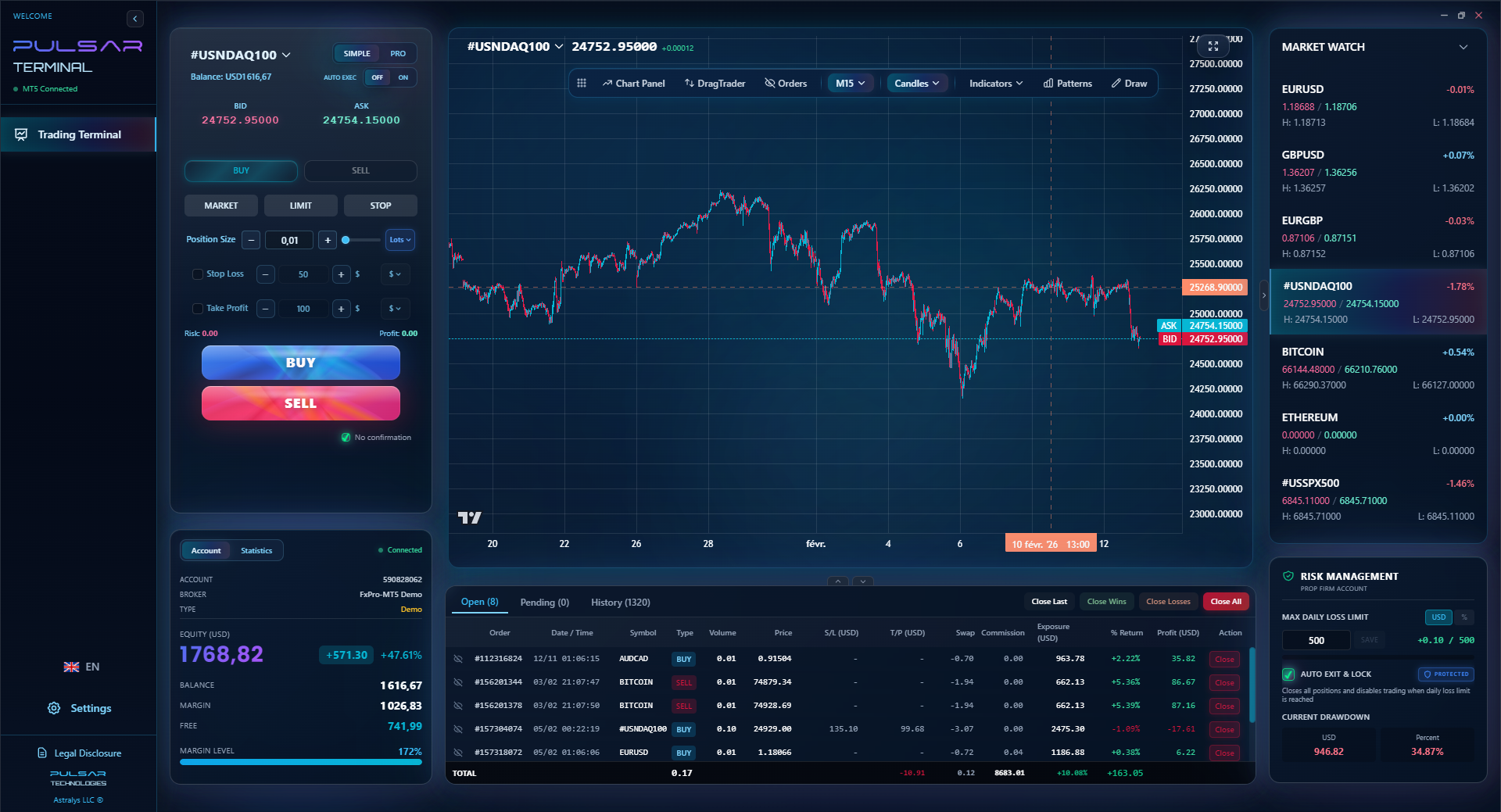
Modern trading terminals that plug into MT5 allow you to drag and drop an order with multiple take-profit and stop-loss levels set in a single click. You can set a breakeven stop to move automatically, or a trailing stop that follows the price. For a swing trading approach where you're managing trades over days, this automation is a game-saver. It takes the emotion out of the mechanical parts of trade management.
The key is to use tools that are secure and don't require you to share your main login credentials. They should work through MT5's secure API. Your core Transport Forex login remains with the broker; the tool just helps you execute your plan more efficiently once you're inside.
💡 Winston's Tip
Perform a 'withdrawal drill' every six months. Withdraw 5% of your balance. If it's not smooth, find a new broker. Liquidity is the only truth.
Managing complex trades after you login is where most mistakes happen; Pulsar Terminal's drag-and-drop orders with multiple TP/SL levels automate your plan directly on MT5.
Pulsar Terminal
The all-in-one MT5 companion: drag-and-drop orders, multi-TP/SL, trailing stop, grid trading, Volume Profile, and prop firm protection. Used by 1,000+ traders daily.
“Your Transport Forex login is only as secure as the company behind it.”
All this talk about secure logins is pointless if the broker itself is shady. Your Transport Forex login is only as secure as the company behind it. For South African traders, the checklist is specific.
Regulation is Non-Negotiable: The broker must be regulated by a reputable authority. The FSCA is ideal for local operations. For international brokers, look for ASIC (Australia), CySEC (Cyprus), or FCA (UK) regulation. This ensures client money segregation and a degree of oversight. I've reviewed many, and brokers like Pepperstone and XM often meet these high regulatory standards.
ZAR Account & Local Support: Can you deposit and withdraw in Rands without crazy conversion fees? Is there a South African phone number or support team that operates during JSE hours? When you have a login issue at 10:30 AM on a Tuesday, you don't want to wait for a UK office to open.
Trading Costs: Look beyond the headline. It's not just the spread. What's the commission? Are there inactivity fees? Does your EUR/USD guide assume a 1-pip spread, but the broker charges 1.8? That erodes your edge fast.
I opened an account with a flashy international broker once because they offered a 100% deposit bonus. The catch? My Transport Forex login to the client portal worked fine, but withdrawals were a months-long nightmare of paperwork and excuses. I learned that the easiest part of the relationship is the login. The hardest part is getting your money back. Choose a broker where both are simple.
FAQ
Q1I forgot my Transport Forex login password. What should I do?
Don't panic. Go to your broker's website and click 'Forgot Password' on the client portal login page. You'll receive a reset link via email. For your MT4/MT5 trading password, you usually cannot reset it yourself. You need to contact your broker's support directly via live chat or email. They will generate a new one for you, often within minutes.
Q2Is it safe to use a VPN when logging into my forex trading account?
It can be, but it's tricky. A VPN adds security on public Wi-Fi but can also trigger your broker's security systems, flagging your login as suspicious from an unknown location. Some brokers explicitly prohibit VPNs. My advice: check your broker's policy. If you must use one, try to consistently connect from the same VPN server location to avoid repeated security alerts.
Q3Why does my MT5 platform keep disconnecting after login in South Africa?
This is usually a local internet stability issue. SA's load-shedding and network congestion are prime culprits. First, test your connection on another device. If the problem persists, in MT5, try switching servers under Tools > Options > Server. If disconnections are frequent, consider a broker with a local server presence in South Africa for a more stable data feed.
Q4Can someone else trade on my account if they get my login details?
Yes, absolutely. If someone has your client portal login, they can potentially withdraw funds. If they have your MT4/MT5 login and server details, they could open and close trades. This is why two-factor authentication (2FA) on your client portal is critical. It adds a layer they can't bypass without your phone.
Q5What's the difference between my account login and my trading platform login?
They are separate keys to different doors. Your account login (client portal) accesses your money management dashboard for deposits, withdrawals, and statements. Your trading platform login (e.g., MT5) accesses the software where you view charts and execute trades. You should have strong, unique passwords for both.
Q6Are there any specific South African laws about forex trading logins?
There's no specific 'login law,' but the FSCA's general financial advice and intermediary service regulations require brokers to implement strong security measures to protect client data and funds. This includes secure login protocols. As a client, you also have a responsibility to keep your credentials secure under the terms of service you agree to.
Prof. Winston's Lesson
Key Takeaways:
- ✓Use a password manager for unique 20-character passwords.
- ✓Enable 2FA on your client portal immediately.
- ✓Test withdrawals before making large deposits.
- ✓Never trade during unstable platform connections.
- ✓Choose FSCA or top-tier regulated brokers only.
How useful was this article?
Click a star to rate
Weekly Trading Insights
Free weekly analysis & strategies. No spam.
About the Author
David van der Merwe
Emerging Markets Trader
Johannesburg-based trader with 11 years in emerging market currencies. Specializes in ZAR pairs, FSCA-regulated trading, and South African market analysis.
Comments
Risk Disclaimer
Trading financial instruments carries significant risk and may not be suitable for all investors. Past performance does not guarantee future results. This content is for educational purposes only and should not be considered investment advice. Always conduct your own research before trading.
You Might Also Like

Cara Trading Forex Sukses: 7 Prinsip dari Trader Profesional
Cara trading forex sukses dengan 7 prinsip trader pro: manajemen modal, disiplin, journal trading, backtest. Data nyata, bukan janji profit palsu.
Jam Trading Forex Terbaik untuk Trader Indonesia: Panduan Lengkap dengan Tabel Waktu
Panduan jam trading forex untuk trader Indonesia. Tabel 4 sesi dunia, jam emas 20:00-00:00, sesi mana yang harus dihindari. Data akurat + tips dari trader berpengalaman.
Top 5 Sàn Forex Uy Tín Nhất 2026: Review Jujur dari Trader Indonesia
Top 5 sàn forex uy tín 2026 untuk trader Indonesia. Review jujur: spread, deposit, withdraw, dukungan lokal. Exness, XM, IC Markets & lebih.
Get Pulsar Terminal
All these calculators are built into Pulsar Terminal with real-time data from your MT5 account. One-click position sizing, automatic risk management, and instant calculations.
Get Pulsar Terminal