


Let's cut through the marketing fluff right now.

David van der Merwe
Emerging Markets Trader ·  South Africa
☕ 10 min read
What you'll learn:
Let's cut through the marketing fluff right now. A Forex VPS is a glorified, overpriced computer you rent so your trading robot doesn't stop when Eskom loadsheds. That's it. The entire industry is built on selling you a solution to a problem you might not even have, and 90% of traders are better off putting that monthly fee into a better broker or a position size calculator. I've blown money on these services, watched friends get rinsed, and I'm here to give you the unvarnished truth about what a Forex VPS actually does.
VPS stands for Virtual Private Server. Forget the fancy name. Imagine a massive, powerful computer sitting in a data centre in London or New York. A company slices that computer into dozens of smaller, virtual computers. You rent one of those slices. That's your VPS.
You connect to it remotely from your laptop in Cape Town or Durban. Once you're connected, you install your trading platform (like MetaTrader 4 or 5) and your Expert Advisors (EAs) or scripts on it. The VPS then runs 24/7, regardless of whether your home PC is on, your internet is down, or there's a power outage in your suburb.

Warning: The biggest misconception is that a VPS makes your trades faster. It doesn't. The speed of your trade execution is determined by your broker's servers and your internet connection to the broker. A VPS just ensures your trading terminal is always online to send the order. If your broker's servers are junk, a VPS won't save you.
The core value proposition is uptime. For a scalping strategy that might open and close 50 trades a day, or a grid EA that needs to manage orders constantly, that uptime is non-negotiable. For the average swing trader checking charts once a day? It's probably a waste of cash.
“A Forex VPS is a glorified, overpriced computer you rent so your trading robot doesn't stop when Eskom loadsheds.”
This is where you need to be brutally honest with yourself. The VPS companies want you to think every trader needs one. They don't.
The 3 Traders Who MUST Use a VPS
- Algorithmic/EA Traders: If you run a robot, especially one that trades multiple times a day or manages complex order structures, a VPS is essential. I learned this the hard way in 2018. I was running a momentum EA on USD/ZAR. Loadshedding hit Midrand, my PC shut off, and the EA couldn't close a profitable trade that reversed. I watched the loss mount on my phone, helpless. That R1,500 loss paid for two years of VPS fees.
- Prop Firm Traders: Most proprietary trading firms, like the ones you see all over Instagram, have strict rules. Many require your trading platform to be running 24/5 if you're using EAs. If your terminal disconnects during a news event and their system can't monitor your risk, they might fail you on the spot. A VPS is cheap insurance for a R20,000 challenge account.
- Traders with Unreliable Infrastructure: If your home internet drops multiple times a day, or your power situation is so dire you can't guarantee a few hours of uptime, then yes, a VPS solves a real problem.
The Traders Who Should Skip It
- Manual Swing Traders: You hold trades for days or weeks. If your internet is down for 3 hours, your EUR/USD trade won't care. Just use a stop-loss.
- Discretionary Day Traders: You're in front of the screen. If the power goes out, you're not trading anyway. A mobile app from a broker like IC Markets or Pepperstone for emergency management is a better backup.
- Beginners: You have no business worrying about a VPS. Focus on not blowing up your first account. Your biggest risk is your own decisions, not a disconnection.

💡 Winston's Tip
A VPS is a tool for execution, not a source of edge. A losing strategy on a VPS just loses money more efficiently.
“The biggest misconception is that a VPS makes your trades faster. It doesn't.”
If you've decided you're in the "need" category, don't just buy the first Google ad. Here’s what matters, in order of importance.
- Proximity to Your Broker's Server: This is the #1 factor for reducing latency (lag). If your broker's main server is in London (LD4), you want a VPS in London. Connecting from a Johannesburg VPS to London adds needless milliseconds. Most good brokers, like Exness or XM, will tell you their server locations.
- Specifications (RAM & CPU): You don't need a gaming PC. Running MT5 and a few EAs is lightweight. 2GB of RAM and a decent CPU core is plenty. Don't get upsold on 8GB unless you're running something insane.
- Uptime Guarantee: Look for a 99.9% or higher Service Level Agreement (SLA). This is their promise of reliability. Read the fine print on their compensation if they fail.
- Ease of Setup: The best providers have one-click installs for MT4/MT5. You should be up and running in 10 minutes, not spending hours configuring a Linux server.
- Price: The Forex-VPS niche is overpriced. You can often get the same (or better) specs from a general-purpose cloud provider for less. I used a "specialist" Forex VPS for $30/month. I now use a virtual machine from a mainstream cloud service with better specs for $12. The only difference was the five minutes it took me to install Windows myself.

Pro Tip: Test your need first. Run your EA on an old laptop you leave on 24/7 for a month. See if the constant uptime makes a measurable difference to your results. You might be surprised.
“The biggest misconception is that a VPS makes your trades faster. It doesn't.”
Let's talk Rands and sense. The monthly fee is just the start.
Typical Costs:
- "Forex-Optimized" VPS: R450 - R900 per month ($25-$50). You're paying a premium for the label.
- General Cloud VPS (e.g., AWS, DigitalOcean, Azure): R180 - R600 per month ($10-$35). More work to set up, but identical or better performance.
- Broker-Provided VPS: Often "free" if you meet a monthly trading volume. This can be a great deal, but check the specs and location. Sometimes it's just a marketing gimmick with poor performance.
Mistakes I've Made (So You Don't Have To):
- Paying for Speed You Can't Use: I once bought a VPS with a 1 Gbps connection, thinking it would make my orders lightning fast. It didn't. My broker's execution speed was the bottleneck. I was just funding their new office coffee machine.
- Not Monitoring the VPS: Setting and forgetting is a trap. In early 2020, my EA had a weird error and stopped trading. The VPS was running fine, but the platform had frozen. I lost a week of potential trades because I didn't check. You still need to log in periodically.
- Using it as a Crutch for a Bad Strategy: This is the big one. A VPS will not turn a losing EA into a winning one. It just ensures your losing strategy loses money 24 hours a day without interruption. I've seen guys spend more on VPS fees over a year than their entire trading profit.
Think of it as a utility bill, not an investment. It's a cost of doing business if your business model requires it.
💡 Winston's Tip
The 'ping' from your VPS to your broker's server is the only speed metric that matters. Aim for less than 1ms.

“A VPS will not turn a losing EA into a winning one. It just ensures your losing strategy loses money 24 hours a day.”
Assuming you've bought a Windows VPS, here’s the straightforward process. It’s easier than most people think.
- Get Your Login Details: You'll receive an IP address, a username (usually
Administrator), and a password via email. - Connect via Remote Desktop: On your Windows PC, search for "Remote Desktop Connection." Type in the IP address from your email and click Connect. Enter the username and password. Boom, you're now looking at the desktop of your remote computer.
- Install Your Trading Platform: Open a browser on the VPS, go to your broker's website, and download MT4/MT5. Install it just like you would at home. Log into your trading account.
- Install Your EAs and Indicators: Copy your
Experts,Indicators, andPresetsfolders from your local PC to the VPS desktop via the remote connection (you can drag and drop files). Place them in the correct MT4/5 data directory on the VPS. - Configure and Test: Open the platform, attach your EA to a chart, and run it on a demo account or with minimal lot size for a day. Check the "Journal" and "Experts" tabs for errors.
- Disconnect (This is Key): Once it's running, you can simply close the Remote Desktop window. Your VPS will keep running everything in the background. Your home PC can be off.
To check on things, just reconnect via Remote Desktop. That’s it. No magic.

Example: My current setup costs me $14/month (about R260). It's in the same data centre as my broker. My average latency (ping) is 0.3 milliseconds. My home connection to the same broker is 180ms. For my algorithmic trades, that consistency matters. For my manual XAU/USD swings, I don't bother putting it on the VPS.
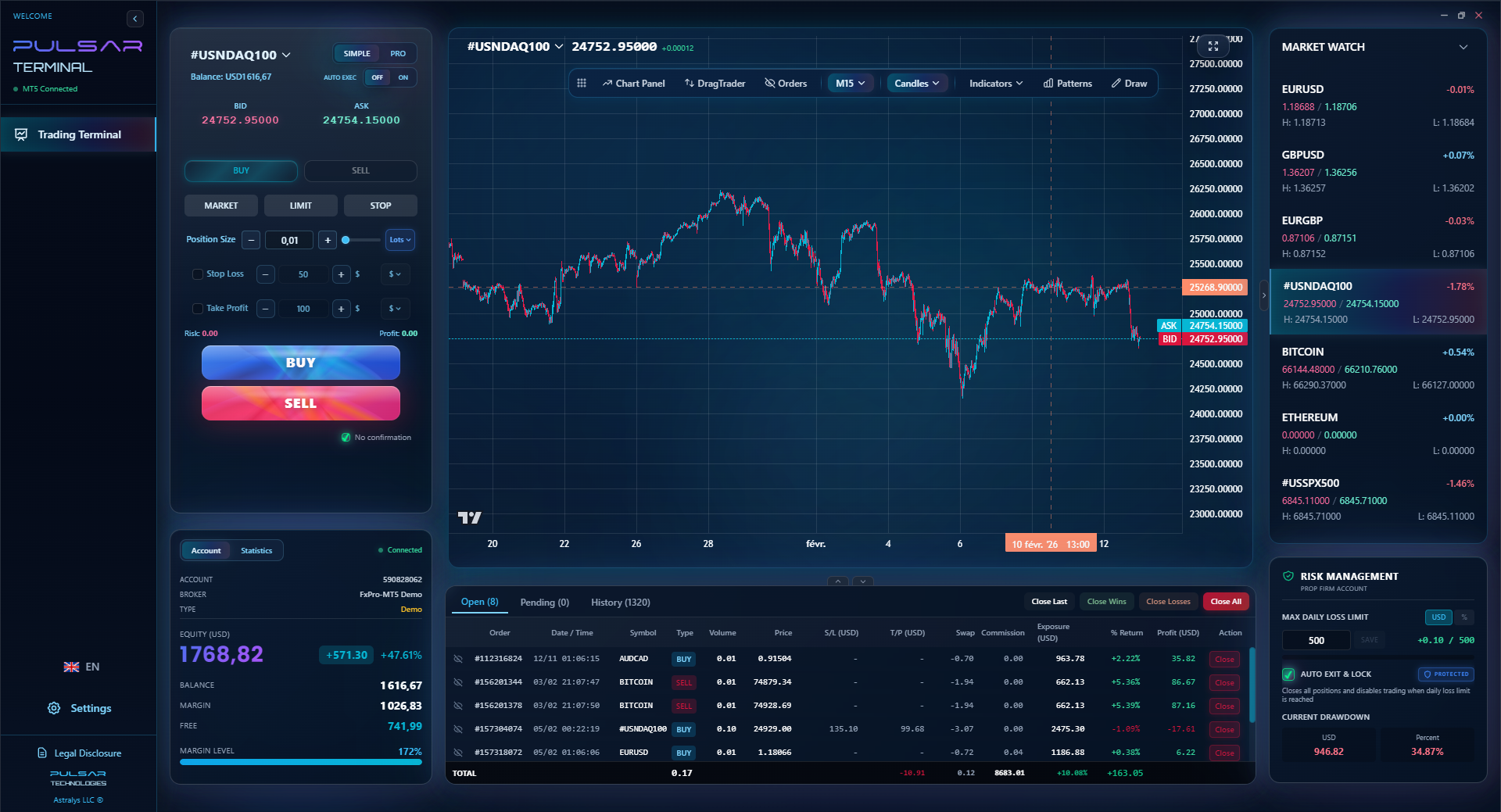
When your EA is running on a VPS, you need precise, automated trade management tools like Pulsar Terminal's multi-TP/SL and trailing stops to work flawlessly 24/5.
Pulsar Terminal
The all-in-one MT5 companion: drag-and-drop orders, multi-TP/SL, trailing stop, grid trading, Volume Profile, and prop firm protection. Used by 1,000+ traders daily.
“A VPS will not turn a losing EA into a winning one. It just ensures your losing strategy loses money 24 hours a day.”
Before you enter your credit card details, explore these options. You might save yourself a recurring bill.
1. Broker-Free VPS Deals: This is the best place to start. Many brokers offer a free or heavily subsidized VPS if you meet certain conditions. Usually, it's a minimum account balance or a monthly trading volume.
| Broker | Typical VPS Offer | Catch? |
|---|---|---|
| Most ECN/Pro Brokers | Free VPS with $5,000+ deposit or 5+ lots monthly volume. | You need significant capital or high activity. |
| Some Prop Firms | Free VPS included with funded account. | You have to pass their challenge first. |
| Brokers like XM | Free VPS with a $500+ deposit on certain account types. | Specs might be basic, but often good enough. |
2. The Old Laptop/PC Solution: Got an old machine gathering dust? Wipe it, install only Windows and your trading platform, and leave it on in a corner. Use a free remote access tool like TeamViewer or Chrome Remote Desktop to check on it from your phone. Total cost: your electricity bill. Reliability depends on your home internet.
3. Cloud Server Providers (The Techie Option): Companies like Amazon Web Services (AWS), Microsoft Azure, or Google Cloud offer free tiers or very cheap introductory credits. You can spin up a Windows server for less than a dedicated Forex VPS. The setup is more technical, but the savings are real. I know a guy running a whole basket of EAs on a $8/month Linux server using a headless MT4 terminal - it's next-level, but it works.
The bottom line? A VPS is a tool, not a strategy. It won't improve your RSI indicator readings or make your MACD indicator crosses more accurate. It's plumbing. Make sure your house needs new pipes before you call the plumber.
💡 Winston's Tip
Before you buy, run your EA on an old PC for a week. If the results don't change, you just proved you don't need a VPS.
“Focus on your strategy, your psychology, and your position size. Let the tech be a silent servant, not an expensive master.”
Here in SA, we have a unique set of problems: loadshedding, expensive and sometimes shaky internet, and brokers whose servers are a hemisphere away. A VPS can solve some of these issues, but it's not a universal fix.
For the South African Algorithmic Trader: It's a business expense. Get one. But be smart - choose a location near your broker (likely London or New York), not Johannesburg. The reduced latency from your home connection is irrelevant; it's the VPS-to-broker link that counts.
For the South African Manual Trader: Ask yourself: "What's my biggest risk?" Is it a disconnection, or is it my own emotional decisions and poor risk management? For 80% of you, the answer is the latter. That R500 a month is better spent on education, or better yet, left in your account to avoid a margin call.
I'll leave you with this. In 12 years of trading, the only times a VPS has been critical were when I was running automated systems. Every other time, it was a convenience I could have lived without. Don't let the fear of missing out (FOMO) on a trade trick you into a recurring expense for a service that provides no edge. Focus on your strategy, your psychology, and your position size calculator. Let the tech be a silent servant, not an expensive master.

FAQ
Q1Does a Forex VPS make my internet trading faster?
No, and this is the biggest myth. A VPS improves reliability (uptime), not raw speed. The execution speed is determined by your broker's technology and the connection between the VPS and the broker's server. If your broker is slow, a VPS won't help.
Q2How much does a good Forex VPS cost in South African Rands?
Expect to pay between R450 and R900 per month for a "Forex-optimized" service. However, you can get identical performance from general cloud providers (like AWS or DigitalOcean) for R180 to R600 if you're willing to do a bit more setup yourself.
Q3Can I use a VPS for prop firm challenges?
Absolutely, and for many firms, it's practically mandatory if you use EAs. They require 24/5 platform uptime for monitoring. A VPS ensures you don't get failed for a disconnection. It's cheap insurance for a large challenge fee.
Q4What's the difference between a broker's free VPS and a paid one?
Broker VPS services are often basic but sufficient. They're usually in a good location relative to their servers. Paid, independent VPS might offer more control, better specs (CPU/RAM), and support for multiple broker platforms. Always test the free one first.
Q5Is a VPS safe? Can the provider see my trades or steal my EA?
Reputable providers operate like any other cloud service. They shouldn't have access to the data inside your virtual machine. The risk is very low, similar to using online banking. For extreme security, you can use encryption for your EA files, but for most traders, it's not a realistic concern compared to other market risks.
Q6I'm a swing trader. Do I need a VPS?
Almost certainly not. If you hold trades for days or weeks and manage them manually, a brief disconnection is irrelevant. Your stop-loss and take-profit orders are held on the broker's server, not your PC. Save your money.
Q7What happens if my VPS crashes or has an outage?
Your open trades remain active with your broker. However, your EA or trading terminal will stop functioning until the VPS is restored. This is why choosing a provider with a high uptime guarantee (99.9%+) is crucial. You still need to monitor your VPS occasionally.
Prof. Winston's Lesson
Key Takeaways:
- ✓VPS provides uptime, not trading speed.
- ✓Only algo & prop firm traders truly need one.
- ✓Location near your broker's server is critical.
- ✓Costs range from R180-R900/month. Shop around.
- ✓Test with old hardware before you buy.
How useful was this article?
Click a star to rate
Weekly Trading Insights
Free weekly analysis & strategies. No spam.
About the Author
David van der Merwe
Emerging Markets Trader
Johannesburg-based trader with 11 years in emerging market currencies. Specializes in ZAR pairs, FSCA-regulated trading, and South African market analysis.
Comments
Risk Disclaimer
Trading financial instruments carries significant risk and may not be suitable for all investors. Past performance does not guarantee future results. This content is for educational purposes only and should not be considered investment advice. Always conduct your own research before trading.
You Might Also Like

Cara Trading Forex Sukses: 7 Prinsip dari Trader Profesional
Cara trading forex sukses dengan 7 prinsip trader pro: manajemen modal, disiplin, journal trading, backtest. Data nyata, bukan janji profit palsu.
Jam Trading Forex Terbaik untuk Trader Indonesia: Panduan Lengkap dengan Tabel Waktu
Panduan jam trading forex untuk trader Indonesia. Tabel 4 sesi dunia, jam emas 20:00-00:00, sesi mana yang harus dihindari. Data akurat + tips dari trader berpengalaman.
Top 5 Sàn Forex Uy Tín Nhất 2026: Review Jujur dari Trader Indonesia
Top 5 sàn forex uy tín 2026 untuk trader Indonesia. Review jujur: spread, deposit, withdraw, dukungan lokal. Exness, XM, IC Markets & lebih.
Get Pulsar Terminal
All these calculators are built into Pulsar Terminal with real-time data from your MT5 account. One-click position sizing, automatic risk management, and instant calculations.
Get Pulsar Terminal