


Here's a fact that might sting a bit: most South African traders download their first forex analysis app based on a flashy ad, not on what it actually does.

David van der Merwe
Trader de Mercados Emergentes ·  South Africa
☕ 10 min de lectura
Lo que aprenderás:
- 1What Exactly Is a Forex Analysis App? (It's Not Just Charts)
- 2The Local Landscape: Regulations and Realities for SA Traders
- 3Breaking Down the Key Features: What to Actually Look For
- 4Costs and Fees: The Reality Check
- 5The MT4/MT5 environment and Companion Apps
- 6From My Trading Journal: Two Costly App Mistakes
- 7How to Choose the Right App for YOU
- 8Final Thoughts for the South African Trader
Here's a fact that might sting a bit: most South African traders download their first forex analysis app based on a flashy ad, not on what it actually does. I know I did. Over a decade later, after burning through more virtual capital than I care to admit on platforms that didn't fit my style, I've learned the hard way that the right app isn't just a tool, it's your trading partner. In a market with nearly 200,000 daily participants and growing fast, your edge often comes down to the software you trust. Let's talk about what really matters when you're choosing one.
When we say 'forex analysis app,' most folks picture a phone screen full of candlesticks. That's part of it, sure. But it's the difference between looking at a map and having a GPS with live traffic updates. A proper analysis app is your central hub. It's where you see price action, sure, but also where you apply your RSI indicator to spot divergences, draw your trendlines, manage your open positions, and sometimes even execute the trade itself.
In South Africa, with our unique market hours and the volatility of pairs like USD/ZAR, a good app needs to be more than just pretty. It needs to be reliable when loadshedding hits and your mobile data is all you've got. It needs to handle the exotic pairs we often trade without freezing up. The core functions break down into three areas: charting and technical tools, fundamental data feeds (like economic calendars), and trade execution. The best ones make all three feel seamless.

Warning: Don't confuse a broker's basic trading platform with a dedicated analysis app. Many brokers offer a bare-bones platform for placing orders. A true analysis app gives you the deep, customizable tools to decide what order to place in the first place.
This is the part you can't ignore. Trading in South Africa is legal, but it's framed by a specific set of rules. The main watchdog is the Financial Sector Conduct Authority (FSCA). They took over from the FSB a few years back. Any broker you sign up with should ideally be FSCA licensed. This isn't just bureaucratic box-ticking, it means they have to follow rules like keeping your money in a separate account from their own operating funds.
Then there's the South African Reserve Bank (SARB) and their exchange controls. You need to know this: as a resident, you have an annual discretionary allowance for moving money offshore. I learned this the awkward way after a good run on EUR/USD, only to get tangled in paperwork moving profits back. Plan your funding and withdrawals with these limits in mind.
Why This Matters for Your App Choice
Your analysis app might be global, but your broker and your money are local. You need an app that integrates smoothly with FSCA-regulated brokers popular here. Think about deposit methods, too. Does the app or its connected broker support instant EFTs, or are you stuck waiting days for an international SWIFT transfer? That downtime can kill a trading opportunity. Most major international brokers like Exness or IC Markets have local presence and support these methods, and their dedicated apps are built for it.

💡 Consejo de Winston
Your first app should feel boring, not exciting. Excitement leads to overtrading. Boring leads to consistency.
“Your edge isn't in the software's features; it's in your ability to use them with discipline.”
App stores are flooded with options. Cutting through the noise means focusing on features that impact your P&L, not just ones that look cool.
Charting & Tools: This is non-negotiable. You need multiple timeframes, a wide range of drawing tools (Fibonacci, channels, etc.), and the ability to save templates. Can you easily switch between a scalping strategy layout and a swing trading setup? I wasted months on an app that made this a 10-minute chore every time.
Indicators & Customization: Pre-loaded indicators like Moving Averages, Bollinger Bands, and the MACD indicator are standard. The real test is customizability. Can you adjust the parameters easily? Can you create your own alerts based on those indicators? The best apps let you build a unique workspace.
Execution & Risk Management: This is where many free apps fall short. You need one-tap trading, reliable stop-loss and take-profit placement, and visibility of your spread in real-time. I once used an app with a gorgeous charting package, but its order execution was laggy. Slippage on a volatile USD/ZAR move cost me R1,200 on a single trade. Never again.
Data & News Integration: A built-in economic calendar that filters for high-impact ZAR and USD events is gold. So are real-time news feeds from reputable sources. You shouldn't have to jump between five different apps.

Pro Tip: Before you commit, test the app's alert system. Set a price alert on USD/ZAR and see how quickly it notifies you. If it's slow or unreliable, imagine what that means for a stop-loss order.
Let's talk numbers, because this is where dreams meet reality. The app itself might be free, but trading never is.
Spreads & Commissions: This is your primary cost. In South Africa, you can find tight spreads on majors. For example, some brokers offer EUR/USD from 0.0 pips on a 'Raw' account, but then charge a commission per lot. Others have slightly wider spreads but no commission. You need your analysis app to display the effective cost clearly. A 0.5 pip spread with a $5 commission is very different from a 1.5 pip spread with no commission, especially for scalping.
Overnight Financing (Swap): If you hold positions overnight, you pay or receive swap interest. These rates can be brutal on exotics like USD/ZAR. A good app will show the swap rate for your specific lot size before you open the trade, not just in some hidden menu afterward.
Inactivity Fees: This one catches people off guard. Some brokers, even FSCA-regulated ones, will charge a monthly fee (sometimes R1,500 or more) if your account is dormant. Your analysis app won't warn you about this. It's on you to read the broker's terms.
Here’s a quick comparison of common cost structures you'll see:
| Cost Type | Typical Range | Paid To | Key Question for Your App |
|---|---|---|---|
| Spread | 0.0 - 1.5 pips (Majors) | Broker | Does it show live, dynamic spreads on the chart? |
| Commission | $3 - $10 per lot (round turn) | Broker | Can you calculate commission into your position size calculator? |
| Overnight Swap | Variable, can be high on ZAR pairs | Broker | Are swap rates visible and easy to understand in the order window? |
| Data Fees | Sometimes for premium news/feeds | App Provider | Are the free data feeds sufficient, or do you need the paid tier? |
“I've lost money because of app choices. Not just from bad trades, but from the software itself failing me.”
Here in SA, MetaTrader 4 and 5 are practically the national platforms. They're reliable, universally supported, and most local brokers offer them. But let's be honest, their native analysis tools can feel a bit... dated. That's where companion apps come in.
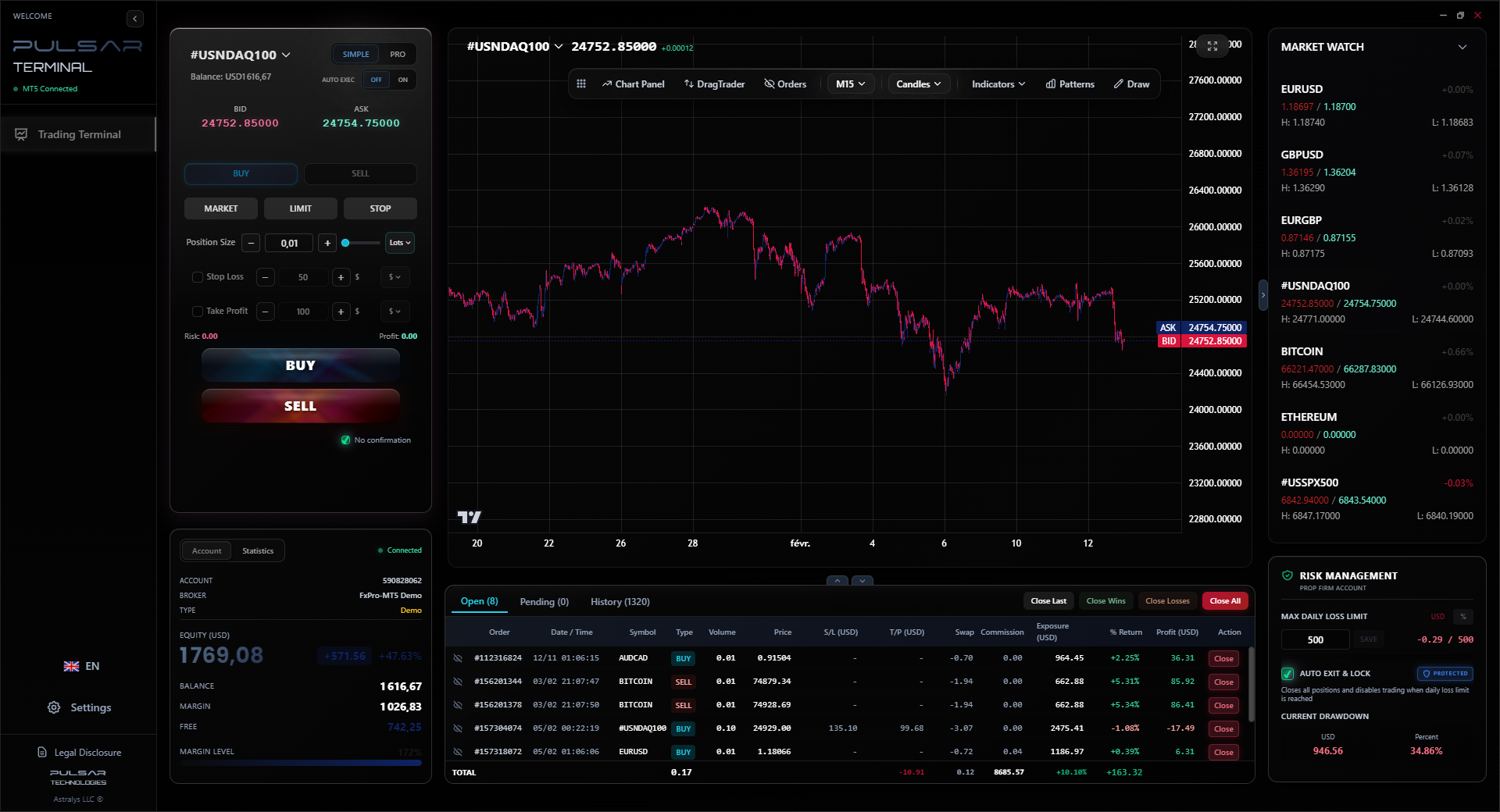
These are third-party applications that connect to your MT4/MT5 platform and supercharge it. They don't replace your broker's terminal; they sit on top of it, offering advanced order management, better charting tools, and automated features. This is a game-changer for managing risk.
For instance, a good companion app can automate trailing stops or set breakeven points automatically when a trade goes a certain number of pips in your favor. I manually moved my stop-loss to breakeven for years, often getting distracted and missing the perfect moment. Automating that simple task saved me from countless small losses. These apps also often include advanced visual tools like Volume Profile, which can give you incredible insight into market structure that standard MT4 lacks.
If you're trading with a prop firm or in a challenge, some of these apps have features specifically for managing the strict daily loss limits, helping you avoid a margin call from a single bad move.
💡 Consejo de Winston
Test an app's order execution with a 1-cent risk on a demo account during high volatility. If it slips more than 2 pips consistently, delete it.
Managing complex orders and risk on MT5 can be clunky, but companion apps like Pulsar Terminal automate trailing stops, breakeven moves, and prop firm loss limits directly on your charts.
Pulsar Terminal
La herramienta MT5 todo-en-uno: órdenes drag-and-drop, multi-TP/SL, trailing stop, grid trading, Volume Profile y protección prop firm. Usado por más de 1.000 traders diariamente.
Let me be vulnerable for a minute. I've lost money because of app choices. Not just from bad trades, but from the software itself failing me.
Mistake 1: The 'All-in-One' Mirage. Early on, I used an app that promised charts, signals, news, and a social trading feed all in one. It was overwhelming. The charts were cluttered with other users' annotations, the news was delayed, and I found myself following the herd instead of my plan. I took a long position on XAU/USD at $1780 because a 'top trader' on the app was bullish. The chart didn't support it. I ignored my own analysis, rode it down to $1750, and took a R3,000 loss. The lesson? An app that tries to do everything often does nothing well. Choose specialized tools.
Mistake 2: Ignoring the 'Offline' Test. During a period of intense loadshedding, my mobile data was spotty. I was in a short trade on GBP/ZAR. The app I was using had beautiful charts, but its reconnect function was terrible. The platform froze, showed 'offline,' and by the time it reconnected 90 seconds later, the price had spiked 50 pips against me. My stop-loss was supposed to be at 22.850, but the app executed it at 22.900 due to the lag. That 50-pip slippage turned a small, planned loss into a R2,200 disaster. Now, I test every app by switching to airplane mode for 30 seconds to see how it recovers.
“A trader who knows how to use three indicators deeply will outperform the trader who skims the surface of thirty.”
So, with all that said, how do you pick? Don't start with the app store. Start with yourself.
- Define Your Style: Are you a scalper needing millisecond execution and tick charts? A swing trader focused on daily charts and fundamental alerts? Your style dictates your needs. A scalper's perfect app would overwhelm a beginner.
- Match Your Broker: This is critical. Your chosen forex analysis app must be compatible with your broker. Check the broker's website. If you're with Pepperstone or XM, do they support the app's connection method (like MT4/5 bridge)?
- The Free Trial Drill: Use the demo account. Don't just look at the charts. Place dummy orders. Set stop-losses and take-profits. Move them around. Set alerts. Try to break it. See how it feels during your local market open (7am SAST) when volatility often spikes.
- Community & Support: Does the app have an active user community or reliable support? When you have a question at 10pm on a Sunday, is there help? Read reviews from other South African traders specifically.
Your phone is your most personal device. Your trading app should feel just as personal, like an extension of your trading mind. It shouldn't fight you; it should flow with you.
The market here is growing, sophisticated, and competitive. The projected growth to a $6.8 billion market by 2033 means more opportunity, but also more noise. Your forex analysis app is your filter for that noise.
It's not about finding the most powerful app in the world. It's about finding the most powerful app for you that works reliably in South Africa. One that respects our regulatory framework, connects seamlessly to our preferred payment methods, and stays stable when our infrastructure wobbles.
Start simple. Master the core tools on one platform before jumping to the next shiny thing. I promise you, a trader who knows how to use three indicators deeply on a stable platform will consistently outperform the trader who skims the surface of thirty indicators on a buggy, flashy app. Your edge isn't in the software's features; it's in your ability to use them with discipline. Choose the tool that best supports that discipline, and you're halfway there.
FAQ
Q1Are free forex analysis apps any good, or do I need to pay?
Many free apps, especially the official MT4/MT5 mobile apps, are excellent for core charting and order execution. The paid apps or premium tiers usually add advanced features like automated trading scripts (Expert Advisors), deeper backtesting, superior market profile tools, or premium news feeds. Start free, master it, and only pay for a specific feature you know you need and will use.
Q2What's the most important feature for a beginner in South Africa?
Reliability and a simple, clean interface. You need an app that won't crash or freeze, especially during SA market hours (7am-5pm SAST). Avoid apps crammed with complex features you don't understand. Focus on one that makes it easy to place a trade, set a stop-loss, and read a basic chart. A built-in economic calendar highlighting ZAR events is a huge bonus.
Q3Can I use international apps like TradingView with South African brokers?
Yes, but often indirectly. TradingView is a phenomenal analysis platform. You can chart prices from SA brokers if they are listed on TradingView. However, to actually execute trades, you usually need to use your broker's own platform or a bridge app. Many traders use TradingView for analysis and then switch to their broker's MT5 terminal to place the trade.
Q4How do exchange controls affect funding my trading app?
You fund your broker, not the app itself. Your FSCA-regulated broker will offer deposit methods (like instant EFT) that work within SARB limits. Remember, you have an annual discretionary allowance for moving funds offshore. Keep records of all your deposits and withdrawals for tax purposes. The app just displays the balance once the broker has received your funds.
Q5Is mobile-only trading viable, or do I need a desktop?
For serious trading, especially with larger positions, a desktop (or laptop) is highly recommended. Mobile screens are too small for complex chart analysis, and connectivity is less stable. Use mobile for monitoring open positions, setting alerts, and managing trades on the go. But for your primary analysis and planning, the bigger screen and processing power of a desktop are worth it.
Q6What should I do if my app freezes during a trade?
Remain calm. First, try to close the trade using your broker's website or client portal on a different device (like a laptop). If that's not possible, immediately call your broker's support line. This is why you choose a broker with 24/5 local support. Having a backup plan (knowing your broker's website login) is a critical part of risk management that has nothing to do with market analysis.
Lección del Prof. Winston
Puntos clave:
- ✓Test app reconnection during loadshedding simulations.
- ✓Choose apps compatible with FSCA-regulated brokers.
- ✓Automate breakeven stops to remove emotion.
- ✓Mobile is for monitoring, desktop is for analysis.
¿Te resultó útil este artículo?
Haz clic en una estrella
Análisis Trading Semanal
Análisis y estrategias semanales gratis. Sin spam.
Sobre el autor
David van der Merwe
Trader de Mercados Emergentes
Trader con sede en Johannesburgo con 11 años en divisas de mercados emergentes. Especialista en pares ZAR, trading regulado por la FSCA y análisis del mercado sudafricano.
Comentarios
Aviso de riesgo
El trading de instrumentos financieros conlleva un riesgo significativo y puede no ser adecuado para todos los inversores. El rendimiento pasado no garantiza resultados futuros. Este contenido tiene fines educativos únicamente y no debe considerarse asesoramiento de inversión. Siempre realice su propia investigación antes de operar.
También te puede interesar

Cara Trading Forex Sukses: 7 Prinsip dari Trader Profesional
Cara trading forex sukses dengan 7 prinsip trader pro: manajemen modal, disiplin, journal trading, backtest. Data nyata, bukan janji profit palsu.
Jam Trading Forex Terbaik untuk Trader Indonesia: Panduan Lengkap dengan Tabel Waktu
Panduan jam trading forex untuk trader Indonesia. Tabel 4 sesi dunia, jam emas 20:00-00:00, sesi mana yang harus dihindari. Data akurat + tips dari trader berpengalaman.
Top 5 Sàn Forex Uy Tín Nhất 2026: Review Jujur dari Trader Indonesia
Top 5 sàn forex uy tín 2026 untuk trader Indonesia. Review jujur: spread, deposit, withdraw, dukungan lokal. Exness, XM, IC Markets & lebih.
Obtener Pulsar Terminal
Todas estas calculadoras están integradas en Pulsar Terminal con datos en tiempo real de su cuenta MT5.
Obtener Pulsar Terminal