


You're probably wondering if a forex trading robot for Android is the secret to easy money while you're stuck in traffic on the N1.

David van der Merwe
Trader des Marchés Émergents ·  South Africa
☕ 11 min de lecture
Ce que vous apprendrez :
- 1What Exactly Is a Forex Trading Robot for Android?
- 2The South African Rules: FSCA, Taxes, and What's Legal
- 3The Real Cost Breakdown: It's Never Just R499
- 4How to (Carefully) Choose a Robot & Avoid Scams
- 5Android Limitations & A Practical Setup Guide
- 6The Real Reason Most Traders Fail With Robots (It's Not the Code)
- 7A Better Alternative: Build Your Own Semi-Automated System
You're probably wondering if a forex trading robot for Android is the secret to easy money while you're stuck in traffic on the N1. I get it. The promise is seductive: an app that trades for you, 24/7, with cold, emotionless logic. After 12 years in this game and watching countless traders try the automated route, I can tell you the reality is far messier. In South Africa, with our specific FSCA rules and the ZAR's unique volatility, using a robot isn't a 'set and forget' solution. It's more like handing your car keys to a stranger who claims to be a Formula 1 driver. Let's talk about what these robots actually do, what they cost, and the brutal truth about why most people who use them still end up blowing their accounts.
Let's cut through the marketing fluff. A forex trading robot for Android is simply a piece of software - an Expert Advisor (EA) - that runs on the MetaTrader 4 or MetaTrader 5 app on your phone or tablet. It's not some magical AI. It's a set of coded instructions: "If price does X, then place order Y."
You install the EA file onto your MT4/MT5 platform, connect it to a chart (usually EUR/USD or another major pair), and it will attempt to execute trades based on its programming. The big appeal for South Africans is the mobility. You can theoretically manage trades from anywhere, without being chained to a desktop.
But here's the critical bit everyone misses: the robot is only as smart as its programmer and is utterly dependent on your phone's stable internet connection. A dropped signal during a volatile ZAR move can lead to disaster. Also, most complex robots are designed for the desktop version of MT4/MT5. The Android version is a stripped-down port, and some advanced functions simply don't work properly on mobile.

Warning: Never run a live trading robot directly on your Android phone. The app can close in the background, your connection can fail, or your battery can die. If you're serious about automation, you must run the robot on a dedicated Virtual Private Server (VPS). Your phone then becomes just a monitoring screen.

💡 Conseil de Winston
A robot's backtest is its fairy tale. Its live drawdown is your horror story. Never believe the first without preparing for the second.
“You're not just buying software. You're renting someone else's trading strategy.”
This is non-negotiable. Using a trading robot is legal in South Africa, but you're operating within a strict framework. Ignoring this is how you get into real financial and legal trouble.
FSCA is Your Watchdog The Financial Sector Conduct Authority (FSCA) regulates all forex trading activity. Any broker you use to run your robot must be FSCA-licensed. This isn't a suggestion; it's your primary protection against fraud. FSCA-licensed brokers must segregate client funds, offer clear pricing, and adhere to the use cap of 30:1 for retail traders. If your robot's strategy requires 500:1 use, it's dead on arrival here.
The Tax Man Cometh (SARS) Profits from automated trading are not free money. They are taxable income. You must declare them to SARS. I've seen traders make a killing with a robot for six months, only to be wiped out by a surprise tax bill because they didn't set aside a portion. Keep careful records of every trade the robot executes.
The Licensing Grey Area You, as an individual trader using a robot for your own account, don't need a license. However, if you start selling robot signals or managing other people's money with your EA, you're venturing into territory that requires a Financial Service Provider (FSP) license. Don't cross that line without proper legal advice.
Using an unlicensed international broker to avoid these rules is the fastest way to lose everything. When things go wrong, you have zero recourse. Stick with reputable, locally regulated brokers like those we've reviewed, such as Exness or XM, who operate under the FSCA umbrella.
“Android is for monitoring, not for execution. Your phone is a window, not the engine.”
That robot you see advertised for $99 (roughly R1,800) is just the entry fee. The real costs stack up quickly, and if you don't account for them, your profit calculations are fantasy.
1. The Robot Itself
- Cheap Garbage (R200 - R1,800): These are usually 'grid' or 'martingale' EAs sold on forums. They work until they explode. I wasted R1,200 on one back in 2017. It made 2% a week for two months, then lost 95% in a single USD/ZAR spike.
- Mid-Range (R1,800 - R9,000): These might have a logical strategy like a breakout system. You're paying for slightly better code and maybe some support.
- Professional/Custom (R18,000+): A properly coded, custom-built robot for a specific strategy. This is where serious automated traders play.
2. The Essential Infrastructure
- VPS Hosting: This is mandatory. You rent a tiny, always-on server in a data centre near your broker's servers. Cost: $20-$50 per month (R360-R900). This ensures your robot runs 24/7 without interruption.
- Broker Spreads & Commissions: Your robot's tiny profits can be eaten alive by costs. If your robot is a scalping strategy aiming for 5-pip gains, a 1.5-pip spread on EUR/USD from a bad broker kills it. You need a broker with tight, consistent spreads. Check our IC Markets review for an example of a broker known for low latency and tight pricing, which is crucial for bots.
3. The Hidden Cost: Drawdown This is the big one. No robot wins 100% of the time. It will have losing periods. A 30% drawdown means your R10,000 account drops to R7,000. Can your psychology - and your account - handle that while the robot keeps trading? Most can't. They panic and shut it off at the worst possible time.

Example: Let's say you start with R20,000.
- Robot Cost: R3,500 (one-time)
- VPS for 1 year: R7,200 (R600/month)
- Total setup cost: R10,700 Your trading capital is now effectively R9,300. The robot needs to make back its own cost plus the VPS fee before you see a real cent of profit. That's a 115% return just to break even. Suddenly, that 'guaranteed 10% per month' claim looks a lot harder.
“Android is for monitoring, not for execution. Your phone is a window, not the engine.”
The market is 90% scams, 9% mediocre products, and maybe 1% something usable. Here’s how to navigate the minefield.
The Scam Red Flags
- Guaranteed Profits: The single biggest lie. If it was guaranteed, they'd be using it, not selling it to you for R500.
- Backtest Results Only: Anyone can curve-fit a robot to show amazing profits on past data. It's meaningless. Demand a verified, real-time forward test (a demo account running live market prices) for at least 3-6 months.
- No Clear Strategy: If the seller can't explain in simple terms what the robot does (e.g., "It buys when the RSI indicator is oversold and price is at a support level"), run.
- Overly Complicated Setup: If it requires 50 obscure input parameters, it's likely over-optimized junk.
The Due Diligence Checklist
- Find the Logic: What indicators does it use? MACD crossovers? Price action patterns? Understand its core premise.
- Demand Real Statements: Ask for a live account statement from Myfxbook or FXBlue. These services verify the results and show key stats: profit factor, drawdown, average win/loss. A profit factor below 1.5 is risky. A max drawdown above 25% is a heart-stopper.
- Test it YOURSELF: Buy it (if you must), put it on a DEMO account for a minimum of two months. Watch it trade through different market conditions - high volatility, low volatility, news events. Does it do what the seller said? Does it handle losses well?
- Community Check: Search the robot's name + "scam" or "review." Look for real user experiences, not testimonials on the seller's site.
Remember, you're not just buying software. You're renting someone else's trading strategy. If you wouldn't give that person R20,000 to trade for you manually, don't give their robot control.
💡 Conseil de Winston
The most important line of code in any robot is the one that defines position size. If you get that wrong, nothing else matters.
“The problem was never the algorithm. It was your inability to stick to the plan.”
Here’s the truth they don’t tell you: Android is for monitoring, not for execution. Let's set up a strong system.
Why Your Phone Isn't Enough
Your Android MT4/MT5 app is a lite version. It can host and run EAs, but:
- It stops if you close the app or your screen sleeps.
- A phone call or notification can interrupt it.
- Mobile data is less stable than fibre.
- You can't run multiple currency pairs efficiently.
The Correct Setup (The Only Way I Recommend)
- Choose an FSCA Broker: Select one with good MT4/MT5 support and low latency.
- Rent a VPS: From a provider like ForexVPS or CheapVPS. Choose a server in London (LD4) if trading EUR/USD, as most broker servers are there.
- Install MT4/MT5 on the VPS: This is your always-on machine.
- Install & Configure the Robot: On the VPS. Set your position size calculator parameters here. This is where you define your risk per trade, which is the most important setting of all.
- Use Your Android Phone as a Remote Monitor: Install the MT4/MT5 app on your phone. Log into the same trade account. You can now check positions, see the P&L, and even manually intervene if you must. But the heavy lifting is done on the VPS.
This setup separates the critical execution engine (VPS) from the convenient monitoring device (your phone). It’s the only professional way to do it.

Pro Tip: Before going live, use your Android app to watch the robot trade on a demo account for a full week. Get a feel for its trade frequency and behavior. This builds confidence so you're less likely to meddle later.
“The problem was never the algorithm. It was your inability to stick to the plan.”
After a decade of mentoring, I can tell you the robot rarely fails first. The trader does. Here's the cycle of failure:
Stage 1: Over-Expectation. You buy a robot expecting monthly returns. You start with too much money, dreaming of quitting your job.
Stage 2: The First Drawdown. The robot has 3 losing trades in a row. Your R15,000 account is now R13,500. Anxiety kicks in. You start checking your phone every 5 minutes.
Stage 3: Meddling. You override the robot. "It's obviously wrong," you think. You close a trade early, turning a potential winner into a small loss. Or you add to a losing position, breaking the robot's risk management rules. You've now broken the system.
Stage 4: Abandonment. A bigger loss hits. You can't take it. You shut off the robot completely... often at the bottom of the drawdown, right before it would have recovered. You're left with a loss and a feeling of being scammed.
The problem was never the algorithm. It was your inability to stick to the plan. Automated trading requires more discipline, not less. You have to trust a system you didn't create, through periods where it looks stupid. Most human brains aren't wired for that.
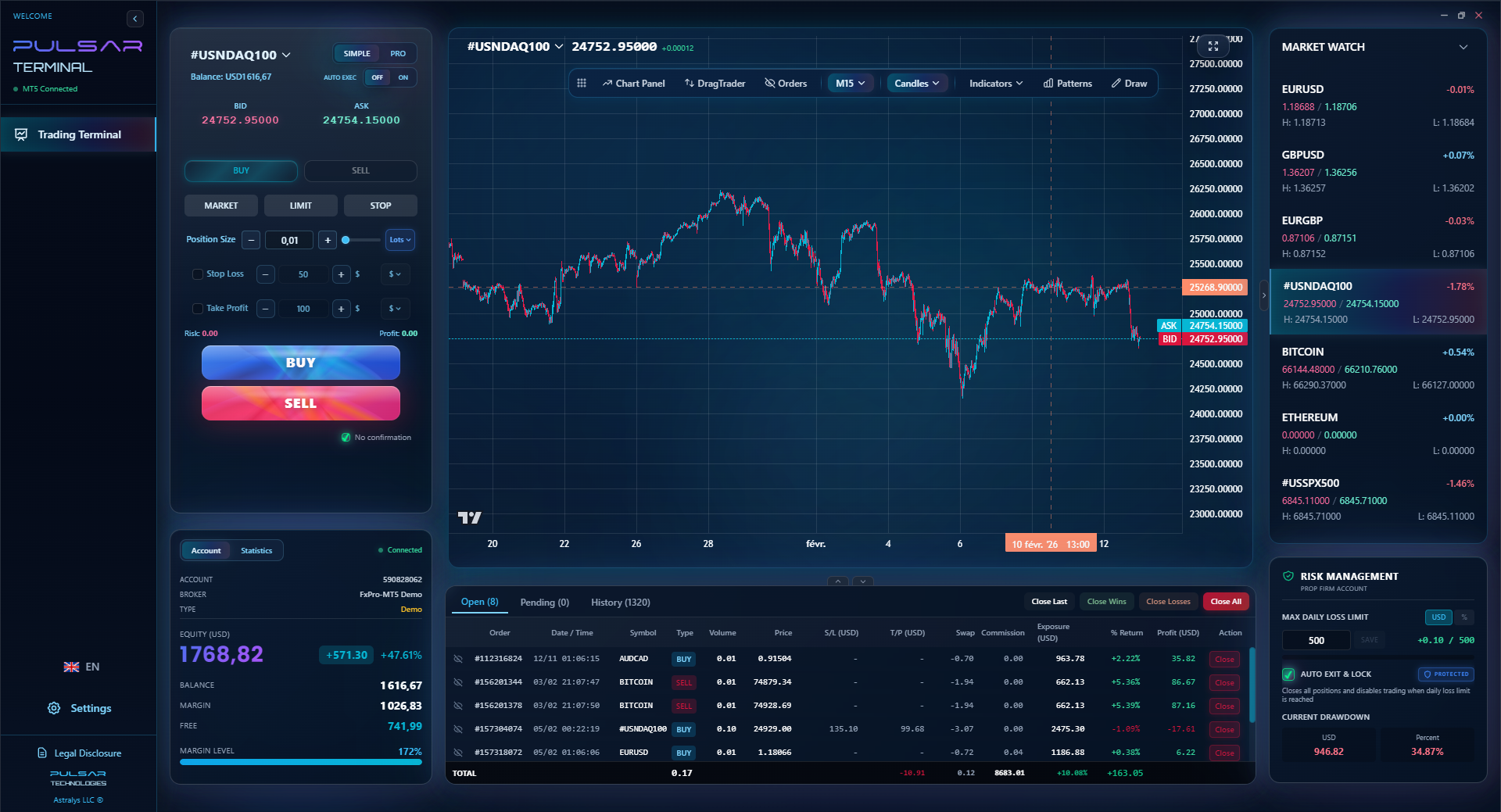
This is where tools that enforce discipline are worth their weight in gold. For example, managing a prop firm challenge requires iron-clad daily loss limits. A tool that can automatically enforce that rule - shutting down trading if a loss threshold is hit - removes the emotional decision. It acts as a circuit breaker for your worst impulses.
Managing the emotional cycle of robot trading is the hardest part. A tool that automates strict risk rules, like daily loss limits, can act as the circuit breaker your discipline needs.
Pulsar Terminal
L'outil MT5 tout-en-un : ordres glisser-déposer, multi-TP/SL, trailing stop, grid trading, Volume Profile et protection prop firm. Utilisé quotidiennement par 1 000+ traders.
“Automated trading requires more discipline, not less.”
Here's what I do now, and what I advise my clients to do. Forget the black box robot. Build a semi-automated alert system. You use technology to do the boring work, but you keep your brain in the loop for the final decision.
How it works:
- You Define the Rules: You create a clear trading strategy. "I will buy USD/ZAR only if the following happens: price pulls back to the 200-day moving average, the 1-hour chart shows a bullish engulfing candle, and there's positive USD news flow."
- Use Tools to Scan: Use your trading platform's tools (or even a simple script) to scan the markets for those conditions.
- Get an Alert: When all conditions align, you get a push notification on your Android phone: "USD/ZAR Setup Alert."
- You Make the Call: You open the chart. You assess the overall context. Is the SARB making an announcement today? Is there major risk-off sentiment? Then, you manually execute the trade.
Why this is superior:
- You Understand It: It's your strategy, so you trust it during drawdowns.
- You Filter Out Noise: The robot might see 10 'setups' a day. You can see that 9 of them are in messy market conditions and only take the clean one.
- You Manage the Trade: You can move stop losses to breakeven, take partial profits, or trail stops based on what you see. A static robot can't adapt like that.
- It's Cheaper & Safer: No upfront robot cost, no VPS needed for execution.
This approach uses technology as a powerful assistant, not a replacement for your judgment. It's how you graduate from a passive hopeful to an active, disciplined swing trading professional. You learn the market, you stay engaged, and you retain control. That's the only path to sustainable trading.
FAQ
Q1Are forex trading robots legal in South Africa?
Yes, using a trading robot for your own personal account is legal. However, you must trade through an FSCA-licensed broker, and all profits are subject to normal South African income tax from SARS. Selling robot signals or managing others' money with a robot requires a Financial Service Provider (FSP) license.
Q2What is the best forex trading robot for Android?
There is no single 'best' robot. Any robot claiming to be the best is likely a scam. The right robot depends on your risk tolerance, account size, and the market conditions it's designed for. More important than finding a 'best' robot is doing extreme due diligence: demand verified live results, understand its strategy, and forward test it yourself on a demo for months.
Q3Can I really run a trading robot on my Android phone?
Technically, yes. The MT4/MT5 app can run Expert Advisors. But you absolutely should not do this for live trading. Phones lose connection, apps crash, and batteries die. The only professional way is to run the robot on a 24/7 Virtual Private Server (VPS) and use your Android phone solely to monitor the account.
Q4How much money do I need to start with a forex robot?
Realistically, you need enough to cover the robot cost, a year of VPS hosting (R7,000+), and still have sufficient trading capital to survive drawdowns. I wouldn't recommend starting with less than R25,000 total. With a R20,000 trading account, a 25% drawdown - which is common - is a R5,000 loss. You need to be able to withstand that psychologically and financially.
Q5Why did my forex robot work in demo but lose money in live trading?
This is the most common story. First, demo trading often uses ideal, slippage-free execution. Live trading has real spreads and slippage, especially during news events, which can kill a robot's small profit margins. Second, demo trading lacks emotion. In a live account, you likely interfered, changed settings, or turned it off during the first drawdown, breaking its statistical edge.
Q6Do I need to understand forex to use a robot?
You need to understand it more. If you don't understand concepts like use, pips, margin calls, and the robot's core strategy, you are blindly gambling. You won't know when the market conditions have changed and rendered the robot's strategy obsolete. Knowledge is your only defense against losing everything.
La leçon du Prof. Winston
Points clés:
- ✓A VPS is non-negotiable for live robot trading.
- ✓FSCA regulation is your primary shield against fraud.
- ✓Account for ALL costs: Robot, VPS, spreads, and taxes.
- ✓Expect a minimum 20-30% drawdown; plan your capital for it.
- ✓Semi-automated alerts beat black-box robots for most traders.
Cet article vous a-t-il été utile ?
Cliquez sur une étoile
Analyses Trading Hebdo
Analyses et stratégies hebdo gratuites. Pas de spam.
À propos de l'auteur
David van der Merwe
Trader des Marchés Émergents
Trader basé à Johannesbourg avec 11 ans d'expérience sur les devises des marchés émergents. Spécialisé dans les paires ZAR, le trading régulé par la FSCA et l'analyse du marché sud-africain.
Commentaires
Avertissement sur les risques
Le trading d'instruments financiers comporte des risques importants et peut ne pas convenir à tous les investisseurs. Les performances passées ne garantissent pas les résultats futurs. Ce contenu est fourni à titre éducatif uniquement et ne constitue pas un conseil en investissement. Effectuez toujours vos propres recherches avant de trader.
Vous aimerez aussi

Cara Trading Forex Sukses: 7 Prinsip dari Trader Profesional
Cara trading forex sukses dengan 7 prinsip trader pro: manajemen modal, disiplin, journal trading, backtest. Data nyata, bukan janji profit palsu.
Jam Trading Forex Terbaik untuk Trader Indonesia: Panduan Lengkap dengan Tabel Waktu
Panduan jam trading forex untuk trader Indonesia. Tabel 4 sesi dunia, jam emas 20:00-00:00, sesi mana yang harus dihindari. Data akurat + tips dari trader berpengalaman.
Top 5 Sàn Forex Uy Tín Nhất 2026: Review Jujur dari Trader Indonesia
Top 5 sàn forex uy tín 2026 untuk trader Indonesia. Review jujur: spread, deposit, withdraw, dukungan lokal. Exness, XM, IC Markets & lebih.
Obtenir Pulsar Terminal
Tous ces calculateurs sont intégrés dans Pulsar Terminal avec des données en temps réel de votre compte MT5. Dimensionnement de position en un clic, gestion automatique des risques et calculs instantanés.
Obtenir Pulsar Terminal