


Most lists of 'top forex trading apps' are just generic fluff written for a global audience.

David van der Merwe
Emerging Markets Trader ·  South Africa
☕ 10 min read
What you'll learn:
Most lists of 'top forex trading apps' are just generic fluff written for a global audience. They ignore the specific rules, costs, and realities of trading from South Africa. You end up downloading something that either isn't legal here, slaps you with hidden fees on ZAR pairs, or doesn't understand our 30:1 use cap. Let's cut through the nonsense. I've traded from SA for over a decade, and I'll show you which apps are genuinely useful for us, how to navigate the FSCA's rules, and what you're really paying for.
Before we even look at features, we have to talk about legality. In South Africa, your trading app is just the front door. Who's running the house behind it matters more. The Financial Sector Conduct Authority (FSCA) is our watchdog. Trading with an FSCA-licensed broker isn't just a good idea, it's your main layer of protection. They enforce client fund segregation, which means your money is kept separate from the broker's operating cash. If the broker goes under (it happens), your funds should be safe.
The big rule you can't ignore? Maximum 30:1 use for retail traders. This came in back in 2021. Any app or broker offering you 500:1 or even 100:1 while you're based in SA is either ignoring local law or classifying you as a 'professional' (which has strict criteria). I learned this the hard way early on. I was with an offshore broker offering huge use. When a trade moved against me, that use magnified my loss so fast I couldn't react. The 30:1 cap forces discipline. It's annoying when you want to swing for the fences, but it probably saved my account more than once.
Also, remember you can't directly speculate against the ZAR with a South African broker. You want to trade USD/ZAR? You'll need to use a broker with an offshore entity, but then you lose that FSCA protection. It's a trade-off. And yes, SARS wants its share. Profits are taxable income. Keep a log.

Warning: If an app's sign-up process doesn't ask for your SA ID and proof of residence to apply FSCA rules, you're likely signing up with their offshore entity. You might get higher use, but you're on your own if things go wrong.
Everyone looks at the spread. That's the difference between the buy and sell price, measured in pips. But for a South African trader, the true cost picture has more layers.
The Spread Itself
On major pairs like EUR/USD, competition is fierce. You'll see ads for 'spreads from 0.0 pips'. That's usually on a 'Raw' or 'ECN' account where you pay a commission per trade. Other accounts have slightly higher spreads but no commission. For example:
- IC Markets: Raw spread account can show 0.0 pips on EUR/USD, plus a $7 round-turn commission per lot.
- XM: Their standard account might start around 0.6 pips on EUR/USD, with no commission.
Which is cheaper? It depends on your trade size. You need to do the math. Our position size calculator can help factor this in.
The ZAR Pair Premium
This is where many global 'top apps' lists fail. Trading ZAR pairs like USD/ZAR or EUR/ZAR is more expensive. Liquidity is lower. Don't expect sub-1 pip spreads. It's common to see 5 pips on USD/ZAR and 14 pips or more on EUR/ZAR. That's just the cost of trading our local currency.
The Hidden Bites
- Overnight Financing (Swap): You pay or earn this for holding a position past the daily cut-off time. It's based on the interest rate difference between the two currencies. Long a high-interest currency against a low one? You might earn a small amount. Do the opposite, and you pay. These rates are listed in your app.
- Inactivity Fees: Leave your account dormant for 3-6 months? Some brokers charge around $10/month. Just close the account if you're taking a break.
- Currency Conversion: If your account is in USD but you're funding with ZAR, the broker's bank will convert it. They often add a 1-1.5% margin on the exchange rate. It's better to use a specialist forex service for larger deposits.

Example: Let's say you take a 1-lot (100,000 units) trade on USD/ZAR with a 5-pip spread. At a rate of 16.34, each pip is worth roughly R100. So, the spread cost alone to enter that trade is R500. You're in the red by that amount from the get-go. That's why your position size and profit target need to account for this wider spread.
“Your phone is for trade management, not deep analysis. That separation alone will improve your discipline.”
Forget flashy animations. When you're in a trade and the power goes out (hello, loadshedding), you need an app that lets you manage risk from your phone, fast. Here’s what I prioritize, based on using most of these apps from Johannesburg.
MetaTrader 4 & 5 (MT4/MT5): These aren't brokers, they're the platforms most brokers offer. The mobile apps are solid workhorses. You get full charting, indicators like RSI and MACD, and can place/manage all order types. The UI is a bit dated, but it's reliable. Almost every FSCA broker offers MT4/5.
cTrader: This is the sleek, modern alternative. The mobile app is, in my opinion, the best designed for retail traders. Charting is intuitive, order entry is super clear, and it feels built for touchscreens. Brokers like Pepperstone and IC Markets offer it. If you're serious about trading from your phone, cTrader's app is a winner.
Broker-Specific Apps (e.g., XM, Exness): These vary wildly. Some are just simplified front-ends for quick trades. Others are surprisingly full-featured. The advantage? They often have faster deposit/withdrawal integration for South African methods like Ozow or Instant EFT. The downside? You're locked into that broker's environment.
My Must-Have App Features:
- One-Tap Trading: The ability to execute a market order directly from the chart. Saves precious seconds.
- Reliable Push Notifications: For when your stop-loss or take-profit hits. If the app doesn't alert you, you're flying blind.
- Full Order Management: Can you modify your stop-loss, move to breakeven, or add a trailing stop after the trade is live? If not, the app is a toy.
- Offline Functionality: It should at least let you see your open positions and P&L if your signal drops.
I once had a profitable scalping trade on EUR/USD turn into a loser because my broker's app froze when I tried to move my stop to breakeven. I switched to a platform with a more strong mobile app the next week.

💡 Winston's Tip
A fast app is useless if your internet is slow. I keep a mobile data bundle loaded just for trading. The R50 cost is cheaper than a slipped stop-loss.
Let's link some popular FSCA-regulated brokers to their app offerings. Remember, 'FSCA regulated' means their local entity complies with our 30:1 use and other rules.
| Broker | FSCA License # | Their Strongest App For SA Traders | My Quick Take |
|---|---|---|---|
| IG Markets SA | FSP 41393 | Proprietary App & MT4 | The local giant. Their own app is excellent for research and education, which is IG's strength. Very trustworthy. |
| Plus500SA | FSP 47546 | Proprietary App | Super simple, intuitive app. Great for beginners. Limited in advanced charting, but perfect for straightforward CFD trading. |
| ForexTime (FXTM) | FSP 46614 | MT4/MT5 | Well-established with a good local presence. The app experience is standard MT4/5, but they have strong SA-focused support. |
| Pepperstone (ZA) | FSP 49434 | cTrader & MT4/5 | If you want cTrader's brilliant mobile app with FSCA regulation, this is a top pick. Also great for tight spreads. |
| Exness (SA) | FSP 51024 | MT4/5 & Proprietary | Exness offers a user-friendly proprietary app alongside MT. They're known for flexible account types. |
| XM Group | FSP 48976 | MT4/5 & XM App | XM has a massive global client base. Their own XM app is feature-packed and they're known for their customer service. |
| IC Markets (SA) | FSP 47425 | cTrader & MT4/5 | Like Pepperstone, a top choice for the cTrader app experience with raw spreads. Favored by more active traders. |
A personal note: I've had live accounts with three on this list. I settled on Pepperstone's cTrader for my active scalping because the app's speed and clarity are unmatched. For longer-term swing trading ideas, I use IG's app for their analysis tools.
💡 Winston's Tip
Test the app's notification system with a demo trade. Set a take-profit 5 pips away and see if the alert wakes you up. If not, don't trust it with real money.
“The true cost for a South African trader isn't just the spread on EUR/USD; it's the premium you pay to trade ZAR pairs.”
The standard broker mobile app is fine for monitoring and basic orders. But what if you want to run a multi-take-profit strategy, use a trailing stop, or protect your daily drawdown for a prop firm challenge? You hit a wall. This is where companion tools come in.
These are desktop applications that connect to your MT4/MT5 platform and supercharge it. They add features the basic apps lack. For example, a proper trailing stop that moves automatically, not one you have to manually drag. Or the ability to set a breakeven stop on all your trades at once.
The most powerful feature for me is automated trade management. You can set rules like: "When trade is up 10 pips, move stop-loss to entry +2 pips." The software does it instantly, without emotion. I missed so many winners in my early years because I got greedy and didn't lock in profit. Automation solves that.
These tools also offer advanced charting like Volume Profile and better drawing tools, which you can then view on your mobile MT app (the charts sync). So, you do your analysis and set your automated rules on desktop, and then you can monitor and manage from your phone with much greater confidence.

Pro Tip: If you're trying to pass a prop firm challenge, a tool that can automatically enforce a daily loss limit is a game-saver. One big, emotional loser can blow your challenge. Automation removes that risk.
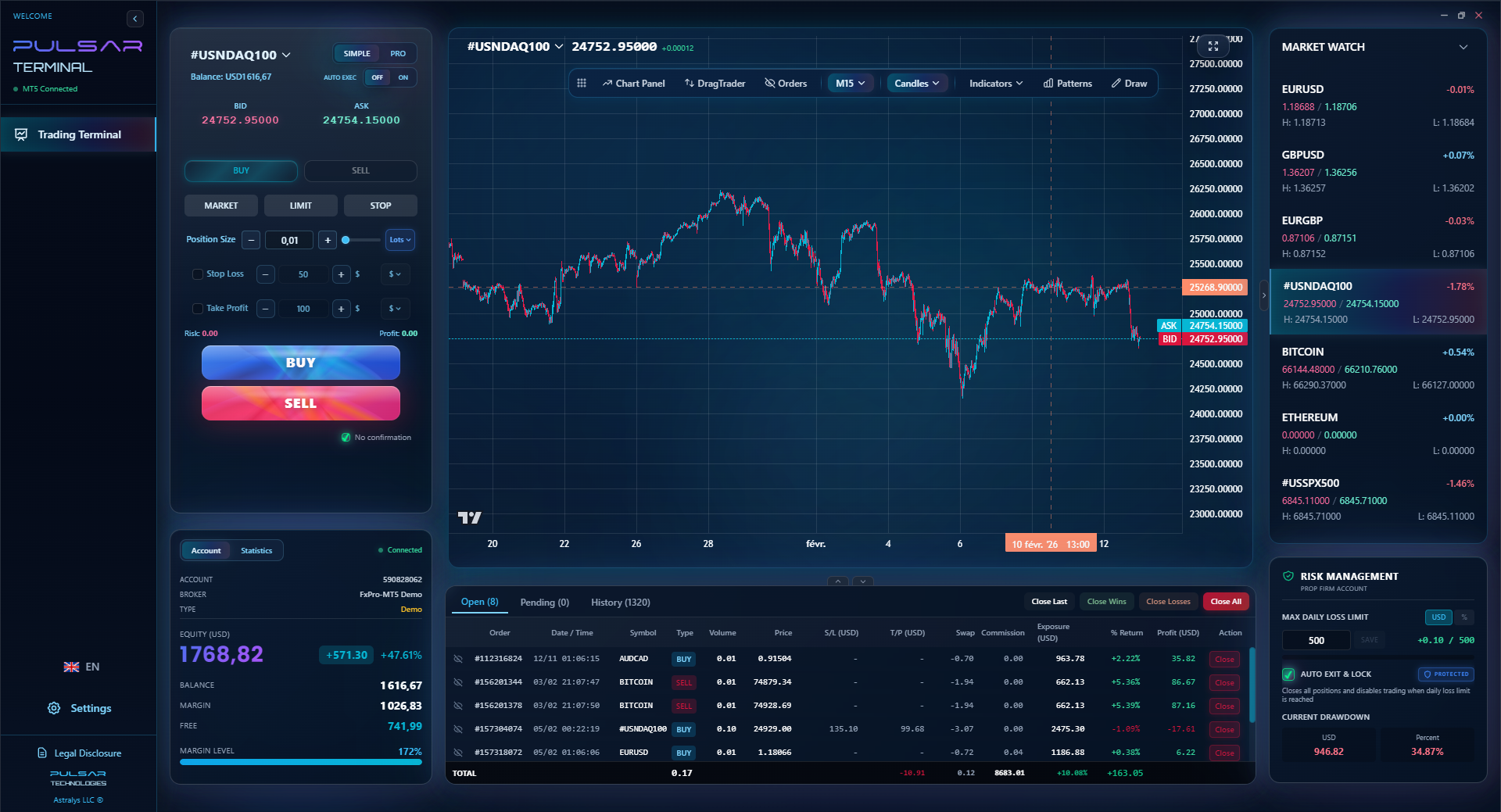
When you need to manage complex strategies like multi-take-profit levels or trailing stops on the go, a tool like Pulsar Terminal automates these rules directly on your MT5 platform, so your mobile app becomes a true control center.
Pulsar Terminal
The all-in-one MT5 companion: drag-and-drop orders, multi-TP/SL, trailing stop, grid trading, Volume Profile, and prop firm protection. Used by 1,000+ traders daily.
Okay, so how do you choose? Don't just download the shiniest app. Follow this process.
- Regulation First: Shortlist only brokers with a verifiable FSCA FSP number. Check it on the FSCA's website. This is non-negotiable for your main trading capital.
- Test the App Experience: Open a demo account with 2-3 brokers. Don't just look at the charts. Try to place a complex order. Set a stop and take-profit. Then, modify them. How many taps does it take? Is it intuitive while you're pretending to be in a rush?
- Check the ZAR Details: If you plan to trade ZAR pairs, look at the spreads on USD/ZAR in the demo. Also, check their local deposit methods and fees. Do they offer Instant EFT? How long do withdrawals take?
- Understand the Costs: Decide if you prefer a raw spread + commission model or a wider spread with no commission. Match this to your typical trade size and strategy.
- Plan for Growth: If you're starting, a simple app like Plus500 or IG might be perfect. If you're more experienced and want advanced order types, prioritize cTrader or a broker whose MT4/5 platform works well with advanced desktop tools.
My final piece of advice? Your phone is for management, not deep analysis. Do your chart work on a big screen when you can. Use the app to stay connected to your trades, not to make all your decisions. That separation alone will improve your discipline.
Remember, the best top forex trading app for you is the one that fits your South African reality: it's legal, it's cost-effective on the pairs you trade, and it lets you control your risk reliably, even during stage 6 loadshedding.
FAQ
Q1Can I use international forex trading apps like Robinhood or eToro in South Africa?
eToro has a South African entity (eToro ZA) which is regulated by the FSCA, so yes, you can use their app. Robinhood, however, does not offer services to South African residents. Always check if the global brand has a locally licensed entity. Using their main international app might bypass FSCA protections and could be against their terms of service.
Q2What is the best app for trading Gold (XAU/USD) from South Africa?
For trading instruments like XAU/USD, you need an app that offers competitive spreads on commodities and reliable execution. The cTrader app (via brokers like Pepperstone or IC Markets) and the MT4/5 apps are excellent choices. Check the specific broker's spreads on gold on their demo account before funding.
Q3Are there any fees for depositing ZAR into my trading app?
Most FSCA-regulated brokers don't charge a fee for deposits via local methods like Instant EFT. However, the broker's bank or payment processor might use an exchange rate with a small margin (e.g., 1% above the interbank rate). Always check the final ZAR amount deducted from your bank versus the USD credited to your trading account to see the effective cost.
Q4Can I get higher than 30:1 use on a forex trading app in SA?
If you are classified as a 'retail client' by an FSCA-regulated broker, no, 30:1 is the maximum. Some brokers may classify you as a 'professional client' or 'eligible counterparty' if you meet specific criteria (significant trading experience, portfolio size, etc.), which can allow for higher use. This is not common and comes with reduced regulatory protection.
Q5My trading app is showing a 'margin call' warning. What should I do immediately?
A margin call means your losses have eaten into the required margin for your open positions. Your broker is warning you to add funds or close positions. The immediate action is to either deposit more money or close some losing trades to free up margin. If you do nothing, the broker will automatically start closing your positions, often starting with the biggest loser, which can lock in losses. This is a critical risk management failure - re-evaluate your position size.
Q6Is it safe to trade forex on a public WiFi network using these apps?
It's a significant risk. Public WiFi is not secure. Avoid logging into your trading account or placing trades on public networks. Use your mobile data (3G/4G/5G) instead, as it's a more secure, encrypted connection. Treat your trading app like your banking app.
Prof. Winston's Lesson
Key Takeaways:
- ✓FSCA regulation is your primary safety net - verify the license.
- ✓The real cost includes ZAR pair spreads, swaps, and conversion fees.
- ✓cTrader's mobile app is the current benchmark for user experience.
- ✓Use demo accounts to test app reliability under simulated pressure.
- ✓Companion tools automate risk management where basic apps fail.
How useful was this article?
Click a star to rate
Weekly Trading Insights
Free weekly analysis & strategies. No spam.
About the Author
David van der Merwe
Emerging Markets Trader
Johannesburg-based trader with 11 years in emerging market currencies. Specializes in ZAR pairs, FSCA-regulated trading, and South African market analysis.
Comments
Risk Disclaimer
Trading financial instruments carries significant risk and may not be suitable for all investors. Past performance does not guarantee future results. This content is for educational purposes only and should not be considered investment advice. Always conduct your own research before trading.
You Might Also Like

Cara Trading Forex Sukses: 7 Prinsip dari Trader Profesional
Cara trading forex sukses dengan 7 prinsip trader pro: manajemen modal, disiplin, journal trading, backtest. Data nyata, bukan janji profit palsu.
Jam Trading Forex Terbaik untuk Trader Indonesia: Panduan Lengkap dengan Tabel Waktu
Panduan jam trading forex untuk trader Indonesia. Tabel 4 sesi dunia, jam emas 20:00-00:00, sesi mana yang harus dihindari. Data akurat + tips dari trader berpengalaman.
Top 5 Sàn Forex Uy Tín Nhất 2026: Review Jujur dari Trader Indonesia
Top 5 sàn forex uy tín 2026 untuk trader Indonesia. Review jujur: spread, deposit, withdraw, dukungan lokal. Exness, XM, IC Markets & lebih.
Get Pulsar Terminal
All these calculators are built into Pulsar Terminal with real-time data from your MT5 account. One-click position sizing, automatic risk management, and instant calculations.
Get Pulsar Terminal