


Most articles about the best forex charting software get it wrong.

Olumide Adeyemi
Пионер трейдинга в Западной Африке ·  Nigeria
☕ 10 мин чтения
Что вы узнаете:
- 1Why Your Charting Platform is Your Most Important Tool
- 2Free Broker Platforms: The Good, The Bad, and The Ugly
- 3TradingView: The All-Rounder Champion (For Most People)
- 4MT4 & MT5: The Professional's Workhorse
- 5Side-by-Side: What to Actually Look For
- 6My Hybrid Workflow (How I Use Multiple Tools)
- 7What Should YOU Choose? (A Straight Recommendation)
- 8Pitfalls I Fell Into (So You Don't Have To)
Most articles about the best forex charting software get it wrong. They just list features. The truth is, the 'best' software is the one you'll actually use consistently, without it slowing you down or confusing you. It's a deeply personal choice, like picking a car. A flashy supercar is useless if you don't know how to drive it. I've wasted money on subscriptions I never used and stuck with clunky platforms out of habit. Let me walk you through the real pros and cons of each major option, so you can find your perfect match.
Forget the broker for a second. Your charting software is where you'll spend 95% of your time. It's your cockpit. A bad one will have you missing entries, misreading data, and getting frustrated before you even place a trade. I learned this the hard way early on. I was using a broker's basic web platform and couldn't understand why my stop-losses were getting hit so precisely. Turns out, the chart was on a 1-minute delay during high volatility! I lost about ₦40,000 on a EUR/USD trade before I realized the price on my screen wasn't the real price. That was my wake-up call.
The right software gives you speed, reliability, and the tools to see what the market is really doing. It should feel like an extension of your brain, not a fight. We'll look at three main categories: free broker platforms, standalone free software (like TradingView), and professional platforms (like MT4/MT5). Your choice depends entirely on your trading style, budget, and how serious you are.

Warning: Never rely solely on your broker's web platform for fast-moving trades, especially if you're into scalping strategy. The lag can be a silent account killer.

💡 Совет Уинстона
A clean chart is a thinking chart. If you can't explain what your chart shows in 10 seconds, you have too much on it.
Every broker offers one. Think of the web traders or basic apps from Exness review, XM review, or others. They're convenient, especially when you're starting out and your capital is small.
The Good (Yes, There is Some)
They're free and integrated. You open an account, log in, and start trading. No extra downloads. For a beginner just learning what a candlestick is, this is fine. They usually have basic drawing tools and a few common indicators like Moving Averages or the RSI indicator.
The Bad and The Ugly
This is where the problems start. They are often slow to update, especially during news events. The charting tools can be clunky. The biggest limitation? You're locked in. You can't easily pull in data from other sources or use advanced custom indicators. I remember trying to backtest a simple strategy on a broker's platform; it was impossible. The historical data was patchy.
They also tend to have higher default spreads displayed on their charts, which can subconsciously make you avoid certain trades. If you're trading anything more complex than basic swing trading, you'll outgrow these platforms fast. View them as a temporary training wheels, not a long-term solution for finding the best forex charting software.
“TradingView is for analysts. MT4/MT5 is for executors.”
Let's be real: for 80% of retail traders, TradingView is the best forex charting software available. And it's not just my opinion. Its popularity is for solid reasons.
First, the charts are beautiful and intuitive. Drawing trendlines, adding Fibonacci retracements, or comparing multiple charts is effortless. The social element is a double-edged sword, but for learning, it's gold. You can see what ideas other traders are posting (take them with a mountain of salt, of course).
I use TradingView for all my analysis and idea generation. The ability to save chart templates and layouts across devices is a game-saver. I can start an analysis on my laptop in Lagos and check it later on my phone in traffic (not while driving, please).
The Catch: Execution and Cost
Here's the rub. TradingView isn't a broker. You can't place trades directly from it with most Nigerian broker accounts (some integrations exist, but they're fiddly). So, you analyze on TradingView, then switch to your broker's platform to execute. This creates a disconnect.
Also, the free plan is limited. You can only have one chart open at a time with three indicators. The Pro plan, which most active traders need, costs about $15/month. Is it worth it? Absolutely, for the analysis power. But factor it into your costs.

Pro Tip: Use TradingView's powerful backtesting feature on the Pro+ plan. I tested a moving average crossover strategy on GBP/JPY and found it had a 42% win rate over 5 years - saving me months of live trading losses. That insight alone paid for the subscription.
MetaTrader 4 and 5 are the industry standards for a reason. They are strong, reliable, and supported by almost every broker, including IC Markets review and Pepperstone review. If you want direct, fast execution and deep customization, this is your arena.
MT4 is legendary for forex. MT5 is more capable, handling stocks and futures, but forex traders often stick with MT4 due to its vast library of custom indicators and Expert Advisors (EAs) for automation. The learning curve is steeper. Setting up a chart the way you want takes more clicks than TradingView.
The Real Power: Customization and Automation
This is where MT4/MT5 shines. You can code or buy EAs that trade for you. You can install custom indicators that aren't available anywhere else. Want a specific volatility measure or a proprietary signal indicator? It's probably an MT4 .ex4 file. I run a simple grid EA on a small portion of my account, and it manages itself based on rules I set.
However, the native charting looks dated. The drawing tools feel old. This is why many pros (myself included) use a hybrid approach: analyze on TradingView for the clean visuals and social ideas, then execute on MT4 for the speed and reliability. You can also use tools that bridge this gap, adding advanced drawing and risk management features directly onto your MT5 platform.

Example: My standard EUR/USD setup on MT4 uses a custom session indicator (to mark London/NY open), a volume profile tool, and the standard MACD indicator. Setting this up took time, but now it's a one-click template.
“Power is useless without understanding. I was overwhelmed by professional tools and it paralyzed my trading.”
Don't get lost in marketing hype. Compare these concrete features.
| Feature | TradingView (Pro) | MT4/MT5 | Basic Broker Platform |
|---|---|---|---|
| Chart Speed & Reliability | Excellent | Excellent | Poor to Fair |
| Ease of Use | Best in class | Steep learning curve | Very Easy |
| Drawing & Analysis Tools | Extensive & intuitive | Good, but dated | Very Basic |
| Custom Indicators | Large library, some paid | Massive free library | Almost none |
| Automation (EAs/Bots) | Limited scripting | Full automation possible | None |
| Direct Trade Execution | Limited (needs broker integration) | Direct and fast | Direct |
| Cost | ~$15/month for Pro | Free (via broker) | Free |
| Best For | Analysis, retail traders | Automated trading, execution | Absolute beginners |
Your decision hinges on your answer to this: Are you an analyst or an execution-focused trader? TradingView is for analysts. MT4/MT5 is for executors who might use automation. Also, consider your internet stability. MT4 can handle spotty connections slightly better than a web-based platform.
💡 Совет Уинстона
Spend your first software budget on a second monitor, not a fancy platform. Screen real estate is a trader's best friend.
I'm not loyal to one platform. I use each for what it's best at. Here's my exact daily routine, which has evolved over 10 years of mistakes.
Step 1: Macro Analysis on TradingView. I open my multi-chart layout with 12 major pairs and key indices. I look for the overall trend using higher timeframes (4H/Daily). I use TradingView's great chart pattern recognition to scan for potential setups. All this is visual and quick.
Step 2: Deep Dive on MT5. When I find a potential setup - let's say a pin bar rejection at a key XAU/USD guide support level on TradingView - I switch to MT5. Why? Because my execution and risk management rules live there. I have templates with my exact entry/exit indicators. I place my order with a precise stop-loss and take-profit, often using a bracket order.
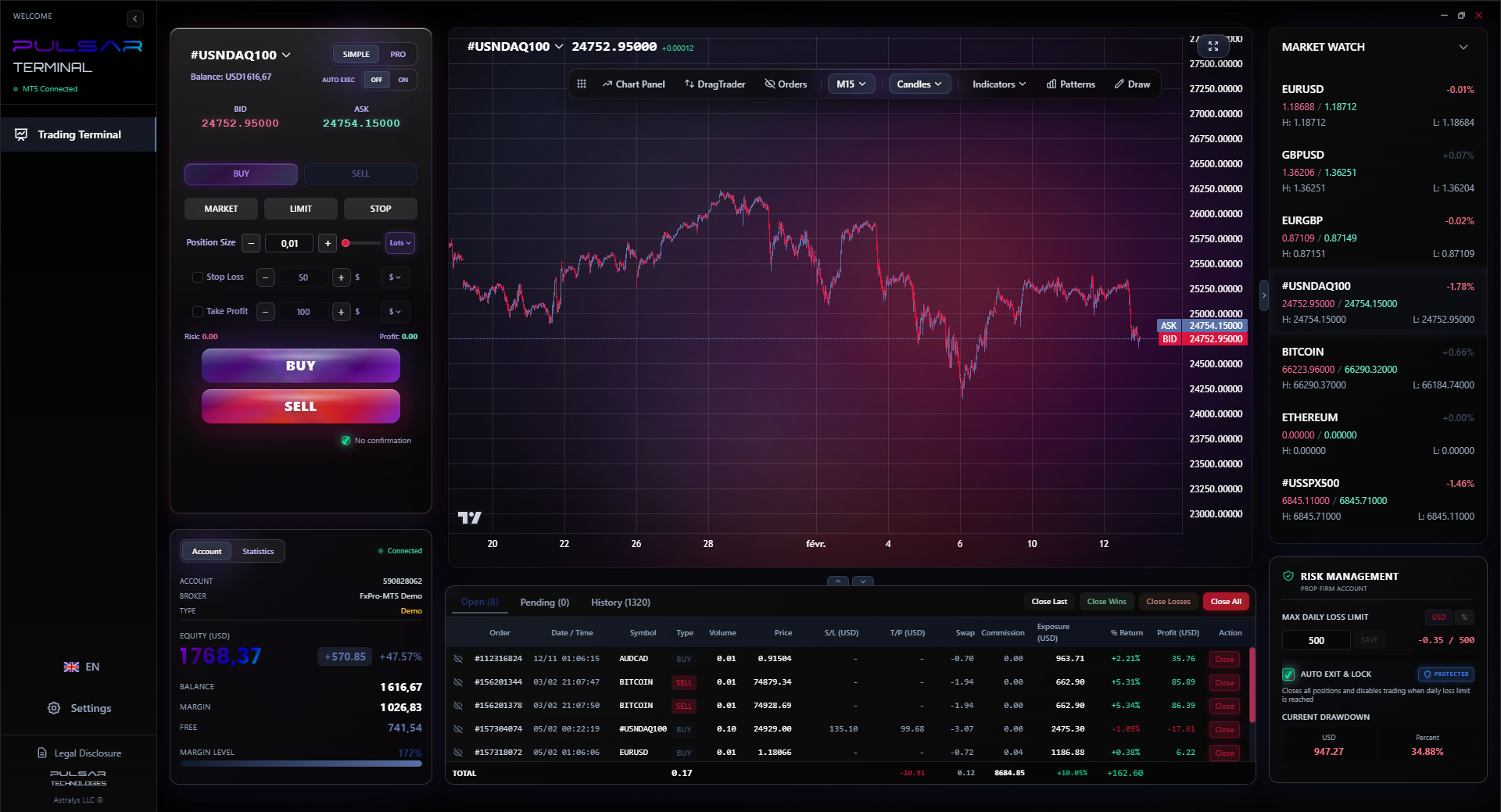
Step 3: Execution & Management with Enhanced Tools. This is the secret sauce. The native MT5 order management is clunky. I use a companion app that layers on top of MT5. It lets me drag and drop orders directly onto the chart, set multiple take-profit levels with partial closures, and automate trailing stops. For example, on a recent USD/CAD trade, I entered at 1.3600, set my stop at 1.3570, and had a trailing stop kick in after 30 pips. It moved to breakeven automatically, then trailed, locking in profit. I never had to manually move a thing. This kind of automated risk management is crucial, especially if you're targeting prop firm challenges with strict daily loss limits.
The hybrid approach gives me the best of all worlds: beautiful analysis and rock-solid, automated execution.
Managing complex orders and risk on MT5 can be clunky, but tools like Pulsar Terminal automate this directly on your chart with drag-and-drop ease.
Pulsar Terminal
Универсальный инструмент для MT5: drag-and-drop ордера, мульти-TP/SL, трейлинг-стоп, грид-трейдинг, Volume Profile и защита для проп-фирм. Используется 1000+ трейдерами ежедневно.
“Your software is a tool for seeing price. Don't let it become a distraction.”
Stop overthinking it. Here's my blunt advice based on where you are.
You're a complete beginner (account < ₦100,000): Stick with your broker's free platform for your first 3 months. Learn what a pip definition and spread definition mean. Practice on a demo account. Don't spend money on software yet. Your focus should be on not blowing up your account, not on fancy tools.
You're a committed retail trader (actively trading): Get a TradingView Pro subscription. It's the single best investment to improve your analysis. Use it for all your charting. Execute on your broker's more advanced desktop platform (which is often a version of MT4/MT5 anyway). This combo is powerful enough for 90% of profitable retail strategies.
You're moving towards professional/systematic trading: You need MT4 or MT5. Period. You need the reliability, the automation potential, and the direct market access. Learn it inside out. Then, consider adding a professional charting or trade management plugin to overcome MT5's clunky interface. This is the path if you're serious about scaling or running automated strategies.
Remember, the goal is to make clear decisions. The more time you spend fighting your software, the less time you spend reading the market. Pick the one that gets out of your way.
Let me save you some time, money, and frustration.
Mistake 1: Chasing the 'Most Powerful' Software. Early on, I subscribed to a professional platform used by hedge funds. It had every bell and whistle. I was overwhelmed. I used about 5% of its features and the complexity paralyzed my trading. Power is useless without understanding.
Mistake 2: Not Learning Order Types. This is huge. Your charting software is linked to your execution. Do you know how to place a limit order vs. a market order? A stop-limit? I once meant to place a buy limit below price but accidentally placed a sell stop. I got filled immediately and lost ₦25,000 in minutes. Understand the basic order types on your chosen platform before you trade live.
Mistake 3: Indicator Overload. This is the classic rookie error. You load 10 flashing indicators on your chart until it looks like a Christmas tree. The chart should tell a story, not create noise. Start with pure price action and one or two indicators you truly understand. I now only use volume, moving averages, and occasionally the RSI indicator for divergence. That's it. Clarity beats complexity every time.
Your software is a tool for seeing price. Don't let it become a distraction. The best forex charting software is the one that helps you see the market simply and act on it decisively.
FAQ
Q1Is TradingView or MT4 better for forex trading?
There's no universal 'better.' TradingView is superior for chart analysis, visualization, and idea generation. MT4 is superior for direct, fast trade execution, automation (Expert Advisors), and integration with your broker. Most serious traders end up using both: TradingView to analyze, MT4 to execute.
Q2Can I use TradingView for free in Nigeria?
Yes, but with major limits. The free plan only allows one chart at a time with three indicators. For active trading, it's nearly unusable. The Pro plan (around $15/month) is what most traders need. You can pay with international debit/credit cards or through services like Paystack that support Naira.
Q3Which is better, MT4 or MT5?
For pure forex trading, MT4 is still the king. It's lighter, faster, and has a larger community creating free indicators and EAs. MT5 is more powerful for trading stocks, futures, and offers more order types, but the forex community hasn't fully migrated. If your broker offers both, start with MT4.
Q4Do I need a powerful computer for charting software?
For TradingView's web platform or basic MT4, a modern laptop with a decent internet connection is fine. If you run multiple complex charts, many indicators, or especially automated EAs on MT4/MT5, then a computer with a good processor (CPU) and 8GB+ RAM is recommended to avoid lag.
Q5How important is mobile charting?
Very, but for monitoring, not active trading. You need to check on positions or see if key levels are holding. TradingView has an excellent mobile app. MT4/MT5 apps are functional but clunky. Never try to execute complex trades on a mobile app; the risk of error is too high.
Q6Can I connect my Nigerian broker to TradingView?
Direct integration is limited. A few international brokers that accept Nigerian clients (like IC Markets) offer a connection for paper trading on TradingView. For live trading, you typically cannot connect your local Nigerian broker account directly. You analyze on TradingView, then place the trade on your broker's MT4/MT5 or web platform.
Урок проф. Уинстона
Ключевые выводы:
- ✓Broker web platforms have lag; avoid for fast trades.
- ✓TradingView Pro is the best value for analysis (~$15/month).
- ✓MT4/MT5 is non-negotiable for automation & precise execution.
- ✓Use a hybrid approach: analyze on one, execute on the other.
- ✓Start with 1-2 indicators max to avoid confusion.
Насколько полезна эта статья?
Нажмите на звезду
Еженедельные торговые инсайты
Бесплатный еженедельный анализ и стратегии. Без спама.
Об авторе
Olumide Adeyemi
Пионер трейдинга в Западной Африке
Один из самых активных преподавателей форекс-трейдинга в Нигерии. 8 лет торгового опыта из Лагоса. Специализируется на стратегиях с малым капиталом и челленджах проп-фирм для африканских трейдеров.
Комментарии
Предупреждение о рисках
Торговля финансовыми инструментами сопряжена со значительным риском и может не подходить всем инвесторам. Прошлые результаты не гарантируют будущих доходов. Данный контент носит исключительно образовательный характер и не является инвестиционной рекомендацией. Всегда проводите собственное исследование перед торговлей.
Вам также может понравиться

Cara Trading Forex Sukses: 7 Prinsip dari Trader Profesional
Cara trading forex sukses dengan 7 prinsip trader pro: manajemen modal, disiplin, journal trading, backtest. Data nyata, bukan janji profit palsu.
Jam Trading Forex Terbaik untuk Trader Indonesia: Panduan Lengkap dengan Tabel Waktu
Panduan jam trading forex untuk trader Indonesia. Tabel 4 sesi dunia, jam emas 20:00-00:00, sesi mana yang harus dihindari. Data akurat + tips dari trader berpengalaman.
Top 5 Sàn Forex Uy Tín Nhất 2026: Review Jujur dari Trader Indonesia
Top 5 sàn forex uy tín 2026 untuk trader Indonesia. Review jujur: spread, deposit, withdraw, dukungan lokal. Exness, XM, IC Markets & lebih.
Скачать Pulsar Terminal
Все эти калькуляторы встроены в Pulsar Terminal с данными в реальном времени с вашего счёта MT5.
Скачать Pulsar Terminal