


On March 25th, 2026, the CBN announced IOCs could repatriate 100% of their export earnings.

Olumide Adeyemi
Пионер трейдинга в Западной Африке ·  Nigeria
☕ 10 мин чтения
Что вы узнаете:
On March 25th, 2026, the CBN announced IOCs could repatriate 100% of their export earnings. My screen was on USD/NGN. The pair didn't just move, it gapped. The chart looked like someone had torn it. That's the moment your forex screen stops being a collection of charts and becomes your command center. If it's not set up to capture that, you're just watching pictures. Let's talk about building a screen that works for Nigeria right now, not some generic tutorial.
Most new traders think a forex screen is just a platform with a price chart. That's like saying a car is just seats and wheels. Your screen is your entire operational interface. It's where you see price action, manage risk, place orders, and monitor news - all at once. For us in Nigeria, it's also where you watch for CBN policy leaks on Twitter and see if the parallel market rate is causing a squeeze on the official pair. If your setup can't handle that multi-source flow, you're trading blind.
Your screen needs to answer three questions instantly: What's the price? What's my risk? What's the context? A single chart with an RSI indicator doesn't cut it. We're talking about a configured workspace. Think of it as your cockpit. You wouldn't fly a plane with only the altimeter visible.

Warning: The biggest mistake I see is traders copying a 'perfect screen' from a YouTube guru in another country. Their context is different. They aren't trading while monitoring the CBN's latest circular on the Nigeria Foreign Exchange Code. Your screen must be built for your market.

💡 Совет Уинстона
Your screen's background color matters more than you think. Ditch the default white. A neutral grey reduces eye strain and makes candlesticks pop, helping you see the story price is telling.
“Your forex screen is a cockpit, not a television.”
The Main Chart Window
This is your battlefield. For most retail traders, this is MetaTrader 4 or 5. Don't overcomplicate it. I use MT5 because it handles more instruments, which matters if you trade commodities like gold (XAU/USD) alongside forex. The chart should be clean. I use a candlestick chart with no fluff. The first thing I do is remove the grid and the background. Pure price action on a neutral background. You'd be surprised how much clearer your decisions become.
The Market Watch & Order Panel
This is your control panel. It shows live bids/asks, your open positions, and pending orders. My rule? It must always be visible. I keep mine on the right side of my screen. You need to see your floating P&L in Naira terms without clicking through three windows. If you're using a broker like Exness or IC Markets, their MT5 integration will show this natively. This is also where you set your stop-loss and take-profit levels directly. Never rely on mental stops.
The Economic Calendar & News Feed
This isn't optional for Nigerian traders. The CBN's monetary policy committee meetings are more important for the Naira than any US jobs report. I have a dedicated browser tab open to a reliable calendar (like Forex Factory) and I follow key local financial journalists on X (formerly Twitter). When the CBN shifted to an inflation-targeting framework with the IMF in late 2025, the news hit social media before the official sites. Your screen needs a conduit for that info.
The Risk Management Dashboard
This is the most overlooked component. It's where you calculate your position size before every trade. I don't do this in my head. I have a simple Excel sheet or use a dedicated position size calculator pinned on my screen. Input your account balance in Naira, your risk percentage (I never risk more than 1% on a trade), and your stop-loss in pips. It spits out the lot size. This one habit has saved me from a margin call more times than I can count.
“A perfect setup is worthless with bad habits. I learned this the hard way.”
The CBN's reforms have changed the game. The gap between the official and parallel market rates is under 2% now, down from over 60%. That's huge. It means less wild volatility on USD/NGN from arbitrage shocks, but it also means you need to be sharper. Your screen setup must reflect this new stability.
First, you need a reliable internet connection. It sounds basic, but in Lagos during a rainstorm, it's everything. I have a primary line and a mobile hotspot ready to go. A frozen forex screen during a CBN announcement is a recipe for disaster.
Second, understand the instruments. You're not just trading EUR/USD. You're trading the effect of EUR/USD on Nigeria's import costs and, by extension, on CBN policy. I always have two key charts side-by-side: the major pair I'm trading (like EUR/USD) and a USD/NGN chart. The correlation isn't always direct, but when the Naira strengthens unexpectedly, it can signal broader dollar weakness that affects all pairs.
Payment methods matter for funding your account. I use brokers that allow relatively seamless deposits in Naira. The process should be straightforward from your screen - a few clicks to deposit, not a three-day bank transfer saga. Brokers like XM and Pepperstone have local payment partners that make this easier.

Pro Tip: Create a 'Naira Watch' section on your screen. It can be a simple notepad widget or a second chart window. Note key levels for USD/NGN, and any chatter about bureau de change rates. This local context is your edge over a trader in London who isn't watching it.
“A perfect setup is worthless with bad habits. I learned this the hard way.”
Indicators should clarify, not clutter. I made the mistake early on of loading 10 indicators on one chart. It was a rainbow of confusion. Now, I use a maximum of three, and they each have a specific job.
I always have volume. In MT5, it's built-in. It tells you if a price move has conviction or if it's just noise. A breakout on low volume near a major CBN announcement time? I'm skeptical.
For momentum, I use the MACD indicator. Not for its crossovers, but for the divergence between the MACD line and price. It helped me spot the exhaustion in the Naira's sell-off back in October 2025 before the big reversal. I have it in a separate window below my main chart.
For overbought/oversold conditions, I prefer the RSI, but with a twist. The standard 70/30 levels are useless in a strong trend. I use it to identify failure swings. A detailed guide on its real use is in our RSI indicator breakdown.
Here’s my typical layout:
| Chart Section | Tool | Purpose |
|---|---|---|
| Main Window | Clean Candlesticks, Key Support/Resistance Lines | See pure price action and critical levels. |
| Sub-window 1 | MACD (12,26,9) | Gauge momentum and spot divergences. |
| Sub-window 2 | RSI (14) | Identify potential reversal zones (not signals). |
| Always On Screen | Account Equity & Margin % Display | Constant risk awareness. |
The tools are simple. The skill is in reading them together with the news flow.
💡 Совет Уинстона
Never have a buy order above a bright red resistance line or a sell order below a bright green support line on your chart. Your eyes must see the conflict before your finger clicks.
“If your screen feels cozy and perfect, you've probably stopped growing.”
A perfect setup is worthless with bad habits. I learned this the hard way after a losing streak in 2024. I had the tools, but my discipline was gone.
Pre-Market Check: Every day, before Lagos market activity picks up, I reset my screen. I close all unnecessary charts. I check the economic calendar for CBN speakers or data releases. I look at the daily charts of my 3-4 favorite pairs to set the broader context. This takes 15 minutes and stops you from jumping into a trade blind.
Trade Journal on Screen: I keep my trade journal open in a window I can minimize, but never close. After every trade - win or loss - I take a screenshot of my forex screen at the moment of entry and exit. I paste it into the journal with notes. Why did I enter? What did I miss? This is how you improve. It's brutal but necessary.
The 'Walk Away' Rule: If my screen shows three losing trades in a row, or if I'm down 3% of my account in a day, I minimize everything. I physically get up. Staring at the screen trying to 'win it back' is the fastest path to blowing up an account. The screen is a tool, not a therapist.
One Strategy, One Screen: If you're scalping, you need a screen with tick charts and Level II data (if your broker provides it). If you're swing trading, you need daily and weekly charts prominent. Don't try to do both on the same setup. I have two separate MT5 profiles saved. I switch between them based on my market approach that week.
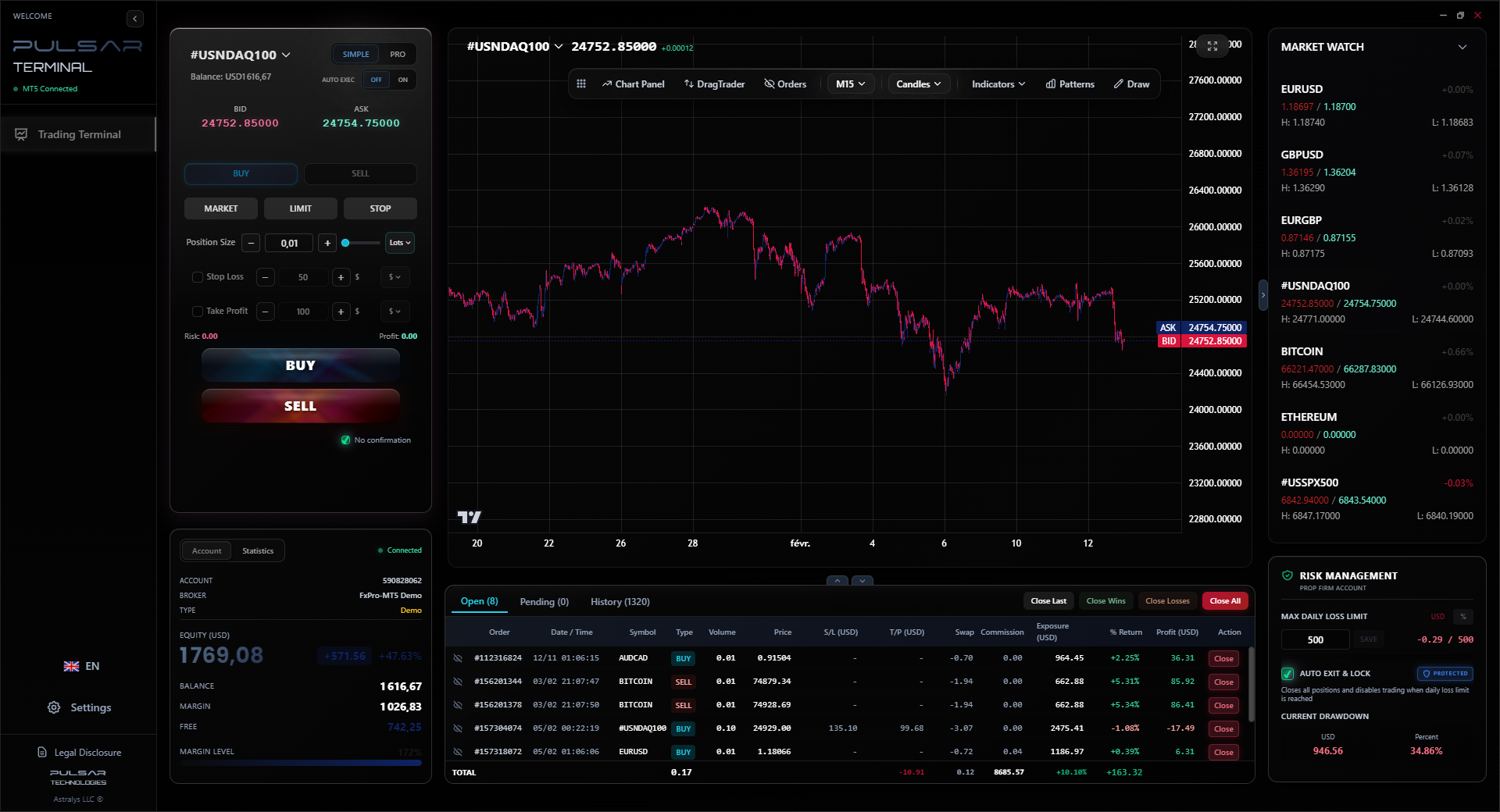
Managing multiple trades and setting advanced stop-losses on a basic MT5 screen is clunky; Pulsar Terminal adds drag-and-drop orders, multi-take-profit levels, and automated trailing stops directly onto your existing platform.
Pulsar Terminal
Универсальный инструмент для MT5: drag-and-drop ордера, мульти-TP/SL, трейлинг-стоп, грид-трейдинг, Volume Profile и защита для проп-фирм. Используется 1000+ трейдерами ежедневно.
“If your screen feels cozy and perfect, you've probably stopped growing.”
Let me be blunt about the failures I've seen (and been guilty of).
The Christmas Tree: A chart with 10 different colored moving averages, Bollinger Bands, Stochastic, and Parabolic SAR all at once. It's unreadable. You get a signal from one indicator, then a conflicting one from another. You freeze. Pick a few tools and master them.
The Distraction Zone: Having WhatsApp, Instagram, or Nairaland forums open on the same monitor as your trading platform. You're not multitasking, you're dividing your attention. Your trading screen should be on its own monitor, or at least its own dedicated desktop space.
Ignoring the Hard Numbers: Not having your account balance, margin used, and free margin clearly visible. You get obsessed with the chart and forget you're risking real money. I once entered a gold trade without checking my margin. The position was twice my normal size. I got lucky and won, but it was a stupid, risky mistake that my screen layout now physically prevents.
Chasing the 'Holy Grail' Layout: You'll waste months searching for the perfect setup. It doesn't exist. My current screen has evolved over 8 years. It started simple, and I added components as I identified a need. Start with a clean chart, your order panel, and a news feed. Build from there based on your own trading pains.
💡 Совет Уинстона
Once a week, take a screenshot of your entire desktop at a random market hour. Review it cold. What's the first thing your eye is drawn to? If it's not your open P&L or your key chart, reorganize.
“The tools are simple. The skill is in reading them together with the news flow.”
The market changes. The CBN's new Nigeria Foreign Exchange Code that took effect in December 2024 demands more transparency from institutions. That trickles down to more data for us, eventually. Your screen must adapt.
In 2024, with the parallel market gap so wide, my screen was obsessed with USD/NGN volatility. Now, with stability, I focus more on how global commodity prices (like oil and gold) affect Nigeria's reserves and, thus, long-term Naira sentiment. My screen now has a spot for Brent Crude charts.
As you progress, you might add more advanced tools. Maybe you start using a platform that offers better market depth. Perhaps you incorporate a trade management tool that helps with partial closures and trailing stops - something platforms like MT5 aren't brilliant at natively. The key is to add only when you feel a specific limitation in your current setup.
Your screen is a living thing. It should feel slightly uncomfortable - like it's pushing you to be better. If it feels cozy and perfect, you've probably stopped growing. Review it every quarter. Ask yourself: "Did this setup help or hinder my best trade last month? Did it prevent my worst mistake?" If the answer isn't a clear yes, change it.
FAQ
Q1Is MetaTrader 4 or 5 better for my forex screen in Nigeria?
For most Nigerian traders starting now, I'd lean toward MT5. It's the newer platform, handles more asset classes (which is useful if you branch into stocks or commodities), and has better backtesting capabilities. However, if your preferred broker only offers MT4 with better Naira deposit options, then MT4 is perfectly fine. The platform matters less than how you configure it.
Q2How can I practice setting up a screen without risking money?
Open a demo account with a broker like IC Markets or Pepperstone. Fund it with virtual Naira. Then, spend a week only building and testing different screen layouts. Try trading the news, try swing trading. See which layout gives you the information you need without stress. A demo is for testing your process, not just making pretend profits.
Q3What's the single most important thing on my screen?
Your account equity display. Not the flashing charts, not the indicators. The number that represents your capital. It must be in your field of view at all times. It grounds every single decision you make. If that number going down causes you panic, your position size is too big. It's your ultimate reality check.
Q4Do I need multiple monitors to trade forex properly?
It's a massive help, but it's not essential starting out. I traded for years on a single laptop screen. The key is ruthless organization. Use MT5's 'profiles' to save different chart layouts and switch quickly. On a single screen, prioritize: 1) Your main trading chart, 2) The terminal window for orders, 3) A small browser window for news/calendar. Everything else can be minimized.
Q5How do I handle news from the CBN on my trading screen?
Designate a specific, reliable source. I have a list of 3-5 verified financial journalists and the official CBN Twitter account in a dedicated Twitter list. I keep this feed open in a narrow column on my screen during Lagos trading hours. Don't get news from random forums - the noise will destroy your focus.
Q6My screen feels cluttered and I get confused. What should I remove first?
Remove every single indicator. Start with a blank candlestick chart. Add one horizontal line at the day's high and one at the day's low. Trade just from that for a day. Then, only add back an indicator if you find yourself repeatedly thinking, "I wish I could see X." Most clutter comes from adding things you think you need, not things you actually use.
Урок проф. Уинстона
Ключевые выводы:
- ✓Start with a blank chart; add tools only to solve specific problems.
- ✓Always keep your account equity visible. It's your anchor.
- ✓Configure separate screen profiles for scalping vs. swing trading.
- ✓Designate a reliable, narrow source for CBN and local news.
Насколько полезна эта статья?
Нажмите на звезду
Еженедельные торговые инсайты
Бесплатный еженедельный анализ и стратегии. Без спама.
Об авторе
Olumide Adeyemi
Пионер трейдинга в Западной Африке
Один из самых активных преподавателей форекс-трейдинга в Нигерии. 8 лет торгового опыта из Лагоса. Специализируется на стратегиях с малым капиталом и челленджах проп-фирм для африканских трейдеров.
Комментарии
Предупреждение о рисках
Торговля финансовыми инструментами сопряжена со значительным риском и может не подходить всем инвесторам. Прошлые результаты не гарантируют будущих доходов. Данный контент носит исключительно образовательный характер и не является инвестиционной рекомендацией. Всегда проводите собственное исследование перед торговлей.
Вам также может понравиться

Cara Trading Forex Sukses: 7 Prinsip dari Trader Profesional
Cara trading forex sukses dengan 7 prinsip trader pro: manajemen modal, disiplin, journal trading, backtest. Data nyata, bukan janji profit palsu.
Jam Trading Forex Terbaik untuk Trader Indonesia: Panduan Lengkap dengan Tabel Waktu
Panduan jam trading forex untuk trader Indonesia. Tabel 4 sesi dunia, jam emas 20:00-00:00, sesi mana yang harus dihindari. Data akurat + tips dari trader berpengalaman.
Top 5 Sàn Forex Uy Tín Nhất 2026: Review Jujur dari Trader Indonesia
Top 5 sàn forex uy tín 2026 untuk trader Indonesia. Review jujur: spread, deposit, withdraw, dukungan lokal. Exness, XM, IC Markets & lebih.
Скачать Pulsar Terminal
Все эти калькуляторы встроены в Pulsar Terminal с данными в реальном времени с вашего счёта MT5.
Скачать Pulsar Terminal