


I remember trying to log into my Forex.com account during a volatile NFP release a few years back.

Olumide Adeyemi
West African Trading Pioneer ·  Nigeria
☕ 13 min read
What you'll learn:
- 1What Forex.com Really Means for Nigerian Traders
- 2The Step-by-Step Login & Access Process
- 3What Awaits You After You Log In: Platforms & Tools
- 4The Real Costs: Spreads, Commissions, and the Naira Angle
- 5Security Musts and Fixing Common Login Problems
- 6Forex.com vs. Popular Nigerian Alternatives: A Quick Comparison
- 7Beyond the Login: Maximizing Your Trading with the Right Tools
- 8Final Verdict: Should a Nigerian Trader Use Forex.com?
I remember trying to log into my Forex.com account during a volatile NFP release a few years back. The platform was lagging, my login felt like it took forever, and by the time I got in, the 40-pip move on GBP/USD I was waiting for had already happened without me. I was left staring at the chart, frustrated. That moment taught me that your broker's login and platform stability aren't just minor details, they're critical parts of your trading edge. For us trading from Nigeria, with our unique challenges around funding and regulation, choosing where to log in every morning is a big decision. Let's break down what the Forex.com login experience really means for a Nigerian trader.
First things first, we need to be clear about what we're talking about. Forex.com is a global brand operated by GAIN Capital. For a Nigerian trader, this presents an immediate fork in the road.
You have two main paths:
- The International Entity: This is the Forex.com operated under strict regulations like the UK's FCA or the US's NFA. This is the "premium" service with higher protection. However, for Nigerian residents, this path is often closed. They typically don't accept clients from Nigeria due to regulatory complexities and our local restrictions.
- The Global/Market-Linked Entity: This is the version more commonly accessed from regions like Nigeria. It's often operated under a different regulatory jurisdiction (like the Cayman Islands). The branding and login portal look identical, but the legal entity, client fund segregation rules, and use offered can be different.
When you go to the Forex.com login page from Nigeria, you're almost certainly being directed to the global entity. I learned this the hard way after assuming I had FCA protection, only to find my account was under a different regulator when I checked the fine print. It's not inherently bad, but you must know what you're signing up for.

Warning: The most attractive offers (like 500:1 use) you might see advertised alongside Forex.com in Nigeria are almost never from the UK/US entity. They're from offshore divisions or, worse, clone firms using a similar name. Always verify the regulatory license number on the website footer after you log in.
The platform itself, once you're in, is strong. You'll typically get access to their advanced web platform or the MetaTrader suites. The real question for us is: are there better-suited alternatives that understand the Nigerian market's funding and support needs? Brokers like Exness and XM have built a strong presence here precisely because they've adapted to local deposit methods like bank transfers and have local support teams.
Let's walk through the actual login, from creating an account to placing your first trade. It's straightforward, but the devil is in the details.
Account Creation and Verification
You start on their website, clicking 'Open an Account'. You'll fill in personal details, trading experience, and financial information. This is where you declare you're a resident of Nigeria. They'll ask for proof of identity (International Passport or National ID) and proof of address (a utility bill or bank statement not older than 3 months).
A tip: Use documents that match the name on your funding bank account exactly. Mismatches cause delays. My verification took about 48 hours, which is pretty standard.
The Forex.com Login Portal
Once approved, you'll get your login credentials. The main login portal is on their website. You have a few access points:
- WebTrader: The browser-based platform. Just enter your username and password. Bookmark the real site to avoid phishing links.
- MetaTrader 4/5: You'll get separate login credentials (a login number, password, and server name) for MT4/MT5. You enter these in the MT platform itself, not on the Forex.com website.
- Mobile App: Download the official app from the App Store or Google Play. Never from a third-party link.

Pro Tip: Use a password manager. Your trading account password should be long, unique, and never used elsewhere. Enable two-factor authentication (2FA) the moment it's offered. It adds an extra 30 seconds to your Forex.com login but can save your entire account.
Funding Your Account
This is the Nigerian hurdle. Forex.com's global entity typically accepts international bank wire transfers and credit/debit cards. You'll be sending money abroad. This means:
- Your Nigerian bank will convert your Naira to USD (or EUR/GBP) at their rate, plus a transfer fee.
- The international wire will have a cost ($25-$50 is common).
- It can take 3-7 business days to arrive.
Compare this to brokers with local Naira payment options, where deposits can be instant and fee-free. That speed can be a real advantage when you see a setup forming.

💡 Winston's Tip
The first rule of broker club: test the withdrawal before you make the big deposit. A small test tells you everything about speed, fees, and hassle.
“When you log in from Nigeria, you're almost certainly accessing a different legal entity than the one advertised on TV.”
You've passed the Forex.com login. Now what? You're greeted by their trading environment. For the global client, the flagship is often their proprietary "Forex.com Web Platform" alongside MetaTrader.
Forex.com Advanced Trading Platform: This is a clean, chart-centric platform. I found its charting tools quite good for quick analysis. It has drawing tools, a decent number of indicators, and integrated news. The order entry is simple. Where it sometimes falls short for a power trader is in advanced order types and automation compared to what's possible with MT5 and add-ons.
MetaTrader Access: You will have MT4 and/or MT5 access. This is where most serious retail traders live. The beauty here is familiarity and the universe of custom indicators and Expert Advisors (EAs). The spread you see on the Forex.com login for MT4 might differ slightly from their proprietary platform, so always check.
Mobile Trading: Their mobile app is functional for monitoring positions and placing simple orders. I wouldn't want to do complex technical analysis on it, but for managing risk on the go, it works.
The Tools That Matter:
- Economic Calendar: Integrated and decent.
- Market Analysis: They provide daily commentary.
- Research: The quality is generally good for fundamental ideas.
The gap I felt was in advanced trade management. Setting a trailing stop or taking partial profits at multiple targets required manual work. This is where third-party tools that connect to MT5 really shine, automating these processes so you can stick to your plan without emotion. For a disciplined swing trading approach, such automation is a game-saver.
Let's talk numbers, because this is where your profit gets eaten. The costs you face after your Forex.com login come in a few forms.
Spreads: This is the main cost for most accounts. On major pairs like EUR/USD, expect spreads starting from 1.0 to 1.5 pips on their standard account. During major news events, these can widen significantly. I've seen it jump to 3-4 pips, which can instantly turn a would-be profitable scalping trade into a loser.
Commissions: If you opt for a "commission" account (often with raw spreads), you'll pay a fee per lot traded. It might be $3.50 per 100k lot (per side). So, a round turn on one standard lot costs $7. You need to factor this into your position size calculator.
Overnight Financing (Swap): If you hold positions past 5 PM EST, you pay or earn swap. For Naira-based traders, remember you're often buying USD to fund your account. If the CBN's interest rate is high relative to the Fed's, holding a USD-funded account that pays no interest has an implicit opportunity cost.
The Hidden Naira Cost: Currency Conversion. This is the big one. Your capital is in Naira. To fund your account, you buy USD from your bank at their rate. Let's say the official CBN rate is ₦1,450/$, but your bank sells to you at ₦1,480/$.

Example: To deposit $1,000, you don't pay ₦1,450,000. You pay ₦1,480,000. That's a ₦30,000 instant loss ($20 at that rate) before you even place a trade. When you withdraw, you convert back at the bank's buy rate, which might be ₦1,420/$, losing again. This two-way spread is a silent fee many overlook.
Compare this to a broker offering true Naira accounts where your balance is in Naira and you trade USD-based pairs via a CFD. The conversion is baked into the quote, but it's often more efficient than your bank's spread. Brokers like IC Markets or Pepperstone via certain payment providers can offer better conversion paths for Nigerians.
“That ₦30,000 loss on currency conversion happens before you even place a trade. It's the silent fee everyone misses.”
Your trading account is a bank account. Securing your Forex.com login is non-negotiable.
Security Essentials:
- Strong, Unique Password: 'Kunle123' is not a password. Use a mix of letters, numbers, symbols.
- Two-Factor Authentication (2FA): If they offer it (via an app like Google Authenticator), use it. It stops 99% of unauthorized access attempts.
- Device Hygiene: Don't log in from public WiFi. Keep your computer and phone updated. Use a reputable antivirus.
- Phishing Awareness: You'll get fake emails saying 'your account is locked, click here to log in.' The link goes to a fake site that steals your details. Always type the Forex.com URL directly or use your bookmark.
Common Login Issues & Fixes:
- "Invalid Login" on MT4/5: This is almost always a server issue. You're logging into the wrong server. Double-check the server name provided in your welcome email. It's not 'Forex.com-Live' but something like 'Forex.com-Live04'.
- Web Platform Not Loading: Clear your browser cache and cookies. Try a different browser (Chrome, Firefox).
- Account Locked: After too many failed attempts, it locks for security. You'll need to contact support to reset it. This is why 2FA is better.
- Slow/Unstable Connection: The platform servers are overseas. A poor internet connection in Nigeria will magnify this. Consider a stable ISP. A laggy login during a fast market is a recipe for a margin call disaster.
If you lose access and have open positions, call their support immediately. Don't just email.
💡 Winston's Tip
Your login password is your first line of defense. If it's something your cousin could guess, you've already lost. Use a manager, make it random.
Is Forex.com the best place for your Nigerian Naira? Let's stack it up against brokers who've specifically courted the Nigerian market.
| Feature | Forex.com (Global Entity) | Popular Nigerian-Friendly Brokers (e.g., Exness, XM) |
|---|---|---|
| Regulation | Offshore (e.g., Cayman) | Often CySEC, FSCA, or other int'l regulators + local compliance |
| Naira Deposits | No (Int'l Wire/Card only) | Yes, via local bank transfer, cards, USSD |
| Deposit Speed | 3-7 business days | Instant to few hours |
| use Offered | Up to 200:1 (varies) | Can be higher, up to 1000:1+ on minors (higher risk) |
| Spreads on EUR/USD | ~1.0 - 1.5 pips (Standard) | Can be tighter, sometimes < 1.0 pip on Raw accounts |
| Local Support | Email/Phone, not Nigeria-specific | Local Nigerian office, WhatsApp, phone support |
| Platforms | Proprietary, MT4, MT5 | MT4, MT5 (almost universal focus) |
My Take: Forex.com is a solid, established broker with a good platform. If you prioritize brand history and a specific tool they offer, it's a valid choice. However, for the average Nigerian retail trader, the funding friction and lack of localized support are major drawbacks.
The convenience of funding in Naira without international wire fees is a massive practical advantage. When I switched to a broker with local deposits, the mental relief of not worrying about week-long fund transfers was tangible. For active strategies like scalping, where you might need to top up your margin quickly, this speed is critical.
Always check recent broker reviews from fellow Nigerian traders to see the current state of withdrawals and support before you decide where to open your login screen every day.
“A secure login gets you in the door, but automated trade management keeps you from being thrown out the window.”
Logging in is just the start. What you do inside the platform defines your success. Regardless of your broker, your edge comes from your process.
Trade Management is King: A clean Forex.com login gets you in the door, but poor trade management will blow you out the window. This means having a plan for:
- Partial Take-Profit Levels: Don't just have one target. Scale out. This books profit and reduces risk on the remainder.
- Trailing Stops: To lock in profit as a trend moves your way.
- Breakeven Stops: Moving your stop to entry after a certain profit level is hit, guaranteeing a risk-free trade.
Doing this manually on fast-moving pairs like XAU/USD is stressful and error-prone. I've manually trailed a stop, only to have the price reverse and hit my new stop before I could adjust it back, turning a winner into a breakeven. Automation removes this emotion.
Analysis Depth: The built-in indicators like RSI and MACD are fine. But are you using Volume Profile to see where the real buying and selling happened? Are you automatically spotting chart patterns? The platform you log into should either have these tools or allow you to add them.
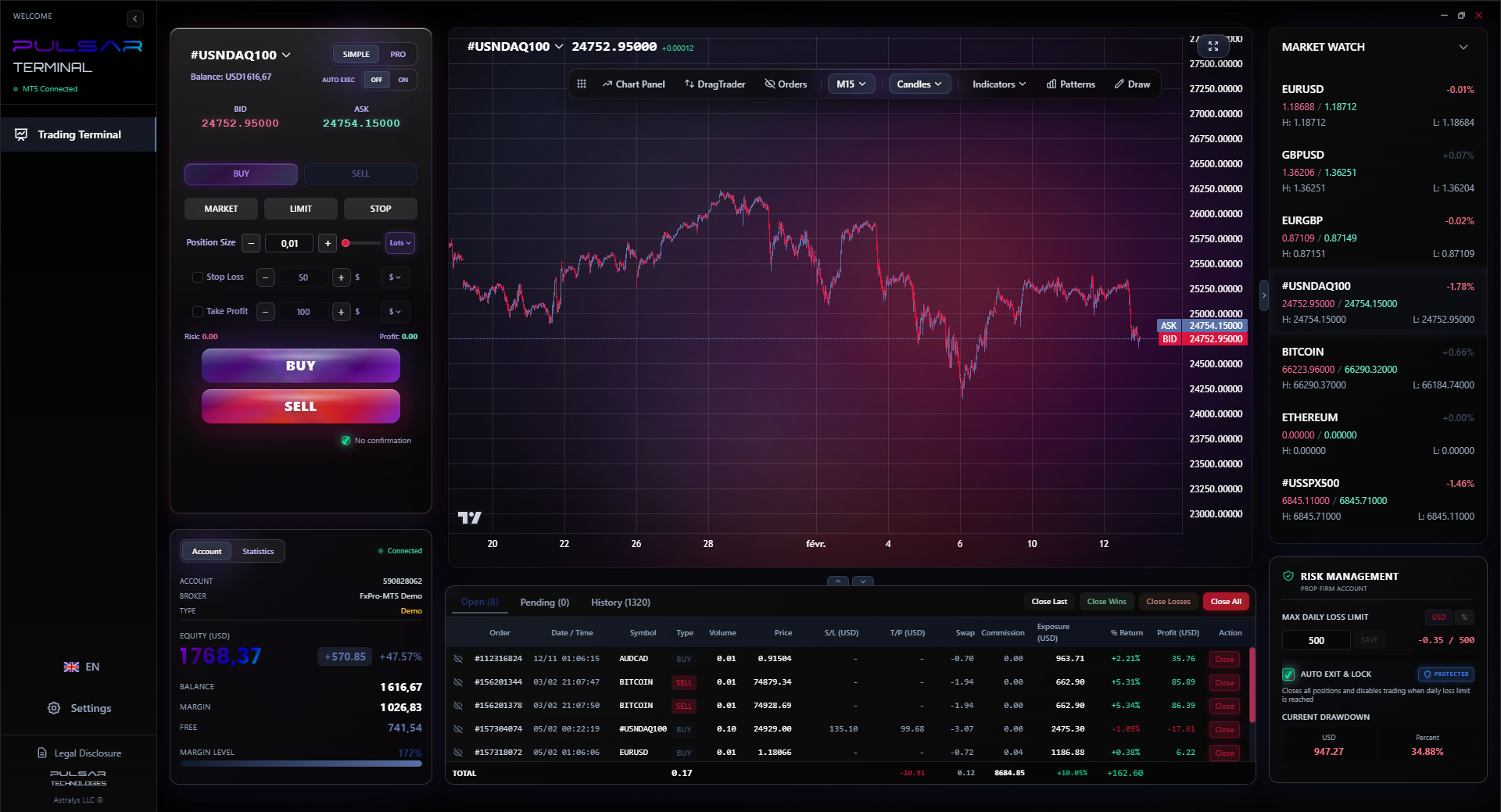
This is where the concept of your trading terminal becomes crucial. Think of your broker's login as providing the market data and execution pipe. Your terminal - the charting and order management software - is your cockpit. Using a powerful terminal that connects to your MT5 (which you access via your Forex.com login credentials) can transform your efficiency. It lets you drag and drop orders, set multi-level take-profits with one click, and automate your entire risk management plan. This turns a reactive trading session into a proactive, rules-based operation.
💡 Winston's Tip
Platform lag during news is a cost. If your broker's login or execution consistently slows when volatility spikes, that's a direct tax on your strategy. Measure it.
Managing complex trade plans manually after login is tough; Pulsar Terminal automates multi-level take-profits, trailing stops, and breakeven orders directly on your MT5 platform.
Pulsar Terminal
The all-in-one MT5 companion: drag-and-drop orders, multi-TP/SL, trailing stop, grid trading, Volume Profile, and prop firm protection. Used by 1,000+ traders daily.
So, after all this, is the Forex.com login right for you?
Consider Forex.com if:
- You are a more experienced trader who doesn't mind the international funding process.
- You value the brand name and its long history.
- Their specific proprietary research or platform tools align perfectly with your strategy.
- You are trading larger sizes where the brand's institutional feel matters to you.
Look at Nigerian-friendly alternatives if:
- You want fast, fee-efficient Naira deposits and withdrawals.
- You value having local customer support you can call or visit.
- You are a retail trader starting out or with a smaller account where funding friction is a big deal.
- You want seamless integration with popular MT4/MT5 tools and add-ons commonly used here.
For most Nigerian traders I mentor, the practicalities of local banking and support win out. The trading environment is tough enough without adding currency conversion headaches and slow fund movements.
Your action plan:
- Define your needs: Size, strategy, required tools.
- Test the login: Open a demo account with Forex.com AND with a couple of alternatives like Exness or IC Markets. Feel the platforms.
- Test the funding: Try a small deposit and withdrawal process with each to see the real-world speed and cost.
- Then decide.
Remember, the most secure Forex.com login in the world won't save a bad trading plan. But a good plan executed through a reliable, convenient broker is a strong foundation. Choose the gateway that supports your process, not one that adds unnecessary obstacles.
FAQ
Q1Can I legally open a Forex.com account from Nigeria?
Yes, but typically only with their global/international entity, which is regulated offshore (not by the UK FCA or US NFA). The top-tier regulated entities often do not accept clients resident in Nigeria. Always check which specific company you are contracting with during sign-up.
Q2What is the minimum deposit for Forex.com in Nigeria?
For the global entity accessible from Nigeria, the minimum deposit is usually $100. However, remember you'll need to convert Naira to USD through your bank to send this, incurring transfer fees and the bank's exchange rate spread.
Q3Why can't I log into my MT4 after getting my Forex.com credentials?
This is almost always a server selection error. In MT4, when you log in, you must select the correct server from the dropdown list. This server name (e.g., 'Forex.com-Live05') is in your account opening email. Using the wrong server will give an 'invalid login' error.
Q4Does Forex.com accept Nigerian debit cards like Verve or Naira Mastercard?
Generally, no. They accept international Visa/Mastercard credit and debit cards. If your Nigerian-issued card has international transaction capabilities (and you have the USD forex limit on it), it might work, but it's not guaranteed and is subject to your bank's policies and fees.
Q5How long do withdrawals back to Nigeria take?
Withdrawals back to a Nigerian bank account via international wire can take 5-10 business days. The funds will be converted from USD to Naira by your receiving bank at their own rate, which may differ from the market rate you see online.
Q6Is two-factor authentication (2FA) available for my Forex.com login?
For the web platform login, it is often available and highly recommended. For MT4/MT5 logins, 2FA is usually not supported by the MT platform itself. Your security for MT access relies entirely on the strength and secrecy of your MT password and server details.
Q7What should I do if I suspect a phishing attempt for my login details?
Do not click any links in the email. Go directly to the official Forex.com website by typing the URL yourself. Forward the suspicious email to their official support address for investigation. Never enter your credentials on a site you reached via an email link.
Prof. Winston's Lesson
Key Takeaways:
- ✓Verify the exact regulatory entity post-login, not pre-signup.
- ✓Factor in a 2-5% loss on Naira-USD currency conversion for funding.
- ✓Local deposit options can save 3-7 days of fund-transfer stress.
- ✓Enable 2FA on your web login immediately - no exceptions.
How useful was this article?
Click a star to rate
Weekly Trading Insights
Free weekly analysis & strategies. No spam.
About the Author
Olumide Adeyemi
West African Trading Pioneer
One of Nigeria's most active forex trading educators. 8 years of experience trading from Lagos. Specializes in low-capital strategies and prop firm challenges for African traders.
Comments
Risk Disclaimer
Trading financial instruments carries significant risk and may not be suitable for all investors. Past performance does not guarantee future results. This content is for educational purposes only and should not be considered investment advice. Always conduct your own research before trading.
You Might Also Like

Cara Trading Forex Sukses: 7 Prinsip dari Trader Profesional
Cara trading forex sukses dengan 7 prinsip trader pro: manajemen modal, disiplin, journal trading, backtest. Data nyata, bukan janji profit palsu.
Jam Trading Forex Terbaik untuk Trader Indonesia: Panduan Lengkap dengan Tabel Waktu
Panduan jam trading forex untuk trader Indonesia. Tabel 4 sesi dunia, jam emas 20:00-00:00, sesi mana yang harus dihindari. Data akurat + tips dari trader berpengalaman.
Top 5 Sàn Forex Uy Tín Nhất 2026: Review Jujur dari Trader Indonesia
Top 5 sàn forex uy tín 2026 untuk trader Indonesia. Review jujur: spread, deposit, withdraw, dukungan lokal. Exness, XM, IC Markets & lebih.
Get Pulsar Terminal
All these calculators are built into Pulsar Terminal with real-time data from your MT5 account. One-click position sizing, automatic risk management, and instant calculations.
Get Pulsar Terminal