


I watched the EUR/USD chart for three hours, waiting for a pullback to 1.0850 to enter.

Olumide Adeyemi
West African Trading Pioneer ·  Nigeria
☕ 11 min read
What you'll learn:
- 1What Exactly Is a Pending Order? (And Why You Need It)
- 2The Four Types of Pending Orders: Your Strategic Arsenal
- 3How to Set a Pending Order in MT4/MT5: A Walkthrough
- 4Practical Pending Order Strategies for the Nigerian Market
- 5The 5 Costly Mistakes Nigerian Traders Make (I Made #3)
- 6Managing Your Trades in a Volatile Naira Environment
- 7Choosing a Broker: Execution Quality is Everything
I watched the EUR/USD chart for three hours, waiting for a pullback to 1.0850 to enter. I stepped away for 15 minutes to handle a power cut - typical Lagos afternoon. When I came back, price had kissed 1.0852 and rocketed up 80 pips without me. That missed opportunity cost me over $400 on a single standard lot. That's the exact moment I stopped being a 'click-and-hope' trader and learned the power of a proper pending order forex strategy. It's not just a tool; it's your automated trading assistant that works while you're dealing with real life.
A pending order is simply an instruction you give your broker to execute a trade automatically when price hits a specific level you define. You're not buying or selling at the current market price. You're saying, "Hey, when EUR/USD drops to this support level, buy it for me." Or, "When it breaks above this resistance, sell short."
Think of it like setting a trap for the market. You identify a key zone, set your order, and walk away. This is non-negotiable for Nigerian traders. Our internet can be unreliable. NEPA (or your generator) has its own schedule. You have a job, family, life. A pending order trades for you while you're offline.
The four main types are your foundational tools. Don't overcomplicate it.
| Order Type | Simple Logic | When You'd Use It |
|---|---|---|
| Buy Limit | Buy BELOW current price. | You expect a dip to support, then a bounce up. |
| Sell Limit | Sell ABOVE current price. | You expect a rally to resistance, then a drop. |
| Buy Stop | Buy ABOVE current price. | You're waiting for a breakout above resistance to catch the uptrend. |
| Sell Stop | Sell BELOW current price. | You're waiting for a breakdown below support to catch the downtrend. |

Example: Let's say GBP/USD is trading at 1.2650. You see strong support at 1.2600. Instead of staring at the screen, you place a Buy Limit order at 1.2605. If price drops to that level, your trade opens automatically. You've just caught a bounce you might have missed while stuck in traffic on the Third Mainland Bridge.
This is the core of a disciplined swing trading approach. It removes emotion and forces you to plan your trade before you're in it.

💡 Winston's Tip
A pending order is a plan. If you wouldn't sit and manually execute at that price, don't set an order there. Laziness in planning is not a strategy.
Let's break these down with a Nigerian context. I'm not giving you textbook definitions. I'm telling you how I've used them to make and lose money.
Buy Limit: The "Buy the Dip" Order
This is for when you're bullish on a pair but want a better entry. Price is at 1.0900, you think support is at 1.0850. Place a Buy Limit at 1.0850. If the market agrees with you and dips to that level, you get in. The risk? Price never comes down and you miss the move entirely. I've done this on XAU/USD (gold) countless times, setting orders near key Fibonacci levels.
Sell Limit: The "Sell the Rally" Order
The opposite. Price is falling, but you expect a temporary pullback to a resistance area before it continues down. You set a Sell Limit above the current price at that resistance. It's a way to short a market without chasing it lower.
Buy Stop: The Breakout Hunter
This one is tricky but powerful. Price is consolidating, say between 1.0700 and 1.0750. You believe if it breaks 1.0750, it will surge. You place a Buy Stop at 1.0755. This order only triggers if price rallies up to that level. It's how you catch explosive moves. The danger? False breakouts. Price triggers your order at 1.0755, then immediately reverses. You're now in a losing buy trade. I got whipsawed like this three times in a week trading USD/NGN spreads before I learned to combine it with volume confirmation.
Sell Stop: The Breakdown Catcher
Same logic, but for downtrends. Price is range-bound; you set a Sell Stop just below the support line. If support breaks, your short trade opens automatically. This is essential for trading during major news events when moves are fast.

Warning: Never place a Stop order (Buy Stop or Sell Stop) too close to the current price in a volatile market. A tiny, meaningless spike can trigger your trade and then reverse. Always give it breathing room - at least 5-10 pips beyond a clear technical level.
Brokers like IC Markets and Pepperstone offer these orders standard on their MT4/MT5 platforms. The execution is usually reliable, but during extreme volatility (like when CBN news hits), slippage can occur.
“A pending order trades for you while you're dealing with power cuts, traffic, and real life.”
Open the 'New Order' window (F9 is the shortcut). Don't just click 'Buy' or 'Sell' at market price. See that 'Type' dropdown? Change it from 'Market Execution' to 'Pending Order'.
A new set of fields will appear.
- Type: Select your order (Buy Limit, etc.).
- Volume: Your lot size. Use a position size calculator here. Always.
- Price: This is the trigger price. The exact level you want your trade to open.
- Stop Loss (SL): SET THIS. Right now. Don't say you'll add it later. You won't. Define your risk in pips.
- Take Profit (TP): Your target. This locks in profit when hit.
- Expiry: You can set a date/time for the order to cancel if not triggered. Useful if your trade idea is only valid for a day or two (like before a big US data release).
Click the 'Place' button. You'll see the order listed in the 'Trade' tab of your Terminal window. It will sit there, inactive, until price hits your level or you delete it.
Here's a real mistake I made early on: I confused the 'Price' field with my Stop Loss. I meant to set a Buy Limit at 1.0850 with a Stop Loss at 1.0820. I accidentally put 1.0820 in the 'Price' field. My Buy Limit was set way below where I intended. The trade never triggered, and I missed a perfect setup. Double-check your numbers.
Theory is fine, but how do you actually use this to make decisions? Here are two strategies I've run with real money.
Strategy 1: The Support/Resistance Fade
This uses Limit orders. Identify a clear support level on a chart (like a previous swing low or a horizontal line). Wait for price to approach it from above. Place a Buy Limit order a few pips above that support level (so you don't miss it by a hair). Set your Stop Loss a safe distance below support. Your Take Profit target is the next resistance area.
I used this on EUR/USD in Q4 2024. Identified support at 1.0720. Placed a Buy Limit at 1.0725 with a 25-pip SL. TP was set at 1.0780. Price dipped, triggered my order, and rode it back up for a 55-pip gain. I was asleep when it happened. That's the beauty.
Strategy 2: The Volatility Breakout
This uses Stop orders. Identify a tight consolidation range. Place a Buy Stop 5 pips above the range high and a Sell Stop 5 pips below the range low. Attach equal Stop Losses and Take Profits to both. Whichever direction breaks, you're in. Crucially, you must CANCEL the opposite order once one triggers. If your Buy Stop hits, immediately delete the pending Sell Stop. Otherwise, you'll end up in two opposite trades.
This is more advanced and works well on pairs like GBP/JPY or during the London session open. Your risk is the whipsaw - getting into a breakout that immediately reverses and hits your SL.

Pro Tip: Combine pending orders with an indicator for confluence. I often use the RSI indicator to see if it's oversold near my Buy Limit zone, or the MACD indicator showing bullish divergence. It doesn't guarantee success, but it improves your odds.
Remember, the 10% capital gains tax applies to any profit you make from these trades. Factor that into your profit targets.
💡 Winston's Tip
The market doesn't know or care about your pending order. That 'perfect' round number you chose is a magnet for stop hunts. Place your limits a few pips away from the obvious levels.
“Confusing a Stop Loss with a Sell Stop order is a classic, account-draining mistake.”
- Placing Orders Too Close to the Market: This is asking for trouble. If you set a Buy Stop 2 pips above current price, any minor fluctuation will trigger it. Give your trade idea room to breathe. Respect the market's noise.
- Forgetting to Set Stop Loss: A pending order without an SL is a time bomb. If your Buy Limit triggers and the market keeps crashing, you have no automatic protection. You'll be hoping and praying while your account bleeds. I've seen a student lose 15% of his account on a single unguarded pending order during a news spike.
- Setting and Forgetting (The 'Fire-and-Forget' Fallacy): This was my big mistake. I'd set 5-6 pending orders across different pairs and not look at the charts for days. The market context changed - a major trend reversed - but my old, irrelevant orders were still active. One triggered and immediately went against me. You must review your pending orders daily. Cancel those that no longer make sense.
- Ignoring the Spread: If you set a Buy Limit at 1.0850 and the spread for that pair is 1.5 pips, your actual fill price might be 1.0851.5. For a scalping strategy with tight targets, this can kill your edge. Know your broker's typical spread on your chosen pair.
- Overcomplicating with Too Many Orders: You're not a hedge fund. Having a dozen pending orders open at once scatters your focus and capital. It's better to have 2-3 high-conviction orders than 10 hopeful ones. Concentration beats diversification in active trading.
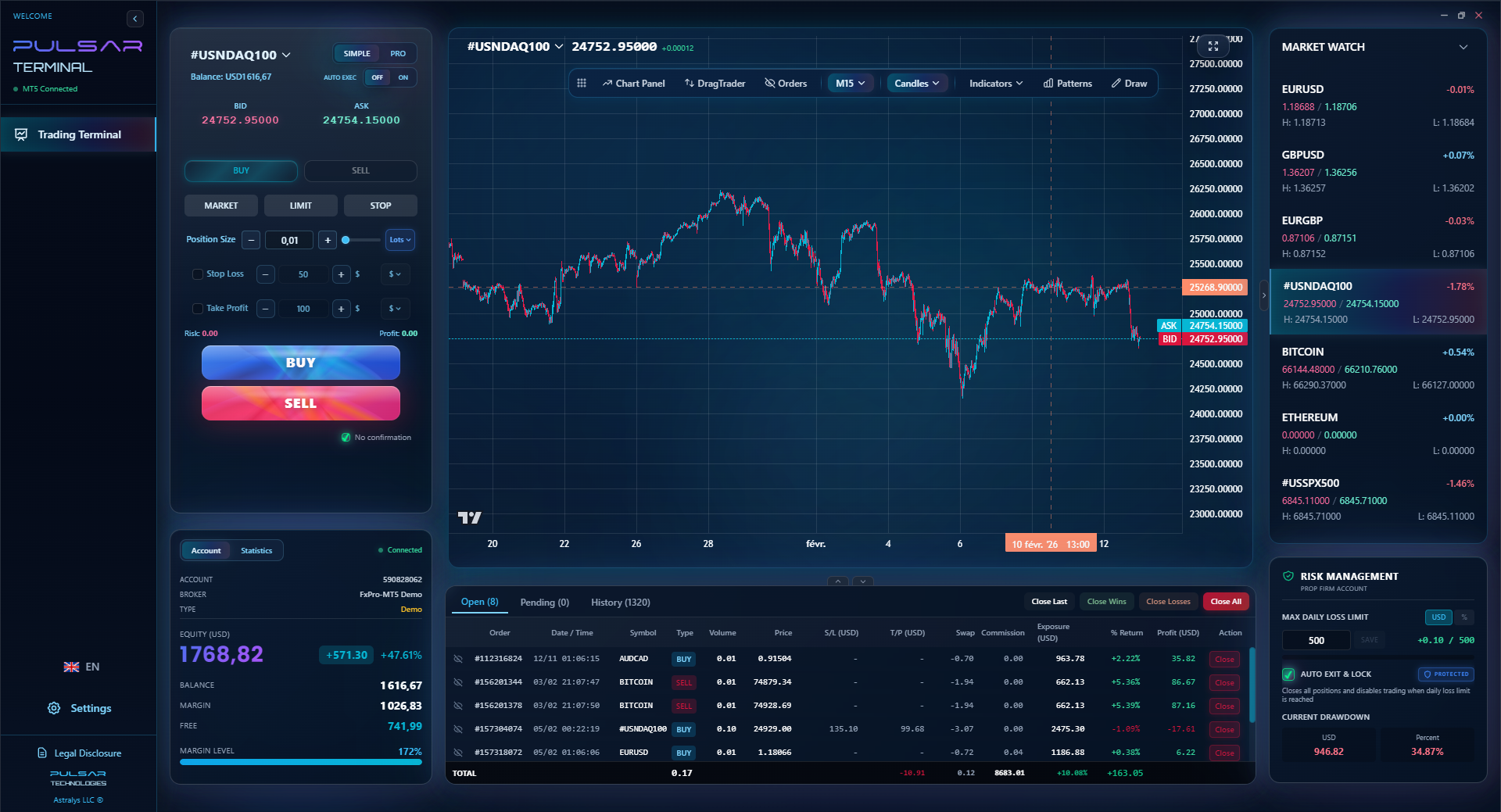
Manually tracking and adjusting multiple pending orders is a chore, which is why tools like Pulsar Terminal allow you to set complex multi-level order grids directly on your MT5 chart.
Pulsar Terminal
The all-in-one MT5 companion: drag-and-drop orders, multi-TP/SL, trailing stop, grid trading, Volume Profile, and prop firm protection. Used by 1,000+ traders daily.
The Naira's moves are a reality we trade around. When the CBN makes an announcement or liquidity shifts, volatility spikes. This affects you in two ways.
First, if you're funding a USD account with Naira, the deposit/withdrawal value changes. A profit you made last month could be worth fewer Naira today if the dollar weakens. Some brokers like Exness offer NGN-denominated accounts, which can simplify this mentally - you see profits and losses in Naira directly.
Second, and more critically for pending orders, is execution during volatility. High volatility can mean wider spreads. Your order might trigger at a worse price than you specified (slippage). This is why your Stop Loss is sacred. If you set a 20-pip SL, but the market gaps 50 pips past your trigger, you could get a margin call or a much larger loss than planned.
How to adapt?
- Widen your Stop Losses around major known events (CBN MPC meeting dates, inflation data releases).
- Avoid placing pending orders right before these high-impact news times. The risk of a disastrous fill is too high.
- Use lower use. If you normally trade with 1:500, drop to 1:100 during uncertain Naira periods. This gives your account more buffer to handle the wild swings.
The Naira's 40.9% depreciation in 2024 was a lesson for everyone. Traders who were over-leveraged and didn't respect volatility got wiped out. Those who used conservative pending orders with wide stops survived and even profited from the trend.
“Your brilliant strategy is useless if your broker executes it poorly.”
Your brilliant pending order strategy is useless if your broker has terrible execution. For Nigerian traders, you need a broker that accepts you, has reliable deposits/withdrawals, and executes orders cleanly.
Based on the data and my experience, here’s what matters:
- Regulation: While local CBN registration is ideal, many top brokers serving Nigeria operate under strong international regulators like the FSCA (South Africa) or CySEC. Exness and XM have a strong local presence and understand the market.
- Spreads & Commissions: For pending orders, especially limits, tight spreads are money in your pocket. Brokers like IC Markets and Pepperstone offer raw spreads from 0.0 pips on ECN accounts (with a small commission per lot). If you're trading a standard account with a 1.6-pip spread on EUR/USD, you're down 1.6 pips the moment your order fills. That's a hurdle you must overcome.
- Order Execution Speed: Look for brokers boasting 99%+ instant execution. During a fast move, a delay of even milliseconds can mean a worse fill price. XM publishes stats on this (99.35% instant execution).
- Platform Stability: MT4/MT5 are the standards. Ensure the broker's server connection is stable from Nigeria. There's nothing worse than your platform disconnecting while you have pending orders live.
My advice? Open demo accounts with 2-3 brokers from the list. Test pending order execution during active market hours (London session). See which one fills your orders most accurately at the price you set. That's your broker.
FAQ
Q1Can I place a pending order on my phone?
Absolutely. The MT4 and MT5 mobile apps have full functionality for placing, modifying, and deleting pending orders. The interface is a bit smaller, but it works the same way. It's perfect for managing trades when you're away from your computer.
Q2What happens if price gaps past my pending order price?
It depends on the order type. For a Buy Limit or Sell Limit, if price gaps past your level (e.g., opens much lower than your Buy Limit), the order will usually execute at the first available price after the gap, which could be much worse for you. For Buy/Sell Stops, a gap past your level guarantees execution, often at a significantly worse price. This is a major risk around weekend gaps or major news events.
Q3Do pending orders cost money?
No, there's no extra fee to place a pending order. You only incur costs when the order is triggered and becomes a live trade. At that point, you pay the spread (the difference between buy/sell price) and any commission if you're on an ECN account. The pending order itself is free.
Q4What's the difference between a Stop Loss and a Sell Stop order?
A Stop Loss is attached to an existing trade to close it at a loss. A Sell Stop is a pending order to open a new short trade. Don't confuse them. One protects you (SL), the other initiates an attack (Sell Stop).
Q5How long does a pending order stay active?
By default, pending orders in MT4/MT5 stay active until you cancel them or they are triggered. However, you can set an expiry date (e.g., end of day, end of week). It's good practice to use an expiry if your trade idea is time-sensitive.
Q6Is there a limit to how many pending orders I can have?
Most brokers impose a limit, often around 200-500 total orders (pending + open trades) per account. For a retail trader, you should never get close to this. If you have more than 10 pending orders, you're probably over-trading.
Q7Can I modify a pending order after placing it?
Yes. You can right-click on the order in the Terminal window and select 'Modify or Delete'. You can change the trigger price, lot size, Stop Loss, and Take Profit. This is essential as the market evolves and your analysis changes.
Prof. Winston's Lesson
Key Takeaways:
- ✓Use Buy Limits for bounces, Buy Stops for breakouts.
- ✓Always attach a Stop Loss before clicking 'Place'.
- ✓Widen stops during Naira volatility events.
- ✓Test broker execution with a demo first.
- ✓10% capital gains tax applies to all profits.
How useful was this article?
Click a star to rate
Weekly Trading Insights
Free weekly analysis & strategies. No spam.
About the Author
Olumide Adeyemi
West African Trading Pioneer
One of Nigeria's most active forex trading educators. 8 years of experience trading from Lagos. Specializes in low-capital strategies and prop firm challenges for African traders.
Comments
Risk Disclaimer
Trading financial instruments carries significant risk and may not be suitable for all investors. Past performance does not guarantee future results. This content is for educational purposes only and should not be considered investment advice. Always conduct your own research before trading.
You Might Also Like

Cara Trading Forex Sukses: 7 Prinsip dari Trader Profesional
Cara trading forex sukses dengan 7 prinsip trader pro: manajemen modal, disiplin, journal trading, backtest. Data nyata, bukan janji profit palsu.
Jam Trading Forex Terbaik untuk Trader Indonesia: Panduan Lengkap dengan Tabel Waktu
Panduan jam trading forex untuk trader Indonesia. Tabel 4 sesi dunia, jam emas 20:00-00:00, sesi mana yang harus dihindari. Data akurat + tips dari trader berpengalaman.
Top 5 Sàn Forex Uy Tín Nhất 2026: Review Jujur dari Trader Indonesia
Top 5 sàn forex uy tín 2026 untuk trader Indonesia. Review jujur: spread, deposit, withdraw, dukungan lokal. Exness, XM, IC Markets & lebih.
Get Pulsar Terminal
All these calculators are built into Pulsar Terminal with real-time data from your MT5 account. One-click position sizing, automatic risk management, and instant calculations.
Get Pulsar Terminal