


I remember staring at the MT4 login screen on a Monday morning in 2018, my finger hovering over the 'Sign In' button.

David van der Merwe
Emerging Markets Trader ·  South Africa
☕ 8 min read
What you'll learn:
- 1It's More Than Just a Password
- 2Choosing Your Battlefield: Platform Sign In
- 3The Cost of Entry: What Your Sign In Really Pays For
- 4Security Rituals Every SA Trader Needs
- 5The First 5 Minutes After You Sign In
- 6Mobile Sign In: Trading in Your Pocket (A Double-Edged Sword)
- 7When Sign In Fails: The SA Trader's Troubleshooting Guide
I remember staring at the MT4 login screen on a Monday morning in 2018, my finger hovering over the 'Sign In' button. The ZAR/USD was gapping up after some political news, and my short position from Friday was about to get smoked. That click wasn't just accessing a platform, it was opening a door to a R12,000 loss. In South Africa, your forex sign in is the first line of defense and your most frequent point of failure. It's where discipline meets the market, every single time. Let's talk about what happens before, during, and after you hit that button.
Most beginners think a forex sign in is about username and password. They're wrong. It's the gateway to a regulated financial environment, and in South Africa, that means the FSCA (Financial Sector Conduct Authority). Before you even think about logging in, you need to know who's on the other side of that server.
Your first step should always be verifying your broker's FSP number on the FSCA's public register. I learned this the hard way early on, depositing R5,000 with a "broker" offering 500:1 use (illegal here) and slick marketing. The platform looked legit, the sign in was smooth, but when I tried to withdraw profits? Radio silence. Poof. Money gone.

Warning: If your broker isn't on the FSCA list, your money isn't protected by South African client fund segregation rules. Full stop. That sign in is a one-way ticket to losing your deposit.
Once you've confirmed regulation, the actual sign in process is your daily ritual. It sets the tone. Are you logging in frantic, checking your phone in traffic? Or are you at your desk, charts prepped, with a clear plan? That mental state when you authenticate matters more than you think.

💡 Winston's Tip
Your pre-sign in routine is more important than your trading strategy. If you can't articulate your plan before the platform loads, you have no plan.
“In South Africa, your forex sign in is the first line of defense and your most frequent point of failure.”
In South Africa, you're generally signing into one of three things: MetaTrader 4/5 (MT4/MT5), a broker's proprietary platform, or a web trader. Your choice dictates your entire trading experience.
The MetaTrader Monopoly
MT4 and MT5 are the kings here. Most local brokers like XM, IC Markets, and Exness offer them. Signing in requires your account number (not your email), a password, and the broker's server address. Get one of these wrong and you're locked out. I've done it during volatile news - frustrating doesn't begin to cover it.
A huge local advantage? ZAR-denominated accounts. When you sign in to a platform like Khwezi Trade or a ZAR account with a major broker, your profit and loss is in Rands from the get-go. No mental currency conversion. This is crucial for sane position size calculation.
Proprietary & Web Platforms
Brokers like IG and Plus500 have their own systems. The sign in is often simpler (email/password), and the interface is cleaner for beginners. But you're locked into their environment. Custom indicators, complex scripts? Often not possible.
The bottom line: Your platform is your cockpit. Test the demo sign in process thoroughly. Is it reliable during South African load-shedding? Does it reconnect quickly if your internet drops? If not, find another broker.
“The amateur logs in and stares at the charts, looking for ‘something’. The pro has a checklist.”
You click 'Sign In', you see a chart. Seems free, right? Wrong. Your first glance at the EUR/USD price is already showing you the cost: the spread. This is the broker's cut, and it varies wildly.
Let's use real numbers from early 2026. On a standard account:
- IG: You'll see an average spread of 0.98 pips on EUR/USD when you log in.
- XM: Around 0.8 pips on their commission-free accounts.
- AvaTrade: Fixed spreads from 0.9 pips.
But the real players use raw/ECN accounts. When I sign in to my IC Markets Raw Spread account, I routinely see EUR/USD at 0.0 pips. The cost? A commission of $7 round turn per lot. For a scalping strategy, this is a no-brainer.

Example: Trade 1 lot EUR/USD on a standard account at 0.8 pips vs. a raw account at 0.0 pips + $7 commission.
- Standard cost: 0.8 pips * $10 per pip = $8
- Raw account cost: $7 commission The raw account saves you $1 per lot. Scale that up over 100 trades a month.
Other fees lurk behind your sign in:
- Overnight Swaps: Hold a position past 10 PM SAST? You'll pay or earn interest. Logging in the next morning shows this adjustment.
- Inactivity Fees: Don't sign in for 3 months? AvaTrade, for instance, will charge you $50. Your capital is slowly drained.
- Deposit/Withdrawal: Funding your account isn't free. Some brokers absorb bank charges; many don't. That R500 deposit might only be R480 in your trading account.
“The amateur logs in and stares at the charts, looking for ‘something’. The pro has a checklist.”
Here’s a fun fact: the most common point of failure isn't a bad trade, it's a compromised account. Your forex sign in credentials are a goldmine for hackers.
1. Two-Factor Authentication (2FA): Non-negotiable. If your broker offers it (and they all should), enable it. This means after entering your password, you need a code from your phone app (like Google Authenticator) to complete the sign in. It stopped an attempt on my Exness account cold in 2023.
2. Password Discipline: Don't use ‘Springbok2024!’. Use a password manager. Your trading password should be unique, long, and never used elsewhere.
3. The Device Rule: Never, ever sign in to your live trading account from a public computer or an unsecured WiFi network. I treat my trading laptop like a weapon: it does one thing. No random browsing, no downloads.
4. The Logout: Always actively log out. Don't just close the window. Especially important if you're using a VPS (common for algo traders). An open session is an invitation.
A breach means more than lost money. It can mean manipulated trades executed from your account, leaving you liable. A secure sign in is your first trade of the day, and it should always be a winner.
💡 Winston's Tip
Treat your login credentials with the same secrecy as your online banking PIN. A compromised trading account can be emptied faster than a current account.
“A secure sign in is your first trade of the day, and it should always be a winner.”
This is where pros and amateurs diverge instantly. The amateur logs in and stares at the charts, looking for ‘something’. The pro has a checklist.
My ritual, honed over a decade:
- Check Open Positions: Before anything else. What's my current exposure? Any stops that need adjusting? I once signed in after a weekend to find a trailing stop had moved way too close on a gold trade, killing a winning position. Now I check first.
- Review Economic Calendar: What's scheduled for today? SARB announcements? US CPI? High-impact news changes everything. No new trades 30 minutes before major news if you're sane.
- Check Margin & Equity: What's my usable margin? Has my broker's server pinged me with a margin call warning? This tells me how much firepower I have (or don't have).
- Set Alerts: I don't watch charts all day. I set price alerts for key levels I identified before I signed in. Then I minimize the platform.
This process takes 5 minutes. It removes emotion. The market is chaos; your post-sign in routine is the discipline that contains it.

Pro Tip: Use a trading journal app outside your platform. Log your mental state before you sign in. Tired? Stressed? Hungover? Note it. You'll start to see patterns where your worst trades follow specific mental states at sign in.
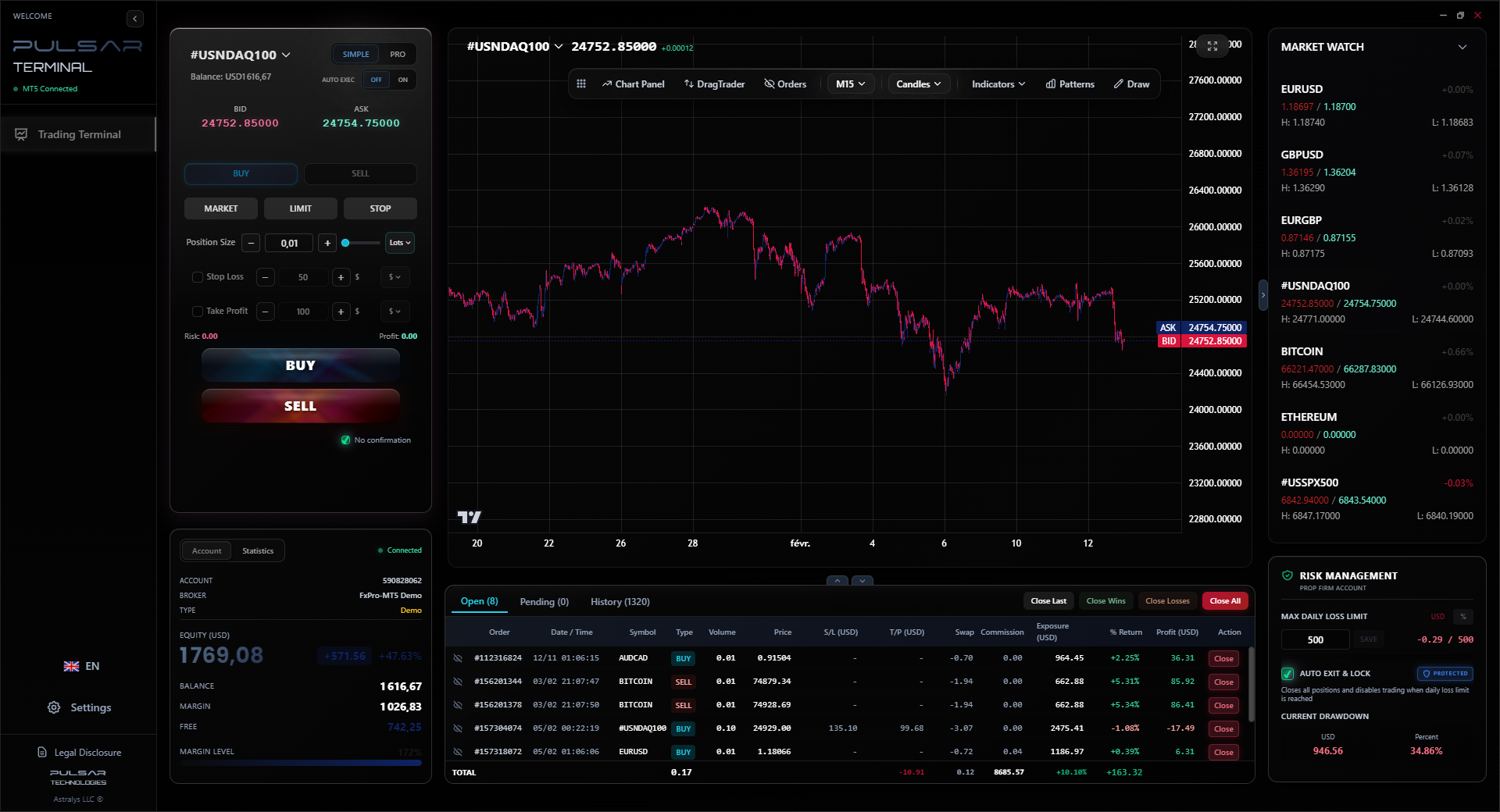
A disciplined post-sign in routine is key, and tools like Pulsar Terminal can automate your trade management—setting multiple take-profits, trailing stops, and breakeven levels—directly from your MT5 charts, so you can log out with confidence.
Pulsar Terminal
The all-in-one MT5 companion: drag-and-drop orders, multi-TP/SL, trailing stop, grid trading, Volume Profile, and prop firm protection. Used by 1,000+ traders daily.
“A secure sign in is your first trade of the day, and it should always be a winner.”
Your broker's mobile app is a blessing and a curse. The ability to sign in from your phone to manage risk is powerful. The ability to sign in from the bar and revenge trade is a disaster.
I use mobile sign in for three things only:
- Risk Management: To move a stop-loss to breakeven or take partial profits if I'm away from my desk. That's it.
- Monitoring Alerts: I get an alert, I sign in, I assess. I don't look for setups on the tiny screen.
- Deposits/Withdrawals: Sometimes you just need to top up margin quickly.
The mobile chart is terrible for analysis. You'll miss context, volume, subtle chart patterns. Trying to execute a complex swing trading entry on a phone is like doing brain surgery with a butter knife.
Also, beware of data costs. Streaming real-time charts on mobile data can chew through your bundle. Always use WiFi when possible, and set your app to update prices less frequently if you're just monitoring.
💡 Winston's Tip
The five most expensive words in trading: 'Let me just log in quickly...' to check. Every sign in should have intent.
“The mobile chart is terrible for analysis. Trying to execute a complex swing trade on a phone is like doing brain surgery with a butter knife.”
It will happen. You'll click 'Sign In' and get an ‘Invalid Account’ or ‘No Connection’ error. Panic is not a strategy.
Common Issues & Fixes:
| Error Message | Likely Cause | What to Do First |
|---|---|---|
| Invalid Account | Wrong account number, password, or server. | Double-check credentials from broker email. Brokers have multiple servers (Live, Demo, Backup). |
| No Connection | Your internet, broker server maintenance, or local ISP issue. | Check if broker website is accessible. Use a mobile hotspot to test. Check broker's status page on Twitter/website. |
| Trade Context Busy | Platform glitch, often on MT4/5. | Restart the platform. If persistent, delete and re-download the platform from your broker's site. |
The Load-Shedding Factor: We have to plan for it. A UPS for your router and laptop is a trading expense, not an IT luxury. If you trade during scheduled outages, have your phone's hotspot ready as a backup.
If it's a genuine broker server issue, do not keep trying to place orders. I've seen traders hammer the login, finally get in, and place a market order that executes at a horrific price due to delayed quotes. Wait for official all-clear communications.
Your final safeguard? Know your broker's South African phone number. Have it saved. When tech fails, a human voice is your best bet.
FAQ
Q1Is forex trading legal in South Africa, and how does that affect my sign in?
Yes, it's completely legal if you use an FSCA-licensed broker. This affects your sign in directly: you should only be entering your credentials into platforms operated by these authorized entities. Signing in with an unregulated offshore broker puts your entire capital at risk with no South African legal recourse.
Q2What is the minimum deposit needed to start trading with a real account after signing up?
You can find accounts with minimums as low as R70-R150 (like some cent accounts), but I consider those traps. They encourage terrible position sizing. A realistic minimum for a standard account is R1,500-R5,000. For serious beginners who want room to breathe and learn proper risk management, aim for R5,000 to R20,000 starting capital. Brokers like Tickmill and AvaTrade have $100 (approx. R1,800) minimums.
Q3Why do I sometimes see different prices when I sign in on my phone vs. my computer?
Slight price discrepancies are normal due to data feed latency, especially on mobile apps which may update less frequently. A large difference is a red flag. It could mean one device is logged into a demo account by mistake, or there's a serious server sync issue. Always trust the price on your primary desktop platform for execution.
Q4Can I use the same forex sign in for multiple devices?
Generally, yes. Most brokers allow you to be logged into the same live account on one desktop and one mobile device simultaneously. However, logging into the same account on two desktop platforms (e.g., MT5 on two laptops) can sometimes cause conflicts and 'Trade Context Busy' errors. It's best practice to log out of one before signing in on another.
Q5What should I do immediately if I think my trading account has been hacked?
- Change your password immediately via the broker's website (not the platform). 2) Contact your broker's support via phone and email, stating "Suspected Account Compromise." 3) If you have open positions, ask them to freeze the account or at least disable trading. 4) Review your account statement for any unauthorized trades. Time is critical.
Q6Are there tax implications in South Africa just from signing in and trading?
Signing in itself? No. But the profits you generate from the trades you execute after signing in are absolutely taxable income. You must declare them to SARS. Keep detailed records of all your trades (your broker's statements are key). Losses can be offset against profits, but you need the paperwork. Consult a tax professional familiar with trading income.
Q7My broker offers 'ZAR accounts'. What does this mean for my sign in and trading?
It means your account balance, margin, and profit/loss are all denominated in South African Rands. When you sign in, you'll see everything in Rands. This simplifies everything - you know exactly what you're winning or losing in your local currency without conversion. It's a fantastic feature for local traders offered by brokers like Khwezi Trade and some international brokers with local entities.
Prof. Winston's Lesson
Key Takeaways:
- ✓Always verify FSCA regulation before your first sign in.
- ✓Enable Two-Factor Authentication (2FA) on every account.
- ✓Know your true costs: spread + commission + swap.
- ✓Implement a strict 5-minute post-sign in checklist.
- ✓Use mobile for risk management, not analysis.
How useful was this article?
Click a star to rate
Weekly Trading Insights
Free weekly analysis & strategies. No spam.
About the Author
David van der Merwe
Emerging Markets Trader
Johannesburg-based trader with 11 years in emerging market currencies. Specializes in ZAR pairs, FSCA-regulated trading, and South African market analysis.
Comments
Risk Disclaimer
Trading financial instruments carries significant risk and may not be suitable for all investors. Past performance does not guarantee future results. This content is for educational purposes only and should not be considered investment advice. Always conduct your own research before trading.
You Might Also Like

Cara Trading Forex Sukses: 7 Prinsip dari Trader Profesional
Cara trading forex sukses dengan 7 prinsip trader pro: manajemen modal, disiplin, journal trading, backtest. Data nyata, bukan janji profit palsu.
Jam Trading Forex Terbaik untuk Trader Indonesia: Panduan Lengkap dengan Tabel Waktu
Panduan jam trading forex untuk trader Indonesia. Tabel 4 sesi dunia, jam emas 20:00-00:00, sesi mana yang harus dihindari. Data akurat + tips dari trader berpengalaman.
Top 5 Sàn Forex Uy Tín Nhất 2026: Review Jujur dari Trader Indonesia
Top 5 sàn forex uy tín 2026 untuk trader Indonesia. Review jujur: spread, deposit, withdraw, dukungan lokal. Exness, XM, IC Markets & lebih.
Get Pulsar Terminal
All these calculators are built into Pulsar Terminal with real-time data from your MT5 account. One-click position sizing, automatic risk management, and instant calculations.
Get Pulsar Terminal