


Most new traders in South Africa think the best forex application is the one with the most indicators or the flashiest interface.

David van der Merwe
新兴市场交易员 ·  South Africa
☕ 8 分钟阅读
您将学到:
Most new traders in South Africa think the best forex application is the one with the most indicators or the flashiest interface. They're wrong. I've blown up accounts chasing the 'perfect' platform. The truth is, your choice of trading app is less about bells and whistles and more about one brutal, practical reality: execution speed and cost when your internet is patchy during loadshedding. Let's cut through the marketing nonsense and talk about what actually works when trading from Johannesburg, Cape Town, or Durban.
When I say 'forex application,' I'm talking about the entire environment you use to trade. This isn't just one piece of software. It's a chain, and the weakest link will cost you money. The chain has three critical links:
- The Broker's Platform: This is your gateway to the market. It's where you place orders. For most South Africans, this is MetaTrader 4 or 5 (MT4/MT5) provided by your broker. Some brokers have their own web-based or mobile apps.
- The Data Feed: The prices you see. This comes from your broker's liquidity providers. A slow or 'sketchy' feed means you're trading on old information. I once had a broker whose price would freeze for 2-3 seconds during high volatility. Lost R1,200 on a single EUR/USD trade because of it.
- Your Connection: Your phone's 4G/5G or your home Wi-Fi. With loadshedding, this is our biggest wildcard. A platform that caches data well can be the difference between managing a trade and getting a nasty surprise when the power comes back.
The best forex application for you is the combination of these three elements that offers reliability above all else. Fancy tools mean nothing if you can't execute a stop-loss.
This is your first and most important decision. You're not just choosing software, you're choosing a business partner. Here’s the South African lowdown.
The MetaTrader Dynasty
MT4 and MT5 are the kings here. Why? Familiarity and support. Almost every local broker supports them, and every programmer makes tools for them. MT4 is simpler, loved for forex. MT5 handles more assets (like JSE equities) but has a slightly different order system. For pure forex, MT4 is often enough. I use MT5 because I sometimes trade gold (XAU/USD) and want the more advanced position size calculator built-in.
The Broker Behind the Curtain
Your broker dictates the quality of the MT4/5 you use. Their server location, liquidity, and spreads are baked into your app experience.
- International Brokers with SA Presence: Like Exness or IC Markets. They often have better technology, tighter spreads, and servers in London or New York. The catch? Deposits and withdrawals in ZAR might have extra bank fees. Their execution during the London/New York overlap is usually top-notch.
- Local FSCA-Registered Brokers: They operate under South African law (FSCA). Your money is in a local bank account, which feels safer for many. The platforms can sometimes be older versions of MT4, and spreads on major pairs might be 0.2-0.3 pips wider. For a beginner, that safety can be worth the slight cost.

Warning: If a broker's platform doesn't show clear, real-time commission costs and doesn't explain their spread model (fixed/variable), walk away. Hidden costs are a profit killer.
I split my capital. I use an international broker (Pepperstone on MT5) for most trades because of their raw speed. I keep a smaller account with a local FSCA broker for testing strategies in the local regulatory environment.

💡 Winston 小贴士
A platform is a tool, not a strategy. Don't confuse a well-designed button with an edge in the market. Your edge is in your psychology and risk management, which no app can code for you.

“The best forex application for you is the one that offers reliability above all else.”
Ignore the 50+ indicator packages. These are the features your forex application must have, or you're driving a car with no brakes.
- One-Click Trading: You should be able to open and close trades with a single mouse click or tap. When the market moves, you don't have time for 'Confirm Order' pop-ups. Enable this in settings immediately.
- Reliable Mobile App: Your phone will be your primary trading device during loadshedding. The mobile app must allow full trade management: placing, modifying, closing. Test it on data, not just Wi-Fi. The XM mobile app, for instance, is surprisingly strong when signal is weak.
- Customizable Alerts: You can't stare at screens all day. Set price alerts to notify you on your phone. This is better than any indicator for a swing trading approach.
- Clear Account History: You need to be able to dissect every trade: entry price, exit price, spread at entry, commission, swap fees. If you can't easily analyze your losses, you'll repeat them.

Pro Tip: Before you deposit real money, open a demo account on the mobile app only. Trade for a week using only your phone on 4G. This simulates a loadshedding scenario. If the experience is frustrating, the platform fails the test.
Once you've mastered the basics and have consistent discipline, these tools can improve your game. Don't touch them until you have.
- Advanced Order Types: Beyond simple stop-losses. Trailing stops that lock in profit are a game-saver. I once turned a R800 profit on a GBP/USD trade into a R2,100 profit using a 50-pip trailing stop, riding a huge momentum wave.
- Trading Journal Integration: Some platforms or add-ons can auto-log your trades. This data is gold for improving your system.
- Market Profile/Volume Profile: These are advanced charting tools that show where most trading activity happened. They help you identify key support and resistance levels. It's a step above just drawing lines on a chart.
Remember, a tool is only as good as the strategy behind it. Using the MACD indicator without a clear rule set is just watching pretty lines.
💡 Winston 小贴士
Test a platform's mobile app by trying to close a trade while walking down a busy street. If it takes more than 3 seconds and 2 taps, it's not good enough for real-world SA trading.
“Your relationship with your platform is a marathon, not a sprint.”
Your forex application isn't free. The costs are baked in, and they'll eat you alive if you're not aware.
Let's break down a typical R10,000 trade on EUR/USD with a standard lot (100,000 units):
| Cost Type | Example | Impact on R10k Trade |
|---|---|---|
| Spread | 1.0 pip | R80 loss the moment you enter |
| Commission | $7 per round turn | ~R130 (at ZAR18/$) |
| Swap/Overnight | Long EUR/USD -2 pips daily | R16 per night you hold |
See that? On a R10,000 position, you're down R210 before the market even moves in your favor. This is why scalping with a high-spread broker is a near-impossible path for most. Your forex application must make these costs crystal clear on the order ticket. If it doesn't, you're flying blind.

Example: I traded USD/ZAR during a volatile political announcement. The spread widened from 50 pips to over 200 pips instantly. My planned risk was R500, but the slippage and wide spread cost me R1,800. The platform showed the wide spread, but I was too eager and clicked anyway. Lesson learned: the app shows you the cost, but you control the click.
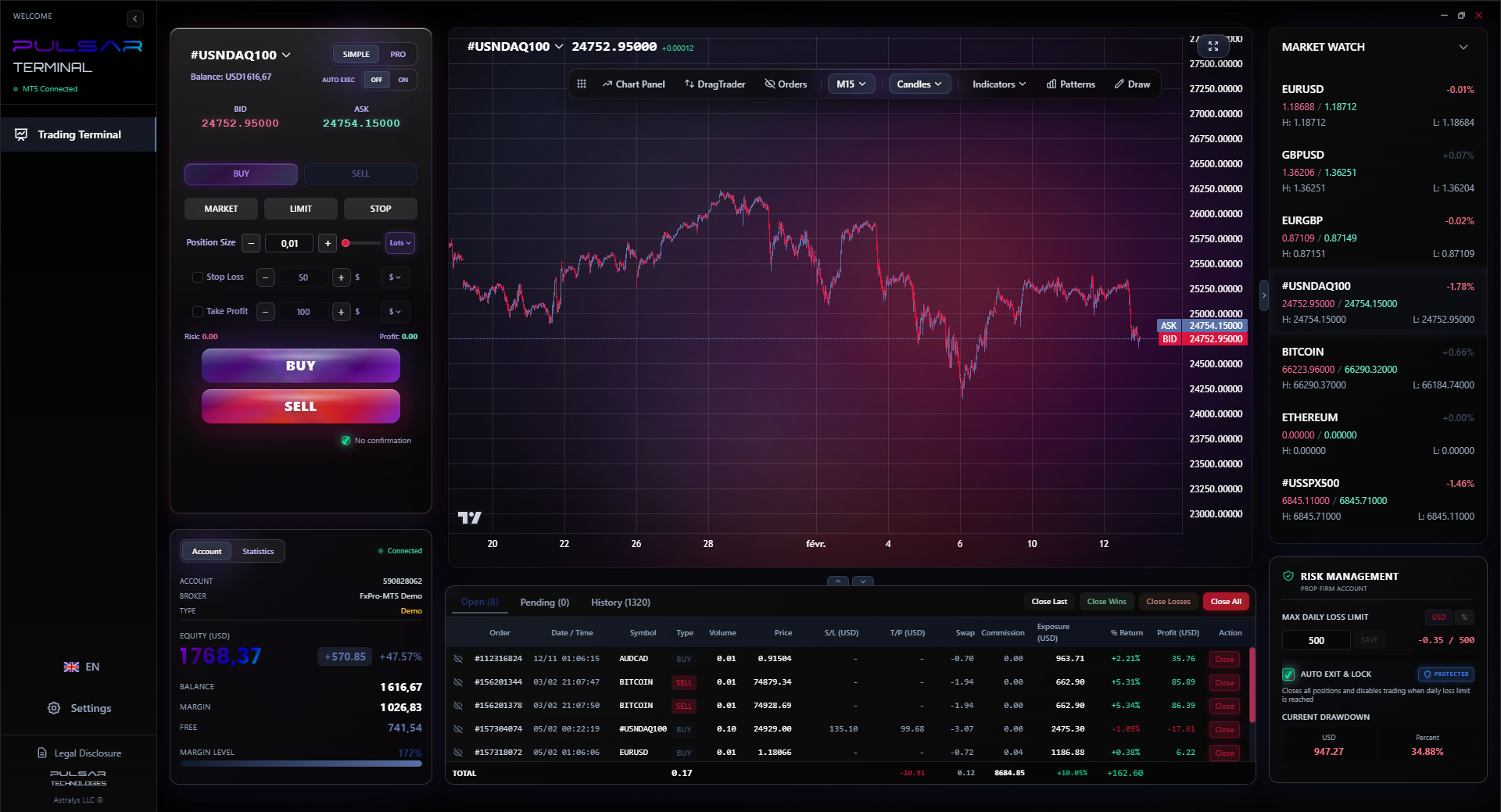
Managing multiple trades and protecting profits manually is stressful; a tool like Pulsar Terminal automates trailing stops and breakeven orders directly on your MT5, so you can focus on analysis instead of babysitting trades.
Pulsar Terminal
MT5一站式工具:拖拽下单、多重止盈/止损、追踪止损、网格交易、成交量分布图和自营交易保护。每日1000+交易者使用。
After 12 years, here's what works for me. This isn't a recommendation, just my reality.
- Primary Platform: MT5 from IC Markets. Raw spreads are good, and the server connection from SA is stable. I use it for analysis and most order placement.
- Mobile Backup: The IC Markets MT5 mobile app. Tested and reliable on Rain 5G.
- Critical Add-On: I use a separate trade management tool that plugs into MT5. Why? Because it automates my risk management. I can set a breakeven stop or a trailing stop the moment I enter a trade, and it executes automatically. This removes emotion after entry. Before I had this, I'd watch a R1,500 profit turn into a R500 loss because I couldn't pull the trigger to move my stop.
- Charting: I keep it simple on the main platform: candlesticks, a few horizontal lines for levels, and the RSI indicator to spot potential reversals when it hits extremes.
The core of my setup is automation of the boring, disciplined tasks. The forex application should handle the rules, so my brain can handle the analysis.

“On a R10,000 position, you're down R210 before the market even moves in your favor.”
The best forex application is the one that gives you the most control with the least friction. It's not about having 100 tools, it's about having 5 tools you use with 100% precision.
For a South African trader, your checklist is unique:
- Does it work reliably on mobile data? (Loadshedding test).
- Are all costs transparent before you click? (Spread, commission).
- Can you execute and modify orders instantly? (One-click trading).
- Is the broker behind it reputable and accessible for ZAR deposits?
Start with a demo that mimics your real-life conditions - phone trading on 4G. Graduate to a small live account. Your relationship with your platform is a marathon, not a sprint. The flashy ads promise a sports car, but what you need is a reliable bakkie with good ground clearance for our bumpy economic roads. Find that, and you've found your best forex application.
FAQ
Q1Is MetaTrader 4 or 5 better for South African beginners?
MT4. It's simpler, has fewer distractions, and every tutorial under the sun is made for it. The community support is massive. Only move to MT5 if you need to trade things beyond forex and CFDs, or if your specific broker recommends it.
Q2Can I use international trading apps like TradingView with a South African broker?
Sometimes, but it's a patchwork. You can use TradingView for charting and analysis - it's excellent. But to actually execute trades, you'll usually need to connect it to a supported broker. Many international brokers (like Pepperstone) offer this, but not all local FSCA brokers do. You'll often end up using two apps: one for charts, one for execution.
Q3What's the single biggest mistake South Africans make choosing a forex app?
Choosing based on the sign-up bonus or use offered. These are marketing traps. The real criteria should be spread consistency, deposit/withdrawal reliability in ZAR, and the stability of the mobile platform. A R500 bonus means nothing if the platform freezes during a news event.
Q4How important is FSCA regulation for the platform I use?
It's a safety vs. cost/features trade-off. FSCA regulation means the broker must follow South African rules and keep client money segregated locally. This is safer for your capital. However, internationally regulated brokers (like ASIC or FCA) often have more advanced technology and tighter spreads. Many experienced traders use the latter, accepting the slightly higher jurisdictional risk for better trading conditions.
Q5My internet is slow and unstable. Any platform tips?
Stick to the major pairs (EUR/USD, GBP/USD, USD/JPY). They have the most liquidity and the tightest spreads, so you're less vulnerable to slippage. Use longer timeframes (like 4-hour or daily charts) so you don't need to watch the screen constantly. And always, always use a stop-loss. A slow connection is no excuse for a blown account.
Q6Are there any free forex applications that are actually good?
The platforms themselves (MT4, MT5, broker apps) are free to download and use. The 'cost' is in the spread and commissions. Be very wary of any 'free' standalone trading system that promises signals or robot trading. If it was truly profitable, they wouldn't be selling it for R299 a month.
Winston 教授的课程
要点总结:
- ✓Test the mobile app on 4G, not just Wi-Fi.
- ✓Transparent costs are more important than fancy indicators.
- ✓One-click trading is a non-negotiable feature.
- ✓A wide spread can double your planned loss instantly.
这篇文章对您有用吗?
点击星星评分
每周交易洞察
免费每周分析与策略。无垃圾邮件。
关于作者
David van der Merwe
新兴市场交易员
约翰内斯堡交易者,11年新兴市场货币经验。专注于ZAR货币对、FSCA监管交易和南非市场分析。
评论
风险提示
金融工具交易存在重大风险,可能不适合所有投资者。过往业绩不代表未来表现。本内容仅供教育目的,不构成投资建议。在交易前请务必自行研究。
您可能还喜欢

Cara Trading Forex Sukses: 7 Prinsip dari Trader Profesional
Cara trading forex sukses dengan 7 prinsip trader pro: manajemen modal, disiplin, journal trading, backtest. Data nyata, bukan janji profit palsu.
Jam Trading Forex Terbaik untuk Trader Indonesia: Panduan Lengkap dengan Tabel Waktu
Panduan jam trading forex untuk trader Indonesia. Tabel 4 sesi dunia, jam emas 20:00-00:00, sesi mana yang harus dihindari. Data akurat + tips dari trader berpengalaman.
Top 5 Sàn Forex Uy Tín Nhất 2026: Review Jujur dari Trader Indonesia
Top 5 sàn forex uy tín 2026 untuk trader Indonesia. Review jujur: spread, deposit, withdraw, dukungan lokal. Exness, XM, IC Markets & lebih.
